





limawaken
Members
-
Joined
-
Last visited
Everything posted by limawaken
-
thank you, that was good to know. i'll put the drive back in and see if it causes more problems. thanks @JorgeB @whipdancer
-
but if data is getting corrupted during read/write, then the drive is essentially unusable. will they replace it only if the drive is completely dead due to hardware failure? they guy is saying that the uncorrectable errors is not of concern but didn't explain what those errors mean. i feel cheated.
-
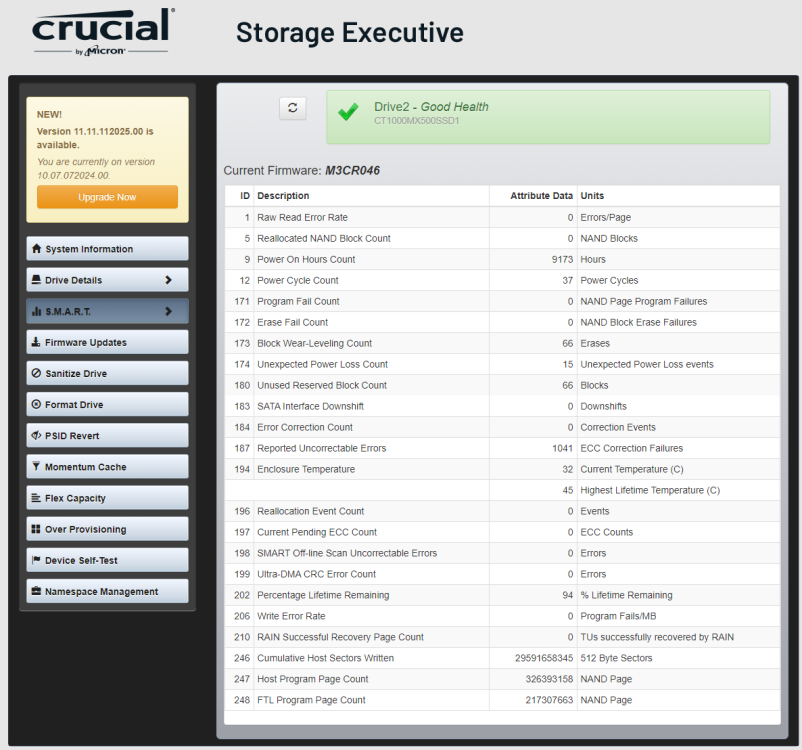
Last week my cache pool failed and i had to replace this drive and reinstall all my dockers. I sent a complaint to Crucial since the drive is still under warranty (less than 2 years old). They asked to use their Storage Executive software and send them the SMART information (which i attach here). They came back with this reply: I don't understand how they can say the drive is fine, don't the uncorrectable errors mean something? I believe the SATA connections were fine since there were no UDMA CRC errors before this. there were no problems after I swapped the replacement drive to the same slot. Does any one have some experience with this?
-
it was a 3 disk raid1 - 2 Apacer AS350X 1TB SSDs and 1 Sandisk Ultra 1TB SSD. i was so certain the problem was with the disk because i removed it from the pool and tested it by itself (mounted and formatted using unassigned devices), confirming that it really did have write speed problems at that time. i have replaced the "faulty" AS350x with a mx500, and write speed has improved however the pool only seems to be able to write at about 80MB/s. i suspect the other AS350x is also having write speed problems because i have not seen it being written above 100MB/s, while i do see write speeds above 350MB/s for the other 2 disks. i plan to swap it out when the new disk i ordered arrives.
-
hi @JorgeB , ok, this is really embarrassing... i put the disk back and mounted using unassigned devices. formatted to BTRFS again (because earlier i formatted it to NTFS to test in Windows). guess what... now the disk seems to be ok. Here's the output of PV root@SILOmetalico:~# pv /mnt/cache/isos/VeeamBackup\&Replication_11.0.0.837_20210525.iso > /mnt/disks/AD20230608A0101901/test.iso 6.72GiB 0:00:14 [ 477MiB/s] [==================================================================================================>] 100% i also ran DD again several times for sanity root@SILOmetalico:~# dd if=/dev/zero of=/mnt/disks/AD20230608A0101901/test1.img bs=1G count=10 oflag=dsync 10+0 records in 10+0 records out 10737418240 bytes (11 GB, 10 GiB) copied, 26.9105 s, 399 MB/s root@SILOmetalico:~# dd if=/dev/zero of=/mnt/disks/AD20230608A0101901/test1.img bs=1G count=10 oflag=dsync 10+0 records in 10+0 records out 10737418240 bytes (11 GB, 10 GiB) copied, 28.2348 s, 380 MB/s root@SILOmetalico:~# dd if=/dev/zero of=/mnt/disks/AD20230608A0101901/test1.img bs=1G count=10 oflag=dsync 10+0 records in 10+0 records out 10737418240 bytes (11 GB, 10 GiB) copied, 27.2 s, 395 MB/s i'm really puzzled. it was definitely causing issues with my raid1 btrfs pool, so removed it, cleared it and reformatted using unassigned devices, and i swear it could only manage 40MB/s writes. it seems like reformatting the disk in Windows (NTFS) had somehow fixed it. really sorry for wasting your time, but i'm so curious now - what could have happened? i actually had this problem before and threw out another SSD because i though it gone bad... i'm really regretting it now because at that time i didn't think of testing it in Windows before throwing it away
-
Apacer AS350X 1TB SATA SSD, tested using CrystalDiskMark shows the expected read/write speeds for a SATA SSD (r - 500+MB/s / w - 400+MB/s). it can sustain 300+MB/s when writing large files (4GB) to the SSD. but in UNRAID (formatted BTRFS) it only gets about 40MB/s write speed. Tested using dd dd if=/dev/zero of=test1.img bs=1G count=10 oflag=dsync Read speed is okay. when it was part of a RAID1 pool, the pool's write was about 20MB/s and CPU cores go red when writing to the pool. i thought the disk was faulty, but why does it seem fine in Windows? i'm on Unraid 7.1.2
-
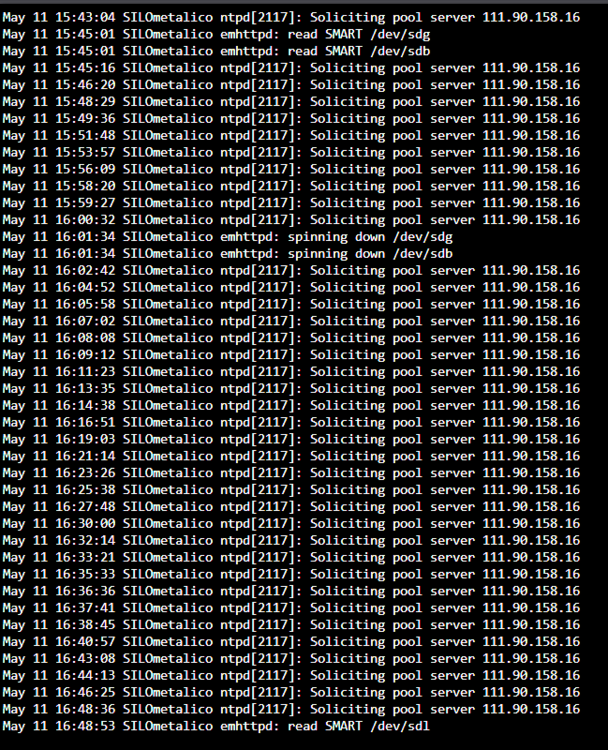
it was using the default pool.ntp.org and was getting replies when pinged from unraid terminal. anyway i changed it to time.google.com and see how it goes. so far, its been 5 minutes and the messages have not appeared so maybe changing it google NTP server fixed it. thanks guys.
-
I upgraded from 7.0.0 to 7.0.1 yesterday. Everything went smoothly, and I didn't encounter any problems. However after the upgrade my logs are full of "Soliciting pool server" events, they repeat about every minute. Any idea what's the reason for this? Thanks.
-
ah, ok... that makes sense. i do have a camera that i have to occasionally restart. It seems to have poor wifi signal and is sometimes dropping frames, even though other devices in that same location shows good signal. i guess i'll have to get another camera and see how it goes then. thanks!
-
hi @jordandrako, just wondering if you found any solutions to this? i'm using frigate docker, and i also have this out of memory killing a ffmpeg process. fix common problems reported the out of memory error, my system didn't crash. maybe because i don't have plex or anything else that does transcoding. strangely i actually didn't notice any issues with frigate either. but i would like to find out how to fix this before it causes bigger problems.
-
i was afraid that would be the case... i guess that's one drawback of ZFS for me.
-
hi guys, i recently upgraded my cache pool, decided to make it a 3 disk ZFS pool. before this i had been using a regular xfs single disk cache pool. with zfs cache pool now, when moving files from a /user/temporary folder to another /user/destination (both are cached shares) it seems to be doing an actual move or a copy. i checked and confirm it is still moving files within the cache pool, not moving anything to the array. so everything is actually happening within the cache pool. previously moving files like this happened instantly since the move only happened within the cache pool, then only later mover would move the files to the array. is this the expected behavior for zfs cache pools? i'm using unraid 6.12.6 and moving files using midnight commander in a terminal window or putty.
-
hi @JorgeB, i used the ---checksum flag, and rsync took around 7 hours to go over almost 3TB of data. i guess 7 hours isn't too bad. by the end of it there were 6 files that were copied. at least i didn't have to swap the disks around and rebuild the data again. i'm starting to suspect that my supermicro drive cage has something to do with these errors that i'm getting. these problems seem to occur after i move drives in or out of the drive cage. i always do power down before i swap any drives out, just to make sure that the HBA card detects all the disks before unraid starts up. i had an experience this time when a drive couldn't be detected until i had to sort of install the drive into the caddy in a certain way to make it sit a little further in towards the backplane (if that makes any sense). anyway, thanks again JB, you saved my sanity.
-
hi @JorgeB sorry, my sleep deprived brain was slow to pickup. the data rebuild on disk1 completed without additional disk errors from disk4, now the array looks to be healthy. now instead of swapping back to the old disk and doing all that, i would like to instead try mounting the old disk1 using unassigned devices and copying the data over to the array. i believe rsync would be good for this, right, as it would only copy the parts of the files that are different from the source? so i tried this, using the rsync command rsync -avh /mnt/disks/X7TY08TAS /mnt/disk1/ however all i get is sending incremental file list sent 766.30K bytes received 1.52K bytes 1.54M bytes/sec total size is 2.90T speedup is 3,782,919.89 there doesn't seem to be any data being compared or transferred. am i doing this wrong?
-
i was thinking... would it be possible to switch back to the old disk1 (since all the data inside it is intact)? so i can replace the failing disk4 first. does that make any sense? however the new disk1 (whose contents are currently being emulated) is bigger than the old disk1 (4tb vs 3tb). will unraid accept back my old disk1, maybe just re-validate the parity? or would the failing disk4 also cause the parity to have corruption when rebuilding the replacement disk4?
-
any changes should still be in the cache because i had stopped mover from transferring anything to the array. i think the parity should still be valid? i was worried that the data on the rebuilt drive would be corrupted because of the disk errors during the rebuild process.
-
hi JB, here's the diagnostics. earlier i had paused the rebuild for a while... then i restarted and it ran for a while without new errors, but just around a minute ago i got another warning and the pending sector count increased to 4 and now there is 1 reallocated sector so i have paused the rebuild again. silometalico-diagnostics-20240207-2347.zip
-
Hi guys, Just wanted some advice about this situation that i'm having. Data was being rebuilt for one of my disks which i had upgraded to a larger size, it was progressing nicely up until 59% and 4 hours to go then i got some pending sector warning on another disk. i have only 1 parity disk. Before upgrading the drive i did a parity check to be sure that parity and the other drives were all ok. There were no problems when doing the parity check, but just my luck that another disk starts to fail when i'm halfway rebuilding data on a new disk... so guys, should i just let the data rebuild complete? will the rebuilt disk have corrupted data due to the errors from the other drive? i'm worried that if i stop the data-rebuild now, i'll be faced with 2 failed disks and with no way to rebuild the array. What should i do?
-
wow i had no idea this was happening. i'm using Brave browser but this does seem to be the case. its quite interesting... like the OP i changed my computer's dns to several different servers (1.1.1.1, 8.8.8.8, 208.67.222.222) but couldn't ping github.com. edge browser was also able to load the page.
-
its not the linux bond, its not proxmox, or unraid. its my WINDOWS laptop! i ran iperf from between unraid vm to another linux box and upload/download speeds were at around 930 Mbits/s! so this is a windows 11 bug! some info here: https://www.windowscentral.com/software-apps/windows-11/windows-11-2022-update-slowing-file-transfers-by-up-to-40#:~:text=Microsoft recently confirmed an issue,(Windows 11 version 22H2). it seems there is no fix yet
-
you're not the only one. for me the issue just went away eventhough i still can't ping github.com. it still seems to resolve to an ip address that is down. but i can access github.com on the web. i don't understand it. i didn't change any dns settings.
-
i have a feeling this has something to do with the network interface configured in proxmox. i configured a 802.3ad LAG for 2 network ports and assigned it to a bridge, which is also proxmox main interface. anyone with virtualised unraid experience, or experience setting up linux bond, please give me some advice? iperf client on proxmox host and my windows laptop as the server, i get about 500+ Mbits/s iperf client on laptop and proxmox host as server, i get 900+ Mbits/s i also ran it on unraid vm and got similar result. i also tried balance-rr, and the results were also similar. is a linux bond supposed to reduce the server's upload speed like this?
-
couple days ago all my plugin update statuses showed "not available" and after some googling it seems it is because unraid couldn't connect to github. true enough i couldn't ping github. strangely though, when i ping github.com it says pinging 20.205.243.166, but when i did a dns lookup it seems that github.com is supposed to be 140.82.113.3. so for some reason the dns record isn't correctly propogated (i'm in Malaysia). i check dns propogation and seems a few other countries are still resolving github.com to 20.205.243.166 which is still down. can you ping github.com?
-
i just noticed that my read speeds are now slower than bare-metal. now i'm getting about 55 - 60 MB/s when copying a large file from unraid. used to be MUCH faster. but write speeds are 110 - 120 MB/s when copying a large file to unraid (cache share) i tried setting the "max protocol = SMB2_02" setting that makes none of the shares accessible and logs would show these errors: Jan 3 22:32:52 SILOmetalico smbd[22262]: [2023/01/03 22:32:52.682566, 0] ../../source3/smbd/smb2_server.c:657(smb2_validate_sequence_number) Jan 3 22:32:52 SILOmetalico smbd[22262]: smb2_validate_sequence_number: smb2_validate_sequence_number: bad message_id 0 (sequence id 0) (granted = 1, low = 1, range = 1) Jan 3 22:32:53 SILOmetalico smbd[22263]: [2023/01/03 22:32:53.915491, 0] ../../source3/smbd/smb2_server.c:657(smb2_validate_sequence_number) Jan 3 22:32:53 SILOmetalico smbd[22263]: smb2_validate_sequence_number: smb2_validate_sequence_number: bad message_id 0 (sequence id 0) (granted = 1, low = 1, range = 1) Jan 3 22:33:03 SILOmetalico smbd[22500]: [2023/01/03 22:33:03.071618, 0] ../../source3/smbd/smb2_server.c:657(smb2_validate_sequence_number) Jan 3 22:33:03 SILOmetalico smbd[22500]: smb2_validate_sequence_number: smb2_validate_sequence_number: bad message_id 0 (sequence id 0) (granted = 1, low = 1, range = 1) any tweaks that could fix this? could it be some network adapter setting in proxmox that is causing this? my network device is virtio and default settings. when doing the same transfer in a windows VM the read/write speeds are between 400 - 500 MB/s (reading speed seems just slightly slower than the write speed)
-
the last couple of days i've been running unraid as a VM in proxmox. machine - q35, bios - seabios, cpu - host i only had to passthru the LSI controllers and USB flashdrive. it could be my imagination, but i feel that unraid vm starts up faster, including starting up all the dockers. its very nice to be able to open a console to unraid, its very much like having a pikvm or ipmi on the unraid machine. now i can make pfsense vm start before unraid (its just one of the small things that bugged me and made me want to try unraid as a vm) i had a few VMs in unraid, importing them over to proxmox was quite simple and quite fast (using qm importdisk). one of the things i miss is being able to see the cpu and mb temperatures on the dashboard. and the fan speeds too. could there be a way to have these displayed on the dashboard like before? another thing that bugs me is the processor appears as "pc-q35-7.1 @ 2000 MHz" on the dashboard instead of the actual intel processor and speed. server power usage is still displayed on the dashboard because i passed thru the UPS, but i would eventually have to connect the ups to proxmox as the nut master, then configuring nut slave in unraid, but i'm afraid the power usage will no longer be shown. or anyone can suggest better way to monitor the PC health (temperatures, fan, power consumption, etc.)?


