





larachbeg
Members
-
Joined
-
Last visited
Everything posted by larachbeg
-
Folks I'd like to 'edit' the layout of my Plex GUI. On the left hand side of the GUI, i have a layout that contains an old Plex install, a new Plex install, and the Plex streaming content. See screenshot. I'd like to remove the old Plex structure (showing the yellow warning triangle). Any idea if (how...) i do that ???? Ideally i just want my new Plex install structure showing on the left side. Richard

-
Jorge Thank you for that. I will retire the cache disk. Plex running beautifully on disk7 :-) Richard
-
Jorge When i tried to run a smart report on the cache disk last night, it terminated. I dont recall the exact wording. However i have tried again this morning (Frid 21/11) and the scan completed successfully. Please find the report attached. Now a quick update. Based on your initial feedback that my cache disk might be toast....i used UnRaid to delete the docker.img file. I then attempted to install Plex on another drive, within my array (disk7). This time it has worked perfectly, and quickly (took maybe 3 mins). I'm now loading my media & metadata. However i am left wondering about my cache drive. Could i ask you to cast any eye over the contents of the report, and give me your thoughts ? Should i just throw the cache disk, or should i re-format it and continue using ?? Await your feedback. And thank you for your input. Richard tower-smart-20251121-1107.zip
-
Jorge I dont use user shares. Never have. I know exactly where my media is stored. Await smart report.
-
Jorge Thx for reply. Diagnostics attached. I have no idea about containers. I download the app (app tab), install it, and it appears in docker tab. Happy to try 'new container' if theres a guide ?? tower-diagnostics-20251120-1806.zip
-
Folks, need help.... At the beginning of last week (w/c Mon 10 Nov) i noticed Plex had hung. I dont recall the circumstances i'm afraid. But i came to the conclusion it was knackered. By Thurs 13 Nov, i had decided to un-install the app, and re-install. I did that, and after installing, i had to point Plex at my media libraries. Plex spent several days scanning vast music & video libraries. It finally came to a halt, but the GUI showed many categories, on the left side. I had x6 'Film' categories. So i tried to delete some of them. I must have ended up in another mess, and decided to uninstall & re-install another time. Now.....i've got a real problem. I cant get Plex to install at all. Please see screenshots attached. I download the official Plex app, setup my config (/config, /transcode and /data). Once i kick that off, Plex tries downloading some files. The last one RARELY downloads fully. But sometimes it does download fully. I did some forum research. Someone mentioned deleting docker image. So i deleted docker.img. I left Plex for x18 hrs doing this install. But i find it hung, again. Another observation, when Plex is downloading the files, the GUI hangs solid. So when i reckon its hung, i have to re-boot UnRaid, to get a working GUI. I'm in a real mess here. Can someone help ?? Happy to publish whatever files you need. Richard
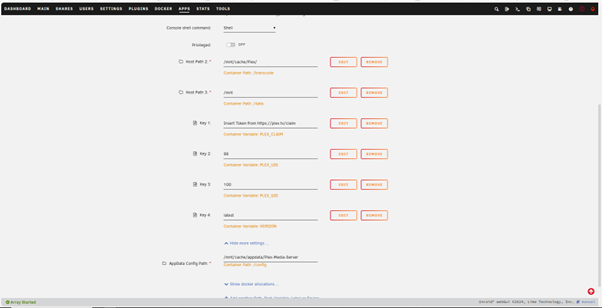
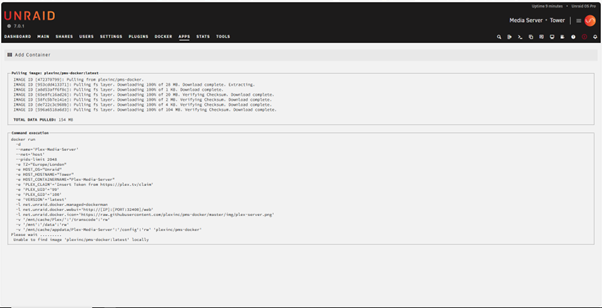
-
Ok, i here ya. Thank you for your guidance.
-
Hello I think my cache drive has gone bang, or at least is in the process of going bang. I use it to support my Plex docker. I discovered that Plex had stopped working last Saturday. I had a look at UnRaid syslog, and see ATA14 (my cache drive) throwing various errors on boot up. Q1) can anyone clarify what has happened ?? Q2) can i re-format the cache drive, and continue as normal ?? I'm attaching the Diagnostics.ZIP Meantime i removed/re-installed Plex, and told it to use one of my data disks for support. The webgui fires up no problem now, and i'm re-building my libraries. thanks Richard tower-diagnostics-20241125-1327.zip
-
Ok, i hear your points. I'm not hell bent on upgrading, just thought something was wrong. Many thanks all. Richard
-
But the URL even says "please install manually" (which delivers the DEB file). You're saying i cant install manually ????
-
Thanks for the reply. Yes, i should have said, i have done that MANY times now. It appears to result in a successful upgrade. BUT it never seems to happen. The version ref always stays at 1.32.8.7639. And the Docker tab always shows 'apply update'. So hence i was gonna try to run the DEB file myself. plex - update - Thur 29 Aug 2024.docx
-
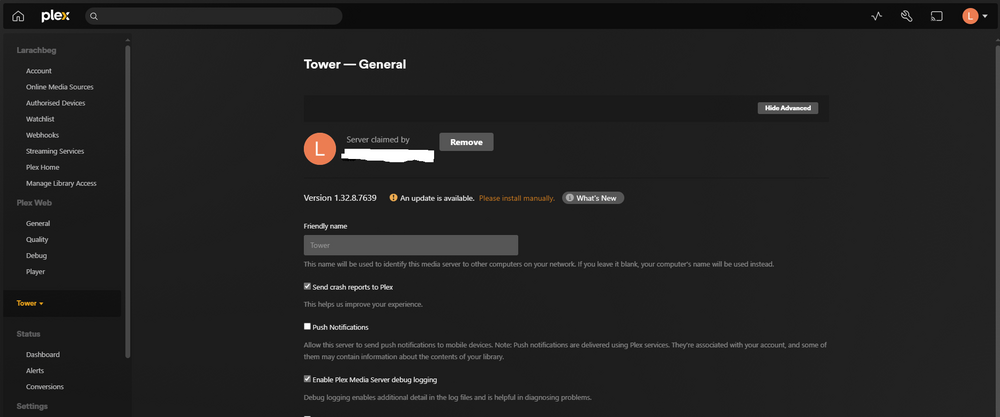
Hi ! My Plex GUI showed me i needed to update. See picture. I downloaded the new install file ( plexmediaserver_1.40.5.8921-836b34c27_amd64.deb ) It downloaded to my Windows PC. Now what ? As a rookie, can someone explain (step by step) what i do now ???? I can likely move the file anywhere you want, on the UnRaid box. Just not sure what commands i use to make use of the file. Thanks you, and sorry. Richard
-
Sorry, got busy with job hunting, and forgot i had asked this. I will have to upgrade. Some of my plugins now cant upgrade cause i'm on 6.9.2. Will likely go for the big upgrade during Christmas holidays. I'll let you know how it goes,
-
Folks Its come to my attention that i'm running a fairly old O/S (6.9.2 dates to spring 2021). Its time i upgraded. Q1) can i migrate DIRECT from 6.9.2 to 6.12.6 ? Or do i need to take it in various steps ?? Q2) reading the 6.12.6 notes, it says theres a known issue with the RealTek NIC 8125. My m/b hosts a RealTek 8111. Am i to assume that i'm ok to proceed, or do i need to include myself in that known issue ?? cheers Richard
-
Jonathan Due to a slip-up by my supplier, my x2 new parity disks arrived on different days. When the first disk arrived, i bunged into the server, and rebuilt parity. Done. Now the second parity disk has arrived, and i have allocated it to its slot, and we are doing another parity sync. Will UnRaid do some sort of background process now, that says "parity 1 - you handle this stuff, and parity 2 - you handle other stuff" ?????
-
Jonathan Thx for that. I've actually bought x2 new drives - was thinking i would move to double parity. Do i bung in both drives at once, and follow ur guide ? Or install parity 1 before attempting parity 2 ?? Richard
-
Folks, i think my (single) parity drive is goosed. I have bought a new disk - its on its way. Can someone point me to the procedure for replacing the parity drive. I've been looking around - cant see anything. thanks in advance Richard
-
Tower - Sunday.docxTower - Sunday.docx Need some advice. This morning i physically removed an old (small 1.5TB) drive (disk2). I have already got a copy of its contents (on new disk10), so i'm happy to pull it out. I replaced the old disk2 with a brand new (6TB) drive. UnRaid prompted me to format it, so i did. Then i clicked on 'mount'. That seemed ok. I then allocated my new disk to the old slot (Disk 2) I then clicked 'Start' to bring the array online. The 'mount disks' process started. Now i appear to be 4% through a parity sync/data rebuild. To be honest, i dont need a data rebuild. All i wanted to end up with was a formatted & available 6TB disk. Can i just cancel the parity sync/data rebuild ???? If yes, do i need to undertake other steps ?? Diagnostics & screenshots attached. Richard tower-diagnostics-20230127-1651.zip
-
Apandey, thx for your response. As it happens, i awoke this morning & suddenly realised i had made a mistake. Although my data was originally on disk2, i had also started using disk4 more recently. In the rush last night of trying to find certain business data, i completely forgot. Although i am embarrassed, i am also hugely relieved to have found my data. Moderators - you can close/delete this thread as you wish. Richard
-
Guys, i need help, please. And fast. I seem to have lost a swathe of my data. And i'm in a panic. Background is, i installed a new disk (disk 10) in the array last Sunday. All good. By Monday morning it was online, so i copied the content of an old disk (disk 2) to the new disk 10. Plan was...that if the migration was good, i would remove disk2. On Monday i ran the following command :- rsync -r /mnt/DISK2 /mnt/DISK10 All went well, except all the date/time stamps were out of alignment. On Tuesday i ran the following command :- rsync -a /mnt/DISK2 /mnt/DISK10 Now all the date/time stamps were aligned. Great. But tonight (Thursday) i happened to go looking for some work files. About 30% of my work data is missing. Its not on disk2 and its not on disk10. Surely these x2 exercises i have run, couldnt cause data loss ???? Can anyone suggest how i get eyes into what has happened Richard
-
Anyone ?????????
-
Folks Since Nov 2021 i am seeing loads of these lines in SYSLOG. "Nov 11 15:43:30 Tower dhcpcd[1703]: eth0: part of a Router Advertisement expired". Sometimes x1 per day. Sometimes multiple examples. Q1) can someone give me a simple explanation of what RA is ?? Q2) do i leave these alone, or should i be taking action ?? Thanks in advance Richard
-
@Squid @trurl Guys, i have never used user shares on my UnRaid system. Since 2009 i have used a disk share model exclusively. I like having an exact location for my music, video & data. I’m not a power user. I run Plex & a few utilities. It works for me, and i’m happy. Is this ‘mover - array devices not mounted’ thing related to user shares
-
@Squid Could i ask you to take a quick look at my Diagnostics file ? Its about the "mover: array devices not mounted" lines in SYSLOG.
-
Sorry. Here you go. tower-diagnostics-20211210-2341.zip

