





.png.3c962e96ff78d05da4892f1b0d408e2a.png)
Mirrormir
Members
-
Joined
-
Last visited
Everything posted by Mirrormir
-
@JorgeB Okay the Array is back up in normal mode with disk1 missing with the message "Unmountable disk present:" which look like it need formatting. All the other datasets are present. New diagnostic attached. locutus-diagnostics-20231031-1136.zip
-
What's the next step?
-
Thanks Jorge, The last thing we did was waiting for the Parity sync to finish which has now finished with no errors but I was still see SATA error with disk 1, itimpi answered that question. From my earlier message see above quote. My main concern with disk1 is that it does't having a partition as it is "unknown"
-
I was hoping JorgeB might be around as I would like to finish sorting out the issues I was having if not it will have to wait until the weekend.
-
Okay thanks, I checked the cables were seated correcly yesterday, all seemed ok.
-
Parity sync completed with no error, I am still a little concerned about disk 1 as it is still showing as having errors, I have attached the SMART data I got this morning. Indicated UDMA CRC errors = 9, you can see this in the SMART data file. Also disk1 has no partition format it says "unknown" The server is still in maintenance mode waiting further instructions. locutus-smart-disk1-20231031-0706.zip
-
Hi Jorge, Before starting the Array I did check and it did say valid once the Array was started in maintenance mode that when it change. When I removed the drive from Unassigned Devices I did not format it but just added it to the Array as now it was available. New diagnostics attached locutus-diagnostics-20231030-1015.zip
-
Disk 1 is now back in the Array and the Array is started in "maintenance mode". The parity drive currently has a yellow triangle if you hover over this you get a message that says "Parity is invalid, click to pin down" I'm getting lots of writes to the Parity drive. All drive have a green dot next to them. On the Dashboard i'm now seeing an error "Array has 1 failed device. 1 SMART error." I've checked drive 1 SMART inforation and it shows UMDA CRC error count high lighted with 9 errors. Looks like disk 1 is faulty after all. Should I stop the Array Parity build or let it run?
-
Thanks Jorge, Sound good parity is showing valid.
-
Thanks Jorge, Just to make sure I get this right, I will need to remove disk1 from the Unassigned Devices and then assign it back in the Array as disk 1. Is that correct?...
-
And no I didn't start the Array.
-
All the disk cable used in the Array are connected with SFF 8087 to SATA from a SAS HBA. Disk1 however has turned up under Unassigned Devices for some reason.
-
Okay my fault so what the best way forward from here?
-
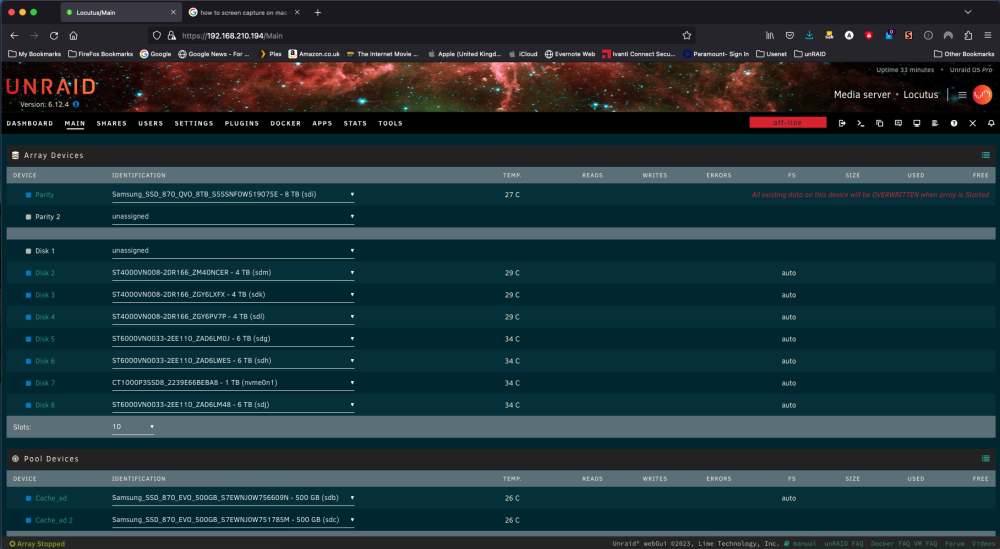
In an attempt to bring disk1 back on-line I made a new config but now it's not showing up, so seems to dead. New diagnostics uploaded. locutus-diagnostics-20231029-1116.zip
-
To save my data I shutdown the server after restarting disk 1 is now showing as missing with a red cross.
-
Hi jorge, I have started the array, witch took a long time to start but now it tells me "Unmountable or Unsupported or no file system:" and that's the whole array.
-
I've posted and attached the status of all my pools. zpool status 29-10-2023.rtf
-
Thanks Jorge, I have been doing some further investigation using the zpool and zfs commands and found that there is indeed a corrupted file on disk3 that I would like to remove and replace. Some of my backups are a little out of date as this issue has been going on since the end of September and ever time I tried to run a backup the system would crash with a kernel panic.
-
Just rebooted with the array stopped and ran the command as before, this time I got the cursor back but no change of state to the drive. zpool status gives this output: root@Locutus:~# zpool status pool: disk1 state: ONLINE scan: scrub repaired 0B in 03:14:41 with 0 errors on Sun Oct 22 05:14:42 2023 config: NAME STATE READ WRITE CKSUM disk1 ONLINE 0 0 0 sdd1 ONLINE 0 0 0 errors: No known data errors root@Locutus:~#
-
Okay, just rebooted but that results in the server getting stuck "Starting Diagnostics collection......." From here it will not reboot or shutdown also collects no data.
-
Hi JorgeB, Ran the command in unraid terminal but did not and reply just a flashing cursor.
-
Thanks for the quick reply, as requested I have attached the new syslog. locutus-syslog-20231028-1053.zip
-
Hi everyone, Been an unRAIDer for about 9 month now and have not had any issues until I converted my file system to ZFS. Now the server will only be up for one to two day before I find it had crashed with a kernel panic. Having already spent some time looking at similar issues on the forum here I think I have corruption in the zpools. Now the array will not start it gets stuck "Mounting Drives". As alway I have attached diagnostic report and a syslog. Any assistance would be greatly appreciated. locutus-diagnostics-20231028-0943.zip locutus-syslog-20231028-0849.zip
.thumb.png.f4dc98381367516493e6f5482ac023aa.png)
