





lukej33
Members
-
Joined
-
Last visited
Everything posted by lukej33
-
Hi dlandon, Thanks for the quick response. Can confirm that worked and now it has worked once i have a share in my shares list. Much appreciated 🙂
-
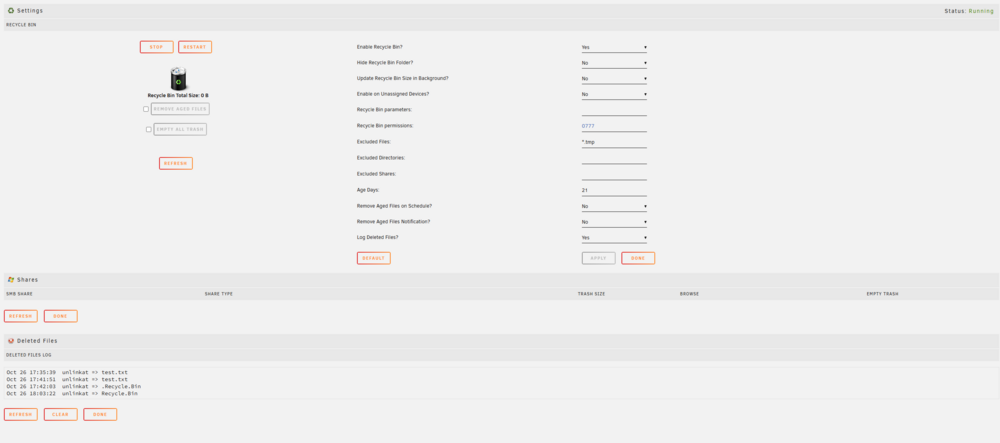
Hello, I think i have a similar issue to the poster above. I installed the plugin, enabled it and it is running. I havent yet excluded any shares and have turned log deleted files on. If i make a test file in windows explorer on the share and then delete it (not shift delete) I can see the deletion appear in the log when i refresh it, but i have no .Recycle.Bin folder created on the share i delete it from. I believe this is due to the fact that the Shares list in the Recycle Bin app is completely empty. I have restarted the server, clicked refresh many a time and still no shares listed. Question - is there an expected share configuration - mine are all Private, SMB, User shares. I have no disk shares. This is the video tutorial i "followed" - screenshot of of what it looks like in the webui - as you can see no shares listed. Note - the Recycle.Bin and .Recycle.Bin folders shown in the log, i created these manually hoping it would make the shares appear. when they didnt i deleted them. unraid log doesnt show anything when refreshing or stopping and starting plugin: Thanks in advance.

-
Hi Graviz, Just delving into the archives here........ I think this one was a Phantom bug, I left it a few days and tried again and it worked, annoyingly. My question above was un answered as to other than the config, where/how do I remove docker images from the system and ensure it's a full fresh pull... So you could look into that. you could try a full fresh new dockerimg but that's a whole new setup of all dockers, not just plex, which might be a step too far for this one and you should only do it if you understand what you're getting into. Sorry I can't give you any other more helpful advice. Hopefully this bump might prompt a response from someone else with more experience. Best of luck, Luke
-
Hey, Tried in an incognito window, no change. Re removing the image - when i deleted the old Plex container, i selected the remove image button. I also renamed the config folder so it is essentially a new install. Is there another part of the image to delete? If so, where would I find that? Thanks, Luke
-
Hey Squid, Gave that a go, no joy unfortunately 😞. I tried via CLI as well, same error, very weird. Cheers, Luke
-
Hi Squid, just added them to the original post. Cheers Luke
-
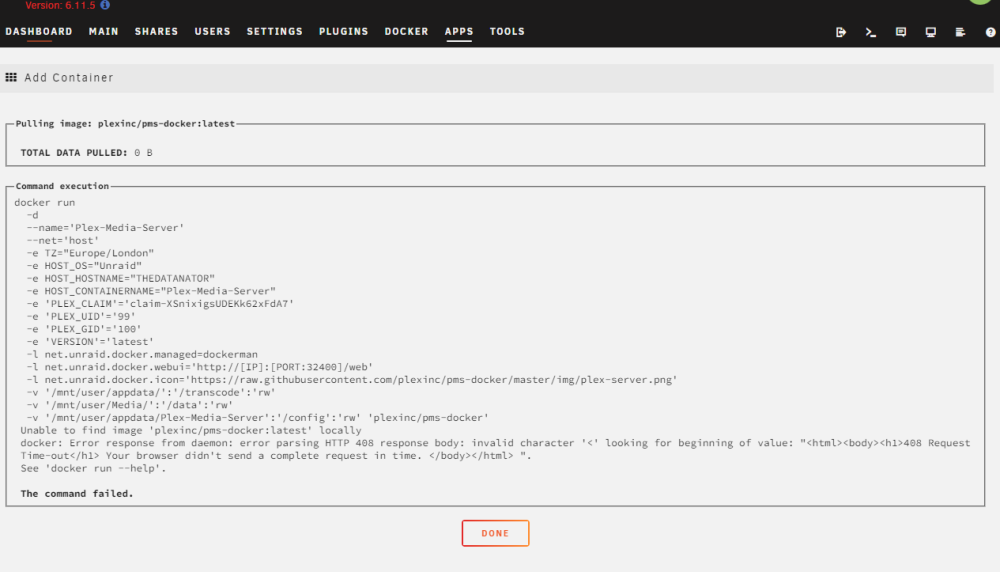
Hello, Appreciate any advice or help with this one as i am stumped. Long story short, my Plex docker container randomly stopped working, was working fine the night before and the following morning I was for some reason unauthorised to access my own media server. I faffed with reclaiming it, restarting docker, the whole Nas etc. Ultimately I took the decision to back my plex config folder up and delete the plex container and start again. This is where I am at, I now cannot install Plex or any other docker container from the Apps menu. This is the error I get when I try to install this. Ive tried binhex plex and even tried sonarrr just to see if it was th eplex official repo that was th eissue and unfortunately all of those failed with the same error. The NAS has functional internet and I was able to update a docker container already installed. I also have the issue reported here after an update to Apps, and have tried both the manual patch method and the docker patch app it mentions. I mention this because the Docker patch app here did just install. Help with this would be much appreciated. LEt me know what logs and info would be helpful. Edit 1 Unraid version 6.11.5 Apps Version 2023.01.28 Docker VErsion 20.10.21 Edit 2 - Added diagnostics as requested thedatanator-diagnostics-20230129-1516.zip Cheers, Luke
-
Hey, thanks for the response. Yes, that seems to have fixed it, I only faffed with that in the first place while debugging so probably fixed another thing and broke this one. Much appreciated!
-
Hello, First time poster, had my unraid server running for a couple of weeks. I am trying to setup sabnzbdvpn and having a weird webui access issue. When the VPN is enabled (using OpenVPN), I cant access the webui from a PC on the same lan as the nas, I just get a too long to respond error in my webbrowser. When vpn is not enabled, i can access the web ui from a PC on the same lan. I can access the webui with vpn enabled via a firefox instance running in docker on the nas. I also have subversion and plex dockers running which i can access from the PC on the lan, so i don't think its a PC thing. (No port crossovers, I've looked for this) Other Info: sabnzbdvpn Docker was only installed a week ago and is showing as up to date. Unraid rev - 6.11.5 vpn connection seems to be working fine and it is downloading logs not reporting any errors but does say sabnzbd is listenning on 8080 Other than webui access, everything is functioning as id expect. I would appreciate any help on this, thanks in advance. Luke Docker config info - docker run -d --name='binhex-sabnzbdvpn' --net='bridge' --privileged=true -e TZ="Europe/London" -e HOST_OS="Unraid" -e HOST_HOSTNAME="REDACTED" -e HOST_CONTAINERNAME="binhex-sabnzbdvpn" -e 'VPN_ENABLED'='yes' -e 'VPN_USER'='REDACTED' -e 'VPN_PASS'='REDACTED' -e 'VPN_PROV'='custom' -e 'VPN_CLIENT'='openvpn' -e 'VPN_OPTIONS'='' -e 'STRICT_PORT_FORWARD'='no' -e 'ENABLE_PRIVOXY'='no' -e 'LAN_NETWORK'='192.168.0.0/255' -e 'NAME_SERVERS'='84.200.69.80,37.235.1.174,1.1.1.1,37.235.1.177,84.200.70.40,1.0.0.1' -e 'VPN_INPUT_PORTS'='' -e 'VPN_OUTPUT_PORTS'='' -e 'DEBUG'='false' -e 'UMASK'='000' -e 'PUID'='99' -e 'PGID'='100' -l net.unraid.docker.managed=dockerman -l net.unraid.docker.webui='http://[IP]:[PORT:8080]/' -l net.unraid.docker.icon='https://raw.githubusercontent.com/binhex/docker-templates/master/binhex/images/sabnzbd-icon.png' -p '8080:8080/tcp' -p '8090:8090/tcp' -p '8118:8118/tcp' -v '/mnt/user/Downloads':'/data':'rw' -v '/mnt/user/appdata/binhex-sabnzbdvpn':'/config':'rw' --sysctl="net.ipv4.conf.all.src_valid_mark=1" 'binhex/arch-sabnzbdvpn' 99eb7e7b0a703a771c78492be017c9991ddf08a4114f63f309ef768ecdbd902e

