





dp12776
Members
-
Joined
-
Last visited
Everything posted by dp12776
-
Thanks. Rebuilding now. I guess i will see if i can find all those Linux Distros again. In any case, I should be able to see within the next day or so, if it was really the PSU that was the culprit. I guess it would explain a lot of random issues i have been having the last year or so.
-
That's what I've done. Both drives are now recognised. Should I rebuild data on drive 2 and just try to salvage what I can from lost+found?
-
Hi Jorge, Attached are the new diagnostics. Please let me know if i can start the data-rebuild? alameda-diagnostics-20240506-1554.zip
-
Hi Jorge. I'm out of the house at the moment. Will post diagnostics when I'm back. When both disks were unmountable I was missing loads of data. Obviously because, as you say, I can only emulate one disk. I am now back to only about 2,5tb data missing. Perhaps this is all what has now gone in the lost+found folder?
-
Hi Jorge, Thanks for chipping in. I have just replaced the PSU and as many of the power cables as I had spares for. So far everything looks more healthy. I repaired file systems on disk 2 and 3 and they are both recognised for now. I have paused the data rebuild as I am nervous about all the data that is missing, that belonged on disk 2. It was starting to be absent when disk 2 was emulated as well. My thinking is that the disk has all the data, but now the emulation from the parity has an incomplete picture? Apologies if i am not using the right terms. In any case, would it even be possible to activate disk 2 without data rebuild? Or should i just bite the bullet and let it data-rebuild and also let that be a stress test for the new power supply? The problems i have been having seem to alway occur during parity checks or data rebuilds. I am guessing because everything is then spun up.
-
Hi Wildfire. Thank you for responding. Two of the failing drives are on one of those cables. But the third is connected directly to a SATA port on the motherboard with a SATA cable. I do have a new "4 SATA" cable, that i will try to use now as well. Just to rule out anything with that.
-
Hi community, I am super nervous, as my server seems to be dying on me little by little. It all started with Disk 2 being disabled and emulated. Suddenly it was unmountable: wrong filesystem. Due to help received here earlier, I was expecting some cabling problems. I opened up the server and tidied up the cabling and ensuring all drives were well connected with both SATA and power. That was when DISK 2 became unmountable. I then followed the official instructions and deleted the log to repair the filesystem. That put 2.46TB in a lost+found folder. A lot, but not the end of the world. I went through it and it seemed to be only media, that i could possibly rename with filebot. Went to bed thinking i had solved the issue, but woke up to the disk being unmountable again...And Disk 7 now had more than 300.000 errors. I noticed that most of the content of the drives was gone from SMB. I rebooted and the content was back. Ordered a new, bigger, power supply, hoping that it is a power issue, although i wouid have thought my 750W PSU should be sufficient for my ten drives. Havent had time to install it yet. The content on the disks has dissapeared once or twice again, but seems to come back when turning off array and starting it again. I have removed DISK 2 from the array for now and it is now in unassigned disks. Because i kind of thought the emulated content would be more complete, if the drive filesystem cant be recognised anyway. Now this afternoon, also DISK 3 has become unmountable....What is going on? Only two of the disks are on the same controller, so I am not sure that is it. I wanted to post the most recent diagnostics here, before i, hopefully tomorrow, have time to replace the power supply. alameda-diagnostics-20240505-1822.zip
-
Thanks Jorge, That is comforting. I am abroad at the moment. Will try to check that when I am home next.
-
Just realized that it is only when i upload from my google drive. Here is the .txt file. ST16000NM001G-2KK103_WL203RF2-20240406-1628.txt
-
That was meant to be a zip file. I have recently changed to Linux Mint and don't understand why it removes file types from uploads. Now this one should be a .txt file. 1qVe-NLAwbQcgqozwEjZcjvR13ggGRIZO
-
Perhaps the SMART report for the drive is of use? 1-W8_5W_t2QUt-bf6_EPgPHLd6l4T0Wfq
-
Hi Jorge. As always, thank you for responding. I cant create a diagnostics file. It starts writing the hundreds of thousands of thumbnail creations that Immich has been doing, and then eventually crashes my computer. I dont know if there is a way of making diagnostics without including the log from Immich?
-
Hi Community, A little over a month ago i replaced a faulty disk 2. It was a shucked 2,5" 4TB drive, so I wasnt too surprised at the failure. I replaced with a reconditioned 16TB Seagate. 1st of the month and my server does its monthly parity check. Unfortunately about halfway in, we had a power cut in the house longer than the UPS could survive and the parity check was interrupted. Server started again and parity check was restarted. It finished this time but found loads of errors. I blamed these on Immich working on making thumbnails for nearly a million photos(as it has been working on for the past week or more). This morning, a day after the parity check finished, I woke up to Disk 2 disabled with 1071 errors. This is the log from the drive: Apr 5 05:21:32 Alameda kernel: sd 1:0:2:0: [sdj] tag#1883 UNKNOWN(0x2003) Result: hostbyte=0x00 driverbyte=DRIVER_OK cmd_age=4s Apr 5 05:21:32 Alameda kernel: sd 1:0:2:0: [sdj] tag#1883 Sense Key : 0x2 [current] Apr 5 05:21:32 Alameda kernel: sd 1:0:2:0: [sdj] tag#1883 ASC=0x4 ASCQ=0x0 Apr 5 05:21:32 Alameda kernel: sd 1:0:2:0: [sdj] tag#1883 CDB: opcode=0x88 88 00 00 00 00 01 1b dc 49 50 00 00 00 08 00 00 Apr 5 05:21:32 Alameda kernel: I/O error, dev sdj, sector 4762388816 op 0x0:(READ) flags 0x0 phys_seg 1 prio class 0 Apr 5 05:21:32 Alameda kernel: sd 1:0:2:0: [sdj] tag#1884 UNKNOWN(0x2003) Result: hostbyte=0x00 driverbyte=DRIVER_OK cmd_age=4s Apr 5 05:21:32 Alameda kernel: sd 1:0:2:0: [sdj] tag#1884 Sense Key : 0x2 [current] Apr 5 05:21:32 Alameda kernel: sd 1:0:2:0: [sdj] tag#1884 ASC=0x4 ASCQ=0x0 Apr 5 05:21:32 Alameda kernel: sd 1:0:2:0: [sdj] tag#1884 CDB: opcode=0x88 88 00 00 00 00 01 1b dc 49 40 00 00 00 08 00 00 Apr 5 05:21:32 Alameda kernel: I/O error, dev sdj, sector 4762388800 op 0x0:(READ) flags 0x0 phys_seg 1 prio class 0 Apr 5 05:21:32 Alameda kernel: sd 1:0:2:0: [sdj] tag#1887 UNKNOWN(0x2003) Result: hostbyte=0x00 driverbyte=DRIVER_OK cmd_age=4s Apr 5 05:21:32 Alameda kernel: sd 1:0:2:0: [sdj] tag#1887 Sense Key : 0x2 [current] Apr 5 05:21:32 Alameda kernel: sd 1:0:2:0: [sdj] tag#1887 ASC=0x4 ASCQ=0x0 Apr 5 05:21:32 Alameda kernel: sd 1:0:2:0: [sdj] tag#1887 CDB: opcode=0x88 88 00 00 00 00 01 1b dc 48 e8 00 00 00 08 00 00 Apr 5 05:21:32 Alameda kernel: I/O error, dev sdj, sector 4762388712 op 0x0:(READ) flags 0x0 phys_seg 1 prio class 0 Apr 5 05:21:32 Alameda kernel: sd 1:0:2:0: [sdj] tag#1888 UNKNOWN(0x2003) Result: hostbyte=0x00 driverbyte=DRIVER_OK cmd_age=4s Apr 5 05:21:32 Alameda kernel: sd 1:0:2:0: [sdj] tag#1888 Sense Key : 0x2 [current] Apr 5 05:21:32 Alameda kernel: sd 1:0:2:0: [sdj] tag#1888 ASC=0x4 ASCQ=0x0 Apr 5 05:21:32 Alameda kernel: sd 1:0:2:0: [sdj] tag#1888 CDB: opcode=0x88 88 00 00 00 00 01 1b dc 49 48 00 00 00 08 00 00 Apr 5 05:21:32 Alameda kernel: I/O error, dev sdj, sector 4762388808 op 0x0:(READ) flags 0x0 phys_seg 1 prio class 0 Apr 5 05:21:32 Alameda kernel: sd 1:0:2:0: [sdj] tag#1889 UNKNOWN(0x2003) Result: hostbyte=0x00 driverbyte=DRIVER_OK cmd_age=4s Apr 5 05:21:32 Alameda kernel: sd 1:0:2:0: [sdj] tag#1889 Sense Key : 0x2 [current] Apr 5 05:21:32 Alameda kernel: sd 1:0:2:0: [sdj] tag#1889 ASC=0x4 ASCQ=0x0 Apr 5 05:21:32 Alameda kernel: sd 1:0:2:0: [sdj] tag#1889 CDB: opcode=0x88 88 00 00 00 00 01 1b dc 48 b8 00 00 00 08 00 00 Apr 5 05:21:32 Alameda kernel: I/O error, dev sdj, sector 4762388664 op 0x0:(READ) flags 0x0 phys_seg 1 prio class 0 Apr 5 05:21:32 Alameda kernel: sd 1:0:2:0: [sdj] tag#1890 UNKNOWN(0x2003) Result: hostbyte=0x00 driverbyte=DRIVER_OK cmd_age=4s Apr 5 05:21:32 Alameda kernel: sd 1:0:2:0: [sdj] tag#1890 Sense Key : 0x2 [current] Apr 5 05:21:32 Alameda kernel: sd 1:0:2:0: [sdj] tag#1890 ASC=0x4 ASCQ=0x0 Apr 5 05:21:32 Alameda kernel: sd 1:0:2:0: [sdj] tag#1890 CDB: opcode=0x88 88 00 00 00 00 01 1b dc 48 e0 00 00 00 08 00 00 Apr 5 05:21:32 Alameda kernel: I/O error, dev sdj, sector 4762388704 op 0x0:(READ) flags 0x0 phys_seg 1 prio class 0 Apr 5 05:21:32 Alameda kernel: sd 1:0:2:0: [sdj] tag#1893 UNKNOWN(0x2003) Result: hostbyte=0x00 driverbyte=DRIVER_OK cmd_age=4s Apr 5 05:21:32 Alameda kernel: sd 1:0:2:0: [sdj] tag#1893 Sense Key : 0x2 [current] Apr 5 05:21:32 Alameda kernel: sd 1:0:2:0: [sdj] tag#1893 ASC=0x4 ASCQ=0x0 Apr 5 05:21:32 Alameda kernel: sd 1:0:2:0: [sdj] tag#1893 CDB: opcode=0x88 88 00 00 00 00 01 1b dc 49 38 00 00 00 08 00 00 Apr 5 05:21:32 Alameda kernel: I/O error, dev sdj, sector 4762388792 op 0x0:(READ) flags 0x0 phys_seg 1 prio class 0 Apr 5 05:21:32 Alameda kernel: sd 1:0:2:0: [sdj] tag#1895 UNKNOWN(0x2003) Result: hostbyte=0x00 driverbyte=DRIVER_OK cmd_age=4s Apr 5 05:21:32 Alameda kernel: sd 1:0:2:0: [sdj] tag#1895 Sense Key : 0x2 [current] Apr 5 05:21:32 Alameda kernel: sd 1:0:2:0: [sdj] tag#1895 ASC=0x4 ASCQ=0x0 Apr 5 05:21:32 Alameda kernel: sd 1:0:2:0: [sdj] tag#1895 CDB: opcode=0x88 88 00 00 00 00 01 1b dc 48 a0 00 00 00 08 00 00 Apr 5 05:21:32 Alameda kernel: I/O error, dev sdj, sector 4762388640 op 0x0:(READ) flags 0x0 phys_seg 1 prio class 0 Apr 5 05:21:32 Alameda kernel: sd 1:0:2:0: [sdj] tag#1896 UNKNOWN(0x2003) Result: hostbyte=0x00 driverbyte=DRIVER_OK cmd_age=4s Apr 5 05:21:32 Alameda kernel: sd 1:0:2:0: [sdj] tag#1896 Sense Key : 0x2 [current] Apr 5 05:21:32 Alameda kernel: sd 1:0:2:0: [sdj] tag#1896 ASC=0x4 ASCQ=0x0 Apr 5 05:21:32 Alameda kernel: sd 1:0:2:0: [sdj] tag#1896 CDB: opcode=0x88 88 00 00 00 00 01 1b dc 48 a8 00 00 00 08 00 00 Apr 5 05:21:32 Alameda kernel: I/O error, dev sdj, sector 4762388648 op 0x0:(READ) flags 0x0 phys_seg 1 prio class 0 Apr 5 05:21:32 Alameda kernel: sd 1:0:2:0: [sdj] tag#1900 UNKNOWN(0x2003) Result: hostbyte=0x00 driverbyte=DRIVER_OK cmd_age=4s Apr 5 05:21:32 Alameda kernel: sd 1:0:2:0: [sdj] tag#1900 Sense Key : 0x2 [current] Apr 5 05:21:32 Alameda kernel: sd 1:0:2:0: [sdj] tag#1900 ASC=0x4 ASCQ=0x0 Apr 5 05:21:32 Alameda kernel: sd 1:0:2:0: [sdj] tag#1900 CDB: opcode=0x88 88 00 00 00 00 01 1b dc 48 b0 00 00 00 08 00 00 Apr 5 05:21:32 Alameda kernel: I/O error, dev sdj, sector 4762388656 op 0x0:(READ) flags 0x0 phys_seg 1 prio class 0 Can anyone please help me interpret what is going on? Is the newly bought disk damaged already or should i just try to reassign it and run parity rebuild again? Have a nice weekend fam Daniel
-
Hi Jorge, I thought i had already posted. It took forever to do the smart tests. Here they are. alameda-smart-20230704-2148.zip alameda-smart-20230704-2147.zip
-
Thanks. I've never looked at that before. So i found both disk 6 and disk 8 to have either ATA2 or ATA4 errors en masse. Can i be certain it is a cable issue and not the drives? Disk 6 is brand new and disk 8 is not old either. And what about the data on them? do i risk losing any or will there be read errors? The problem is that it will be another two months before i can get home and even open up the server. If need be, i do have the capacity to use unbalance to move all data on these somewhere else in the array, but i am guessing that also isnt smart if they are giving errors?
-
Hi Jorge, Sorry, but can you dumb that down a bit? What is ATA4 and how do i click the log info for each disk? Are talking about SATA cable or power cable?
-
Brilliant. Here you go. syslog2.txt syslog1.txt
-
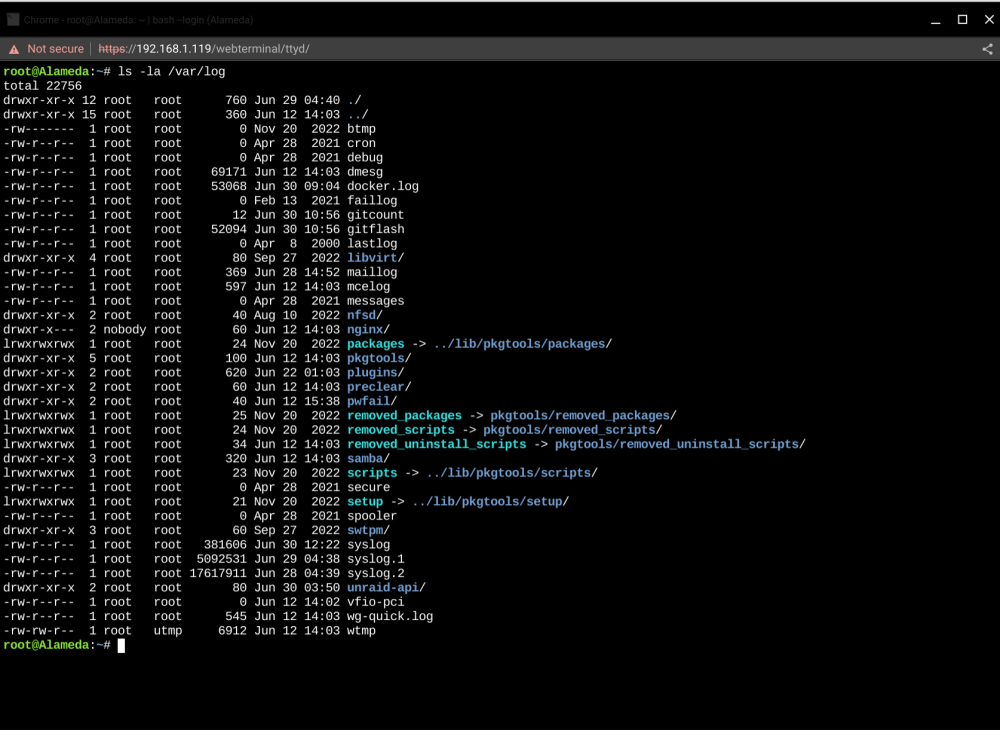
Sorry, I am a total noob when it comes to command line. I see the two syslog files, but i have no idea how to download them for you.
-
I can't find that folder, again logging in through a VPN. But i managed to make the biggest syslog that the system would allow. alameda-syslog-20230630-0947.zip
-
Hi Jorge, As always, your input is much appreciated. The two previous checks were both correcting. Honestly, i am nervous about rebooting remotely through Wireguard. I am not sure if it starts up again? I just ran a diskspeed test and it did not show any drives acting slower than expected. I will change the schedule to monthly. Thanks for the tip.
-
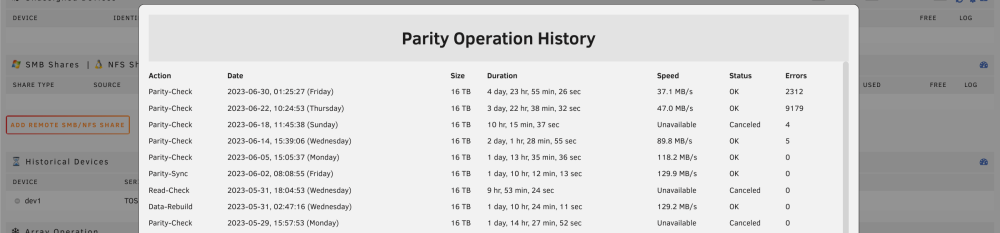
Hi Unraid community. I have an issue that I can't find an answer to in here. I have my server set up to do a weekly parity check. The last two have been incredibly slow(it barely finishes before the next scheduled parity check starts). In particular when reading my 4TB drives. On top of that, it is finding thousands of errors. I am writing a lot to the array while the check is running, but this was never an issue in the past. The issues seem to have started after having a power cut during a parity check a couple of weeks ago. All disks pass smart checks and everything else seems to work normal on the server. When you look at the log, please ignore the high temperature warnings. I have new fans waiting to be installed, but I am working abroad and wont be home for another two months(operating the server through Wireguard). I have not been able to make a full diagnostics file, as my VPN tunnel somehow glitches while it is making the file, every time. But i have attached a system log and a photo of the recent parity check history. Any help is much appreciated. Daniel alameda-syslog-20230630-0651.zip
-
Hi Jorge, that is good to know. I have three of the seagate disks. I could easily make sure those are on the onboard SATA instead of the HBA. I will try to re-organize when the rebuild is done in a day or so. Guess i wont be buying any more Seagate disks.
-
Hi Jorge, I am not really sure. It has happened 3-4 times. The last two times was on the 12TB Seagate drive, before i removed all the old drives. I dont recall which drive it was before that(if it even happened. i should have kept a better eye on what has been going on). Under all circumstances it is very likely that it has been drives connected to the LSI HBA board each time. It certainly was this time. This morning i swapped to a different cable from the HBA board, on the affected 14TB drive and have now started the rebuild. I am definitely thinking that it is not a coincidence that it is always 2048 errors?
-
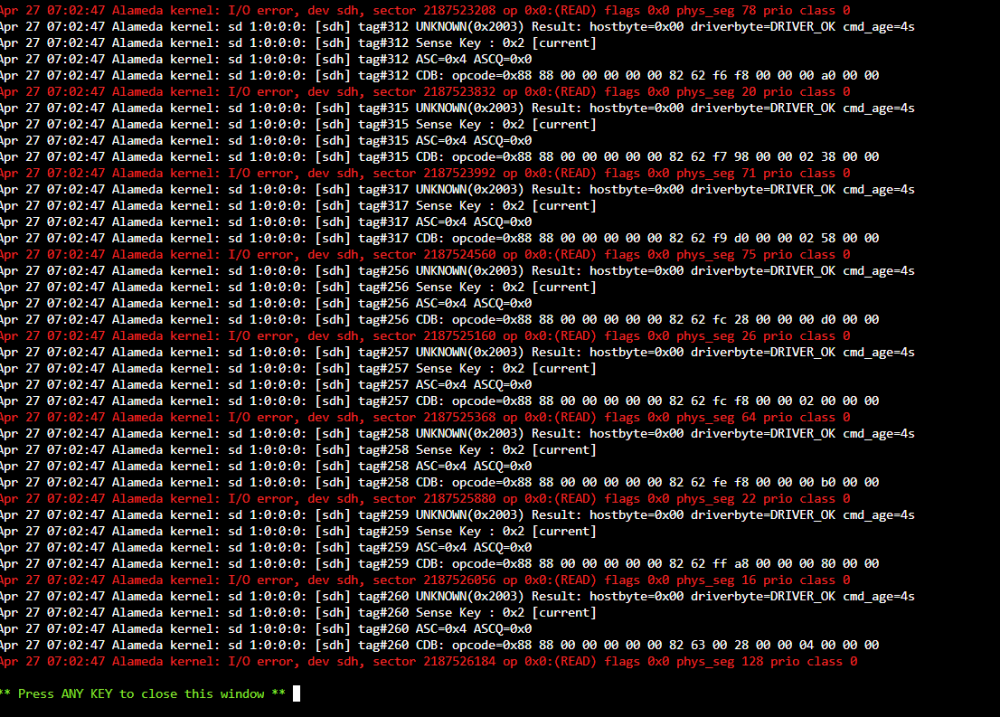
Hi Community, On my server i had a lot of old smaller drives and a few bigger newer drives. I started getting a problem where a disk(not always the same) would get exactly 2048 errors and the disk would disable. Running extended SMART check would show nothing wrong with the disk and it could re-build like normal. The fault would appear, i think, when the mover was running or during Parity-check. I decided that either my HBA card or PSU was at fault(spinning up too many drives at once) and removed all the old small drives using the non-parity protected method. I also replaced my HBA card, just in case this was faulty. Parity just rebuilt over the last couple of days and everything looked sweet until this morning at 0700, when the mover started running. One of the new disks, that hasnt had a fault before, posted 2048 errors again and was disabled. Why the exact same number of errors each time? Why no problem at parity sync or normal operation but only when mover started working? Am i looking at a bad SATA cable? Please see the logs attached. Any help appreciated. This is making me nervous. Daniel alameda-diagnostics-20230427-0747.zip
-
Thanks for your help Jorge. I will order a new one. The wife assures me she can install it with me on a video call...


