





BEAST-SERVER
Members
-
Joined
-
Last visited
-
I did test with 7.1.0-beta.1, and I had to disable (Host access to custom networks) in docker settings for my server to appear on windows network.
-
I rolled back then updated to the stable 7.0.1 version. and made sure (Host access to custom networks) was disabled as in my last post. i can confirm that everything is functioning normally and I can see my server in windows Network panel.
-
Right, I have solved the issue on my server anyway. I decided to disable docker in settings, and my server then appeared on my windows network. So then obviously a problem with the docker settings. I had to disable (Host access to custom networks) and now I can see my server on my windows network. Everything seems to be working as normal with this disabled.
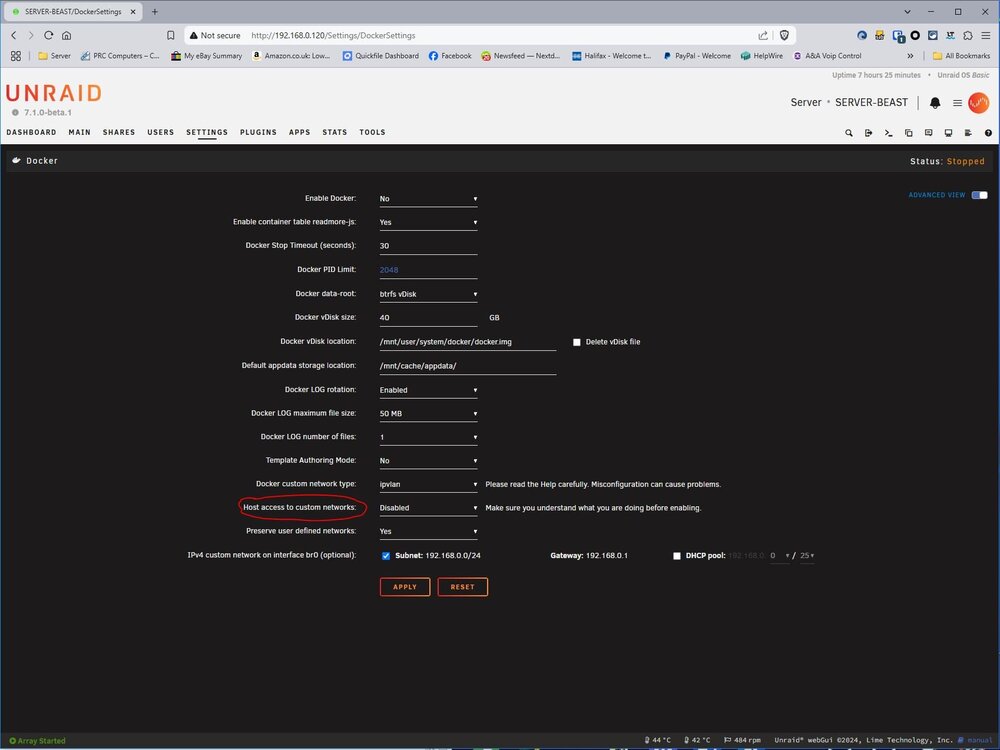
-
I'm thinking of setting up my server from scratch with a fresh installation. Keeping my data on the array and just wiping the cache drives that store the app data etc. But I'm a bit reluctant to do this, as I could possibly go to all that trouble and still have the same issue. I'm very disappointed in Unraid at the minute.
-
It's not really a good workaround for me, as I would have to do this on every customer's computer.
-
It's happening to more than just a few users, look on the net. I have scoured the internet to try to resolve this issue, with no luck. Updates should not be released without thorough testing, instead of using paying customers as Guinea pigs. I'm not happy about this at all, as the issue should have been resolved by now. So I'm stuck on an older version until LT get their act together. I do not want to have to manually type my server address every time I need to access shares on customers Computers.
-
Any more news on when this bug is going to get fixed ?? I still have this issue on version 7.0.1. Had to downgrade yet again back to 6.12.15 to see my server in windows networking. It's not very good releasing buggy updates for software that's been paid for.
-
BEAST-SERVER changed their profile photo
-
Unraid 7 no SMB shares/server showing on Windows network after upgrade. SMB shares/server would show on network when array is stopped when started again the shares/server would disappear again. I rolled back to the previous version of Unraid and everything is working as normal.


