





Mibelosa
Members
-
Joined
-
Last visited
-
Thank you for the clarification, done with all 3 shares! When I run Fix Common Problems now, I see one more issue besides 'Invalid folder cache contained within /mnt', which says that 'Default docker appdata location is not a cache-only share'. How can this be? tower-diagnostics-20241005-1624.zip
-
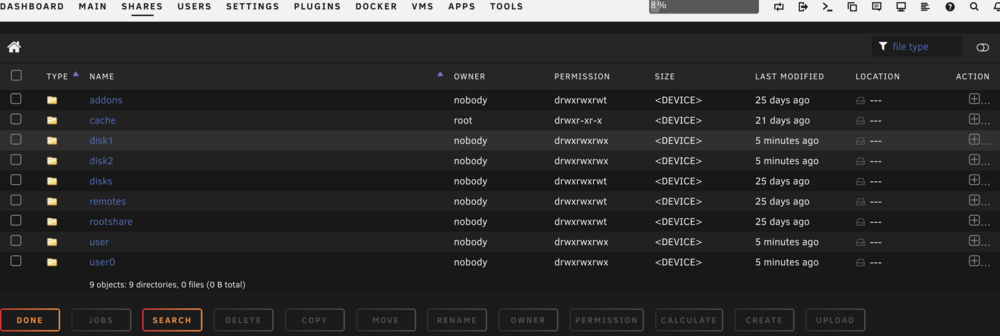
Could you please guide me with a bit more details? I can't find a place to set these settings. But what I did find is this cache folder and I have no cache drive installed in my system. Do I maybe just need to remove this folder?
-
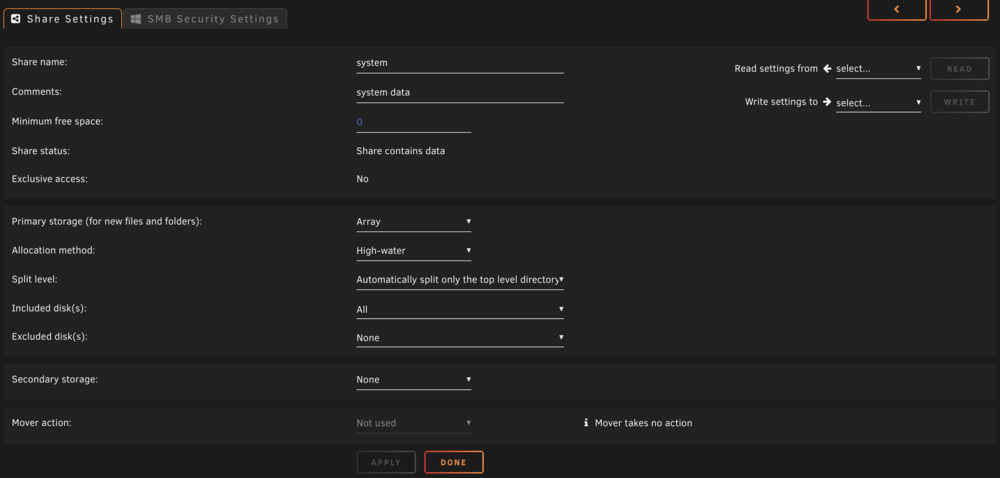
Thanks for the reply JorgeB! I clicked on the different shares and compared the ones with errors to those without errors, and they look quite similar to me. Could you please provide more insight into what might be wrong here?The secondary storage is always set to none, and the primary is the array with all disks.
-
Hello everyone, By chance, while configuring the NUT server today, I noticed the syslog and found that three messages are being spammed continuously multiple times per second. Oct 5 10:54:38 Tower emhttpd: *** bug: 57 /mnt/user/system cache Oct 5 10:54:39 Tower emhttpd: *** bug: 57 /mnt/user/appdata cache Oct 5 10:54:39 Tower emhttpd: *** bug: 57 /mnt/user/domains cache Apart from that, the system is actually doing well. I haven't noticed any problems or instability. Could you please explain what the issue is and how I can fix it? tower-diagnostics-20241005-1102.zip
-
Hey Guys, I am fairly new to Unraid (second day) and had Frigate running in a VM on my Synology. My config file is quite large, but everything has worked very well for the last few years. Due to CPU limitations I would now like to switch to Unraid About my setup: I have several H264 capable cameras and one camera that can only do H265 (called Spielzimmer in the config). So far I have solved it by configuring ffmpeg hwaccel_args once globally and for the one H265 camera the hwaccell_args was adjusted again. This seems to no longer work after initial tests with the Unraid container. Generally ffmpeg configurations do not seem to be provided here or? Only when I comment out ffmpeg Frigate runs and I get images of the H264 camera displayed. How do I then set that I would also like to record the sound and that the H265 stream must first be transcoded with Intel QuickSync? My old config is this: # yaml-language-server: $schema=http://homeassistant:5000/api/config/schema mqtt: host: 10.20.60.113 port: 1883 user: **** password: **** detectors: coral: type: edgetpu device: usb cameras: Spielzimmer: ffmpeg: # output_args: # record: -f segment -segment_time 10 -segment_format mp4 -reset_timestamps 1 -strftime 1 copy -tag:v hvc1 -c:a aac # rtmp: -c copy -f flv -tag:v hvc1 inputs: - path: rtsp://****:****@10.20.60.87:556/Streaming/Channels/102/ roles: - detect - record #- path: rtsp://****:****@10.20.60.87:556/Streaming/Channels/101/ # roles: # - record best_image_timeout: 60 detect: width: 640 height: 480 fps: 5 motion: mask: - 640,316,640,0,531,0,360,0,350,62 - 386,336,498,436,508,415,497,346,436,298,414,306 - 291,0,254,275,116,350,97,37 mqtt: enabled: True timestamp: True bounding_box: True crop: True height: 270 quality: 100 Sauna: ffmpeg: inputs: - path: rtsp://****:****[email protected]:556/Streaming/Channels/103 roles: - detect - rtmp - path: rtsp://****:****[email protected]:556/Streaming/Channels/101 roles: - record #- rtmp #best_image_timeout: 60 motion: mask: - 37,105,501,102,506,47,37,42 - 1920,0,1920,281,1485,313,1046,397,983,0 - 1072,464,1242,472,1255,341,1082,201 - 1920,1080,1920,587,1344,514,1189,563,1099,652,837,827,1033,791,1119,945,960,1080 - 1633,0,1920,0,1920,546,1795,532,1742,551,1698,543,1615,529,1558,446,1563,342 mqtt: enabled: True timestamp: True bounding_box: True crop: True height: 270 quality: 100 Hintereingang: ffmpeg: inputs: - path: rtsp://****:****@10.20.60.103:556/Streaming/Channels/103 roles: - detect - rtmp - path: rtsp://****:****@10.20.60.103:556/Streaming/Channels/101 roles: - record #- rtmp best_image_timeout: 60 motion: mask: - 743,0,1800,0,1789,324,1159,345,877,373,846,490,696,535,563,461,469,529,292,881,0,639,0,469,0,0 mqtt: enabled: True timestamp: True bounding_box: True crop: True height: 270 quality: 100 Hinten: ffmpeg: inputs: - path: rtsp://****:****@10.20.60.105:556/Streaming/Channels/103 roles: - detect - rtmp - path: rtsp://****:****@10.20.60.105:556/Streaming/Channels/101 roles: - record #- rtmp best_image_timeout: 60 mqtt: enabled: True timestamp: True bounding_box: True crop: True height: 270 quality: 100 Tor: ffmpeg: inputs: - path: rtsp://****:****@10.20.60.106:556/Streaming/Channels/103 roles: - detect - rtmp - path: rtsp://****:****@10.20.60.106:556/Streaming/Channels/101 roles: - record #- rtmp #best_image_timeout: 60 mqtt: enabled: True timestamp: True bounding_box: True crop: True height: 270 quality: 100 birdseye: enabled: True width: 1920 height: 1080 quality: 27 mode: continuous timestamp_style: position: "tl" format: "%d/%m/%Y %H:%M:%S" color: red: 255 green: 255 blue: 255 thickness: 2 effect: shadow motion: threshold: 50 contour_area: 30 delta_alpha: 0.2 frame_alpha: 0.2 frame_height: 50 #mask: 0,900,1080,900,1080,1920,0,1920 improve_contrast: True record: enabled: True expire_interval: 60 retain: days: 5 mode: all events: pre_capture: 10 post_capture: 15 retain: default: 1 mode: active_objects objects: person: 7 cat: 7 objects: track: - person - mouse - cat - dog - laptop - handbag - umbrella - backpack - cell phone - bicycle - cow - sheep - bird - bear #- car - baseball bat - tennis racket - knife - bottle - scissors filters: person: min_area: 1000 max_area: 400000 min_score: 0.6 threshold: 0.75 cat: min_score: 0.7 threshold: 0.80 laptop: min_score: 0.8 threshold: 0.9 bird: min_score: 0.8 threshold: 0.9 max_area: 90000 dog: min_score: 0.75 threshold: 0.85 umbrella: min_score: 0.7 threshold: 0.84 max_area: 202000 mouse: min_score: 0.7 threshold: 0.84 max_area: 6000 bear: min_score: 0.7 threshold: 0.9 max_area: 24000 sheep: min_score: 0.7 threshold: 0.85 backpack: min_score: 0.75 threshold: 0.85 ffmpeg: global_args: -hide_banner -loglevel warning hwaccel_args: - -hwaccel_output_format - -c:v h264_qsv input_args: -avoid_negative_ts make_zero -fflags +genpts+discardcorrupt -rtsp_transport tcp -timeout 5000000 -use_wallclock_as_timestamps 1 output_args: detect: -f rawvideo -pix_fmt yuv420p record: -f segment -segment_time 10 -segment_format mp4 -reset_timestamps 1 -strftime 1 -c:v copy -c:a aac rtmp: -c:v copy -c:a aac -f flv environment_vars: LIBVA_DRIVER_NAME: i965 detect: width: 1920 height: 1080 fps: 5 enabled: True max_disappeared: 25 stationary: interval: 10 max_frames: objects: person: 1000 cat: 5000 rtmp: enabled: False snapshots: enabled: True timestamp: True bounding_box: True crop: True #height: 175 required_zones: [] retain: default: 10 objects: person: 15 cat: 10 bear: 5 dog: 5
-
Guten Abend, ich habe ein komplett neues System mit dem RM550x (2021) Netzteil, einem i5-13600K, DDR4 Speicher und nachdem mehrere Gigabyte Boards kaputt ankamen, schlussendlich leider ein MSI Z790-Pro Wifi DDR4 Board geholt. Als Platten sind bisher nur eine 980 Pro SSD und eine Sandisk SSD verbaut. Der Verbrauch liegt momentan bei 10,9-17W. Bei den C-States komme ich bis C6. Wenn ich powertop --auto-tune ausführe, kommt folgende Fehlermeldung: powertop: /lib64/libncursesw.so.6: no version information available (required by powertop) powertop: /lib64/libtinfo.so.6: no version information available (required by powertop) modprobe cpufreq_stats failed Loaded 0 prior measurements Cannot load from file /var/cache/powertop/saved_parameters.powertop File will be loaded after taking minimum number of measurement(s) with battery only RAPL device for cpu 0 RAPL device for cpu 0 Devfreq not enabled glob returned GLOB_ABORTED Cannot load from file /var/cache/powertop/saved_parameters.powertop File will be loaded after taking minimum number of measurement(s) with battery only Leaving PowerTOP Die App "Intel-GPU-TOP" habe ich schon geladen, allerdings konnte die die Fehlermeldung auch nicht beheben. Hat noch jemand eine Idee was ich machen kann, damit Autotune ohne Fehlermeldung durchläuft und ich C8-10 erreiche?

