





Calidor
Members
-
Joined
-
Last visited
-
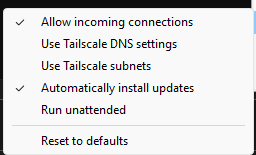
Use this Settings on local Lan Machines, than you can use Ip´s, with magiDNS only Names works on my local Machines.
-
Invalid Hostport 88080, i think thats the reason.
-
Awsome you made my day. thanks a lot
-
We need a new Theme Engine, the Standart UI configuration sucks.
-
You have 2 solutions for that. 1. Plex/Jelyfin are (serve) in Tailscale and u can invite others to access to it (share machine), only acess in yout Tailnet (and local as well). 2. Use TSDProxy (not :latest, :next, because funnel works not) and Label Manager to bring Docker in Tailnet and set it to Funnel. Now the specified Docker is accesable from Internet on the xxxx.yor-Tailnet.ts.net adress.
-
i has the same Issue, The AIO Container Interface loop, I use the TSDProxy as well. With Funnel (with Label Manager) i make the Nextcloud AIO accesable for the Internet, works but loops. Solution was TSDProxy change from Latest to Next. Now it works fine.
-
Wenn du genau weißt das die parity ok ist kannst du es genau so machen. Ich hatte mal probleme mit einem Datenträger und musste das genau so machen , da der Datenträger als Fehlerhaft rausflog (In der zeit wurden keine Daten geändert), da ich mit Powertop rumexperimentierte und die erweiterungskarte wenn ich sie schlafen schickte die Sata Verbindungen abgeschossen hat und dadurch eine Fehlermeldung erzeugt wurde der Datenträger wäre fehlerhaft. Alles wieder richtig einbinden in die Slots (genau wie vorher) und sagen die Parität ist Valide.
-
Mein kumpel hat einen intel i3 12100 . Gpu Top ist installiert und im Template ist dev/dri eingetragen, vaapi wird unter Emby angezeigt aber Quicksync nicht. Ist das immernoch ein Problem oder geht das zwischenzeitlich?
-
Da ich auch ein Backup habe , habe ich es in der Konsole ausgeführt während die Instanz lief, hat alles geklappt. Keine ahnung ob man über die Konsole die Nextcloud stoppen kann ohne das die Konsloe offline geht, das wäre bei einem fehlschlag der nächste Versuch gewesen.
-
Super Danke dir hat geklappt , ich musste zusätzlich noch occ db: convert-filecache-bigin ausführen , danach war alles wieder da.
-
Hallo ich habe schon eine ganze weile einen Nextcloud Docker laufen , der über den nginx reverse Proxy läuft, hatte bisher auch keine Probleme. Beim update auf Version 25 von Nextclod ist alledings wohl was schief gelaufen, ich kann Nextloud zwar aufrufen bekomme aber kein Dashboard nur eine leere weiße Seite. In der Protokolldatei steht volgendes falls das Hilft: ------------------------------------- _ () | | ___ _ __ | | / __| | | / \ | | \__ \ | | | () | |_| |___/ |_| \__/ Brought to you by linuxserver.io ------------------------------------- To support LSIO projects visit: https://www.linuxserver.io/donate/ ------------------------------------- GID/UID ------------------------------------- User uid: 99 User gid: 100 ------------------------------------- using keys found in /config/keys **** The following active confs have different version dates than the samples that are shipped. **** **** This may be due to user customization or an update to the samples. **** **** You should compare the following files to the samples in the same folder and update them. **** **** Use the link at the top of the file to view the changelog. **** /config/nginx/nginx.conf /config/nginx/site-confs/default.conf [custom-init] No custom files found, skipping... [ls.io-init] done. Evtl könnte mir ja jemand helfen wo ich da ansetzen könnte um die Ursache zu finden? Ich bedanke mich schon mal im vorraus für Vorschläge.
-
Ich war ja bis vor 1 Woche noch auf Unraid 6.9.2 , bin dann auf 6.10.3 , soweit sogut. Hatte dann den Stromverbrauch nicht mehr kontrolliert. Vorhin dann die Anzeige mal wieder in die Hand genommen und fast Umgefallen, statt 19-20 watt wie immer steht da doch echt 14,3-knapp 16 Watt . Darufhin Powertop angeschaut, die c-states sind gleich. Was hat sich geändert? Mein System nicht. Würde mich Interessieren , sind immerhin ca 4 Watt und ich hatte vorher ja schon alles mögliche Versucht den Verbrauch zu drücken.
-
Kann ich dir gar nicht sagen, ich mach den Check 1 Monatlich, reicht zu für mein Datengrab. Ob der nun 8Std oder 10Std läuft ist mir auch eigentlich egal. Was ich meinet ist , das mein Netzwerk 1Gbit ist und ich bekomme von jeder Platte 110MB/s über das Netzwerk. Sollte ich irgendwann auf 10/40/100 Gbit upgraden (Wer weiß was die Zukunft bringt) kann ich mir Gedanken machen über höhere Transferraten, allerdings brauchts dann auch mehr als normale Platten (Oder ich muss sie im Raid Verbund laufen lassen). Momentan bin ich allerdings mehr als Zufrieden mit dem Server und Unraid.
-
Hmm ok aber vorher hatte ich 2 Karten, 1x2 Port und 1x4Port. Ich weiß zwar nicht an was es jetzt genau liegt, ob die 2 Karten mehr Strom ziehen als die 6Port, aber ca 4,x Watt weniger find ich schon einen Unterschied. Transferraten sind für mich Ok, ist ja nicht so als ob ich einen Hochgeschwindigkeitsserver brauche, 1Gbit wird von allen Platten voll erreicht. Und ich erreiche so C8 Pkg im Idle. Welche sata karte mit min 6Port´s wäre den Besser geeignet, hast du da Vorschläge?
-
Hersteller weiß ich nicht , es ist jedenfalls ein Marvell 88SE9215 Chip verbaut. Aber auch vorher mit den JMB Karten hatte ich ja schon Pkg auf C3 im Idle.

