





malaki86
Members
-
Joined
-
Last visited
Everything posted by malaki86
-
That's why I'm using the FM plugin. what about a direct rsync instead, or does the FM use rsync in the background already?
-
I just tried switching between High Water and Most Free for the new share. It's still writing to the drive with the least free space (and has well below the minimum free space).
-
The new share, /mnt/user/media_Movies, exists on all eleven drives
-
Dynamix File Manager plugin
-
The files regroup into a single drive in a Move from the File Browser, BUT, file browser is ONLY writing to ONE of the ELEVEN drives.
-
And, even now, I'm trying to move a single movie folder from '/mnt/user/media/movies' to '/mnt/user/media_Movie/movie' and it's putting it on the drive that is down to 85Gb, while the minimum space on that share is set to 200Gb. WHY? There are 10 more drives on that array, with all but one having 1Tb+ of free space. Why is it ONLY going to that ONE drive?
-
But, when files are written, then years later more files for that movie are downloaded, like subtitles, posters, etc, they end up scattered everywhere. That's what the split level is for.
-
I have THOUSANDS of individual files spread across 11 drives, with 2-4 files per movie. Unraid has a split level feature, a minimum space feature and there's zero reason that they can't work together automatically.
-
That doesn't solve the problem with the files being split up, which is why I enabled the split level option.
-
So, basically select stuff from the share (/mnt/user/media/movies) and move it to a drive with enough space (/mnt/disk2/media_Movies)?
-
What is driving me nuts is that I can't move anything now until Unbalance clears more space on that one single drive because that's the ONLY place that the File Browser Move is putting the files now.
-
For the Movies, that I'm doing now, I have it set to "Top Level": /mnt/user/media_Movies/<movie>, which splits it at <movie> as it's supposed to do. Example: \Movies\Movie1\Movie1.mkv Split only the Top Level: (Splits folders at this level apart from each other) ↓ Disk 1 may contain \Movies\Movie 1\All Movie 1 files Disk 2 may contain \Movies\Movie 2\All Movie 2 files Split only the top two: (Splits Here) ↓ Disk 1 may contain \Movies\Movie 1\some of the files for Movie 1 Disk 2 may contain \Movies\Movie 1\some of the files for Movie 1 for TV Shows: (\share\) ↓ Example:\TvShows\Tvshow 1\Season 1\Tvshow file(s) Split only the Top Level: (Splits folders at same level as this) ↓ Disk 1 may contain \TvShows\Tvshow 1\All Seasons\All Tvshow 1 files Disk 2 may contain \TvShows\Tvshow 2\All Seasons\All Tvshow 2 files Split only the top two: (Splits folders at this same level) ↓ Disk 1 may contain \TvShows\Tvshow 1\Season 1\All Season 1 files Disk 2 may contain \TvShows\Tvshow 1\Season 2\All Season 2 files
-
I'm only somewhat of a programmer, but I thought of a plugin that some might find useful. I just enabled the split level on a few of my shares to keep the media files together for a movie, tv series season, etc. Because I had them all combined in a single media folder prior (/mnt/user/media/movies, /mnt/user/media/tv, etc), with no splitting, the files are scattered everywhere. So, I'm in the process of using the File Browser to Move the split folders to the newly created root share (/mnt/user/media_Movies, /mnt/user/media_TV, etc) to get the files combined on the same drive. It's a really long process, and I don't have THAT much media. That's what made me think of the idea for a plugin. Basically, the plugin would go folder by folder, drive by drive, in a user selected folder, looking for all files in that specific subfolder/split level. It would do a quick filesize check of each file it found, and move any file smaller than the largest file found to the physical drive that is holding that largest file. I hope I explained it clear enough. I can see the process in my mind, but that doesn't mean that I know how to put it in words LOL. Right now, I'm doing the movies folders. Those are usually a large video file, followed by one or more "extra" files, like SRT, NFO, etc. So, using my plugin idea, it would take those tiny files from whatever physical drive they're located on and put them in the same folder, on the same drive, as the video file. That's a LOT faster than moving absolutely everything.
-
What that means is that the split-level feature is completely worthless, unless you have a single drive with unlimited space on it. It's set to the lowest level split, but it's insisting on putting EVERYTHING in that one share on that one drive, while there are 9 more drives, with more than enough space available AND the same share on every drive. Something needs fixed here, or just remove the split level completely
-
but, if the split level overrides the allocation method, then it's a screwed up implementation of it and needs to be redone.
-
I'm using the split level so that all files for a single movie, or all episodes of a tv show season, are physically on the same drive. That's exactly what the split level is for.
-
I cleared up some space on the 2 completely full drives with Unbalanced, leaving roughly 500Gb each. I'm going to try using the File Browser to Move the media folders that are split among multiple drives again. Edit: I started the Mover manually to clear it, and started manually moving the split media folders again. I instantly saw the available free space dropping on the drive that is almost completely full (280Gb) while there are multiple drives with 1.25Tb+ of free space. The share is set to use Most Free space.
-
Diagnostics are attached neo-diagnostics-20240211-0440.zip
-
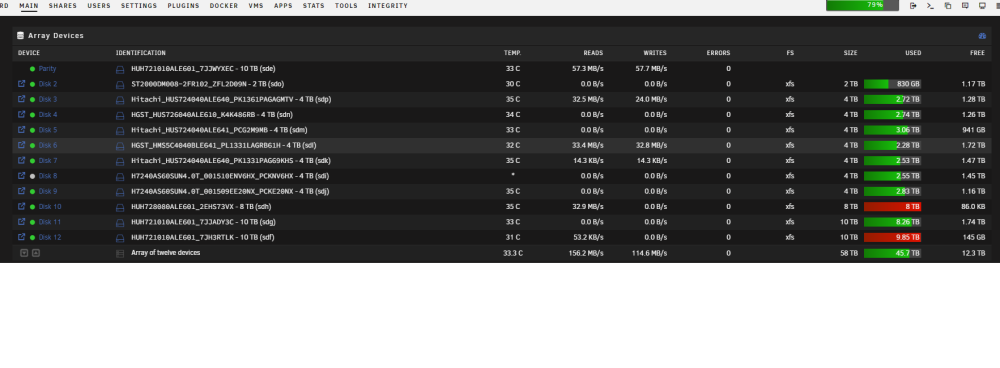
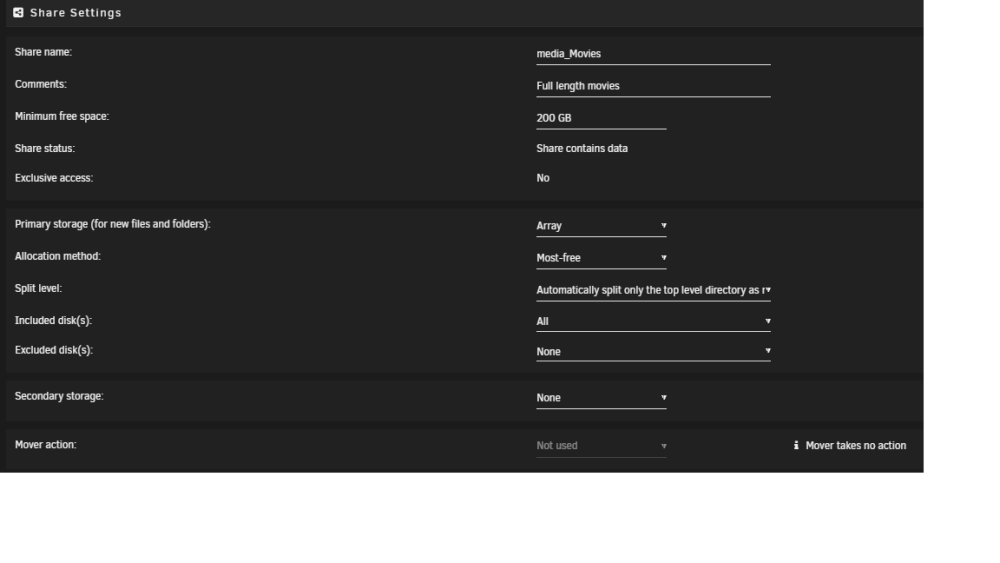
I'm in the process of moving media folders from one folder to a new one with a split-level set to "Automatically split the top level as required" (movie folder). All drives are included in the share, with no exclusions and I have a minimum free space set to 200Gb. I can see that new folder on every drive, and the File Browser confirms it, and that the split-level is correct. I originally set to "High Water", but it does the same when set to "Most Free". The problem is that it when using the File Browser to move the media folders, I started getting "not enough free space" errors. Sure enough, one drive was completely full, with 85kb (or something like that free), and a 2nd drive was down to 145Gb. I'm currently using the Unbalanced plugin to force move folders from the 2 full drives onto the least full drives. Any clue what's going on with it?
-
Awesome! Thank you.
-
Is there an easy/automated way of doing the copy/delete? I definitely don't have the space to do it all at once.
-
When I set up my server, I created a single '/media' share. I then added subdirectories in that share: /media /tv /movies /music Now, after waiting way too long, I'm wanting to get them into separate shares, with split levels enabled. Basically, I want it to split at the last level in this list: /media_tv /<seriesname> /<season> /media_movies /<moviename> /media_music /<artistname> /<albumname> So, if I'm reading the instructions correctly, I would use a 'two levels' for both TV & Music, and 'one level' for Movies, correct? Also, since everything is all bunched up together right now, when I move the individual media folders to the new location, will the proper splitting be done at that time, meaning that some media may move from one physical drive to another?
-
Ok - I finally managed to get the database setup after a removal and clean install. You may want to describe the database installation as part of the tracker installation.
-
I found adminer and installed it. When I try to login, I get the same access denied error
-
I just filled in the blanks on the MariaDB setup. Gave it a new database name, username, userpass, and rootpass. I dont know what adminer is, or what "access is dbuser@%"


