





Hellomynameisleo
Members
-
Joined
-
Last visited
Everything posted by Hellomynameisleo
-
I wanted the array without dedicating storage to a pool, I went for unraid because I didn't need to go for a pool and have good amount of usable storage unlike something like trueNAS. The array is starting to become unusable as I add more stuff and becoming hard to move 1000s of files in the array around since it takes so long. though I've gone to use krusader on unraid instead to do any file/folder modifications instead of using my windows pc over smb and its really that much faster.
-
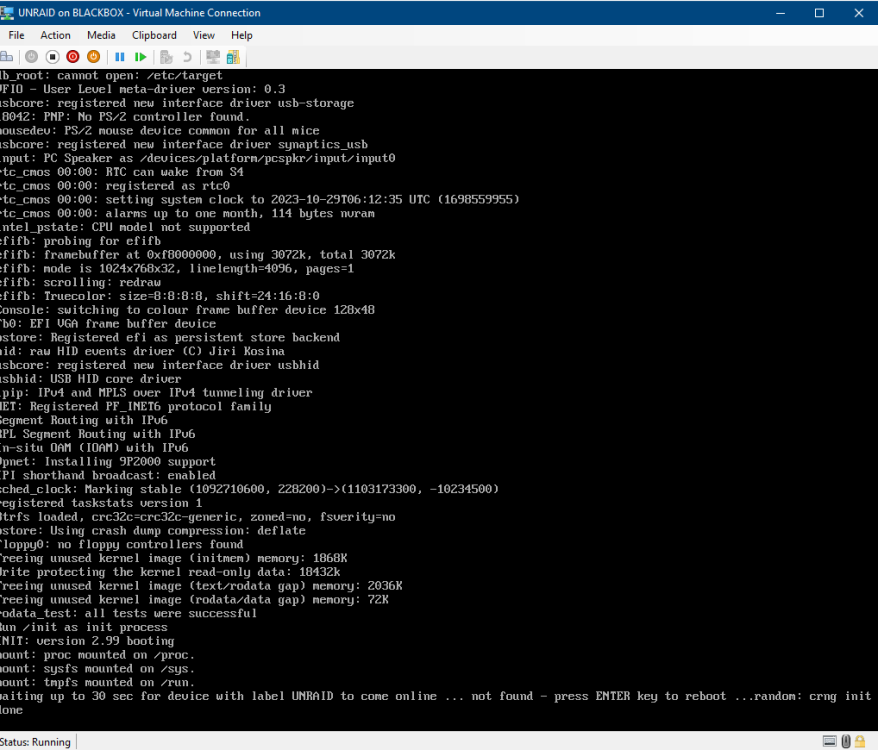
Trying to to run UNRAID to work in windows hyper-v VM for testing/playing with configs etc. I have gotten as far as booting but it gets stuck on detecing the label UNRAID. I've tried creating a VHDX file in windows volume labeled UNRAID with EFI and MBR, the VM is Gen 2 to enable EFI support. I did the manual install steps by copying and pasting the zip file contents to the created VHDX then windows.bat as admin, efi- folder renamed to efi. Booted off the VHDX in the VM but now I am stuck with the below picture. Is there something I am missing or anyone know how to get this working if possible?
-
is disk shares really the only way for this issue? its going to be even harder and pain to manage 5 seperate disks and its one of the many reason I came to use unraid so I wouldn't need to do that.
-
Is this only a setting you can set if you have a cache pool? I only have an existing array with no set cache
-
I have been using UNRAID and TrueNAS both on diffrent machines and through SMB. I find for UNRAID is so much slower access time when opening directories/files it takes much longer to list files compared to my trueNAS computer. Any ideas if this is normal behaviour with UNRAID's performance? In general this is most noticeable on directories with 1000+ files in them, trueNAS handles it very well while unraid is just sluggish in comparision.
-
It just started happening recently and was working as usual on the version I am using until it started crashing. I have the syslog already enabled with the logs below:
-
I have an issue where the server goes offline where the uptime was about 2 weeks then the and is not reachable through the webui or any other means, it has happened 2-3 times now so getting concerned to what causes this to happen. I have checked the unraid server monitor screen and its just a black screen and unresponsive but the server is still powered on. The only way to get it back online again is to press the power button on the unraid server to turn it off an on again reboot when this happens. Any idea why this is happening? unraid-diagnostics-20230908-0932.zip
-
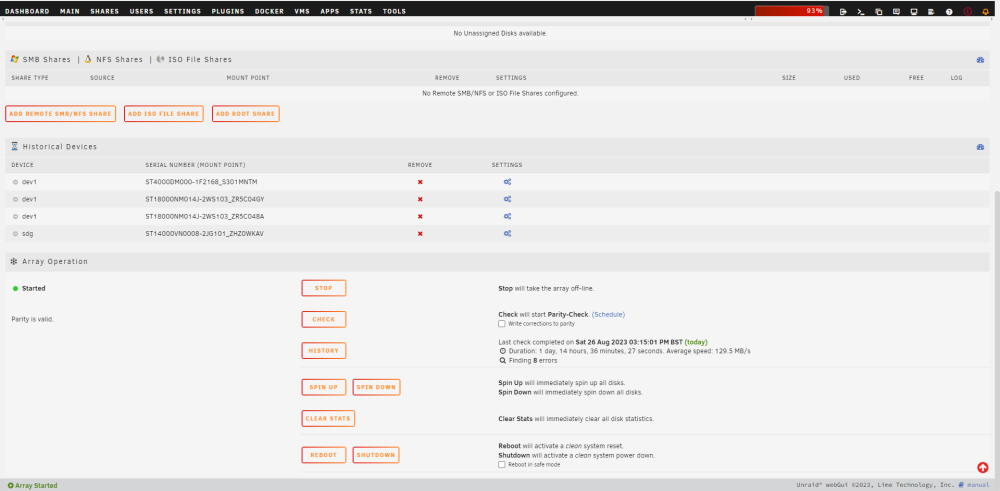
I had an outtage and unclean shutdown as a result. I did the parity check without writing corrections on the array and it came with 8 sync errors. How can I check the files that was affected so I can restore from backup? I also have the drive formatted in BTRFS so will I have to do a error check too?
-
So my Disk 1 failed yet again, so the contents was emulated. I have put some files and folders on my unraid array which should of put some stuff on the emulated disk 1. When I replace and rebuild disk 1 will I no longer have those files and folders I have put on disk 1?
-
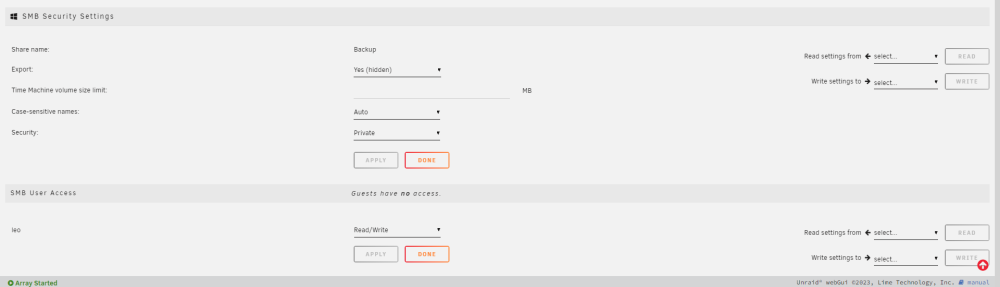
I am getting access is denied errors when accessing folders/files on my windows pc connected through smb. When I try opening the same folder or file again it lets me access it strangely. Even when I am copying files to the unraid share from my windows pc to unraid array I requently get errors and will have to try move that file over again then is suceeds. This is my permissions below and the disks are formatted with BTRFS as I wanted the compressions/error checking. Any ideas what could be causing this annoying issue?
-
should of had a tickbox on the bottom that said "format drive 1 and write changes to parity (All files/data on drive 1 will no longer be in parity)" something like that could be more clearer.
-
even though it says update parity to reflect this its still not really clear that it wouldn't allow pairty to rebuild missing data to the new drive. something like in bold red that says formatting the drive would delete all data on disk and won't be able to rebuild regardless if you have parity, read guide <insert link> to rebuild properly. also like an additional seperate setting that you must enabled specially for cases when the drive has been disabled one from current array this would of stopped me. there should be a link in red somewhere in the array screen whenever a drive has failed and emulated to guide you that you can easily click and read the steps, I had to look it up after I tried to attempt to try rebuild but failed by formatting the drive first. also its weird how unraid doesnt have a automated process button to Rebuild a drive onto itself so you won't have to do it manually and thus stop cases like this from happening, its just too easy to happen
-
this is terrible... How is this implmented like this so its easy to make a mistake for first timers rebuilding
-
wait does this mean everything including my files on disk1 is now gone?? what about my parity?
-
here are the diagnostics unraid-diagnostics-20230731-2206.zip
-
One of my disks failed and has been disabled by UNRAID and is now emulated as I have a parity disk, so I rebooted my unraid and currently doing a "Rebuilding a drive onto itself" for the disabled disk that failed. I looked at my docker containers and see it empty all gone. And the dockers are in my previous apps in the apps tab. Any idea how this has happened?

-
Is it possible for unraid to have something like an option for striping data across all drives for more performance similar to what zfs/raid does, then having the parity drives as usual? I believe something like this should be possible as it doesn't seem to change how unraid calculates its parity or the way it works. With the performance being bound to the parity drive in this case you can assign a hard drive as something like a performance drive paired to the parity drive to take half of the calculation of the parity drive so it is twice or three overall faster if assigning multiple performance drives. the benefits will be you can have mixed drives sizes, an array that you can expand without hassle like usual unraid, with added performance beneifts while also having the protection redundancy all the same time.
-
look like I found it. it wasn't in the syslog but was in the syslog when you produce it from unraid. May 27 07:51:58 Unraid kernel: ata9.00: ATA-11: ST14000VN0008-2JG101, SC60, max UDMA/133
-
I ran the script from that thread but I get, my motherboard has 4 ports that run at 3gb/s and 2 ports that run at 6/gbs. I am guessing it doesn't show the 4 ports ata for some reason even through its the mothboard port. Any ideas what I can do to find the ata9? root@Unraid:/boot# bash ata_devices.sh (Device sda is not an ATA device, but a USB device [e. g. a pen drive]) sdb: ata1.00 sdc: ata2.00 cat: '/sys/devices/pci0000:00/0000:00:11.0/0000:02:00.0/host7/port-7:0/end_device-7:0/target7:0:0/hostsdd/scsi_host/hostsdd/unique_id': No such file or directory : ata. cat: '/sys/devices/pci0000:00/0000:00:11.0/0000:02:00.0/host7/port-7:1/end_device-7:1/target7:0:1/hostsde/scsi_host/hostsde/unique_id': No such file or directory : ata. cat: '/sys/devices/pci0000:00/0000:00:11.0/0000:02:00.0/host7/port-7:2/end_device-7:2/target7:0:2/hostsdf/scsi_host/hostsdf/unique_id': No such file or directory : ata. cat: '/sys/devices/pci0000:00/0000:00:11.0/0000:02:00.0/host7/port-7:3/end_device-7:3/target7:0:3/hostsdg/scsi_host/hostsdg/unique_id': No such file or directory : ata.
-
It says ata9 how do I find out which sata cable it is? There's currently 5 HDD in the array
-
I occasionally get a error that says ata9.00: failed command with the below messages in the syslog: May 28 08:19:14 Unraid kernel: sas: sas_scsi_find_task: task 0x00000000728b3cab is done May 28 08:19:14 Unraid kernel: sas: sas_eh_handle_sas_errors: task 0x00000000728b3cab is done May 28 08:19:14 Unraid kernel: sas: trying to find task 0x00000000357ec383 May 28 08:19:14 Unraid kernel: sas: sas_scsi_find_task: aborting task 0x00000000357ec383 May 28 08:19:14 Unraid kernel: isci 0000:02:00.0: isci_task_abort_task: dev = 000000005c2760bc (STP/SATA), task = 00000000357ec383, old_request == 00000000bafa4ef5 May 28 08:19:14 Unraid kernel: isci 0000:02:00.0: isci_task_abort_task: SATA/STP request or complete_in_target (1), or IDEV_GONE (0), thus no TMF May 28 08:19:14 Unraid kernel: isci 0000:02:00.0: isci_task_abort_task: Done; dev = 000000005c2760bc, task = 00000000357ec383 , old_request == 00000000bafa4ef5 May 28 08:19:14 Unraid kernel: sas: sas_scsi_find_task: task 0x00000000357ec383 is done May 28 08:19:14 Unraid kernel: sas: sas_eh_handle_sas_errors: task 0x00000000357ec383 is done May 28 08:19:14 Unraid kernel: sas: trying to find task 0x0000000049f81fab May 28 08:19:14 Unraid kernel: sas: sas_scsi_find_task: aborting task 0x0000000049f81fab May 28 08:19:14 Unraid kernel: isci 0000:02:00.0: isci_task_abort_task: dev = 000000005c2760bc (STP/SATA), task = 0000000049f81fab, old_request == 00000000e30f14fc May 28 08:19:14 Unraid kernel: isci 0000:02:00.0: isci_task_abort_task: SATA/STP request or complete_in_target (1), or IDEV_GONE (0), thus no TMF May 28 08:19:14 Unraid kernel: isci 0000:02:00.0: isci_task_abort_task: Done; dev = 000000005c2760bc, task = 0000000049f81fab , old_request == 00000000e30f14fc May 28 08:19:14 Unraid kernel: sas: sas_scsi_find_task: task 0x0000000049f81fab is done May 28 08:19:14 Unraid kernel: sas: sas_eh_handle_sas_errors: task 0x0000000049f81fab is done May 28 08:19:14 Unraid kernel: sas: ata9: end_device-7:2: cmd error handler May 28 08:19:14 Unraid kernel: sas: ata7: end_device-7:0: dev error handler May 28 08:19:14 Unraid kernel: sas: ata8: end_device-7:1: dev error handler May 28 08:19:14 Unraid kernel: sas: ata9: end_device-7:2: dev error handler May 28 08:19:14 Unraid kernel: sas: ata10: end_device-7:3: dev error handler May 28 08:19:14 Unraid kernel: ata9.00: exception Emask 0x0 SAct 0xf8000416 SErr 0x0 action 0x6 frozen May 28 08:19:14 Unraid kernel: ata9.00: failed command: READ FPDMA QUEUED May 28 08:19:14 Unraid kernel: ata9.00: cmd 60/f0:00:70:0d:46/02:00:1c:00:00/40 tag 1 ncq dma 385024 in May 28 08:19:14 Unraid kernel: res 40/00:01:01:4f:c2/00:00:00:00:00/00 Emask 0x4 (timeout) May 28 08:19:14 Unraid kernel: ata9.00: status: { DRDY } May 28 08:19:14 Unraid kernel: ata9.00: failed command: READ FPDMA QUEUED May 28 08:19:14 Unraid kernel: ata9.00: cmd 60/80:00:60:10:46/02:00:1c:00:00/40 tag 2 ncq dma 327680 in May 28 08:19:14 Unraid kernel: res 40/00:01:00:00:00/00:00:00:00:00/00 Emask 0x4 (timeout) May 28 08:19:14 Unraid kernel: ata9.00: status: { DRDY } May 28 08:19:14 Unraid kernel: ata9.00: failed command: READ FPDMA QUEUED May 28 08:19:14 Unraid kernel: ata9.00: cmd 60/00:00:88:be:3e/01:00:82:02:00/40 tag 4 ncq dma 131072 in May 28 08:19:14 Unraid kernel: res 40/00:01:00:4f:c2/00:00:00:00:00/00 Emask 0x4 (timeout) May 28 08:19:14 Unraid kernel: ata9.00: status: { DRDY } May 28 08:19:14 Unraid kernel: ata9.00: failed command: READ FPDMA QUEUED May 28 08:19:14 Unraid kernel: ata9.00: cmd 60/20:00:20:74:3b/00:00:01:00:00/40 tag 10 ncq dma 16384 in May 28 08:19:14 Unraid kernel: res 40/00:01:01:4f:c2/00:00:00:00:00/00 Emask 0x4 (timeout) May 28 08:19:14 Unraid kernel: ata9.00: status: { DRDY } May 28 08:19:14 Unraid kernel: ata9.00: failed command: READ FPDMA QUEUED May 28 08:19:14 Unraid kernel: ata9.00: cmd 60/08:00:20:0d:46/00:00:1c:00:00/40 tag 27 ncq dma 4096 in May 28 08:19:14 Unraid kernel: res 40/00:01:00:00:00/00:00:00:00:00/00 Emask 0x4 (timeout) May 28 08:19:14 Unraid kernel: ata9.00: status: { DRDY } May 28 08:19:14 Unraid kernel: ata9.00: failed command: READ FPDMA QUEUED May 28 08:19:14 Unraid kernel: ata9.00: cmd 60/08:00:28:0d:46/00:00:1c:00:00/40 tag 28 ncq dma 4096 in May 28 08:19:14 Unraid kernel: res 40/00:01:00:00:00/00:00:00:00:00/00 Emask 0x4 (timeout) May 28 08:19:14 Unraid kernel: ata9.00: status: { DRDY } May 28 08:19:14 Unraid kernel: ata9.00: failed command: READ FPDMA QUEUED May 28 08:19:14 Unraid kernel: ata9.00: cmd 60/10:00:30:0d:46/00:00:1c:00:00/40 tag 29 ncq dma 8192 in May 28 08:19:14 Unraid kernel: res 40/00:01:00:4f:c2/00:00:00:00:00/00 Emask 0x4 (timeout) May 28 08:19:14 Unraid kernel: ata9.00: status: { DRDY } May 28 08:19:14 Unraid kernel: ata9.00: failed command: READ FPDMA QUEUED May 28 08:19:14 Unraid kernel: ata9.00: cmd 60/10:00:40:0d:46/00:00:1c:00:00/40 tag 30 ncq dma 8192 in May 28 08:19:14 Unraid kernel: res 40/00:01:00:4f:c2/00:00:00:00:00/00 Emask 0x4 (timeout) May 28 08:19:14 Unraid kernel: ata9.00: status: { DRDY } May 28 08:19:14 Unraid kernel: ata9.00: failed command: READ FPDMA QUEUED May 28 08:19:14 Unraid kernel: ata9.00: cmd 60/20:00:50:0d:46/00:00:1c:00:00/40 tag 31 ncq dma 16384 in May 28 08:19:14 Unraid kernel: res 40/00:ff:ff:00:00/00:00:00:00:00/40 Emask 0x4 (timeout) May 28 08:19:14 Unraid kernel: ata9.00: status: { DRDY } May 28 08:19:14 Unraid kernel: ata9: hard resetting link May 28 08:19:14 Unraid kernel: ata9.00: configured for UDMA/133 May 28 08:19:14 Unraid kernel: ata9: EH complete May 28 08:19:14 Unraid kernel: sas: --- Exit sas_scsi_recover_host: busy: 0 failed: 9 tries: 1 I am able to use unraid but find the error concerning. It usually happens when I do a parity check or a big read operation.
-
Why not? This is indeed possible but I found out if I do it by share each disks then doin each transfer folder to each of the individual disk, it does work but is not really usable. I am using UNRAID shares as a whole but was wondering if a feature like this is hidden somewhere or as a plugin
-
When I transfer files to unraid array it will only transfer this data to a single drive. Is there a way to improve speeds by making unraid do simultaneous transfers of the files to each drive in the array at the same time instead of just a single one? I'd imagine this would make unraid have ZFS like speeds whenever doing random i/o write operations
-
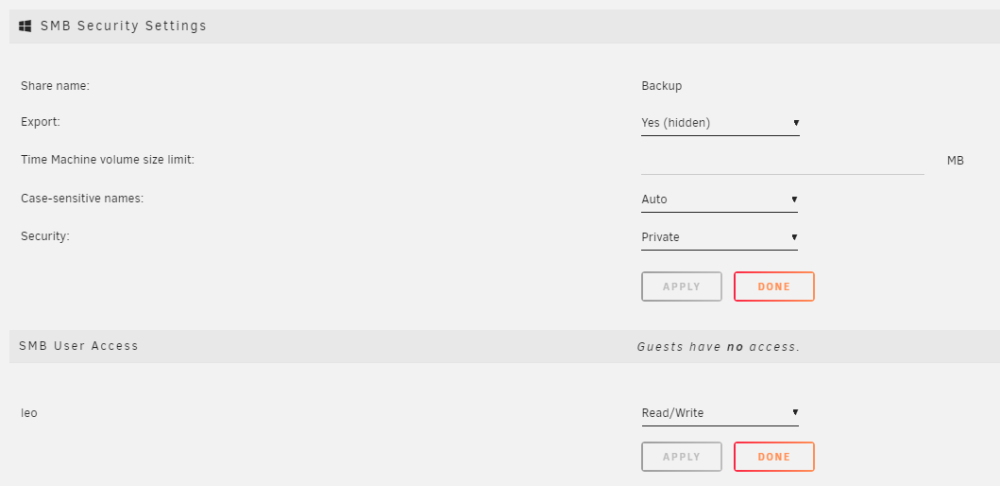
I have a windows 10 pc connected to my mapped network unraid share through SMB. When copying files over to the unraid share or downloading to it using bittorrents I will get an issue randomly that say access is denied and it couldn't copy over the file to unraid. But if I try again it usually goes thorough the second or third time. An example is if I was to copy 1000 files from windows to unraid share it'll successfuly copy over 800 files but 200 of the files will not copy over because access is denied so I will try again and it will copy without issue for the most part. I have already setup unraid to give me full read/write access to the whole share so not sure why this is happening. Below is the image setting of the share access. Any idea what I am doing wrong here or could be causing the issue? For more info I do have another share from a TrueNAS machine mapped to my Windows 10 pc as well not sure if this is causing a conflict.
-
Is there a way to choose multiple days of the months UNRAID will run a BTRFS scrub of the disk? For example only run on days 7, 14, 21, 28 of every month. Currently I can only choose one day of the month or a day every week.


