UninspiredENVY
Members
-
Joined
-
Last visited
Everything posted by UninspiredENVY
-
Hi Everyone, I am seeking support for AutoKuma. I have been trying to set this up for some time and will admit I am a newbie to a lot of this. I am trying to set this up on Unraid using the already-created Docker app. What I don't understand is what needs to be done to get Autokuma to recognize any of my installed apps. If anyone has successfully installed this and could provide a brief set of instructions in layman's terms on what needs to be done, that would be great. Thanks
-
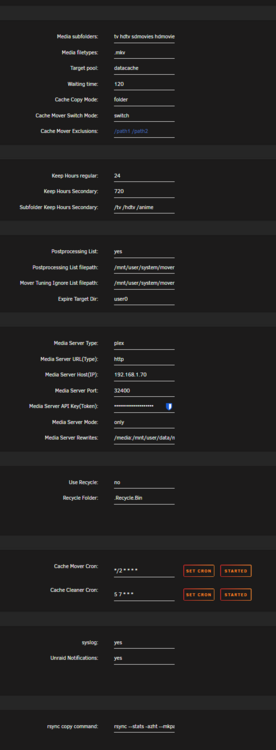
Hi, I am having an issue with CACHE-MOVER where it is working but it takes 40 minutes for the plugin to recognize a movie is playing and then move it to the cache drive. You can see that I have even set my corn job to go every 2 minutes instead of every 10. It doesn't seem to make a difference. Do I have something set wrong? ** Update to this. I am now getting the following error. May 29 12:39:35 Cyberdyne root: cache-mover: msm: cat: /usr/local/emhttp/plugins/cache-mover/tmp_openfiles2.txt: No such file or directory May 29 12:39:35 Cyberdyne root: cache-mover: msm: not matching tv|hdtv|sdmovies|hdmovies|anime, breaking here
-
I have been having issues with my server not shutting down cleanly. Today, I tried shutting down all of my Docker containers and VMs and stopping the Docker and VM services. Then, when I went to stop the array, it kept saying Array Stopping: Retry unmounting disk shares. Looking at the logs, it shows that the issue is with my System Cache Drive. I have looked through some logs and searched forums for a fix, but I can't find one. I did find one for 6.11 that was a Docker issue, but I was able to shut down Docker and VMs fine. So I don't think that is the issue. Can anyone help me figure this out? cyberdyne-diagnostics-20250521-0635.zip
-
I must have something setup wrong with my plex docker then because I cant get it to find anything at all if I switch it to only mode. Is there something I can send you to take a look at my setup and help me get this set properly? When I set the cron to started it doesn't run any logs. The cache cleaner logs start but not the cache mover logs. ****Thanks for all your help on this. It looks like my issue is resolved and everything is working correctly now.
-
So I added those files and it still doesn't seem to be working right. I've seen it move a few shows but they arent even ones that people are watching. What could I be doing wrong? It continues to move Doctor Who as shown below but nobody is watching that show. May 13 13:02:28 Cyberdyne root: cache-mover: reg: Number of files: 35 (reg: 34, dir: 1) May 13 13:02:28 Cyberdyne root: cache-mover: reg: Number of created files: 34 (reg: 34) May 13 13:02:28 Cyberdyne root: cache-mover: reg: Number of deleted files: 0 May 13 13:02:28 Cyberdyne root: cache-mover: reg: Number of regular files transferred: 34 May 13 13:02:28 Cyberdyne root: cache-mover: reg: Total file size: 4.39G bytes May 13 13:02:28 Cyberdyne root: cache-mover: reg: Total transferred file size: 4.39G bytes May 13 13:02:28 Cyberdyne root: cache-mover: reg: Literal data: 4.39G bytes May 13 13:02:28 Cyberdyne root: cache-mover: reg: Matched data: 0 bytes May 13 13:02:28 Cyberdyne root: cache-mover: reg: File list size: 0 May 13 13:02:28 Cyberdyne root: cache-mover: reg: File list generation time: 0.001 seconds May 13 13:02:28 Cyberdyne root: cache-mover: reg: File list transfer time: 0.000 seconds May 13 13:02:28 Cyberdyne root: cache-mover: reg: Total bytes sent: 4.36G May 13 13:02:28 Cyberdyne root: cache-mover: reg: Total bytes received: 662 May 13 13:02:28 Cyberdyne root: cache-mover: reg: May 13 13:02:28 Cyberdyne root: cache-mover: reg: sent 4.36G bytes received 662 bytes 170.85M bytes/sec May 13 13:02:28 Cyberdyne root: cache-mover: reg: total size is 4.39G speedup is 1.01 May 13 13:02:28 Cyberdyne root: cache-mover: reg: open file Doctor Who (1963) - S04E31 - The Faceless Ones 1 [Bluray-1080p][AAC 2.0][h265]-OUIJA.mkv will be switched datacache now May 13 13:02:29 Cyberdyne root: cache-mover: reg: /mnt/datacache/data/media/tv/Doctor Who (1963) {imdb-tt0056751}/Season 04/Doctor Who (1963) - S04E31 - The Faceless Ones 1 [Bluray-1080p][AAC 2.0][h265]-OUIJA.mkv May 13 13:02:29 Cyberdyne root: cache-mover: reg: ready to switch live May 13 13:02:29 Cyberdyne root: cache-mover: reg: -: No such file or directory. May 13 13:02:29 Cyberdyne root: cache-mover: reg: (gdb) Attaching to process 23401 May 13 13:02:29 Cyberdyne root: cache-mover: reg: [New LWP 65818] May 13 13:02:29 Cyberdyne root: cache-mover: reg: [New LWP 65815] May 13 13:02:29 Cyberdyne root: cache-mover: reg: [New LWP 65814] May 13 13:02:29 Cyberdyne root: cache-mover: reg: [New LWP 65813] May 13 13:02:29 Cyberdyne root: cache-mover: reg: [New LWP 65811] May 13 13:02:29 Cyberdyne root: cache-mover: reg: [New LWP 50379] May 13 13:02:29 Cyberdyne root: cache-mover: reg: [New LWP 31787] May 13 13:02:29 Cyberdyne root: cache-mover: reg: [New LWP 23881] May 13 13:02:29 Cyberdyne root: cache-mover: reg: [New LWP 23403] May 13 13:02:29 Cyberdyne root: cache-mover: reg: [New LWP 23402] May 13 13:02:29 Cyberdyne root: cache-mover: reg: [Thread debugging using libthread_db enabled] May 13 13:02:29 Cyberdyne root: cache-mover: reg: Using host libthread_db library "/lib64/libthread_db.so.1". May 13 13:02:29 Cyberdyne root: cache-mover: reg: 0x000014576946dc4f in __futex_abstimed_wait_cancelable64 () May 13 13:02:29 Cyberdyne root: cache-mover: reg: from /lib64/libc.so.6 May 13 13:02:29 Cyberdyne root: cache-mover: reg: (gdb) [Detaching after vfork from child process 1891811] May 13 13:02:29 Cyberdyne root: cache-mover: reg: $1 = 246 May 13 13:02:29 Cyberdyne root: cache-mover: reg: (gdb) $2 = 179 May 13 13:02:29 Cyberdyne root: cache-mover: reg: (gdb) [Detaching after vfork from child process 1891813] May 13 13:02:29 Cyberdyne root: cache-mover: reg: $3 = 0 May 13 13:02:29 Cyberdyne root: cache-mover: reg: (gdb) Detaching from program: /usr/libexec/unraid/shfs, process 23401 May 13 13:02:29 Cyberdyne root: cache-mover: reg: [Inferior 1 (process 23401) detached]
-
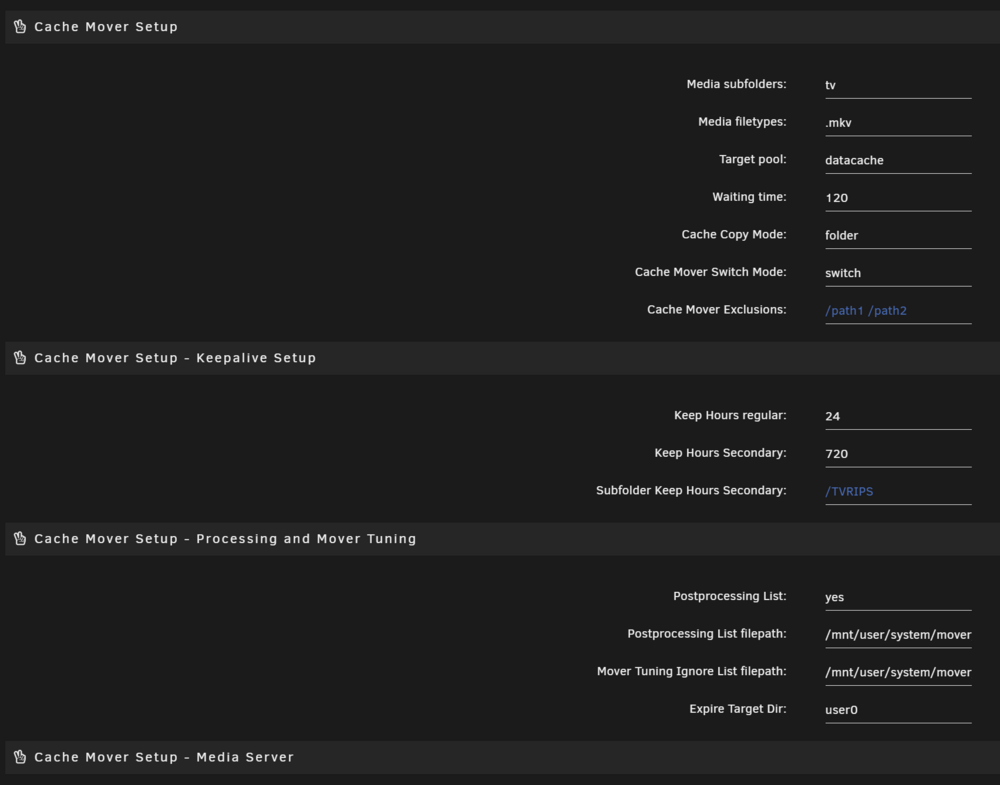
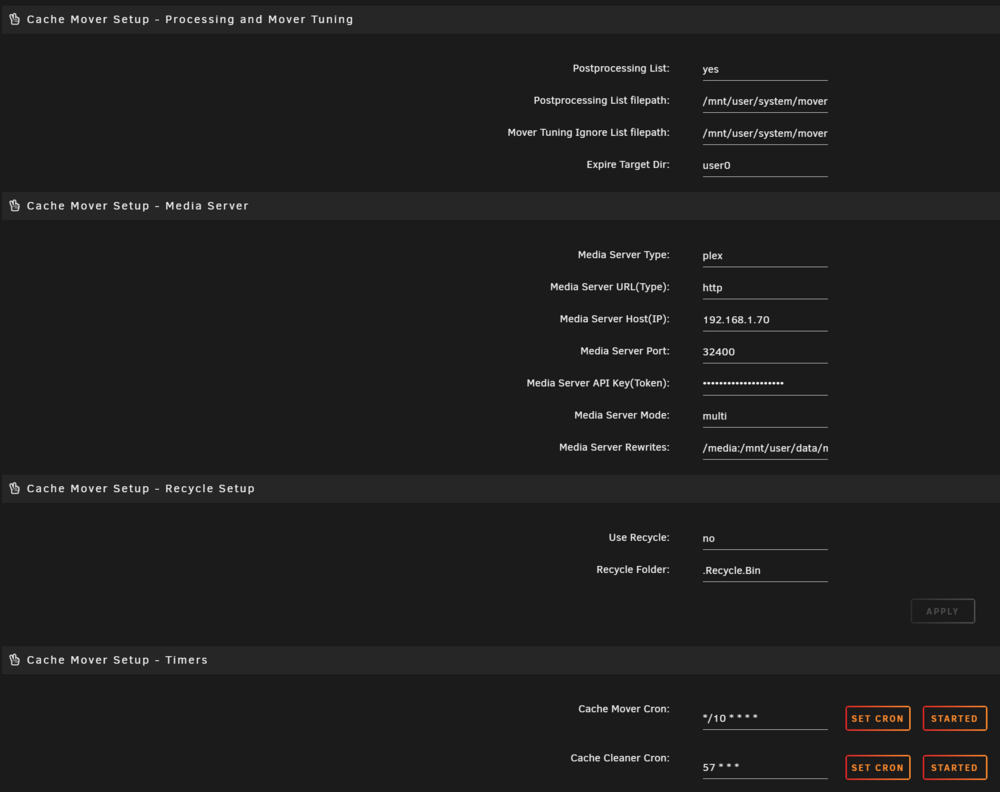
I have been trying to set up the Cache Mover Plugin for a while now. It seems to work from time to time, but it is not consistent. It is also telling me that it can't access the following locations. May 12 17:32:40 Cyberdyne root: cache-cleaner: chmod: cannot access '/mnt/user/system/mover/mover_excl.txt': No such file or directory May 12 17:32:40 Cyberdyne root: cache-cleaner: chmod: cannot access '/mnt/user/system/mover/mover_ignore.txt': No such file or directory Do I need to create these? I am also wondering about media subfolders, mine are named: hd movies, hd tv, sd movies, tv and anime. With it requiring a space separator will my naming scheme not work? cache cleaner log.txt cache mover log.txt
-
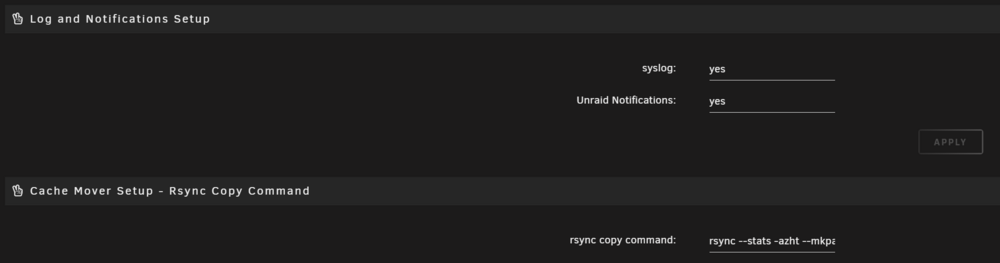
I am having a similar issue when it comes to installing the tensorrt models. However, mine show me that permission is denied when the docker app tries accessing the model. Do you know how I can fix this issue? I have tried changing the permissions on the file to read/write for all but it doesn't seem to change anything. I realize that this may be an issue pertaining to permissions but i really want to make sure i am setting everything up correctly as well. Here is my docker config. I have placed this file under the trt-models directory. https://raw.githubusercontent.com/blakeblackshear/frigate/master/docker/tensorrt_models.sh Below is what I get in the Logs after running the docker app. /opt/nvidia/nvidia_entrypoint.sh: line 49: /tensorrt_models.sh: Permission denied /opt/nvidia/nvidia_entrypoint.sh: line 49: exec: /tensorrt_models.sh: cannot execute: Permission denied ===================== == NVIDIA TensorRT == ===================== NVIDIA Release 22.07 (build 40077977) NVIDIA TensorRT Version 8.4.1 Copyright (c) 2016-2022, NVIDIA CORPORATION & AFFILIATES. All rights reserved. Container image Copyright (c) 2022, NVIDIA CORPORATION & AFFILIATES. All rights reserved. https://developer.nvidia.com/tensorrt Various files include modifications (c) NVIDIA CORPORATION & AFFILIATES. All rights reserved. This container image and its contents are governed by the NVIDIA Deep Learning Container License. By pulling and using the container, you accept the terms and conditions of this license: https://developer.nvidia.com/ngc/nvidia-deep-learning-container-license To install Python sample dependencies, run /opt/tensorrt/python/python_setup.sh To install the open-source samples corresponding to this TensorRT release version run /opt/tensorrt/install_opensource.sh. To build the open source parsers, plugins, and samples for current top-of-tree on master or a different branch, run /opt/tensorrt/install_opensource.sh -b <branch> See https://github.com/NVIDIA/TensorRT for more information.