





Herbert Horst
Members
-
Joined
-
Last visited
-
Duno why the last change didnt work but then after a last time with the error then it dissappeard forever (or at least until now) thanks
-
Now it's gone, so it was there because of the docker logs stuff. I replaced it with the stock, restarted and will write an update in 1 or 2 Weeks if the Problem with SMB and the Login still happens. df -h Filesystem Size Used Avail Use% Mounted on rootfs 7.7G 1.2G 6.6G 16% / tmpfs 128M 5.2M 123M 5% /run /dev/sdb1 7.6G 1.2G 6.5G 15% /boot overlay 7.7G 1.2G 6.6G 16% /lib overlay 7.7G 1.2G 6.6G 16% /usr devtmpfs 8.0M 0 8.0M 0% /dev tmpfs 7.8G 0 7.8G 0% /dev/shm tmpfs 128M 352K 128M 1% /var/log tmpfs 1.0M 0 1.0M 0% /mnt/disks tmpfs 1.0M 0 1.0M 0% /mnt/remotes tmpfs 1.0M 0 1.0M 0% /mnt/addons tmpfs 1.0M 0 1.0M 0% /mnt/rootshare /dev/md1p1 448G 4.1M 446G 1% /mnt/disk1 tmpfs 1.6G 0 1.6G 0% /run/user/0 /dev/md2p1 9.1T 8.9T 292G 97% /mnt/disk2 EDIT: Correction It is still there, I just overlooked it. Also Today (20 hours later) I still got the same Problem. Linux 6.1.79-Unraid. root@--:~# diagnostics Starting diagnostics collection... tail: write error: No space left on device echo: write error: No space left on device echo: write error: No space left on device echo: write error: No space left on device echo: write error: No space left on device echo: write error: No space left on device echo: write error: No space left on device echo: write error: No space left on device echo: write error: No space left on device echo: write error: No space left on device echo: write error: No space left on device tr: write error: No space left on device done. ZIP file '/boot/logs/tower-diagnostics-20260117-1404.zip' created. root@--:~# root@--:~# df -h Filesystem Size Used Avail Use% Mounted on rootfs 7.7G 7.7G 0 100% / tmpfs 128M 5.9M 123M 5% /run /dev/sdb1 7.6G 1.1G 6.5G 15% /boot overlay 7.7G 7.7G 0 100% /lib overlay 7.7G 7.7G 0 100% /usr devtmpfs 8.0M 0 8.0M 0% /dev tmpfs 7.8G 0 7.8G 0% /dev/shm tmpfs 128M 6.8M 122M 6% /var/log tmpfs 1.0M 0 1.0M 0% /mnt/disks tmpfs 1.0M 0 1.0M 0% /mnt/remotes tmpfs 1.0M 0 1.0M 0% /mnt/addons tmpfs 1.0M 0 1.0M 0% /mnt/rootshare /dev/md1p1 448G 4.1M 446G 1% /mnt/disk1 /dev/md2p1 9.1T 8.9T 290G 97% /mnt/disk2 disk3 3.3T 128K 3.3T 1% /mnt/disk3 /dev/md4p1 15T 9.2T 5.4T 64% /mnt/disk4 /dev/nvme0n1p1 477G 106G 370G 23% /mnt/cache disk3/Backup Share 9.0T 5.7T 3.3T 64% /mnt/disk3/Backup Share shfs 34T 24T 9.4T 72% /mnt/user0 shfs 34T 24T 9.4T 72% /mnt/user tmpfs 1.6G 0 1.6G 0% /run/user/0 root@--:~# cat /boot/config/go #!/bin/bash # Start the Management Utility /usr/local/sbin/emhttp & root@--:~# tower-diagnostics-20260117-1404.zip
-
cat /boot/config/go #!/bin/bash # Start the Management Utility /usr/local/sbin/emhttp & # ------------------------------------------------- # RAM-Disk for Docker json/log files v1.4 # ------------------------------------------------- # create RAM-Disk on starting the docker service sed -i '/^ echo "starting \$BASE ..."$/i \ # move json/logs to ram disk\ rsync -aH --delete /var/lib/docker/containers/ ${DOCKER_APP_CONFIG_PATH%/}/containers_backup\ mountpoint -q /var/lib/docker/containers || mount -t tmpfs tmpfs /var/lib/docker/containers || logger -t docker Error: RAM-Disk could not be mounted!\ rsync -aH --delete ${DOCKER_APP_CONFIG_PATH%/}/containers_backup/ /var/lib/docker/containers\ logger -t docker RAM-Disk created' /etc/rc.d/rc.docker # remove RAM-Disk on stopping the docker service sed -i '/^ # tear down the bridge$/i \ # backup json/logs and remove RAM-Disk\ rsync -aH --delete /var/lib/docker/containers/ ${DOCKER_APP_CONFIG_PATH%/}/containers_backup\ umount /var/lib/docker/containers || logger -t docker Error: RAM-Disk could not be unmounted!\ rsync -aH --delete ${DOCKER_APP_CONFIG_PATH%/}/containers_backup/ /var/lib/docker/containers\ if [[ -d /var/lib/docker_bind ]]; then umount /var/lib/docker_bind || logger -t docker Error: RAM-Disk bind unmount failed while docker stops!; fi\ logger -t docker RAM-Disk removed' /etc/rc.d/rc.docker # Automatically backup Docker RAM-Disk sed -i '/^<?PHP$/a \ $sync_interval_minutes=30;\ if ( ! ((date("i") * date("H") * 60 + date("i")) % $sync_interval_minutes) && file_exists("/var/lib/docker/containers")) {\ exec("\ [[ ! -d /var/lib/docker_bind ]] && mkdir /var/lib/docker_bind\ if ! mountpoint -q /var/lib/docker_bind; then\ if ! mount --bind /var/lib/docker /var/lib/docker_bind; then\ logger -t docker Error: RAM-Disk bind mount failed!\ fi\ fi\ if mountpoint -q /var/lib/docker_bind; then\ rsync -aH --delete /var/lib/docker/containers/ /var/lib/docker_bind/containers && logger -t docker Success: Backup of RAM-Disk created.\ umount -l /var/lib/docker_bind\ else\ logger -t docker Error: RAM-Disk bind mount failed!\ fi\ ");\Would you recommend to upgrade my system? I only check every few months on new updates instead of installing them right away but since I got problems right now maybe it would be smart to upgrade unraid to the latest version.
-
Booting in safe mode and it is still there. What do you mean with I'm almost certan you did'nt mean this but I did it anyway to be sure 🙃 root@--:/run/user/0# ls root@--:/run/user/0# diagnostics Starting diagnostics collection... tail: write error: No space left on device echo: write error: No space left on device echo: write error: No space left on device echo: write error: No space left on device echo: write error: No space left on device echo: write error: No space left on device echo: write error: No space left on device echo: write error: No space left on device echo: write error: No space left on device echo: write error: No space left on device echo: write error: No space left on device tr: write error: No space left on device done. ZIP file '/boot/logs/tower-diagnostics-20260116-1605.zip' created. Here the output of df -h while in safe mode while the array is stopped: Filesystem Size Used Avail Use% Mounted on rootfs 7.7G 99M 7.6G 2% / tmpfs 128M 5.1M 123M 4% /run /dev/sdb1 7.6G 1.2G 6.5G 15% /boot overlay 7.7G 99M 7.6G 2% /lib overlay 7.7G 99M 7.6G 2% /usr devtmpfs 8.0M 0 8.0M 0% /dev tmpfs 7.8G 0 7.8G 0% /dev/shm tmpfs 128M 212K 128M 1% /var/log tmpfs 1.6G 0 1.6G 0% /run/user/0 tower-diagnostics-20260116-1605.zip
-
I have no clue to be honest what this is. When setting up my server I did read in a thread that I can create a Ram disk so my docker logs are not written instantly all the time but are stored in ram and only every 30minutes written to disk, but I'm pretty sure this is not a result from that. I also checked these tmpfs are instantly after a reboot there, even when the array is still starting and mounting the disks (no dockers running at that moment) they are allready there.
-
df -h Filesystem Size Used Avail Use% Mounted on rootfs 7.7G 1.3G 6.5G 17% / tmpfs 128M 5.9M 123M 5% /run /dev/sdb1 7.6G 1.2G 6.4G 15% /boot overlay 7.7G 1.3G 6.5G 17% /lib overlay 7.7G 1.3G 6.5G 17% /usr devtmpfs 8.0M 0 8.0M 0% /dev tmpfs 7.8G 0 7.8G 0% /dev/shm tmpfs 128M 424K 128M 1% /var/log tmpfs 1.0M 0 1.0M 0% /mnt/disks tmpfs 1.0M 0 1.0M 0% /mnt/remotes tmpfs 1.0M 0 1.0M 0% /mnt/addons tmpfs 1.0M 0 1.0M 0% /mnt/rootshare /dev/md1p1 448G 4.1M 446G 1% /mnt/disk1 /dev/md2p1 9.1T 8.8T 320G 97% /mnt/disk2 disk3 3.5T 128K 3.5T 1% /mnt/disk3 /dev/md4p1 15T 9.2T 5.4T 64% /mnt/disk4 /dev/nvme0n1p1 477G 98G 377G 21% /mnt/cache disk3/Backup Share 9.0T 5.6T 3.5T 62% /mnt/disk3/Backup Share shfs 34T 24T 9.6T 72% /mnt/user0 shfs 34T 24T 9.6T 72% /mnt/user tmpfs 1.6G 0 1.6G 0% /run/user/0
-
Hello everyone, In the last few months and weeks, I get more and more often the problem, that my SMB shares are not working, when I then try to open the unraid dashboard I am stuck in the Login screen (I can enter my credentials but I get instantly redirected to the login without seeing my dashboard). I can access my server via ssh and restart the samba shares with '/etc/rc.d/rc.samba restart' but I am not able to restart my Dashboard. At the beginning this was very rarely the case but know I had this issue 3 times in 1 week. All my dockers like Jellyfin, Homar, nextcloud still work fine, as far as i noticed only samba and the dashboard are affected. Today before restarting my server i typed 'diagnostics' in ssh and hope that someone here can tell me what’s wrong with my system. This is the output that came when I entered the diagnostics command (zip file uploaded): diagnostics Starting diagnostics collection... tail: write error: No space left on device echo: write error: No space left on device echo: write error: No space left on device echo: write error: No space left on device echo: write error: No space left on device echo: write error: No space left on device echo: write error: No space left on device echo: write error: No space left on device echo: write error: No space left on device echo: write error: No space left on device echo: write error: No space left on device tr: write error: No space left on device done. ZIP file '/boot/logs/tower-diagnostics-20260115-1153.zip' created.All my drives at least got a few 100gb of free space except my boot drive with only 8gb where 6gb are free Thanks in Advance for all your expertise. tower-diagnostics-20260115-1153.zip
-
Good evening, I recently upgraded from version '30.0.5.1' to '31.0.4' and didn't realise until now that my upload of files bigger than 100mb does not work anymore. I am using cloudflare and got my chunking configured in the config.php. Before upgrading everything worked fine with big uploads. I trie to upload via the browser and the drag and drop function. The Upload stops immediately (or after 1-5sec) and I get the error message in the upper right corner "Some files could not be uploaded" and "Unknown error during upload". Both errors do not show up in the log file. I really hope someone knows this problem, cause after trying for 5,5hours I got no clue, or idea left what i could try. I even was not smart enough (or probably to tired by now) to downgrade back because the moment I start the container after restoring from "APPDATA.BACKUP" the container automatically upgrades. I am using the "https://hub.docker.com/r/terratrax/nextcloud-multimedia" image. EDIT: I have no idea what was the problem, but today it is working again. I double checked my nginx proxy manager to be sure that client_max_body_size is set correctly and after changing that to a low number and then back to 100 now it works. Dunno why it stopped working in the first place.
-
But is this normal? Im using Firefox and even when I delete cookies and data of site the problem sometimes stays and is really anoying. Sometimes im not able to open my cloud because I only have 1 Browser on a machine installed and im stuck in this loop.
-
Hallo zusammen, ich hab probleme mit dem login in meiner Nextcloud. Wenn ich auf der login Page Benutzer und PW eingebe und auf Login klicke, werde ich direkt wieder auf die Anmeldeseite redirected. Im log tauchen folgende 2 zeilen dabei auf: 2a00:6020:4899:3300:c9f1:bd40:2da1:15db - - [29/Apr/2024:20:46:32 +0200] "POST /login HTTP/1.1" 303 2099 "-" "Mozilla/5.0 (Windows NT 10.0; Win64; x64; rv:125.0) Gecko/20100101 Firefox/125.0" 2a00:6020:4899:3300:c9f1:bd40:2da1:15db - - [29/Apr/2024:20:46:38 +0200] "GET /login?redirect_url=/apps/dashboard/&direct=1&user=HerbertH HTTP/1.1" 200 10429 "-" "Mozilla/5.0 (Windows NT 10.0; Win64; x64; rv:125.0) Gecko/20100101 Firefox/125.0" Der Fix ist dann 1-3 Tage warten oder manchmal funktioniert ein anderer Browser. Das problem tritt nicht immer auf sondern nur manchmal. Zwischendurch komm ich problemlos rein. Wenn ich eingeloggt bin (gestern z.b. eingeloggt) und heute neu geöffnet passiert auch zwischendurch, dass ich nicht auf die Login Page redirected werde, sondern stadessen eine Meldung oben rechts sehe das ich nicht eingeloggt bin und erst wenn ich versuche eine Datei zu öffnen die er nicht im cache hat werde ich dann auf die Login Page geleitet (bekomm den fehler gerade nicht nachgestellt, sonst würde ich ein screenshot davon teilen) Weiß jemand was ich bei der einrichtung falsch gemacht hab? Ich benutze nextcloud-multimedia mit NginxProxyManager und cloudflare. Falls das hier schon behandelt wurde und ich es nicht gefunden habe nehm ichauch gerne Tipps dazu, wie ich die 25 Seiten Thread zu diesem Docker gut durchsuchen kann ohne jede Seite einzelnd zu lesen. Vielen Dank an alle schonmal im vorraus🙏! -------------------------------------------- Hello everyone, I have problems with the login in my Nextcloud. When I enter user and PW on the login page and click on login, I am redirected directly to the login page. The following 2 lines appear in the log: 2a00:6020:4899:3300:c9f1:bd40:2da1:15db - - [29/Apr/2024:20:46:32 +0200] "POST /login HTTP/1.1" 303 2099 "-" "Mozilla/5.0 (Windows NT 10.0; Win64; x64; rv:125.0) Gecko/20100101 Firefox/125.0" 2a00:6020:4899:3300:c9f1:bd40:2da1:15db - - [29/Apr/2024:20:46:38 +0200] "GET /login?redirect_url=/apps/dashboard/&direct=1&user=HerbertH HTTP/1.1" 200 10429 "-" "Mozilla/5.0 (Windows NT 10.0; Win64; x64; rv:125.0) Gecko/20100101 Firefox/125.0" The fix is to wait 1-3 days or sometimes another browser works. The problem does not always occur, but only sometimes. In between I can get in without any problems. If I am 'logged in' (logged in yesterday but token should be expired by now) and open it again today, I can normally browse my files and I am not redirected to the login page, but see a message in the top right corner that I am not logged in and only when I try to open a file that it does not have in cache (or at least I think this is when it happens) I am then redirected to the login page (I can't recreate the error right now, otherwise I would share a screenshot of it). Does anyone know what I did wrong with the setup? I'm using nextcloud-multimedia with NginxProxyManager and cloudflare. If this has already been covered here and I haven't found it, I'd also like tips on how to search the 25 page thread on this Docker without reading each page individually. Many thanks to everyone in advance🙏!
-
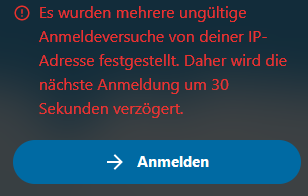
Hello, I have some issues with signing me in using my Browser. normaly im logged in but after X? hours I am redirected to the login page (no problem with that). But when I insert my User name and PW (I have them saved in my browser so no misstyping) I get Logged in but also still redirected to the login page " So my redirect goes from "https:/MyDomain.com/login" to "https://MyDomain.com/login?direct=1&user=HerbertH". When I try to open my dashboard URL directly I still get redirected to the login page "https://MyDomain.com/login?redirect_url=/apps/dashboard/" When i repeat clicking on the Login button I get a message that because of multiple invalid login attempts from my IP address the next login will therefore be delayed by 30 seconds. When i look into my dev options in the browser in the network tab I only see 200 as status codes so there is evereything fine. But I am not able to open my dashboard. Picture shows the error message "Several invalid login attempts from your IP address have been detected. The next login will therefore be delayed by 30 seconds." in german. Does any one know this problem or have a hint how to fix this. This does btw. not happen all the time, but way to often.
-
Hey all - I have a problem with big file upload. I am able to uplaod big files up to 25Gb but everytime after a big file uplaod, a few hours (or days) later my complete Server dies. I'm then not able to open the unraid dashboard or any of my dockers webui (nextcloud, jellyfin, ... everything dead). The file itself is fine when I look it up on my disk(the file is assembled out of chunks. After the uplaod I'm able to download it without error and nextcloud shows no error messages. I#m not sure right now if SMB share still works when everything is dead.) Only way for me then is to go to my server and hold the on/Off button till it shuts down. Then when I restart, everything works fine, until I upload the next big file. For making Big File upload possible I added the following variables to my Docker: PHP_UPLOAD_LIMIT = 50G Also I gave PHP 2Gb of Ram with PHP_MEMORY_LIMIT = 2048m I'm using a NginxProxyManager where I also got some 'Custom Configuration': real_ip_header CF-Connecting-IP; client_body_buffer_size 512k; proxy_read_timeout 86400s; client_max_body_size 95M; Does someone know this problem and/or can help me where I can Download the Logs and what Logs would be interstinng to lock into? I allready enabled Unraid mirror Log to Flashdrive. Can I Upload this Log without being worried that personal Info will be in there? I switched from nextcloud linuxServer docker to nextcloud-multimedia (official nextcloud image but with ffmpeg (install from apt repository), pdlib (built from source) and bzip (built from source)) a week ago, but I had the same problem with the linuxServer dockerimage. Everytime after a big file upload (Big = everything bigger than ~2Gb) 2 Days later my server was dead. Maybe one of my apps got a problem or I dont know... My installed Apps: Im really thankfull for every help and hope someone knows this, Right now my cloud is not really usable like this. Thanks in advance!
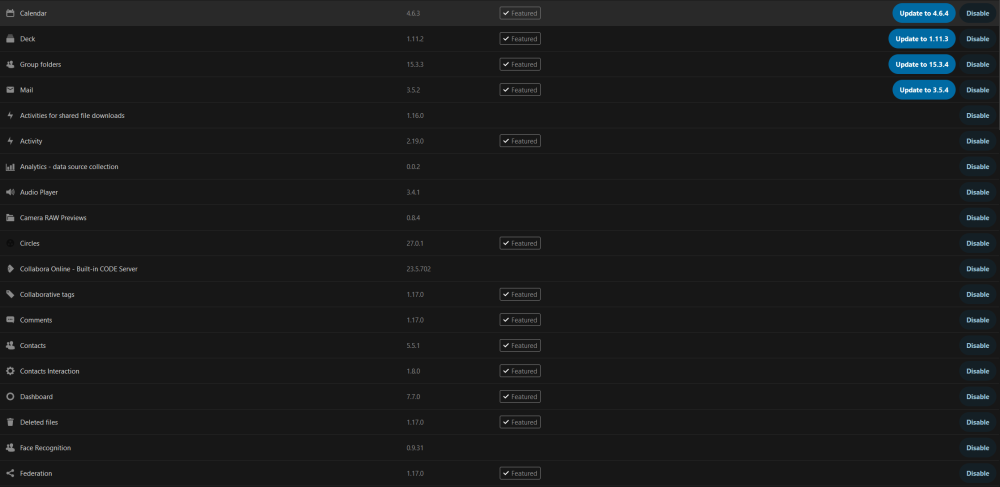
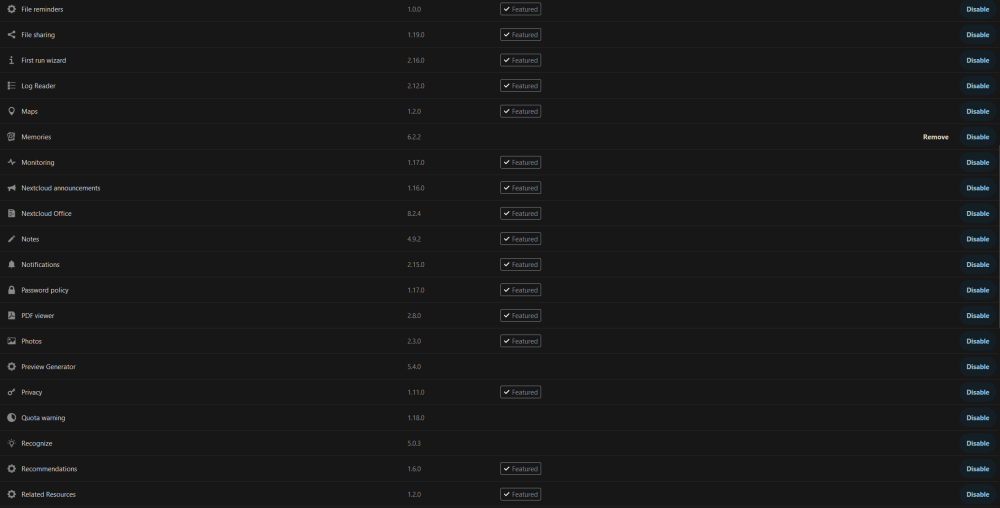

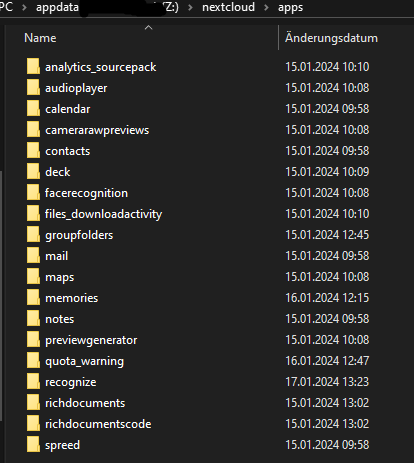
-
@Shawn Young Hey, I had the same problem with cron, but solved it like most people who also use the normal official nextcloud docker. I installed the plugin "User Scripts" on my Unraid and there a script which calls the cron.php. I'm not sure yet if this is 100% correct, but at least it works and doesn't give any errors. Skript: #!/bin/bash docker exec -u 99:100 Nextcloud-multimedia php -f /var/www/html/cron.php exit 0 I set the schedule to custom with executing it every 10 minutes "*/10 * * * *" . When everything works fine it should look something like this. When you got the wrong user or something like that it will show you the error statements. But with no errors it should look like my screenshot. Also the first few executions were taking pretty long but after that it got faster.

-
EDIT: Found everything myself deep down in this and another nextcloud thread, so no help needed anymore. Hello, I'm complete new to all of this and im trying to get my cron to work with user scripts. I tried running this user script but I get the following error: Error: "Script location: /tmp/user.scripts/tmpScripts/nextcloud Cron for Knex/script Note that closing this window will abort the execution of this script Cannot write into "config" directory! This can usually be fixed by giving the web server write access to the config directory. But, if you prefer to keep config.php file read only, set the option "config_is_read_only" to true in it. See https://docs.nextcloud.com/server/27/go.php?to=admin-config" I tried setting Permission in my unraid system appdata/nextcloud/ and my share folder for nextcloud so everyone can read and Write but as a result I only got the next error: Error with appdata/nextcloud/ and data share permission set to "drwxrwxrwx": "Script location: /tmp/user.scripts/tmpScripts/nextcloud Cron for Knex/script Note that closing this window will abort the execution of this script Your data directory is readable by other users. Please change the permissions to 0770 so that the directory cannot be listed by other users." Now I have no idea what I have to do EDIT: I got no Error now using user 99:100, but is this wy the right way to do it or will I discover some erros in the future because of that? #!/bin/bash docker exec -u 99:100 Nextcloud php -f /var/www/html/cron.php exit 0 I also didnt understand what to do with the following information and how to set this up: EDIT: I found that the extra parameters are a thing in the docker advanced view where I was able to set these things.
-
Das hab ich tatsächlich komplett übersehen beim suchen. Soweit das es sich bei dem was ich will um "HTTP basic auth" Support handelt hab ich garnicht bedacht bei meinem Problem (soweit abstrahiert hatte ich nicht ^^) Danke für den GitLink wo man verfolgen kann, wenn der Support dazu kommt und danke für die weiteren Tipps mit dem geo blocking. Hier ist noch ein Link zu einem Thread wo GeoBlocking mit Nginx etwas überlegt wird:



