





ks-man
Members
-
Joined
-
Last visited
Everything posted by ks-man
-
Got it. The fan is making a huge difference. Almost finisehd doing another 1tb transfer and the temp hasn't gone over 34 during it. Thanks.
-
Thanks for the thoughts. My first file transfer finished at 55 but probably would have kept climbing if it was longer. It then came down to 50 and idled there throughout the night. This morning I got a small fan and put it angled next to the drive. Within 30 minutes it has brought the idle temp down to 34. I'm going to try and do another transfer with the fan blowing on it and see how hot it gets. If the fan can keep the temps reasonable I guess I will just plan on using a fan whenever I need to move data from or to this drive. Not ideal but not a huge deal since I won't be doing frequent transfers and it was a great price for a large backup drive.
-
I just got a new 26tb Seagate Expansion to backup my Unraid Media share. BestBuy has a sale going on for that unit. I formatted the drive and have it connected through Unassigned Devices. Pretty shortly after it was connected (before I started any data transfer) the temperature of the drive rose to about 46 degrees C. It has been copying data for about an hour and it is currently at 52C (it has gone up about a degree every 10-15 minutes). I can't find anything specific to operating temps for this drive but I did find something on Seagate's website that looks like it applies to internal drives that normal operating temps are 5-50 but newer model drives have a maximum temp of 60 degrees. Do I need to worry about this? I bumped up the critical temp for the drive in Unraid to 57. I've only copied about 300gb and I want to copy close to 20tb of data. I don't know if it is going to keep rising or if it will eventually settle in somewhere. Once the data is copied it would be disconnected and stored somewhere perhaps only adding new media to it every 3-6 months. Do you think this drive will suffice or is the fact that it is running so hot a concern for a backup and that I should return it? Also if the drive exceeds the critical temp in Unraid will it simply stop the transfer and unmount the drive? Thanks for the thoughts.
-
Ok, thanks.
-
Ok, so if I understand correctly, doing it this way means I don't have to fully zero out the new data (old parity). If something goes wrong in the process, will the data of the old parity still be valid to in theory to load up the old config and essentially recreate the pool? I basically don't wipe the old parity data until I've confirmed the new pool is valid with the parity drive?
-
New data drive. I'm going to keep all my old existing data drives.
-
I've been reading through this thread and wanted to confirm as my situation is similar to the one quoted above. I'm going to replace a 12tb parity drive with a new larger parity drive. Once the new parity is established I will then add the old 12tb parity drive as a data drive. Questions: 1. Should I do a parity check (either correcting or non-correcting) before I start the whole process? 2. The first time I connect the new drive can I start up the array as normal without the new drive assigned and preclear it? I don't remember the preclear process but am hoping I can do that while the server runs. 3. After the new drive is precleared and I start the array with the old drive excluded and the new drive set as the parity drive do I need to do a New Config? 4. After everything is complete (new drive as parity and old drive as data drive) do I need to download a new flash backup? It is mentioned above but I'm not sure if their use case is different from mine. Thanks!
-
Thought I would come back and give an update in case anybody else has a similar issue. The parity check completed without any errors. I still had all the same above issues so I stopped the array and then rebooted the server via the web gui. Once it came back up all the issues seemed to be fixed.
-
Last night I had a brief power outage and since things have come back up my Unraid Server has a few strange issues. As soon as it started up it initiated a Parity Check which is still running (about 11 hours to go) but has yet to find any errors. Below are the things that seem to be off that were fine before the outage: 1) Plex cannot connect to my server. I am running the LinuxIO in docker and I can get into plex via my server's IPaddress:32400, but all of my media says Unquthorized and my LiveTV says Unable to connect to Server. 2) If I look in the Docker tab of my server every container says that the version is not available 3) On the Apps tab it says Download of appfeed failed. Community Applicaitons require your server to have internet access... I'm planning on letting the Parity Check finish to see if things start working after that however I don't believe that the check running would cause these issues. I can access all of my media and data via my Windows share without issue. The problems seem to be more related to docker (plex) and apps (CA). Thanks for any help.
-
Thanks. I did just test it today. Was 30c after spun up and climbed to 35c over about 10 minutes and then stayed there for the duration of my usage. I'm guessing this would be considered a small reasonable jumnp rather than a shock but if you feel differently please let me know. Thanks.
-
How do I know the temperatures when they are spun down? I only see an * in that state. Do you mean what the temperature reports immediately after being spun up and then perhaps 20 minutes later after usage? Thanks!
-
One of my data disks (3.5" HDD) I typically access once a day during the week for 30-60 minutes and I rarely access it on the weekend. Is it better for me to spin this disk down after I'm done (usually a 60 minute timeout) and have it spin up the next day for the hour of use or just always leave it spinning. I've read different things about if spinning it up and down once a day is worse for the drive than leaving it spinning 24/7. Thanks for the help.
-
That all makes sense and thanks for the response. I actually decided to first try and small CPU upgrade rather than a full motherboard. I'm going to go from a Pentium G2120 to an i5 3470. The 3470 supports Quick sync and I do have a GTX 970 in the server and have Plex Pass so perhaps hardware transcoding will accomplish what I need. I know this is all old hardware but I really only care about being able to transcode local stations from my HDHomerun to my phone when I'm out so hopefully this hardware can support a single stream of transcoding. I can get the 3470 and a cooler for about $35 so seems worth trying to see if it suits my purpose before upgrading everything. I'll still go through the same steps you mention after the CPU upgrade just in case. Thanks!
-
My unraid server is running on pretty old hardware. I think I built the PC in 2013 and while it is fine for most tasks it doesn't do very well when I want to watch Plex remotely. I'm thinking my best bet is to just bite the bullet and buy a new motherboard, RAM and processor. I'm guessing I could get that done for about $400 which I'm willing to spend. If I were to do this and just swap those components and turn everyting on would Unraid just start back up and work or would I need to do something else due to the motherboard swap? Thanks.
-
Ok, so my media location is just I believe my media share. Within that share I have three folders (movies, music and tv). I'd like to create a new folder called dvr with all recordings going directly into that dvr folder. Where would I set that to be the location for the recordings? Thanks!
-
I've tried searching around youtube and forums but so much of the information is old. I just recently setup my Unraid Server and got Plex installed. I have an HDHomeRun which works great on it for viewing live TV (way better than the HD Roku app). I am going to try Plex Pass and use the DVR but I don't quite understand where it will save DVR recordings. I followed an online guide and my HostPath2 is /mnt/user/apdata/Plex-Media-Server/transcode and the HostPath3 is /mnt/user/media. I have one Cache Drive (500gb SSD) for my appdata, domains and system and then use my 30gb array for all media and data storage. How do I set where the DVR recordings are saved? Thanks!
-
I'm trying to understand how a cache drive would work for data where you are regularly acessing and modifying the file. Take for example an Excel file that is stored on the unraid server and accessed via SMB on a Windows PC. If I were to use a cache drive and open the excel document would it be copied from my array to the cache drive when I open it and then leave it there until the end of the day when mover moves it back? What if the file is still open on the Windows PC when mover wants to run?
-
I'm getting started with a new unraid server. I have two new HDD and one new SDD (cache) for the array which I already precleared. I now want to add my old drives. One is my old parity drive so there isn't any data on it that needs to be transferred so I can add it to the array now before moving over my existing data and media files. My old drives are between 3-8 years old and none have given me any trouble in the past. Should I preclear these disks before adding them to the array or is that pointless since the drives have been working fine and all I need to do is add them to the array which will clear them and maintain parity? Thanks.
-
Thanks for the response. I saw tutorial videos where it showed how to sync parity and then cut to later showing parity synced. My guess is it was like you said not showing the true first sync.
-
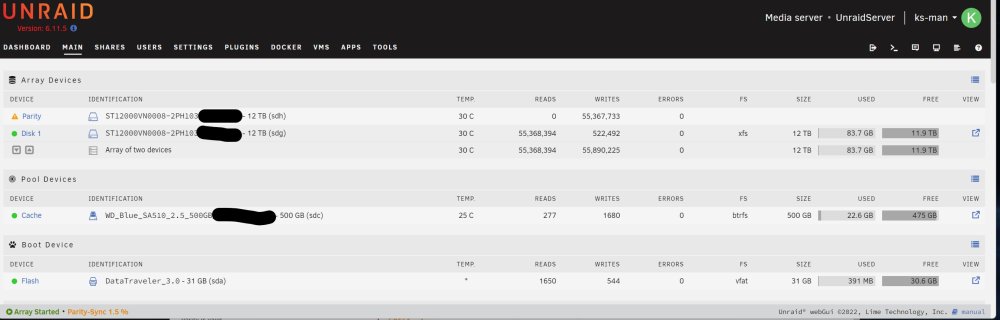
I just finished preclearing my drives and started a new Unraid array. I have one 12tb parity drive and one 12tb data drive and then one 500gb ssd cache drive. I just started the parity sync and it is only 1.5% done but there are a ton of reads/writes and I just want to make sure nothing is wrong. When I watched tutorial videos most have far fewer reads and writes. Is mine showing a different scale or is there some other reason I have so many and is it a problem? Thanks.
-
I'm migrating my existing NAS to a new Unraid Server. I've almost finished my preclean and will get things started with two new 12tb HDD (one data and one parity) and a 500gb SSD cache. I'll move over the data one disk at a time and then add the old data disk to the array. I used KODI with my old NAS but intend to setup a Plex server with the new Unraid NAS. Should I keep my old folder and file structure as I move things over or should I do something different? My current file structure for media is: Media->Movies,TV Shows, Kids Movies, Home Videos ---- Then in the Movies folder I have individual folders with each movie name and inside that folder is the .mkv file, all the posters and wallpapers and a .nfo file. It will be a little effort getting all the files from the old disks into the same structure but I don't mind doing it. I just want to make sure there isn't a better folder and file structure before I go through the effort. Thanks.
-
I guess I'm a little confused. Up until now I've used Kodi and added my pooled drive and streamed media that way. I've only done it from my home network and never used my server when I was away from home. The way I read your comment is that if I stream videos through the server inside my home network to either a Roku TV or a Windows PC it would be direct stream. However if I connect to my server remotely and stream a video while I'm not at home then the video will be transcoded and thus needs better hardware. Is that correct? I guess I will connect my nVidia 970 regardless. It isn't being used right now so probably no harm in having it connected so it is there if needed. Probably will just mean a few additional settings so transcoding is offloaded to the GPU when needed.
-
What devices can and cannot transcode the video? Most of my viewing will be on Roku TV sets or else on Windows PCs.
-
I'm planning on updating my 10 year old WHS 2011 server to an unraid server soon. It's older hardware but from my reading should work ok. My main usage for the server will to run as a Plex Media Server and also to hold some backup files. The hardware will be: Intel Pentium G2120, ASRock H77 Motherboard, 8GB DDR3 1600 RAM, Seasonic 620w Power Supply and for drives I'm adding a 500GB WD Blue SSD (for cache) and then will have two 12tb Seagate Ironwolf and 2 8tb drives (one Seagate and one WD Red). I have an extra Nvidia GTX 970 that I'm not currently using (but may find use in the future). Should I put it in the Unraid server? Will it get any use or is the GPU not needed? Thanks!
-
Flexraid creates a pool does doesn't modify the structure so if I stop the array I have the individual formatted NTFS disks. So for purposes of switching to Unraid you can assume I currently have 5 filled data disks (4 3tb and 1 8tb), one blank 8tb disk (current parity drive which I will format) and I will buy one 8tb or larger drive. So my main questions are: 1) Once I create an Unraid array with two blank drives (let's assume both 8tb with one being parity and one being data), how will I move data from my existing data drives to the Unraid array. Both Unraid array drives and existing data drives will be connected to the same computer via Sata 2) Is my hardware good enough to run Unraid and Plex 3) Do I need to have cache drives? I currently don't have any SSD or M.2 drives connected. Thanks.

