





Zalszibar
Members
-
Joined
-
Last visited
-
Yes, just empty folders. Good advice, thank you! I do use this cache pool for a lot of media and temp storage before migrating to the array. Ideally, I'd have a separate cache pool for this, and I'll open up a separate thread to ask about that.
-
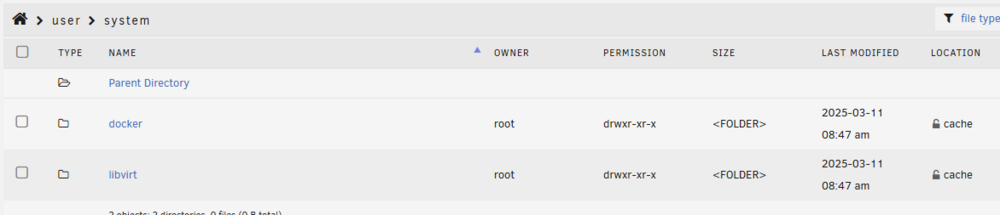
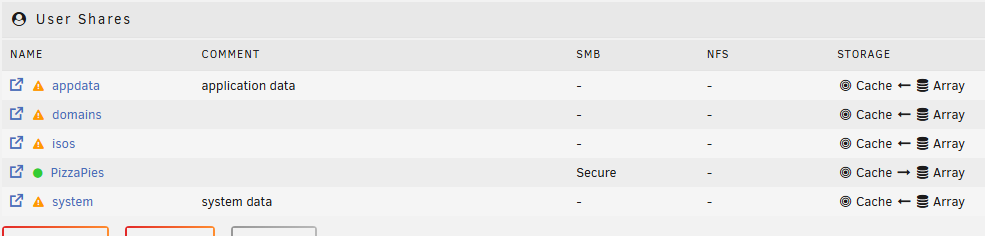
I trimmed everything using the File Manager, and attempted to make cache the source of truth for everything except for my disk array share (PizzaPies). So, I've got my disk shares in green, but appdata, domains, isos, and system are still in the orange exclamation mark. System seems only to appear on cache--I spot checked the other drives, and there is no system folder on the disks in the array. The remaining user shares look like: Might be worth noting that I don't have any domain or isos folders. Appdata and system are located on cache and no other disk. Performed a reboot and logged new diagnostics. It seems to me like the original issue is now cleared up, but do you see any other issues remaining with the shares? tower-diagnostics-20250314-2206.zip
-
tower-diagnostics-20250314-1242.zipNew diagnostics! Thank you
-
I only stopped containers before. OK, so I just went into settings and disabled Docker and VM Manager. Stopped/Started array, and when I click mover, it's still not doing anything. It greys out for a couple of seconds then becomes available again.
-
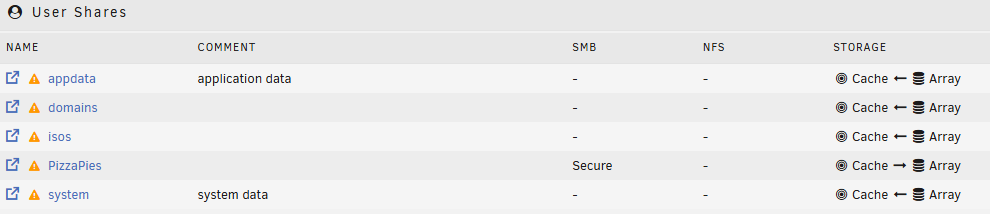
Thanks @trurl. I've set appdata, system, and domains to Primary:cache and Secondary:array, with the move action:array-to-cache. Invoked the mover, but it was a very quick operation. I'm noticing the exclamation point next to all my shares now. See pic. Also posted new diagnostics. Thank you taking a look! tower-diagnostics-20250314-1146.zip
-
OK! So I copied the cache onto a folder in Drive 6. I ran into an error with a particular Docker or file copying over and I selected "Start" again, and the dialogue box disappeared. Ran a scrub, and this was the output: UUID: 2053cffe-1ca1-4777-a2a7-206317bde466 Scrub started: Thu Mar 13 18:58:07 2025 Status: finished Duration: 0:01:40 Total to scrub: 299.13GiB Rate: 2.99GiB/s Error summary: csum=1 Corrected: 0 Uncorrectable: 1 Unverified: 0 I noticed the "1" in uncorrectable. I checked my Docker tab, and there are zero docker containers present with the message, "No docker containers installed." I started poking around the cache files, and I noticed the docker.img file was orange in color and present on two drives (Disk 4, Cache)🤦♂️ So, I invoked the mover. When the mover completed, the docker.img appeared in black text on cache. I checked Shares tab, and I noticed appdata and system were set to Array Storage. So, I changed those two to cache.......... Stop array Restart array, and everything appears good! Dockers are up and running. So in final summary: We repaired the disks in the array by running the "Fix" operation. Stopped array, started array. Ran "btrfs rescue zero-log /dev/nvme1n1p1" on the cache. Stopped array, started array. Ran a scrub on cache, then invoked mover to move some pending files. Changed the shares for appdata and system to cache storage. Stopped array, started array. Dockers are back and running! Thank you so much for your help @JorgeB! Is there anything else I should check or do?
-
OK! With the array running, ran the following in terminal: btrfs rescue zero-log /dev/nvme1n1p1 Output: Clearing log on /dev/nvme1n1p1, previous log_root 686473216, level 0 Stopped Array Started Array Here's the diagnostic logs, attached tower-diagnostics-20250313-1441.zip
-
Did a reboot and started the array in normal mode. Here's the diagnostic zip. tower-diagnostics-20250313-0902.zip
-
Thanks for the direction! Here's the summary of the steps I took, but I'm stuck on the scrub part. The button is disabled while it's unmounted. Started the array in maintenance mode. I ran Fix on Disk 6 and Disk 7 (see the output sections below for details) Stopped the array Started the array. Disk 6 and Disk 7 now appear mounted Selected cache drive settings, and "Scrub" button is disabled with the message, "Scrub is only available when the filesyestem is mounted." The File system status: Unmountable: wrong or no file system More details below: Disk 6 In maintenance mode, I ran Fix, and this is the output: Phase 1 - find and verify superblock... bad primary superblock - bad sector size !!! attempting to find secondary superblock... .found candidate secondary superblock... verified secondary superblock... writing modified primary superblock sb root inode value 18446744073709551615 (NULLFSINO) inconsistent with calculated value 128 resetting superblock root inode pointer to 128 sb realtime bitmap inode value 18446744073709551615 (NULLFSINO) inconsistent with calculated value 129 resetting superblock realtime bitmap inode pointer to 129 sb realtime summary inode value 18446744073709551615 (NULLFSINO) inconsistent with calculated value 130 resetting superblock realtime summary inode pointer to 130 Phase 2 - using internal log - zero log... - scan filesystem freespace and inode maps... Metadata CRC error detected at 0x447820, xfs_agf block 0x1/0x200 agf has bad CRC for ag 0 Metadata CRC error detected at 0x474fd0, xfs_agi block 0x2/0x200 agi has bad CRC for ag 0 bad magic # 0x0 for agf 0 bad version # 0 for agf 0 bad length 0 for agf 0, should be 268435455 bad uuid 00000000-0000-0000-0000-000000000000 for agf 0 bad magic # 0x0 for agi 0 bad version # 0 for agi 0 bad length # 0 for agi 0, should be 268435455 bad uuid 00000000-0000-0000-0000-000000000000 for agi 0 reset bad agf for ag 0 reset bad agi for ag 0 bad levels 0 for btbno root, agno 0 bad agbno 0 for btbno root, agno 0 bad levels 0 for btbcnt root, agno 0 bad agbno 0 for btbcnt root, agno 0 bad levels 0 for rmapbt root, agno 0 bad agbno 0 for rmapbt root, agno 0 bad levels 0 for refcountbt root, agno 0 bad agbno 0 for refcntbt root, agno 0 bad levels 0 for inobt root, agno 0 bad agbno 0 for inobt root, agno 0 bad levels 0 for finobt root, agno 0 bad agbno 0 for finobt root, agno 0 agi unlinked bucket 0 is 0 in ag 0 (inode=0) agi unlinked bucket 1 is 0 in ag 0 (inode=0) agi unlinked bucket 2 is 0 in ag 0 (inode=0) agi unlinked bucket 3 is 0 in ag 0 (inode=0) agi unlinked bucket 4 is 0 in ag 0 (inode=0) agi unlinked bucket 5 is 0 in ag 0 (inode=0) agi unlinked bucket 6 is 0 in ag 0 (inode=0) agi unlinked bucket 7 is 0 in ag 0 (inode=0) agi unlinked bucket 8 is 0 in ag 0 (inode=0) agi unlinked bucket 9 is 0 in ag 0 (inode=0) agi unlinked bucket 10 is 0 in ag 0 (inode=0) agi unlinked bucket 11 is 0 in ag 0 (inode=0) agi unlinked bucket 12 is 0 in ag 0 (inode=0) agi unlinked bucket 13 is 0 in ag 0 (inode=0) agi unlinked bucket 14 is 0 in ag 0 (inode=0) agi unlinked bucket 15 is 0 in ag 0 (inode=0) agi unlinked bucket 16 is 0 in ag 0 (inode=0) agi unlinked bucket 17 is 0 in ag 0 (inode=0) agi unlinked bucket 18 is 0 in ag 0 (inode=0) agi unlinked bucket 19 is 0 in ag 0 (inode=0) agi unlinked bucket 20 is 0 in ag 0 (inode=0) agi unlinked bucket 21 is 0 in ag 0 (inode=0) agi unlinked bucket 22 is 0 in ag 0 (inode=0) agi unlinked bucket 23 is 0 in ag 0 (inode=0) agi unlinked bucket 24 is 0 in ag 0 (inode=0) agi unlinked bucket 25 is 0 in ag 0 (inode=0) agi unlinked bucket 26 is 0 in ag 0 (inode=0) agi unlinked bucket 27 is 0 in ag 0 (inode=0) agi unlinked bucket 28 is 0 in ag 0 (inode=0) agi unlinked bucket 29 is 0 in ag 0 (inode=0) agi unlinked bucket 30 is 0 in ag 0 (inode=0) agi unlinked bucket 31 is 0 in ag 0 (inode=0) agi unlinked bucket 32 is 0 in ag 0 (inode=0) agi unlinked bucket 33 is 0 in ag 0 (inode=0) agi unlinked bucket 34 is 0 in ag 0 (inode=0) agi unlinked bucket 35 is 0 in ag 0 (inode=0) agi unlinked bucket 36 is 0 in ag 0 (inode=0) agi unlinked bucket 37 is 0 in ag 0 (inode=0) agi unlinked bucket 38 is 0 in ag 0 (inode=0) agi unlinked bucket 39 is 0 in ag 0 (inode=0) agi unlinked bucket 40 is 0 in ag 0 (inode=0) agi unlinked bucket 41 is 0 in ag 0 (inode=0) agi unlinked bucket 42 is 0 in ag 0 (inode=0) agi unlinked bucket 43 is 0 in ag 0 (inode=0) agi unlinked bucket 44 is 0 in ag 0 (inode=0) agi unlinked bucket 45 is 0 in ag 0 (inode=0) agi unlinked bucket 46 is 0 in ag 0 (inode=0) agi unlinked bucket 47 is 0 in ag 0 (inode=0) agi unlinked bucket 48 is 0 in ag 0 (inode=0) agi unlinked bucket 49 is 0 in ag 0 (inode=0) agi unlinked bucket 50 is 0 in ag 0 (inode=0) agi unlinked bucket 51 is 0 in ag 0 (inode=0) agi unlinked bucket 52 is 0 in ag 0 (inode=0) agi unlinked bucket 53 is 0 in ag 0 (inode=0) agi unlinked bucket 54 is 0 in ag 0 (inode=0) agi unlinked bucket 55 is 0 in ag 0 (inode=0) agi unlinked bucket 56 is 0 in ag 0 (inode=0) agi unlinked bucket 57 is 0 in ag 0 (inode=0) agi unlinked bucket 58 is 0 in ag 0 (inode=0) agi unlinked bucket 59 is 0 in ag 0 (inode=0) agi unlinked bucket 60 is 0 in ag 0 (inode=0) agi unlinked bucket 61 is 0 in ag 0 (inode=0) agi unlinked bucket 62 is 0 in ag 0 (inode=0) agi unlinked bucket 63 is 0 in ag 0 (inode=0) sb_icount 0, counted 320 sb_ifree 0, counted 282 sb_fdblocks 1952984849, counted 1633657855 root inode chunk not found Phase 3 - for each AG... - scan and clear agi unlinked lists... - process known inodes and perform inode discovery... - agno = 0 imap claims in-use inode 131 is free, correcting imap - agno = 1 - agno = 2 - agno = 3 - agno = 4 - agno = 5 - agno = 6 - agno = 7 - process newly discovered inodes... Phase 4 - check for duplicate blocks... - setting up duplicate extent list... - check for inodes claiming duplicate blocks... - agno = 0 - agno = 1 - agno = 2 - agno = 5 - agno = 7 - agno = 4 - agno = 6 - agno = 3 Phase 5 - rebuild AG headers and trees... - reset superblock... Phase 6 - check inode connectivity... - resetting contents of realtime bitmap and summary inodes - traversing filesystem ... - traversal finished ... - moving disconnected inodes to lost+found ... Phase 7 - verify and correct link counts... Note - stripe unit (0) and width (0) were copied from a backup superblock. Please reset with mount -o sunit=,swidth= if necessary done after running fix, it says, "File system corruption fixed" Ran another check: Phase 1 - find and verify superblock... Phase 2 - using internal log - zero log... - scan filesystem freespace and inode maps... - found root inode chunk Phase 3 - for each AG... - scan (but don't clear) agi unlinked lists... - process known inodes and perform inode discovery... - agno = 0 - agno = 1 - agno = 2 - agno = 3 - agno = 4 - agno = 5 - agno = 6 - agno = 7 - process newly discovered inodes... Phase 4 - check for duplicate blocks... - setting up duplicate extent list... - check for inodes claiming duplicate blocks... - agno = 0 - agno = 3 - agno = 6 - agno = 2 - agno = 5 - agno = 1 - agno = 7 - agno = 4 No modify flag set, skipping phase 5 Phase 6 - check inode connectivity... - traversing filesystem ... - traversal finished ... - moving disconnected inodes to lost+found ... Phase 7 - verify link counts... No modify flag set, skipping filesystem flush and exiting. ...and "No file system corruption detected. Disk 7 In maintenance mode, I ran a Fix and this is the output: Phase 1 - find and verify superblock... bad primary superblock - bad sector size !!! attempting to find secondary superblock... .found candidate secondary superblock... verified secondary superblock... writing modified primary superblock sb root inode value 18446744073709551615 (NULLFSINO) inconsistent with calculated value 128 resetting superblock root inode pointer to 128 sb realtime bitmap inode value 18446744073709551615 (NULLFSINO) inconsistent with calculated value 129 resetting superblock realtime bitmap inode pointer to 129 sb realtime summary inode value 18446744073709551615 (NULLFSINO) inconsistent with calculated value 130 resetting superblock realtime summary inode pointer to 130 Phase 2 - using internal log - zero log... - scan filesystem freespace and inode maps... Metadata CRC error detected at 0x447820, xfs_agf block 0x1/0x200 agf has bad CRC for ag 0 Metadata CRC error detected at 0x474fd0, xfs_agi block 0x2/0x200 agi has bad CRC for ag 0 bad magic # 0x0 for agf 0 bad version # 0 for agf 0 bad length 0 for agf 0, should be 268435455 bad uuid 00000000-0000-0000-0000-000000000000 for agf 0 bad magic # 0x0 for agi 0 bad version # 0 for agi 0 bad length # 0 for agi 0, should be 268435455 bad uuid 00000000-0000-0000-0000-000000000000 for agi 0 reset bad agf for ag 0 reset bad agi for ag 0 bad levels 0 for btbno root, agno 0 bad agbno 0 for btbno root, agno 0 bad levels 0 for btbcnt root, agno 0 bad agbno 0 for btbcnt root, agno 0 bad levels 0 for rmapbt root, agno 0 bad agbno 0 for rmapbt root, agno 0 bad levels 0 for refcountbt root, agno 0 bad agbno 0 for refcntbt root, agno 0 bad levels 0 for inobt root, agno 0 bad agbno 0 for inobt root, agno 0 bad levels 0 for finobt root, agno 0 bad agbno 0 for finobt root, agno 0 agi unlinked bucket 0 is 0 in ag 0 (inode=0) agi unlinked bucket 1 is 0 in ag 0 (inode=0) agi unlinked bucket 2 is 0 in ag 0 (inode=0) agi unlinked bucket 3 is 0 in ag 0 (inode=0) agi unlinked bucket 4 is 0 in ag 0 (inode=0) agi unlinked bucket 5 is 0 in ag 0 (inode=0) agi unlinked bucket 6 is 0 in ag 0 (inode=0) agi unlinked bucket 7 is 0 in ag 0 (inode=0) agi unlinked bucket 8 is 0 in ag 0 (inode=0) agi unlinked bucket 9 is 0 in ag 0 (inode=0) agi unlinked bucket 10 is 0 in ag 0 (inode=0) agi unlinked bucket 11 is 0 in ag 0 (inode=0) agi unlinked bucket 12 is 0 in ag 0 (inode=0) agi unlinked bucket 13 is 0 in ag 0 (inode=0) agi unlinked bucket 14 is 0 in ag 0 (inode=0) agi unlinked bucket 15 is 0 in ag 0 (inode=0) agi unlinked bucket 16 is 0 in ag 0 (inode=0) agi unlinked bucket 17 is 0 in ag 0 (inode=0) agi unlinked bucket 18 is 0 in ag 0 (inode=0) agi unlinked bucket 19 is 0 in ag 0 (inode=0) agi unlinked bucket 20 is 0 in ag 0 (inode=0) agi unlinked bucket 21 is 0 in ag 0 (inode=0) agi unlinked bucket 22 is 0 in ag 0 (inode=0) agi unlinked bucket 23 is 0 in ag 0 (inode=0) agi unlinked bucket 24 is 0 in ag 0 (inode=0) agi unlinked bucket 25 is 0 in ag 0 (inode=0) agi unlinked bucket 26 is 0 in ag 0 (inode=0) agi unlinked bucket 27 is 0 in ag 0 (inode=0) agi unlinked bucket 28 is 0 in ag 0 (inode=0) agi unlinked bucket 29 is 0 in ag 0 (inode=0) agi unlinked bucket 30 is 0 in ag 0 (inode=0) agi unlinked bucket 31 is 0 in ag 0 (inode=0) agi unlinked bucket 32 is 0 in ag 0 (inode=0) agi unlinked bucket 33 is 0 in ag 0 (inode=0) agi unlinked bucket 34 is 0 in ag 0 (inode=0) agi unlinked bucket 35 is 0 in ag 0 (inode=0) agi unlinked bucket 36 is 0 in ag 0 (inode=0) agi unlinked bucket 37 is 0 in ag 0 (inode=0) agi unlinked bucket 38 is 0 in ag 0 (inode=0) agi unlinked bucket 39 is 0 in ag 0 (inode=0) agi unlinked bucket 40 is 0 in ag 0 (inode=0) agi unlinked bucket 41 is 0 in ag 0 (inode=0) agi unlinked bucket 42 is 0 in ag 0 (inode=0) agi unlinked bucket 43 is 0 in ag 0 (inode=0) agi unlinked bucket 44 is 0 in ag 0 (inode=0) agi unlinked bucket 45 is 0 in ag 0 (inode=0) agi unlinked bucket 46 is 0 in ag 0 (inode=0) agi unlinked bucket 47 is 0 in ag 0 (inode=0) agi unlinked bucket 48 is 0 in ag 0 (inode=0) agi unlinked bucket 49 is 0 in ag 0 (inode=0) agi unlinked bucket 50 is 0 in ag 0 (inode=0) agi unlinked bucket 51 is 0 in ag 0 (inode=0) agi unlinked bucket 52 is 0 in ag 0 (inode=0) agi unlinked bucket 53 is 0 in ag 0 (inode=0) agi unlinked bucket 54 is 0 in ag 0 (inode=0) agi unlinked bucket 55 is 0 in ag 0 (inode=0) agi unlinked bucket 56 is 0 in ag 0 (inode=0) agi unlinked bucket 57 is 0 in ag 0 (inode=0) agi unlinked bucket 58 is 0 in ag 0 (inode=0) agi unlinked bucket 59 is 0 in ag 0 (inode=0) agi unlinked bucket 60 is 0 in ag 0 (inode=0) agi unlinked bucket 61 is 0 in ag 0 (inode=0) agi unlinked bucket 62 is 0 in ag 0 (inode=0) agi unlinked bucket 63 is 0 in ag 0 (inode=0) sb_fdblocks 1952984849, counted 1684549401 root inode chunk not found Phase 3 - for each AG... - scan and clear agi unlinked lists... - process known inodes and perform inode discovery... - agno = 0 - agno = 1 - agno = 2 - agno = 3 - agno = 4 - agno = 5 - agno = 6 - agno = 7 - process newly discovered inodes... Phase 4 - check for duplicate blocks... - setting up duplicate extent list... - check for inodes claiming duplicate blocks... - agno = 0 - agno = 1 - agno = 3 - agno = 4 - agno = 5 - agno = 6 - agno = 2 - agno = 7 Phase 5 - rebuild AG headers and trees... - reset superblock... Phase 6 - check inode connectivity... - resetting contents of realtime bitmap and summary inodes - traversing filesystem ... - traversal finished ... - moving disconnected inodes to lost+found ... Phase 7 - verify and correct link counts... Note - stripe unit (0) and width (0) were copied from a backup superblock. Please reset with mount -o sunit=,swidth= if necessary done Afterwards, it says, "File system corruption fixed." Ran another check: Phase 1 - find and verify superblock... Phase 2 - using internal log - zero log... - scan filesystem freespace and inode maps... - found root inode chunk Phase 3 - for each AG... - scan (but don't clear) agi unlinked lists... - process known inodes and perform inode discovery... - agno = 0 - agno = 1 - agno = 2 - agno = 3 - agno = 4 - agno = 5 - agno = 6 - agno = 7 - process newly discovered inodes... Phase 4 - check for duplicate blocks... - setting up duplicate extent list... - check for inodes claiming duplicate blocks... - agno = 0 - agno = 1 - agno = 5 - agno = 4 - agno = 7 - agno = 6 - agno = 3 - agno = 2 No modify flag set, skipping phase 5 Phase 6 - check inode connectivity... - traversing filesystem ... - traversal finished ... - moving disconnected inodes to lost+found ... Phase 7 - verify link counts... No modify flag set, skipping filesystem flush and exiting. ...and "No file system corruption detected." Started the array and the Disks appear mounted! Success with that. The cache, however, is still unmounted, and I cannot run the scrub. Stopping/starting in maintenance mode, I ran a new check on cache: [1/8] checking log [2/8] checking root items [3/8] checking extents metadata level mismatch on [51691520, 16384] metadata level mismatch on [101482496, 16384] metadata level mismatch on [778158080, 16384] ERROR: errors found in extent allocation tree or chunk allocation [4/8] checking free space tree [5/8] checking fs roots [6/8] checking only csums items (without verifying data) [7/8] checking root refs [8/8] checking quota groups skipped (not enabled on this FS) Opening filesystem to check... Checking filesystem on /dev/nvme1n1p1 UUID: 2053cffe-1ca1-4777-a2a7-206317bde466 found 320820903936 bytes used, error(s) found total csum bytes: 289544368 total tree bytes: 371916800 total fs tree bytes: 53035008 total extent tree bytes: 12828672 btree space waste bytes: 27503735 file data blocks allocated: 979578281984 referenced 315945730048
-
Started the array in maintenance mode, and here's the check filesystem logs: Cache btrfs check status using --readonly [1/8] checking log [2/8] checking root items [3/8] checking extents metadata level mismatch on [51691520, 16384] metadata level mismatch on [101482496, 16384] metadata level mismatch on [778158080, 16384] ERROR: errors found in extent allocation tree or chunk allocation [4/8] checking free space tree [5/8] checking fs roots [6/8] checking only csums items (without verifying data) [7/8] checking root refs [8/8] checking quota groups skipped (not enabled on this FS) Opening filesystem to check... Checking filesystem on /dev/nvme1n1p1 UUID: 2053cffe-1ca1-4777-a2a7-206317bde466 found 320820903936 bytes used, error(s) found total csum bytes: 289544368 total tree bytes: 371916800 total fs tree bytes: 53035008 total extent tree bytes: 12828672 btree space waste bytes: 27503735 file data blocks allocated: 979578281984 referenced 315945730048 Disk 6 xfs_repair status Phase 1 - find and verify superblock... would write modified primary superblock Primary superblock would have been modified. Cannot proceed further in no_modify mode. Exiting now. Fix button appeared with "File system corruption detected" Disk 7 xfs_repair status Phase 1 - find and verify superblock... would write modified primary superblock Primary superblock would have been modified. Cannot proceed further in no_modify mode. Exiting now. Fix button appeared with "File system corruption detected" Since the cache is unmounted, I cannot run the scrub operation on it. Should I run --repair on cache?
-
@JorgeB Ran a MemTest86, and the RAM passed. What do you recommend to check or do next?
-
Will do! I just replaced my memory a couple of weeks ago, so I hope it's not that again. Beginning to think I need to lower the clock speed of my RAM from 3600 to 3200 given I'm running on AMD Ryzen 7. Will run a memtest and report back
-
Hey everyone, I see several other users reporting similar issues, but I had difficulty following an actual resolution for me, so I'm posting my experience seeking help. I recently added two drives (Disk 6 and Disk 7) to my array, and things seemed fine after setting them up. I've been moving media files onto cache and letting the mover handle the rest onto the new disks. This morning, I tried to change the names of several files, and I couldn't because they were "in use," so I stopped Dockers and the file still displayed as in use. I tried deleting a different file, and noticed it wouldn't actually delete (it looked like it would delete, but refreshing the folder the file would reappear). I rebooted the system, and upon starting the array, my cache, Disk 6, and Disk 7 are now unmountable: wrong or no file system. I've attached diagnostics. Thanks in advance! tower-diagnostics-20250311-0941.zip
-
This worked perfect for me. Thanks @Munkey
-
Not sure if this helps someone, but in the enshrouded_server.json file, leave the "ip": 0.0.0.0" I tried to set my WAN IP in this line, and I kept getting connection errors to steam. Feel free to change the "name", "password", "gamePort", and "queryPort" here.

