




Skip to content
View in the app

A better way to browse. Learn more.

Unraid

A full-screen app on your home screen with push notifications, badges and more.

To install this app on iOS and iPadOS
  1. Tap the Share icon in Safari
  2. Scroll the menu and tap Add to Home Screen.
  3. Tap Add in the top-right corner.
To install this app on Android
  1. Tap the 3-dot menu (⋮) in the top-right corner of the browser.
  2. Tap Add to Home screen or Install app.
  3. Confirm by tapping Install.

mittygritty

Members
  • Joined

  • Last visited

Everything posted by mittygritty

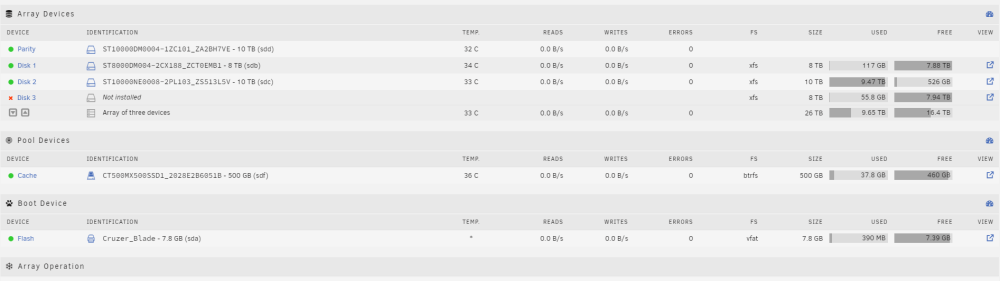
  1. Hi Team! Basically randomly my Disk 3 has the above message. It's really strange, I haven't physically opened up my server but I atleast just wanted to remove it from the pool (the drive has been fine for months and the server has not physically moved). When I tried to run the server in maintenance mode, I do try and repair and such (assuming its not physically disconnected with a bad cable which maybe it is). I am now trying to remove the drive, but I want to be sure the 'contents' have already made it to the other drives. Any suggestions on what I should do next? I saw a similiar thread but that was where the drive was still somewhat behaving as connected.
Account

Navigation

Search

Search

Configure browser push notifications

Chrome (Android)
  1. Tap the lock icon next to the address bar.
  2. Tap Permissions → Notifications.
  3. Adjust your preference.
Chrome (Desktop)
  1. Click the padlock icon in the address bar.
  2. Select Site settings.
  3. Find Notifications and adjust your preference.