Stuart Greig
Members
-
Joined
-
Last visited
-
Stuart Greig changed their profile photo
-
Just want to say thank you. That did the trick. About 4 days of back and forward and your suggestion worked and all drives now accessible in UNRAID. Thanks again 🙂
-
Thanks, formatting all 4 now. Fingers crossed!
-
I'm also running this in UNRAID console. WIll this work?
-
I'ce actually found a post you commented on a long time ago. I'm running this command just now on one of the drives but it's painfully slow. sg_format -v --format --size=512 /dev/sdb
-
I have tried every programe under the sun to format these 4 undetected drives and everytime I try format them I get an error regarding i/o. Can I format them within the UNRAID console as that is the only place I can see them? Logical block size: 520 bytes still as before.
-
I tried the solution in the link you suggested but I think because its a non HP card the system cant see it. I still only had the option for the SAS drives in the server.
-
Should this work with a non HP HBA card? I'm having the exact same issue but I have a PERC h200e HBA card inside my DL380 Gen9 server.
-
And i'll not setup the drives in the server itself in RAID. Thanks
-
HI Both, thank you I've learned something new already. So reading the other guys post you linked to I have to unmask the drives using the HP ssacli and using this command to clear previous configs "ssacli controller slot=3 physicaldrive 2I:1:1 modify clearconfigdata" Thanks
-
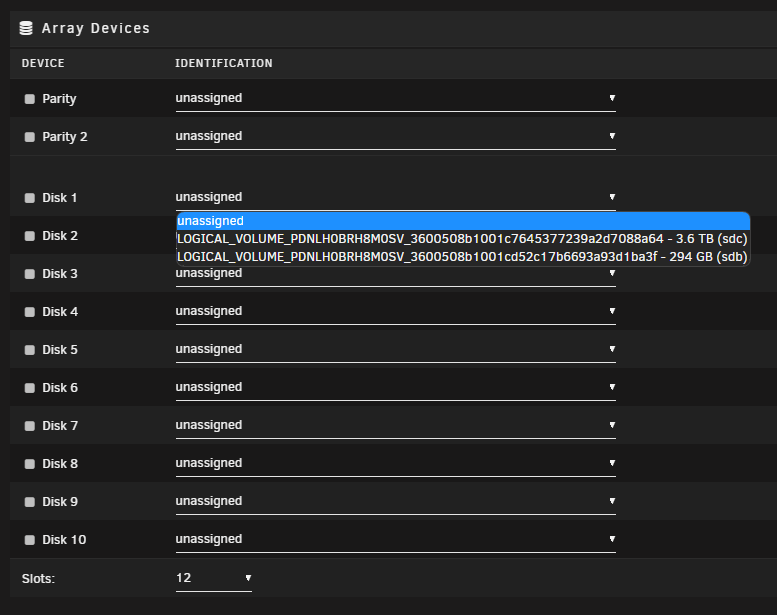
HI All, New to Unraid and new to servers so apologies if I miss anything in this post. I have the setup in title. I have installed the latest version of UNRAID on USB key and everything runs ok....to a point. I have 2x 148GB SAS and x2 1.8TB SAS drives in my HP DL380 Gen9 server. In the backup storage I have 4x4TB SAS drives and soon a 1TB SSD cache drive connected to the server via a PERC H200e HBA (flashed to IT mode). The card is enabled in the BIOS, the card is seen in UNRAID "System Information" and so are the 4x4TB drives. Problem I have is I don't have the option to mount any of these drives into my array. All I see in the dropdown is the 4 SAS drives I have installed in the server itself. Any help would be much appreciated. I'm pulling my hair out here! Thanks, Stuart juno-diagnostics-20230310-1644.zip