






ambipro
Members
-
Joined
-
Last visited
Everything posted by ambipro
-
Fixed, can be deleted
-
Confirmed working on 7.2.7
-
Getting same issue, running 7.2.5
-
This sounds to me like permissions, we get this all the time at the Deluge forums (I'm a moderator and team member for Deluge) - if you wanna throw the book at the situation and see if its permissions, then just use chmod -R 777 /mnt/user/downloadsv2 and then restart the torrent download. If it doesn't work then I would take a look at the tracker announce itself - you can turn on LOGLEVEL to DEBUG and (assuming you don't have a shitload of torrents) you will see in the logs the announce and its response. If you get a peer/seeder count, generallyt its ok but it could also not be able to connect to the peers and seeders themselves, which is an entirely different story. Does the Status under Tracker tab show that Announce was Sent or Announce OK? Are you using a .torrent file when you say "Torrent is added" or a Magnet? No offense, but those logs really only seem to show your VPN and startup stuff, and nothing to do with torrents being added. You'll need to enable AT LEAST info level logging - but preferably DEBUG for actual announce messsaging and responses.
-
There are a few files that, depending on what you are using with Deluge, can grow extremely large. In your appdata/config directory, there is a "sessions": { section in web.conf. This will fill indefinitely with logins made into the WebUI unless you log out. The problem is you can't just delete it outright, as there are other settings in there as well. In my scripts, I log out of the webui every time I exit cross-seed (a program I develop) or when I run scripts that log in and sort my labels and releases. This keeps it somewhat small, but still slightly larger than I'd prefer. They DO expire after 12 or so hours, but I do not believe they are purged until rebooting the webui, or possibly the entire container. There is no real purpose in keeping those sessions past your usage of the webui, and hitting X doesn't log them out or remove them. (They are in JSON, btw.) { "file": 2, "format": 1 }{ "base": "/", "cert": "ssl/daemon.cert", "default_daemon": "", "enabled_plugins": [], "first_login": false, "https": false, "interface": "0.0.0.0", "language": "", "pkey": "ssl/daemon.pkey", "port": 8112, "pwd_salt": "[REDACTED]", "pwd_sha1": "[REDACTED]", "session_timeout": 3600, "sessions": { "0013d2914ccf848be837e5f367e18a9686a5d496f51d1727bd5ff30fe1952a4f": { "expires": 1726879504.0, "level": 10, "login": "admin" }, "0067540478b0a1e647ec8a080b9581464690ee0ed8ea2fb07b0c1eb4291466d1": { "expires": 1759643482.0, "level": 10, "login": "admin" }, "00b94269d123873402aac2e866081b6688fc798ed6f3e7ad41b6cb8dae364564": { "expires": 1731076670.0, "level": 10, "login": "admin" }, .......and many, many more. It has been around a year since I last pruned it, and I have 1852 entries. The primary issue is that there have been PRs and work I've done for the Starr Apps, work I've done refactoring Deluge's client in cross-seed, and several scripts I mentioned. It's impossible to know when the time has come for them to be logged out properly in the automation apps, and turning restarts or container crashes don't clean up The good news is my entire web.conf is 325KB - nothing to worry about. Before I realized this issue, reaching out to Linuxserver, fixing it in cross-seed, and the starr apps - I believe I left binhex a message on Discord, but he doesn't check often, I was getting web.conf files in the range of 30-50MB, screwing up removing the objects in the sessions array, and just having a hard time. Perhaps I'll write a script this weekend that prunes them and keeps a single active connection, and removes idle connections that have not received commands for some duration. It could easily be incorporated into the LSIO and binhex containers as my other scripts have... @binhex If you can find some time, I'd love to have a chat with you on Discord. I think there are a few things I'd consider bugs, as well as the session thing, and other daemon and web process separation that can lead to issues for users. Let me know.
-
Yep, I think I linked you to one of my forks of LSIO or your container, where I have the script check on startup if it's been over a week since the last GeoIP.dat update - and then snatches the updated version if it has. As far as the keys to the repo, i've had this conversation with Cas and a few other contributors (who unfortunately now have taken a backseat) - it's basically just hard and Cas has personal issues preventing him from reviewing PRs currently....I'd say as far as active devs/support team goes, I'm the most active by far, but I don't have the experience or knowledge to field PRs and handle the entire dev cycle. There was work on converting .egg files for plugins to wheels, but there was a lot of drama in the thread (still on GH, if anyone's interested in reading), with the guy trying to make demands and not following the etiquette and procedures used in our repo.
-
Yep, those are our thoughts on it as well... I've seen it in both your and LinuxServer's containers, as well as in my own container builds, and when I run it in my IDE from source or an install, the warning appears. So it's not exclusive to any particular container/set/etc. It's even present in the standard Windows install, but you'd have to run the debug console executable rather than the normal deluge.exe. That's awesome, you've included the Stats and ltConfig (from my repo) in your image? How did you tackle the GeoIP.dat updates? My link has the .dat and .gz versions, and updates every 3rd day from MaxMind directly. Anyway, there are several PRs that, while they aren't a simple bugfix for this warning, should result in the error being handled. The issue is that aside from me, the Deluge dev team is mostly just Cas. He's not able to devote much time to not only development (he's the only one with write access to the repo) but also to spending time online generally.
-
I mean, what exactly is the issue we would be addressing? (I'm on Deluge's team) @binhex ? I don't check these threads super often, but I did post to you just the other day to follow up on some of the things I've been working on that we discussed a while back being integrated into your container. Anyway, If it's just the pkg_resources warning, I am aware of and know that warning, I get it as well both in Docker containers and when running Deluge in debug and console mode. It's only a warning, and does not result in any change in Deluge's behavior. It's innocuous and just a warning you can ignore. We will address it, of course, when we can, but given its lack of importance to the actual client/daemon, it'll probably be some time before we get to fixing this.
-
Hey @binhex Just checking in, whether you ended up using my updating geoIp.dat at https://geo.el0.org and the updated Stats plugin and https://github.com/zakkarry/deluge-ltconfig/releases/tag/v2.1.0 ltConfig - which has my added high performance profile and previous official profiles. I've taken maintaining ltConfig over officially, just so you're aware.
-
That's to be expected currently,
-
Awesome, I left the default profiles but added my own profile that's sightly more up to date with current connection speeds and hardware, would recommend it to most, particularly dedicated seedboxes, I frequently hit above 350MB/s upload while hitting nearly 200MB/s down at the same time with it. Should be a good addition, also there's an updated stats plugin which last I checked you nuked - but can be included for compatibility - you can find our build https://forum.deluge-torrent.org/viewtopic.php?p=236443#p236443
-
I am maintaining the ltConfig plug, i left a link to it in the delugevpn thread for the latest .egg build you can download, when you mention the latest GeoIP, are you referencing from my geoIP page? https://geo.el0.org ? that updates every 3 days and if you recall I gave you code to check the age and resnatch the updated version edit: https://github.com/zakkarry/deluge-ltconfig - taken over maintenance and have my own special profile in this latest version I'd recommend for most high performance gbit+ seeding servers (description of changed settings can be found https://forum.deluge-torrent.org/viewtopic.php?t=56921)
-
@rogales i run mine from a virtual venv on the host machine, installing it in the arch base is a bit of a hassle and doesn't gain you much of any benefit
-
Anyone having speed problems both with VPN and without should check out my (zakkarry's) settings profile in ltConfig (https://github.com/zakkarry/deluge-ltconfig) I'm maintaining the plugin now and my settings gave significant improvement to download AND upload speeds.... You can see what settings are modified https://forum.deluge-torrent.org/viewtopic.php?t=56921
-
This is the post; there is a code block there with the geoip code I am referring to.
-
@binhex Was curious if you got around to what I posted for additions. My geoip.dat continues to run strong and with 0 downtime so if you want to integrate it directly it could provide a good addition.
-
It's been a couple of months, and most of the torrent sites that are private have approved 2.2.0 by now. Not sure where you're torrenting, but I would go to their forums if they have one, and find the technical support/call-in section, and there is probably a thread for approving a new version. Torrent trackers do whitelists, not blacklists, so it has to be "inspected" in whatever method they do... Seems really odd, but if you want what could only be said is extremely bad advice, you can change the Peer ID in ltConfig
-
@binhex would it be possible for you to push a updated (packages and stuff) release of DelugeVPN and native Deluge on both the libtorrent 2 (master) and libtorrentv1 (libtorrentv1 branch) tags, I noticed they are out of date, particularly the libtorrentv1, and that is the official libtorrent version that we recommend at Deluge. If possible, can you setup a GHA that triggers both the main and the libtorrentv1 branches when you trigger a build? That way we aren't left behind in features and version/bug fix/etc when a new image is made? Please let me know if this is possible and when you do it so that I can fork and work on potentially getting a PR for the features and functionality I had in the post I made, if nothing else I would like to have it for my local builds and several of the Deluge community from our forums uses my images (I also maintain a linuxserver fork, but am having some issues right now with it and the host system kernel) Your deluge based off arch would be highly appreciated, since I can't do it entirely by myself. I still am not super familiar with your base image. Also ( Off Topic ) - is it possible to run just your arch-base image and get a bare-bones arch docker running where I can get a shell inside the container and treat it like a VM? Given that there are features in Deluge that ONLY works on libtorrentv1 (referring to the cache preferences and many of the libtorrent settings you can tweak in the plugin I maintain ltConfig (https://github.com/zakkarry/deluge-ltconfig) - it seems more in line that you have libtorrentv1 be the default "master" image and libtorrentv2 be a tag you can use. lt2.0 has quite a few downsides and problems associated with it and v1 also appears more performant when utilizing things like my preset profile in ltConfig.
-
binhex, sorry for the confusion if there was any, I do run that mirror - previously my post had autocorrected now to "not" on "I am not running" vs "I am now running" Please feel free to look over the changes, and if you have any questions let me know. Discord and PMs here are always open to you if you need.
-
@binhex I'm not sure if you remember talking to me on Discord long ago, but we spoke about libtorrentv1 and the deluge containers, I'm ambipro from the deluge dev/support team. I'm now running a geoip.dat legacy maxmind mirror - it updates every 3 days and you can find it at https://geo.el0.org in both .gz and .dat format, in my LSIO container I am currently testing I have it set to check if the .dat is over a week old on startup, and if so snatch the new one. lsio was using mailfud.org for updates only during the build in githubactions, and these can change. I've included code below that checks the age and pulls the update. This does require changing core.conf to set the geoip.dat to /config/GeoIP.dat though, but you can modify it I suppose. I think its better persistent though. Also, we still recommend using libtorrentv1 with Deluge 2.2.0, caching settings in the preferences are removed in libtorrentv2 (they don't work at all due to memory mapping) and the performance is better when tweaks are applied. For anyone looking for tweaks to speed up libtorrent/Deluge you can see my thread (I'm the moderator ambipro posting) where I explain the settings for both Deluge's ltConfig and translate them to qbit's units as well. They can produce DRASTIC improvements, but are not a one size fits all so please read the post carefully. I also forked my good friend @mhertz ltConfig plugin he is taken over maintaining (although it requires no real work except updating presets) and added my settings I recommend for a "fast gbit server" that I explain the specs of there. You can simply apply them like any other preset in ltConfig. Finally, Stats was previously disabled in your image, I'm not sure if it still is, but mhertz fixed this and you can include his 0.4.1 version of Stats located in this post https://forum.deluge-torrent.org/viewtopic.php?p=236443#p236443 if you would like to have it (you can include my ltConfig, but that is somewhat an advanced and power user plugin, not sure its appropriate as Stats). Building libtorrentv1 off fork of your container is rather painful, and I seem to have repeated problems with different things, especially when boost and sandbox were acting up, but I'm no arch users. We previously spoke on Discord, and I would very much like to go over some of the things I think would improve your container over all others and take care of both delugevpn and standard deluge. If you could find time, I've sent you messages already and you should be able to recognize who I am. Otherwise you can visit Deluge's discord at https://discord.gg/X6yhJE6ZTr and find me as ambipro
-
The 192.x IP is not the IP to an interface the container has access to, normally you do not need to put an IP in this (particularly for docker containers) at all. This is generally only used for multi-homed (multiple interface) systems. Docker is not one of those systems. You are basically asking to use an interface address it does not have, and thus are not getting any connectivity.
-
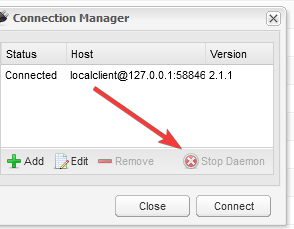
My experience is exactly the opposite, I have Deluge running for many weeks before restarting, and have no issues when restarting the container from the dashboard in unraid. I used to do what I had mentioned and use quit and shutdown, and it did not restart itself...I'm not sure what init changes were made that may have changed this behavior, but consider I believe it ran with -d it shouldn't restart the daemon, I had a crash a few days ago during some testing of some stuff, and the daemon didn't relaunch. deluge-web kept running but was not connected to any daemon, the two are not mutually exclusive. Edit: If you want to stop the daemon from the webui, go to connection manager, and select the daemon and hit stop daemon.
-
Hi guys, I'm ambipro (zakkarry @ GitHub) and I'm a developer on cross-seed. We have only had an unofficial Community App thus far, and we decided it was time to get an official one up. It's available now! Please post any issues or questions you may have regarding this container specifically in this thread (For broader core issues, we may ask you to create an issue on our repository as well for tracking) Repositories GitHub: https://github.com/cross-seed/cross-seed Official Containers: https://github.com/cross-seed/cross-seed/pkgs/container/cross-seed DockerHub Mirror: https://hub.docker.com/r/crossseed/cross-seed/ Documention/Support unRAID Tutorial: https://www.cross-seed.org/docs/tutorials/unraid Getting Started with cross-seed: https://www.cross-seed.org/docs/basics/getting-started If you are not using unRAID you can head over to our Discord. You can find our server on our site (click the Discord Logo in the top right). https://cross-seed.org Non-unRAID users please do not post in this thread for support.
-
Where? I see nothing.

-
Seems to be working, even did a restart of the container from the dashboard (without quit and shutdown) and no issues. Thanks so much



