





resentedpoet
Members
-
Joined
-
Last visited
-
Hi, I need some assistance in getting my servers imported from my old unpaid server to a new one. On my existing server I have two Minecraft worlds on separate docker containers from ich777/minecraftbedrockserver. I have downloaded the contents of the folders from app data for each and zipped them and uploaded them into Crafty4. The issue I have is it is asking for the location of the paper.jar file and there is none that I can find in any of the folders. Is there something else I need to do so that I can use these servers?
-
That was it; never knew that existed. I had myself to dead set focused on Network Settings being the answer. Enabled and everything is working great; thank you!
-
Hi, On my old server/network setup I had a VM with Home Assistant running Frigate NVR Proxy addon connecting to another separate server that had Frigate and wyze-cam-bridge installed and I was able to view my IP cams in Home Assistant and was able to use the the addons for motion detection, automations, etc. I have been working today on moving all my old, slower desktop servers into one dual CPU desktop and I have the VM running with Home Assistant perfect and even using the same IP address as before but now when attempting to view my cameras in Frigate NVR; I get nothing but a blank screen and no errors in the logs. The cameras (frigate and the bridge) are working correctly because if I go into the webui for those containers; I can see everything but the NVR proxy app that is meant to connect the two in HA won't work; and I feel it us due to the VM not being able to communicate with the docker container but i'm not sure why or how to fix this. I have tried putting in my server IP address/port that is assigned to the docker container as well as trying the docker 172.x.x.x ip address but neither will work. Can someone please help me? Is there somewhere I need to enable something for these two to talk to each other; or because they are now on the same server this is not possible?
-
Thanks @Frank1940 and @dboonthego for all the insight and help. The insight into rsync and tmux is good to have; never heard of these two tools before. A bit intimidating being command line based but definitely something I will need to look into more in the future. I ended up going down a different route after adding my 6 HDD's to my server and used unbalance to move everything from the two 300GB drives over to the 24TB array and new CACHE drives. From there, I just SMB'ed over the data from the old array to the new one. I still have to do the docker containers and move them over; but it's not my first time doing that with some of the servers so I think i'll be ok in the process. Will find out soon enough. Again thanks for all your help. Not to solve some networking issues i'm having with multiple NIC's.
-
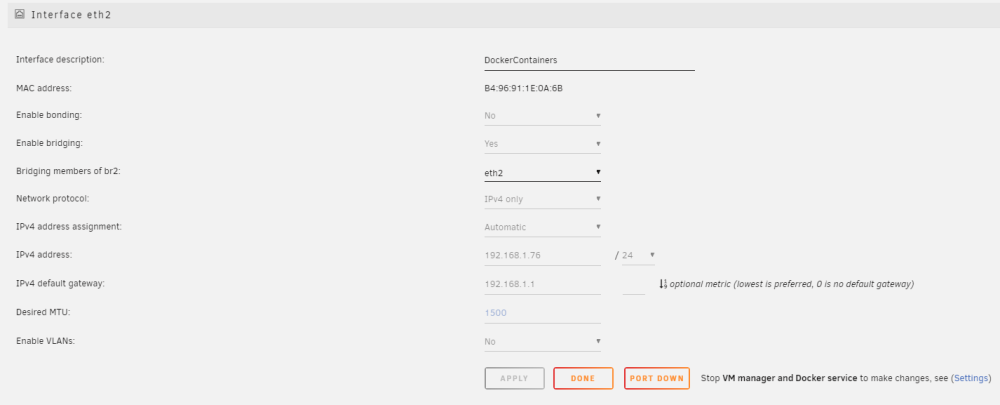
Hi, Currently I am working on configuring my UNRAID server and it has 4 NIC's installed (2x Intel 1GB and 2x Realtek 1GB) that I want to use. What I would like to do is dedicate a NIC to Docker containers, a second to VM's, and keep a third for access to the SMB share. I have enabled a second eth2 adapter in Network settings and I have it setup to bridge but when I add a new docker container (ex. AdguardHome) it only has br0 (default connection eth0; planned for SMB share) and nothing else. Is there something i'm not configuring correctly in Network Settings to do this; or am I missing something completely? I'm not much of a network guy (yet).
-
Server 1 (new) T430 currently with UNRAID installed and 2x 300GB SAS HDD's and 1x SSD (512gb) for Parity (testing config) Currently running some small docker containers for Frigate, Jellyfin (testing), Wyze-bridge, and Dell iDrac controller Server 2 (old) i7-4770k with a mix of HDD's for media content and VM's with 1x 256GB SSD for CACHE/Docker containers. Running Plex, updatekuma, komga, pihole, a few minecraft servers and my Home-Assistant VM My intent: I have purchased 6 x 4TB SAS hard drives and 2x 1TB SATA SSD Drives and would like to move everything from Server 2 into Server 1 so I can decommission server 2 and use my unraid license/key in the future as an off-site backup machine. That all said above; what is the best way for me to make this transition? Where the docker containers on server 1 are rather small; should I just nuke everything start over; and go from there? Or is there a way I can transition everything over and also be able to use the SSD drives as cache/VM drives over the SAS HDD's? -Cheers,
-
Thank you so much!
-
Here you go. Link
-
Hi everyone, I recently discovered and started using Unassigned Devices to mount my other unraid server's NAS volume as a remove share for Jellyfin. Everything was working fine until I had to shutdown and reboot my servers and now UD is won't mount my network share stating it is unavailable; and the mount button is greyed out and I cannot even try to click to mount it. What am I doing wrong? At first I thought it was because my remote share server started up later than the server that has UD installed on it but when I rebooted that server again thinking it would autoconnect after startup; it didn't. - Cheers,

-
Hi, I have a network share on another NAS that contains my media that I want to use with Jellyfin. Is there anyway to mount a network share in Unraid so that Jellyfin can have access to it? -Cheers,
-
Thanks guys for the help. In the end, the user scripts plugin and adding the two modprobe lines to a new script and have it start when the array started; did the trick. Thank you so much for all the help! -Cheers,
-
Hi, I am currently trialing UNRAID on a Dell Poweredge T430 that the fans are a bit loud on even with little load on the CPU with temps under 50c. I installed a container that controls the fan through the iDRAC controller but in order for the docker container to run I needed to install Nerd Tools with the ipmi plugin, and manually run modprobe ipmi_devintf and modprobe ipmi_si. The system is working great but the modprobe is not persisting after a reboot. How can I get this to persist after a reboot so that the docker container is in control after reboot; without my intervention? -Cheers,

