






THEVAN3D
Members
-
Joined
-
Last visited
Everything posted by THEVAN3D
-
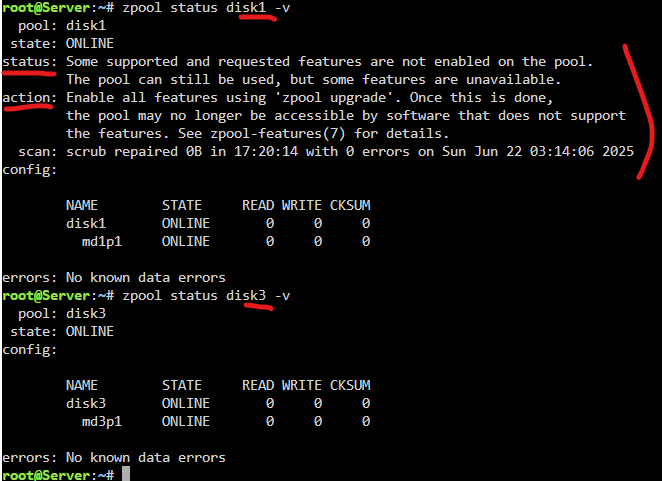
i moved the data, formatted the drive, didnt rebuild it from parity, started is as a fresh drive and now it all works. i have two final questions though: 1) what do you think could've caused this and what do i do to prevent this in future? 2) when i run zpool status disk3 -v it shows me less info, compared to other disks1,2,4,5. why is that so? does this mean other disks need to be formatted too because they have some features disabled and only disk3 has them enabled since it is a "newly" installed disk?
-
ok here's the diagnostics that i downloaded after fresh system reboot and array start server-diagnostics-20250805-1402.zip
-
so what do you think i should do next? even after complete reformat and rebuild of the disk3 the movies folder is still not accessible. i cant just delete EVERYTHING worth of 60TB and re-acquire all the data. there must be another way somehow. all the files are accessible in disks.i just finished scrubbing disk4 with this result so i think disk4 is healthy, right? i'm going to start moving data from disk3 to disk5 now and post an update afterwards.
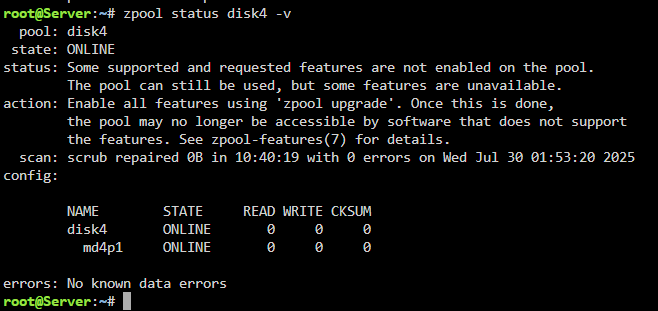 does this definitely mean disk4 is healthy and only disk3 is corrupted? or do i need to run some additional commands to make sure disk4 is definitely healthy? what do i do now? do i start copying data from disk3 to other disks? and whats the next step after i copy that data? do i just remove the disk3 from array and keep using the server? idk how to properly REMOVE the drive from array, so far i've only ever added new drives to the server.
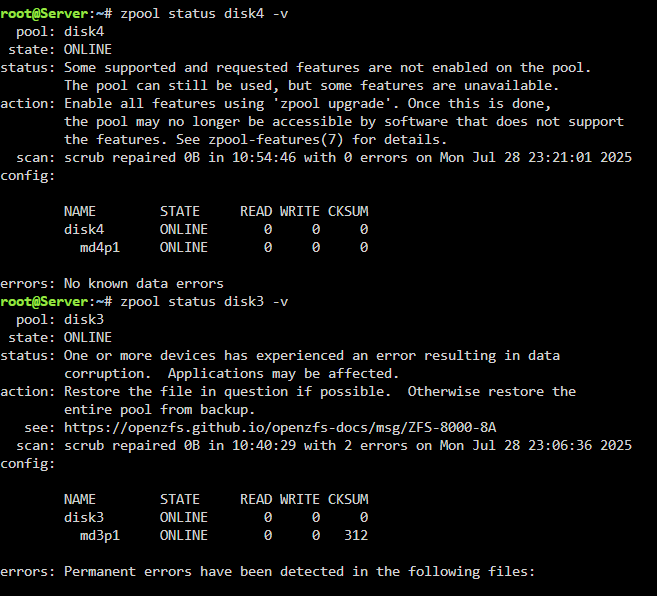 but i ran memtest for a long time with no issues. how can the ram be faulty? i am going to throw this disk3 away completely after this scrub is done. and i'll monitor disk4 too. in case it also starts acting up imma throw it too. i have 12th gen i3. is that risky too? its just the disk that is corrupted right? not the files. i mean moving data from disk3 to other disks wont damage them too, right?so if i go into disk 3 and manually move all the files from it to another disk (1,2,4 or 5) will that fix the issue that i have? will i be able to access the movies folder afterwards? and two more questions: 1) how do i actually do that? from within the webui? or do i use plugins like unbalanced? 2) why are there no other errors anywhere? no notification in webui. no error in hdd smart data? etc.i tried manually removing, clearing and re-adding disk3 and disk4 to the array rebuilding each one of them separately from parity. issue still persists. now i started scrub again and this is the current situation as of right now: I'm going to reboot system after scrub and post here again. i'm so confused at this point. how can everything inside share be accessible except one folder. and how can even that one folder still be accessible through individual disks? what is the problem with my server exactly? are the drives dying? are the cables faulty?
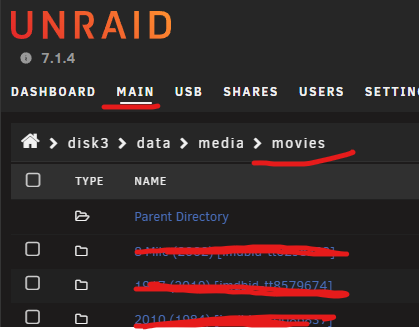
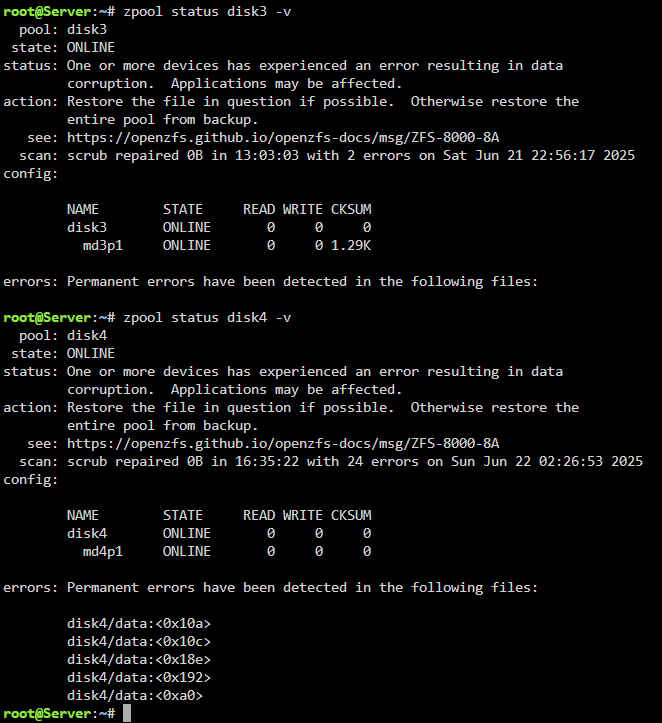
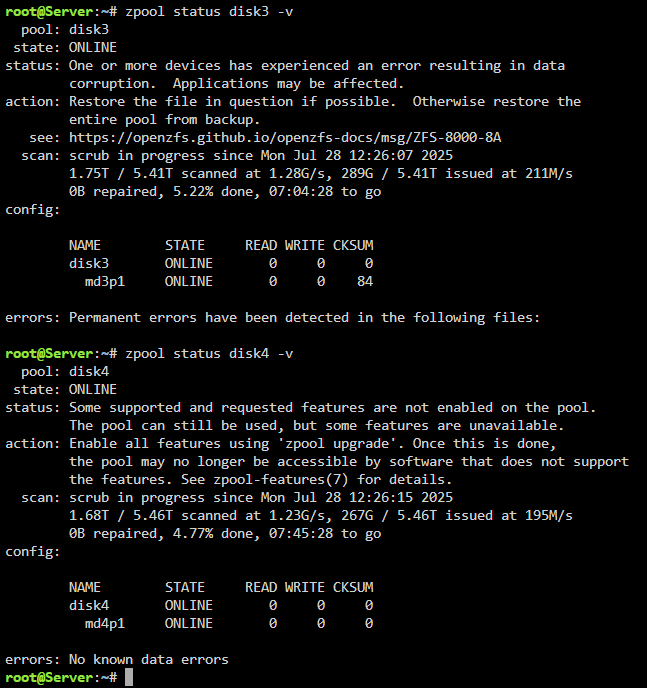 again. sorry for such a late reply. didnt have much time to do memtest, and since EVERYTHING else was working fine on my server i kept using it normally. so now i got time for that and ran memtest for about 17-ish hours. no errors. ram is fine. i did two separate 3-hour runs (4 passes) and then another longer with more passes that i waited for for about 10ish hours. so what is my next step now? how do i make the files re-appear inside the movies folder? or what do i even do to fix the issue of those random zpool errors.what if i do parity check? maybe it can fix something? (but i only have one parity drive and two of the drives have those zpool errors) btw i already tried scrub and i thought it fixed the errors, but neither the movies folder has re-appeared nor the errors have disappeared completely (they were gone for a few hours and then i still got the errors)any suggestions on how to get the content inside the movies folder back though? or do i have to do the memtest first ?alright, will do 24 hourssorry for a late reply. this is the diagnostics file attached. also how long do i need to run memtest to make sure ram is not an issue? server-diagnostics-20250628-2353.zipHello, everyone. This may be somewhat long and unfocused post, but i dont even know where to start diagnosing or what to post here, so i'll just ramble about the problem that I have. I actually have two problems and I dont know whether they are related or not. First and the most major problem is that one folder in one of my shares is showing up as empty, even though it is not. I have "data" share that uses all of my disks and it has multiple folders inside. All of those folders are accessible except one. If I open shares>data>media>movies it is empty: but if I open any disk>data>media>movies then i can see the files inside. All of those files are accessible and openable. Second problem that I have is that there are bunch of damaged/corrupted files and checksum errors on two of my disks (disk3 and disk4): I asked around in discord server and people suggested doing zpool scrub and clear but all in vain. The problem still persists. So i need to confirm if these two drives are dead/dying or not. They already had some problems couple months ago, but i thought that was due to sata adapters that i had and so i took them out and reformatted and thought it was fixed. But now that these random errors resurfaced i think these two disks may be dying, but need a way to confirm that. And if these two disks are dying then maybe i could manage to copy data before they finally die? my overall disk usage is about 50% so theoretically if anyone helps me confirm that my disk3 and disk4 are dead i could maybe manage to copy all the data across disk1,2,5 and just replace the 3 and 4. But first, I just need to fix the first big issue to access my movies share. Also of note, i have done memtest for about 6-7 hours with no issues (i am saying this, because some people in discord suggested it may be ram issue)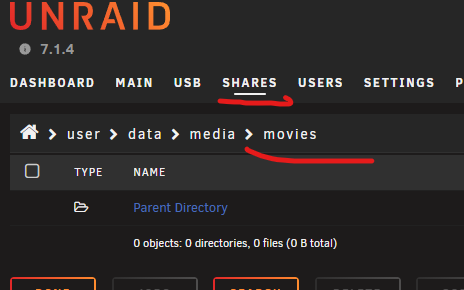
 ok. whatever. f* it. i formatted it. but now that drive is emulated too. how do i re-add it properly to the array? and also, do you think my old disk4 is worth keeping again? i'm so afraid it is actually dead or defective. it had one crc error too before btw.yes, i know you told me that, i just thought you meant the data can not be rebuilt so i had to format it because of that... but it is rebuilding now. or at least i think it is.. is it not? i mean its doing something. all the disks are active at about 250MB/s doing something. should i just give up and cancel this?i thought there was a chance for it to recover dataFinished rebuilding disk4 onto the new drive that i had successfully. Then I stopped the array, removed disk3 and started array like that. Then I stopped it again and re-added disk3 again and now it started rebuilding disk3 too, but it is still showing up as "Unmountable: wrong or no file system" Does this make sense? Is there even a chance for this to actually complete?
 i removed disk4. installed new disk in its place and started rebuild process. hope it goes well fully. and after that, is there anything i can do to fix the filesystem on disk3? or is formatting the only way?Wait a minute. You think both of my drives can be healthy? and it was due to bad cable/adapter or ram or something else?Alright, so i can now rebuild the disk4 on the new drive and then reformat disk3 and see if it works. Thanks. and how do i monitor the drives in the future? any plugins i should have installed to frequently monitor health automatically? or how to properly check the disk3 afterwards? i really want to make sure all my drives are fully healthy.RAM is fine. Did a full successful memtest scan for about 7-8 hours about a month ago when disk4 first started giving me the errors. All the sata data cables are also brand new ones that came with motherboards and the power cables are from the psu directly, high quality. But I was using some cheap-ass 90 degree adapters though, maybe they caused the problem(?) but i threw them away now. everything is direct connection. So what is my next move now? How can disk4 be rebuilt if disk3 is missing? isnt that needed for parity to rebuild the disk4? And if i put the new disk in place of disk4 and i rebuild it, then what do i do with the disk3? is it all lost?do you mean array by chance? because there is no problem with my cache pool. still have couple of questions though. like how could this have happened in the first place? i mean disk4 was maybe faulty, it gave me bunch of errors couple of weeks ago, ok, but disk 3 worked fine, didnt have any errors. it just unassigned itself one day and that's it. no prior warning. so what do i do now? do i just toss them both out? or how do i check if the disk3 is still healthy or not? and finally for the future, how do i monitor my drives properly so i have time to prepare for their death and buy a replacement one?


