Thib001
Members
-
Joined
-
Last visited
-
Dear all, While I was excited with my upgrade to Dell R740 server + unraid + Plex + 70tb of Plex library. Upgrade from r720 went very easy yet the R740 is nearly noy usable since it is not possible to control the fan and the unit is EXTREMELY noisy. I search on net for solution yet nothing, the best I can get is fan speed at 7000 pr minute, while on R720 I can go down to 1080/ per minute. This makes the R740 a dead-end serveur for private usage (ie not placed in data centre). Anyone having solution this would be welcome since on paper the R740 is a great unit. Thanks
-
This finally went smoothly, just inserted plugged all HDD in the new server, installed the unraid usb and boot the new system. no issues, juste a tedious parity sync in background. I close the subject
-
Hi Was the upgrade successful? I have similar situation and do not dare to do it....Thus still running on my old server while new more powerful is awaiting,... Thanks
-
Thanks for the info. I have read Perc HBA mode is working fine? Nevertheless my main concern is to destroy my Plex library and its 40Tb of files by running a wrong upgrade. Thus anyone has any view on this. Thanks
-
Hello, I'm planning to upgrade my current Plex server from old Dell R720 to a more powerful Dell R730. Yet, I'm very afraid of loosing or destroying my existing Undraid configuration and especially my large PLEX library (54Tb of made of 6x HDD + 2x SSD) including 40Tb of existing files. Therefore, I'm seeking for guidance or support with the procedure. I have naively drafted that I think : 0) Set new server R730to default bios setting. 1) Set the new server R730 (with Perc h730mini) to HBA mode (forcing non RAID). On the R720 I had to flash the Perc H710 to IT mode 2) Remove from old R720 the registered OS UNRAID USB and install it into the new R730 free interval USB (see additional question below) 3) Insert all 8x HDD from R720 to new R730 in the HDD slots using exactly the same sot allocation. 4) Boot new R730 server, logging in to Unraid, run Plex. 5?) Any other steps? IE what about IP Server IP address. I have a fixe address on the R720. Will Unraid Os automatically port it to the new server? Or shall I do it manually? ==> Will this work? Is there a risk of loosing all my Plex files? ==> Additional question: Using Dell Internal Dual SD Module (IDSDM). This is a module with dual sd card for hypervisor. I like to use it as my UNRAID OS boot disk (replacing the old low quality USB stick. Many thanks for your collaboration Unrais is just perfect and combined with Plex it makes the best ever multimedia server. Thibaut
-
Hi gents, just need your advise / suggestion. When running Plex/ NVIDA HW transcoding I can only select several format (ie 4k to 1080o or 1080p to 720p but not 4k to lowest 480sd). However, when running CPU transcoding I can chose whatever format from top 4k to 480. Is it normal? Subsequent question, I run a rather powerful Plex server (Dell r720 dual Xeon E-5697v2 with 128mg ram and 40tb drive space), I have a Nvidia Quadro p2000 as spare but not sure it really make sense to use it since it can not manage all transcoding format. Thanks for your suggestion. Thibaut
-
hi, Anyone has any idea how to solve this hdd random speed issue? Thanks
-
Hello to all, I'm using UNRAID as plex server only. works great. I love it. However, Disk array speed access is strange. Can be extremely fast or extremely slow. even copying or moving file within same drive array can be randomly super fast (immediate) or take minutes or more. Using a 500gb EVO flash drive as a cache drive does not change anything. I understood parity makes read write access slower, yet why sometime it is immediate and sometime it takes very long. My config Dell R720 + 128gb ram 30tb hard drives (3 x 10tb western digital red + 1 x parity 10tb western digital red) Only 2 dockers installed (Plex, Deluge) Thanks for your support Thibaut
-
great thanks worked.
-
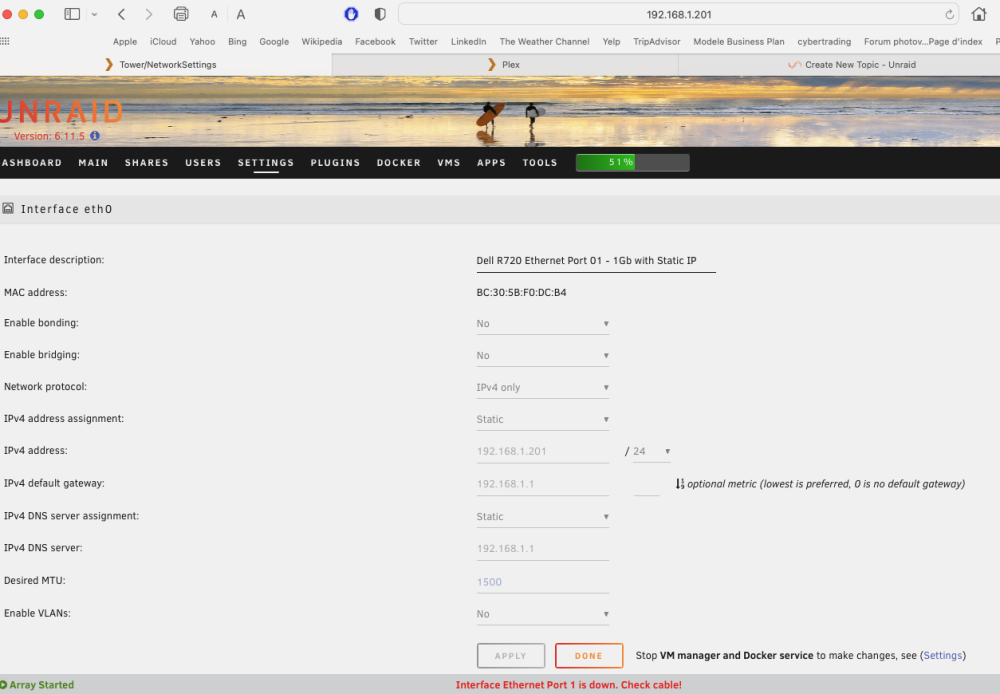
Thanks for the info, I have stopped all Ethernet 1,2 and 3 and set Eth 0 to static IP and static DNS. Reboot and now it seems to be working ok. and I can access the APPS and I can reconnect to Plex from mobile ad TV. Thus WORKS Yet, it still displays Interface Ethernet Port 1 is down. Check cable! yet Mystery to me, Anyone knows where I can find literature to understand better Unraid networking / Bridge/ Host..etc Thibaut
-
hi, Since I installed Unraid, I have regular network connection issues. with the basic message "Interface Ethernet Port x is down. Check cable!" Thus Unraid and unraid Docker can not access internet. I have rebooted, Unraid and my router yet same error. I'm lost and I have literally no expertise in network. thus thanks for your support. here are some details A) Unraid server description = only used to run Plex and Deluge Unraid 6.11.5 Server is Dell R720 dual processor and 128gib Ram 4 x 1gb network port (eth1, eth2, eth3 and eth4) 4 x HD 10tb Western Digital red pro (1 parity + 3 hd) 2 x SSD Samsung in pool for my Plex config and metadata only. Eth1 = Eth0 in unraid config set to static IP 192.168.1.201 Unraid Eth 1,2 and 3 unplugged and not configured (port down) B) Symptoms Unraid boot nicely and WEB UI from my Mac (connected on the same router) runs perfect. I can access Unraid web interfacce non problem however Unraid seem not be able to connect to internet -when selecting Unraid Apps tab, system await and generate error. Can't access internet.... Thus not connected. -Plex Docker starts ok and from my Mac (connected via router) I can access Plex web UI and listen to music, video, etc -I can not connect to Plex server from other devices (TV, mobile, etc) -Deluge can not connect and web ui not showing I had this situation already once and by try and error with the network setting It came back to work. Today, I have again tried to change network config (from static to DHCP, reboot unraid, reboot router, plug unplug cables, change cables,...) no luck still same, Thanks for your assistance, I'm sur this is a bad setup from my side and be happy to learn from this. Thibaut unrai thib001.zip