





pteromyini
Members
-
Joined
-
Last visited
-
The log error mentions that the nginx binding address is in use. I checked Docker and the virtual machine but did not find any usage of port 80/443. I checked the port usage, and did not find any unusual ports. (Additionally, when I was exporting the logs, the GUI could not export them correctly and smoothly, remaining in the downloading stage for a long time. Therefore, I manually downloaded the recent logs using scp. I am not sure if the exported log data is complete.) root@howienas:~# netstat -tulpen | grep :443 tcp 0 0 100.66.66.66:443 0.0.0.0:* LISTEN 0 330865 662/nginx: master p tcp 0 0 127.0.0.1:443 0.0.0.0:* LISTEN 0 330863 662/nginx: master p tcp 0 0 192.168.66.66:443 0.0.0.0:* LISTEN 0 330864 662/nginx: master p tcp6 0 0 fd7a:115c:a1e0::ca0:443 :::* LISTEN 0 330871 662/nginx: master p tcp6 0 0 ::1:443 :::* LISTEN 0 330869 662/nginx: master p root@howienas:~# netstat -tulpen | grep :80 tcp 0 0 100.66.66.66:80 0.0.0.0:* LISTEN 0 330862 662/nginx: master p tcp 0 0 127.0.0.1:80 0.0.0.0:* LISTEN 0 330860 662/nginx: master p tcp 0 0 192.168.66.66:80 0.0.0.0:* LISTEN 0 330861 662/nginx: master p tcp6 0 0 fd7a:115c:a1e0::ca01:80 :::* LISTEN 0 330868 662/nginx: master p tcp6 0 0 ::1:80 :::* LISTEN 0 330866 662/nginx: master p howienas-diagnostics-20241021-1554.zip
-
Is there any way to modify it? As a person with obsessive-compulsive disorder, it is very uncomfortable to see it
-
After deploying docker-compose using the plugin, when a container has an update, when I update the container using the compose plugin, there is still a constant update reminder in the webui docker interface. The only solution I currently feel is to down from the plugin interface, then delete the container, and then open the prompt to update the project. Automatically start and restart NAS
-
There is a certain probability that the docker container br0 cannot access each other after running for a break or after the network is reconnected. Log prompt: no route to host, which can be repaired after restarting the docker setting. No recurrence pattern was found.
-
After I use Compose to create a container, it always prompts an update in the docker container interface, but the image is the latest version. I also encountered another problem, when Compose creates a container, there is a certain probability that the system docker will repeatedly create containers after starting docker, which leads to the containers created by Compose can not be used normally.
-
Thank you very much for your help, everything is back to normal, the data is normal, have a good day
-
This is my new diagnostic file. howienas-diagnostics-20231214-1731.zip
-
ok, I have added it and reboot my nas
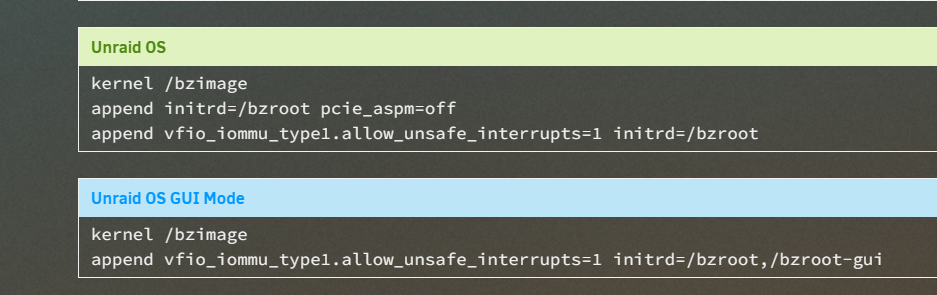
-
I did the following: offline disk array, export pool, online disk array, I still can't function properly, and the pool device still prompts: Unable to mount: unsupported file system or no file system
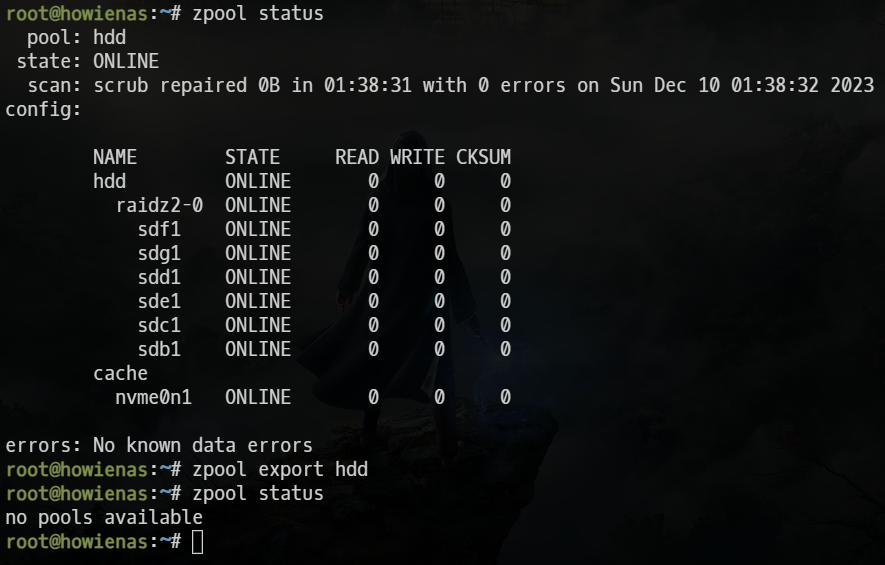
-
These are my diags howienas-diagnostics-20231214-1650.zip
-
I accidentally chose the new configuration, so I lost my zfs pool. When I used the zpool import command and reconfigured the pool, my share could operate normally, but the disk array operation still showed that there were disks that could not be mounted.
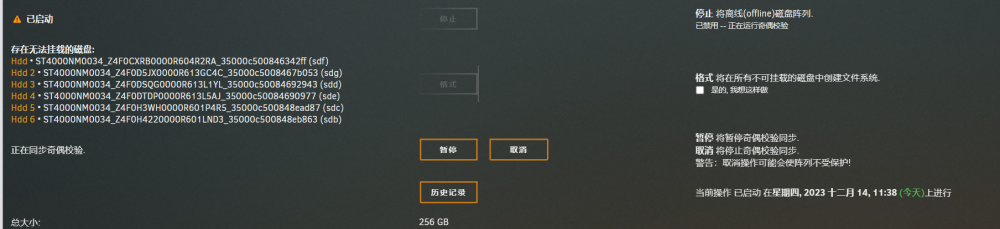

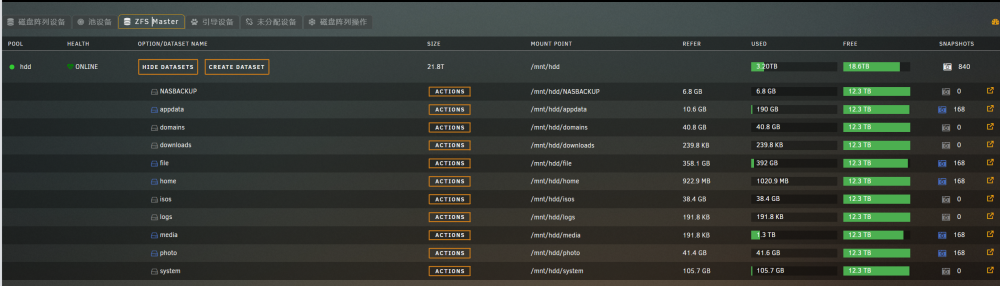
-
I tried this method without success, please communicate in github issus next
-
pteromyini changed their profile photo
-
I don't know what happened, but after installing tailscale my ssh is not available howienas-diagnostics-20230617-0936.zip
-
I reinstalled and tried again. Yesterday by chance, I found that my ssh service did not start, and the restart still failed. After I uninstalled the plugin, ssh returned to normal. I will reinstall tailscale today to try to reproduce this problem
-
I don’t know if someone is like me. Using this plugin in unraid 6.12 will cause the SSH service to be closed after booting and cannot be opened




