





JuSt Floppy
Members
-
Joined
-
Last visited
-
Somehow I couldn't find any peace. I have now changed the DNS server. From Fritz to adguard. Everything is working now. The Fritz has also specified an IPv6 as the name for DNS queries. However, IPv6 is completely switched off. Maybe that was the error?
-
Another strange behavior. I played a little with the system and found an Outgoing Proxy Manager item under Settings. I added my own proxy here. After I added a proxy here, the system is back to normal. If I deactivate the proxy, the same error occurs. I have tried this several times and it is always the same. At the moment I have a workaround until the problem is fixed
-
System is back in false state. Same problem like my first post.
-
I run in my browser CRTL + F5 and now it looks fine.
-
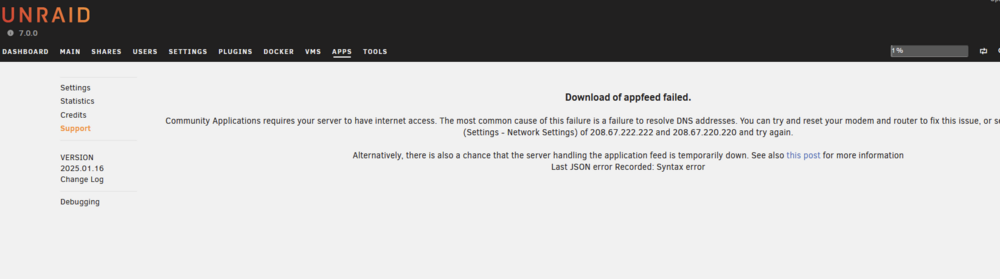
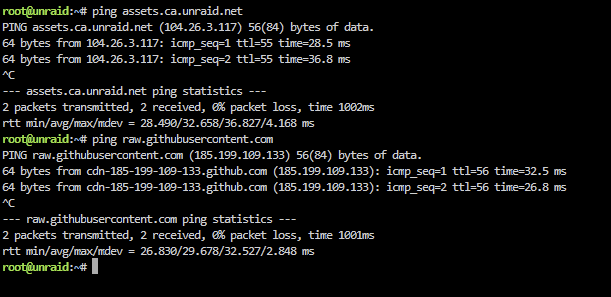
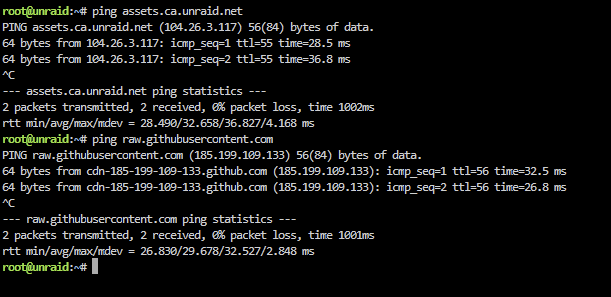
Hi, since yesterday I run into trouble. DNS is ok. Over terminal I am able to ping CA-Logging-20250117-1519.zip
-
Must restart the server for different reason. Now I am able to install the plugin. Strange
-
JuSt Floppy changed their profile photo
-
I tried to install an additional plugin (Intel-GPU-Top), but I get always the error: Installation already in progress Another plugin installation or update is already in progress, and this one cannot start. Wait until the current installation or update is completed and try again What is the best way for troubleshooting? As far as I know there is no update running. I do not want to reboot the server. Last time (3 days ago) I got that error, a reboot fixed it. But there must be a better solution


