





kroese
Members
-
Joined
-
Last visited
-
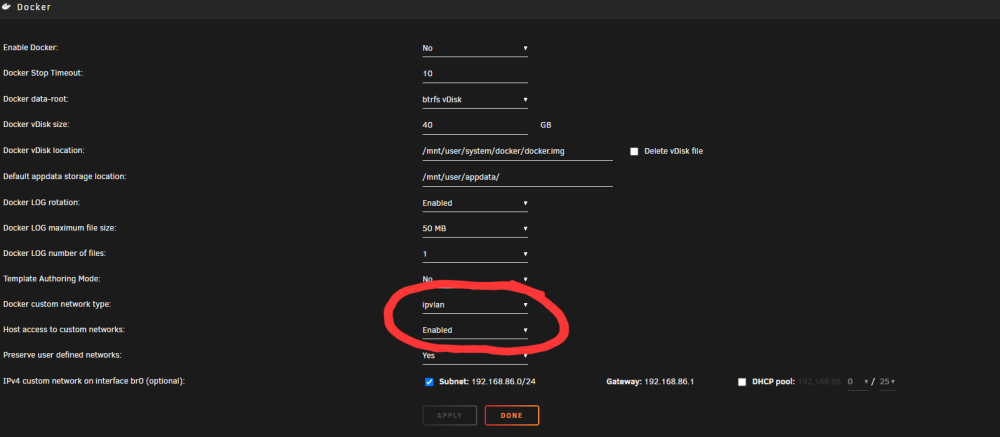
I never used unRAID, but I know from others that my container works with: - Bridge mode network (This is the simplest option. It doesn't require any advanced configuration.) The only downside is that you cannot use any ports that are already in use by unRAID. So if you want to enable the Samba Server in DSM it doesnt work because unRAID is already using the Samba ports. - Custom br0 network in MACVLAN mode (This is the more difficult option. It requires DHCP=Y and the cgroup rules, etc.) The advantage is that DSM will get its own IP, so you will never have port conflicts. As I said before, I think your br0 network is not in MACVLAN mode but in IPVLAN mode, which can never work with DHCP. From a quick Google search I see that you can change it in the Docker settings. So change the two settings in the screenshot below to macvlan and enabled.
-
I think the problem is that your br0 network type is set to IPVLAN instead of MACVLAN. You should change it to macvlan, and enable the setting "Host access to custom networks" in unRAID. After that it should work with DHCP=Y. If it doesn't, please make sure you are using the latest version and post the logs.
-
@classma I think the problem is that your br0 network type is set to IPVLAN instead of MACVLAN. You should change it to macvlan, and enable the setting "Host access to custom networks" in unRAID. After that it should work with DHCP=Y. If it doesn't, please upgrade the container to the latest version and post the logs.
-
I'm trying to make my docker container compatible with unRAID. Because it doesn't play well with unRAIDs custom br0 network. It works fine on Ubuntu on a docker macvlan network, and it also work on unRAID's bridge network. So what are the differences between a normal docker macvlan network on Linux, and the unRAID implementation? The code for the network is located here: https://github.com/kroese/virtual-dsm/blob/master/run/network.sh If anyone has any clue what must be changed to make it work on unRAID that would be great!

