





Spardha
Members
-
Joined
-
Last visited
Everything posted by Spardha
-
OK Thanks will try and report back.
-
Sorry, I'm not following
-
Followed the advice to convert to single profile and remove the unpartitioned device via CLI: btrfs balance start -mconvert=single -dconvert=single -sconvert=single -f /mnt/vm btrfs device remove /dev/sdn /mnt/vmConfirmed clean result: Total devices 1 FS bytes used 692.05GiB devid 5 size 931.51GiB used 700.03GiB path /dev/sdm1Then stopped the array, removed the vm pool, recreated it fresh (same name, sdm only assigned, filesystem Auto), and started the array. Problem: Pool now shows Unmountable: wrong or no file system in the GUI — but the filesystem is demonstrably fine: blkid /dev/sdm1 → valid btrfs UUID btrfs filesystem show → Total devices 1, correct used space, no errors mount | grep vm → confirms /dev/sdm1 mounted at /mnt/vm (rw, healthy) dmesg → no mount errors for sdm1 at all VMs and Docker are running normally off this mount right now Found a couple of similar threads suggesting this is a known GUI status-check bug when a pool is touched outside Unraid's own formatter (mine was originally built via CLI btrfs device add), rather than an actual filesystem problem. Question: Given the GUI is misreporting this pool's status, what's the safest way to now add sdn (currently blank/unassigned, previously removed from this filesystem) back into the pool for a RAID1 rebuild — through the GUI as normal, or is there a CLI-first approach recommended given the GUI's unreliable status-checking on this particular pool? Diagnostics zip attached. tower-diagnostics-20260806-0812.zip

-
i tried and hit this straight away root@Tower:~# btrfs device remove /dev/sdn /mnt/vm ERROR: error removing device '/dev/sdn': unable to go below two devices on raid1 root@Tower:~# btrfs filesystem show /mnt/vm Label: none uuid: 0d3eea3a-97ec-4495-aadc-9bc75f3a2749 Total devices 2 FS bytes used 705.82GiB devid 5 size 931.51GiB used 731.03GiB path /dev/sdm1 devid 6 size 931.51GiB used 731.03GiB path /dev/sdn root@Tower:~# ^C root@Tower:~# ^C root@Tower:~# tower-diagnostics-20260729-1936.zip
-
I think I'm good, i will report back tomorrow. Thanks again
-
Thank you for the quick response. when you say reimport the pool am I removing and re-creating the pool with the same name? When I've tried to set the pool to one slot I'm unable to select anything less than 2 other then when i create the pool from scratch
-
Of course, sorry. tower-diagnostics-20260729-0838.zip
-
On the face of it, it looks like its working the pool has been created with both drives and the array has started which it wouldn't before. But I have a warning Unmountable: unsupported or no file system. Also I have Unmountable disk present: with both disk listed?
-
Ok will try this tonight when home thanks.
-
As the below will show, I had a drive drop from my VM/Docker pool get out of sync. I didnt think it would be to big a job to re-add it so, I did use Ai to help get it re-added. The post below is also Ai to show what I/we did to get where we are. I dont currently have a backup of the pool, but I am working on that. System: Unraid (current release), 2x Crucial BX500 1TB (sdm/sdn) as BTRFS RAID1 pool named vm, holding VM disk images + Docker appdata (~700GB). BackgroundOne device (sdn) dropped out of the vm pool, showing as <missing disk> in btrfs filesystem show. Pool continued running degraded on the surviving device (sdm). What I did to fix the degraded pool (all via terminal)Confirmed pool was degraded with mixed raid1/single block group profiles (btrfs fi usage /mnt/vm) Converted all chunks to single profile to free the missing device from RAID1 constraints: btrfs balance start -mconvert=single -dconvert=single -sconvert=single -f /mnt/vm (took several hours on a DRAM-less SATA SSD, ~700GB to relocate) Once confirmed complete (btrfs device usage showed 0 chunks on missing device), removed it: btrfs device remove missing /mnt/vm Wiped and added the replacement/same physical drive back in: wipefs -a /dev/sdnbtrfs device add -f /dev/sdn /mnt/vm Converted back to RAID1: btrfs balance start -mconvert=raid1 -dconvert=raid1 /mnt/vm Confirmed success — btrfs device usage /mnt/vm showed matching used values on both devices (~715GiB each), no missing devices, no warnings. At this point, BTRFS itself considered the pool fully healthy and mirrored. Where it went wrongsdn was added via CLI (btrfs device add), not through the Unraid pool GUI, so Unraid's own pool slot config never recognized it as a member. After an array restart, the pool wouldn't mount — Unraid only knew about sdm in its pool config, and BTRFS refused to mount a 2-device RAID1 filesystem with only 1 device supplied. Manually mounting both devices via terminal (mount -t btrfs -o device=/dev/sdm1,device=/dev/sdn /dev/sdm1 /mnt/vm) confirmed the filesystem and all data were 100% intact and correctly synced. Attempting to assign sdn to the pool via the GUI triggers "All existing data on this device will be OVERWRITTEN when array is Started" — even though sdn is a fully valid, synced RAID1 member. Attempting to unassign both pool devices and start with an empty pool (per the documented "make Unraid forget" procedure) fails with "Wrong Pool State — vm — too many wrong or missing devices." Pool slot count won't go below 2. Current state (stable, not urgent, but degraded)Running with sdm alone assigned to the vm pool (single slot filled, other left unassigned) — mounts and starts cleanly every time, all data accessible, VMs/Docker running normally. sdn is fully wiped and sitting idle/unassigned — not currently part of the pool. What I'm looking forHas anyone hit this specific combo — BTRFS device added to a 2-slot pool via CLI, GUI refuses to recognize it (overwrite warning), AND "unassign all + restart" also fails with "too many wrong or missing devices" on a pool that requires 2 slots minimum? Trying to avoid another CLI-only balance (know it works, but takes hours and I'd rather have the GUI track this pool properly going forward). Diagnostics zip available on request. tower-diagnostics-20260727-0933.zip
-
Just installed fresh, but I dont get the first login page to change/setup the login. I get a login page, I tried root in the username field but, unauthorised any idea how I fix it?
-
Im not sure, I'm just glad i was able to get it back. Will look into backing up the libvirt. I really appriciate your help on this.
-
Ok so changing to /vm/system etc has brought the VM's back. also doing the same for docker has also brought those back. Thanks @JorgeB
-
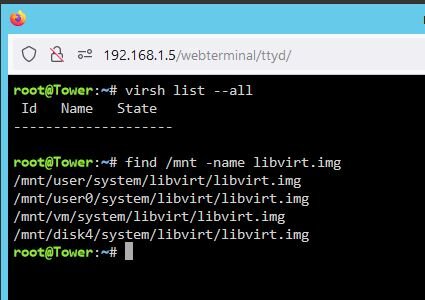
Yeah, so the older is /vm/system
-
I feel like my issue is similar to https://forums.unraid.net/topic/131690-lost-my-vms-after-cache-upgrade/ I have attached my find if it helps. I feel like copying domains from /mnt/vm to /mnt/user but not sure. Both VM manager & Docker are disabled.
-
Diag as requested. Thanks in advance. tower-diagnostics-20240911-1148.zip
-
I think I have messed up, I had my VM's on 2 1TB SSD's one disappeared from the config and I wasn't able to see it to add it back so I bought 2 new SSD's of a better brand and added them. The BTRFS transfer completed sometime this morning. I wanted to remove the older cheaper drive from the pool. I did so by stopping the array and changing the drive in question to none. To complete the removal I thought I had to create a new config with preserve assignments. On doing so My VM's and Docker have gone. The files are all still there how do I get them back. ?? I'm not sure what to provide in terms of logs etc..
-
Got up this morning to Jul 16 10:24:30 Tower kernel: BTRFS error (device sdk1): error writing primary super block to device 1 Jul 16 10:24:30 Tower kernel: BTRFS error (device sdk1): error writing primary super block to device 1 Jul 16 10:24:31 Tower kernel: BTRFS error (device sdk1): error writing primary super block to device 1 tower-diagnostics-20230716-1031.zip tower-smart-20230716-1026.zip
-
So, was all good this morning no further issue until this afternoon when i was copying data from my old server to the new VM on this pool. Jul 15 16:41:54 Tower kernel: I/O error, dev sdk, sector 211154464 op 0x0:(READ) flags 0x80700 phys_seg 1 prio class 0 Jul 15 16:41:54 Tower kernel: BTRFS info (device sdk1): read error corrected: ino 76350 off 21219844096 (dev /dev/sdk1 sector 211152416) I don't know if this is normal, that it corrected the error? tower-smart-20230715-1940.zip
-
Ran without errors. Will leave it and see what happens overnight and check the logs in the morning. UUID: 0d3eea3a-97ec-4495-aadc-9bc75f3a2749 Scrub started: Fri Jul 14 16:19:57 2023 Status: finished Duration: 0:05:30 Total to scrub: 193.01GiB Rate: 598.95MiB/s Error summary: no errors found
-
Powered down, as I have 2 of the same brand ssd i wasn't able to match up the serial so I replaced the power for both. I wasn't able to change the Sata as i'm on a LSI Raid card and only had 8087 SATA cable to hand. I have found the other 8087 so could change if needed. tower-smart-20230714-1534.zip tower-diagnostics-20230714-1534.zip
-
Am I ok to spin down that pool or should I shutdown?
-
So, initially i noticed that some of my containers had stopped. I thought nothing of it and tried to start them, when i got a Execution error 403. After some digging and googling I thought my cache drive was broke/corrupted. When i got home from work I check the connections and rebooted the server. Everything came back as expected so carried on with my evening. come to this morning, and all the containers had stopped. Again tried to start them but same error 403. So with bit more digging and checking the proper logs its not my cache drive but SDK1 of my VM pool. Both are new bought May'23 1tb SSD's, check enchancedsyslog: Jul 13 23:57:53 Tower kernel: BTRFS error (device sdk1): error writing primary super block to device 2 Jul 13 23:57:56 Tower kernel: BTRFS warning (device sdk1): lost page write due to IO error on /dev/sdk1 (-5) Jul 13 23:57:56 Tower kernel: BTRFS error (device sdk1): bdev /dev/sdk1 errs: wr 59, rd 0, flush 0, corrupt 0, gen 0 Jul 13 23:57:56 Tower kernel: BTRFS error (device sdk1): error writing primary super block to device 1 Jul 13 23:57:56 Tower kernel: BTRFS error (device sdk1): error writing primary super block to device 2 Jul 13 23:57:56 Tower kernel: BTRFS: error (device sdk1) in write_all_supers:4438: errno=-5 IO failure (2 errors while writing supers) Jul 13 23:57:56 Tower kernel: BTRFS info (device sdk1: state E): forced readonly SMART & the dashboard show healthy? So, i guess I need to know is the drive bad? if so I can return and replace if so am I able to run my dockers on the single drive for a few days? appriciate the help tower-smart-20230714-0944.zip tower-diagnostics-20230714-1049.zip
-
Hi, Thanks for coming back. JUst removed INPUT_PORTS, Yes i can connect to all webUI's deluge, sonarr, radarr etc. rebooted all the dockers and its working... I guess having the INPUT_PORTS messed it up..
-
tried but doesnt work either, i tried the docker ip for openvpn too 172.17.0.2 but didnt work either


