





Spardha
Members
-
Joined
-
Last visited
Everything posted by Spardha
-
Just installed fresh, but I dont get the first login page to change/setup the login. I get a login page, I tried root in the username field but, unauthorised any idea how I fix it?
-
Im not sure, I'm just glad i was able to get it back. Will look into backing up the libvirt. I really appriciate your help on this.
-
Ok so changing to /vm/system etc has brought the VM's back. also doing the same for docker has also brought those back. Thanks @JorgeB
-
Yeah, so the older is /vm/system
-
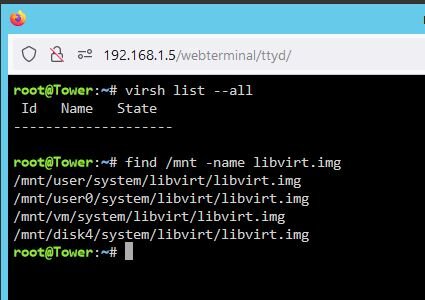
I feel like my issue is similar to https://forums.unraid.net/topic/131690-lost-my-vms-after-cache-upgrade/ I have attached my find if it helps. I feel like copying domains from /mnt/vm to /mnt/user but not sure. Both VM manager & Docker are disabled.
-
Diag as requested. Thanks in advance. tower-diagnostics-20240911-1148.zip
-
I think I have messed up, I had my VM's on 2 1TB SSD's one disappeared from the config and I wasn't able to see it to add it back so I bought 2 new SSD's of a better brand and added them. The BTRFS transfer completed sometime this morning. I wanted to remove the older cheaper drive from the pool. I did so by stopping the array and changing the drive in question to none. To complete the removal I thought I had to create a new config with preserve assignments. On doing so My VM's and Docker have gone. The files are all still there how do I get them back. ?? I'm not sure what to provide in terms of logs etc..
-
Got up this morning to Jul 16 10:24:30 Tower kernel: BTRFS error (device sdk1): error writing primary super block to device 1 Jul 16 10:24:30 Tower kernel: BTRFS error (device sdk1): error writing primary super block to device 1 Jul 16 10:24:31 Tower kernel: BTRFS error (device sdk1): error writing primary super block to device 1 tower-diagnostics-20230716-1031.zip tower-smart-20230716-1026.zip
-
So, was all good this morning no further issue until this afternoon when i was copying data from my old server to the new VM on this pool. Jul 15 16:41:54 Tower kernel: I/O error, dev sdk, sector 211154464 op 0x0:(READ) flags 0x80700 phys_seg 1 prio class 0 Jul 15 16:41:54 Tower kernel: BTRFS info (device sdk1): read error corrected: ino 76350 off 21219844096 (dev /dev/sdk1 sector 211152416) I don't know if this is normal, that it corrected the error? tower-smart-20230715-1940.zip
-
Ran without errors. Will leave it and see what happens overnight and check the logs in the morning. UUID: 0d3eea3a-97ec-4495-aadc-9bc75f3a2749 Scrub started: Fri Jul 14 16:19:57 2023 Status: finished Duration: 0:05:30 Total to scrub: 193.01GiB Rate: 598.95MiB/s Error summary: no errors found
-
Powered down, as I have 2 of the same brand ssd i wasn't able to match up the serial so I replaced the power for both. I wasn't able to change the Sata as i'm on a LSI Raid card and only had 8087 SATA cable to hand. I have found the other 8087 so could change if needed. tower-smart-20230714-1534.zip tower-diagnostics-20230714-1534.zip
-
Am I ok to spin down that pool or should I shutdown?
-
So, initially i noticed that some of my containers had stopped. I thought nothing of it and tried to start them, when i got a Execution error 403. After some digging and googling I thought my cache drive was broke/corrupted. When i got home from work I check the connections and rebooted the server. Everything came back as expected so carried on with my evening. come to this morning, and all the containers had stopped. Again tried to start them but same error 403. So with bit more digging and checking the proper logs its not my cache drive but SDK1 of my VM pool. Both are new bought May'23 1tb SSD's, check enchancedsyslog: Jul 13 23:57:53 Tower kernel: BTRFS error (device sdk1): error writing primary super block to device 2 Jul 13 23:57:56 Tower kernel: BTRFS warning (device sdk1): lost page write due to IO error on /dev/sdk1 (-5) Jul 13 23:57:56 Tower kernel: BTRFS error (device sdk1): bdev /dev/sdk1 errs: wr 59, rd 0, flush 0, corrupt 0, gen 0 Jul 13 23:57:56 Tower kernel: BTRFS error (device sdk1): error writing primary super block to device 1 Jul 13 23:57:56 Tower kernel: BTRFS error (device sdk1): error writing primary super block to device 2 Jul 13 23:57:56 Tower kernel: BTRFS: error (device sdk1) in write_all_supers:4438: errno=-5 IO failure (2 errors while writing supers) Jul 13 23:57:56 Tower kernel: BTRFS info (device sdk1: state E): forced readonly SMART & the dashboard show healthy? So, i guess I need to know is the drive bad? if so I can return and replace if so am I able to run my dockers on the single drive for a few days? appriciate the help tower-smart-20230714-0944.zip tower-diagnostics-20230714-1049.zip
-
Hi, Thanks for coming back. JUst removed INPUT_PORTS, Yes i can connect to all webUI's deluge, sonarr, radarr etc. rebooted all the dockers and its working... I guess having the INPUT_PORTS messed it up..
-
tried but doesnt work either, i tried the docker ip for openvpn too 172.17.0.2 but didnt work either
-
Hi, I'm doing something wrong, I'm using the OpenVPN-Client and I have passed Deluge & Prowlarr through it successfully. I'm also using Sonarr and Radarr but not routing through the VPN and there unable to connect to deluge due to being on different networks. I have tried using the VPN_OUTPUT_PORTS variable but doesnt seem to have changed anything. Images of config https://imgur.com/a/OK2AJoZ I'm sure Im just missing something stupid. Thanks in advance.

