





phosno
Members
-
Joined
-
Last visited
Everything posted by phosno
-
Hey, Could you please consider keeping Gramps-web up to date? Additionally, I noticed that the container size ("devel-latest" release) of Gramps-web is over 5GB. Is there a possibility to adjust this? Given that it’s a relatively small application, it seems a bit excessive. Thank you for your attention to this matter!

-
Reopening my topic, since I'm still running into problems with my unraid machine. Any help from you JorgeB or anyone else is much appreciated. In Short: Dockers/VM are not working and server becomes unresponsive after some time. I'm attaching current diagnostics. I did memory-testing and with one of the 4 sticks the machine wouldn't even boot properly to let me login via webui. The others were fine apparently. Every time when rebooting the server, the cache-pool is "Unmountable: Unsupported or no file system". So I'm running "btrfs rescue zero-log /dev/sdc1" and restart the array. When I enable docker, supervisord, start.sh and unraid-api use 70% of my cpu. After some time (1 1/2 hours) the server becomes unresponsive again: webui/cli doesn't work. On webui I get "500 internal server error", so I need to reboot again and run "btrfs rescue zero-log" again. In my syslog I found: Nov 25 19:57:00 Tyr kernel: BTRFS info (device nvme0n1p1): bdev /dev/nvme0n1p1 errs: wr 0, rd 0, flush 0, corrupt 22901, gen 0 Nov 25 19:57:00 Tyr kernel: BTRFS info (device nvme0n1p1): bdev /dev/sdc1 errs: wr 0, rd 0, flush 0, corrupt 22901, gen 0 Not sure how to read this, were the corruptions created by corrupt ram or are the drives of my cache-pool faulty as well? Not sure how to proceed at this point. I already saved my files. I assume my docker.img is corrupted as well, since for some docker containers I see read-only in the logs. None of them start. My VM does not start as well. How do I fix this? Delete docker.img and reformat drives? Any tips/steps are much appreciated. tyr-diagnostics-20241125-2026.zip
-
This solved my issue of the unmountable cache pool, thank you very much. The devices are recognized again after typing the command and restarting the array. Regarding memtest: I'm using the Live Memtest Plugin, but only getting Failed actions. Do you know if this Plugin is reliable? [15.10.2024 00:10:46 CEST] /usr/bin/memtester 55G ============================================================================================= memtester version 4.6.0 (64-bit) adapted for use on Unraid installations Copyright (C) 2001-2020 Charles Cazabon Copyright (C) 2024 desertwitch (modifications for Unraid) THIS PROGRAM IS PROVIDED AS IS AND WITHOUT ANY WARRANTIES It is licensed under GNU General Public License Version 2 pagesize is 4096 pagesizemask is 0xfffffffffffff000 want 56320MB (59055800320 bytes) got 56320MB (59055800320 bytes), trying mlock ...locked. Loop 1: Stuck Address : Testing... failed Random Value : Testing... failed Compare XOR : Testing... failed Compare SUB : Testing... failed Compare MUL : Testing... failed Compare DIV : Testing... failed Compare OR : Testing... failed Compare AND : Testing... failed Sequential Increment : Testing... failed Solid Bits : Testing... failed Block Sequential : Testing... failed Checkerboard : Testing... failed Bit Spread : Testing... failed Bit Flip : Testing... failed Walking Ones : Testing... failed Walking Zeroes : Testing... failed 8-bit Writes : Testing... failed 16-bit Writes : Testing... failed Loop 2: Stuck Address : Testing... failed Random Value : Testing... failed Compare XOR : Testing... failed Compare SUB : Testing... failed Compare MUL : Testing... failed Compare DIV : Testing... failed Compare OR : Testing... failed Compare AND : Testing... failed Sequential Increment : Testing... failed Solid Bits : Testing... failed Block Sequential : Testing... failed Checkerboard : Testing... failed Bit Spread : Testing... failed Bit Flip : Testing... failed Walking Ones : Testing... failed Walking Zeroes : Testing... failed 8-bit Writes : Testing... failed 16-bit Writes : Testing... failed Regarding scrub: I did the docker btrfs scrub :, this is the result: Error summary: csum=12 Corrected: 1 Uncorrectable: 11 Unverified: 0. How concerning is this?
-
Hello, I'm facing a problem with my unraid server and I'm looking for advice about what to do next. I've been using Unraid for about 1 1/2 years now and I'm still learning. The problem: All my docker containers (~20) and my Homeassistant VM are gone from my server. Now my cache pool says: Unsupported or no file system. This is the second time it happened. After the first time, I reformatted the drives and they were usable again (though empty). Now after ~ 2 months it happened again. I attached the diagnostics to this post in hopes someone can figure out what's going on. Questions: What is the problem with my server? Is there any chance I can restore my apps/vm? (I'm fine with setting up everything again if I'm sure the apps are not getting deleted again, as no real data was lost). Additional Info: My machine was running fine for a year and I decided to swap existing RAM (2x16GB) with new ones (new brand, 4x16GB). After that the server was showing signs of problems, such as 1) some webUis were not accessible, even after reinstalling. 2) Unraid GUI not accessible sometimes. 3) Docker containers randomly shutting down 4) Jellyfin playback stopped randomly and jumped to the beginning of a movie 5) CPU usage sometimes showed workload above 100% (like 424%) when running top in cli for some processes which prevented the dashboard to load or do any actions at all ( https://imgur.com/a/T0ysWql ) Could this be a RAM problem? I rebooted the system or needed to force shut down when these things happened in the last weeks. Problems started on version 6.12.9, then I updated to 6.12.13, but no changes. Also I noticed one time my running microwave went off and on again, recently, so I'm fearing there are power spikes that could mess with my server. Any help is much appreciated. tyr-diagnostics-20241014-1132.zip
-
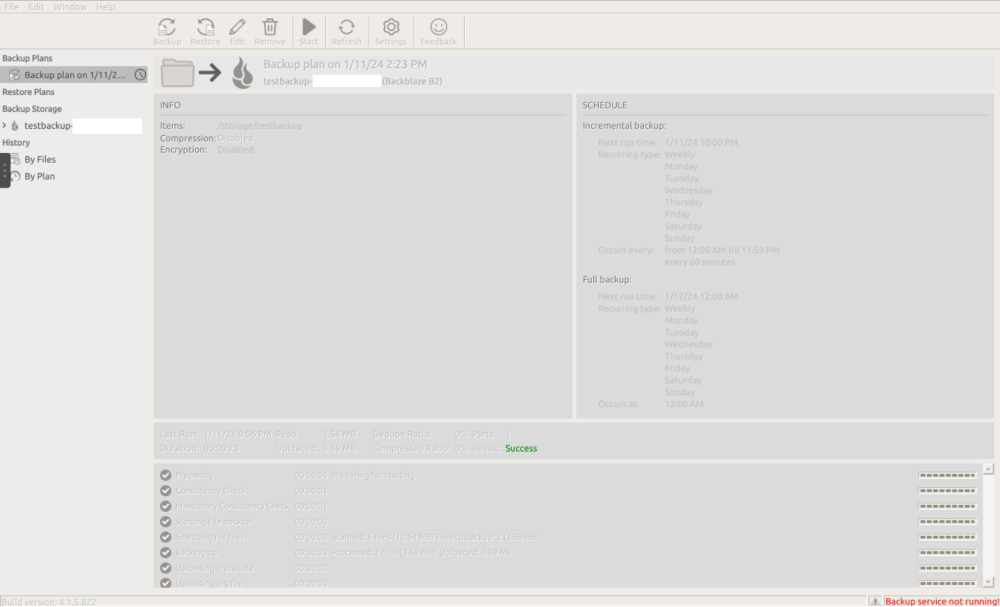
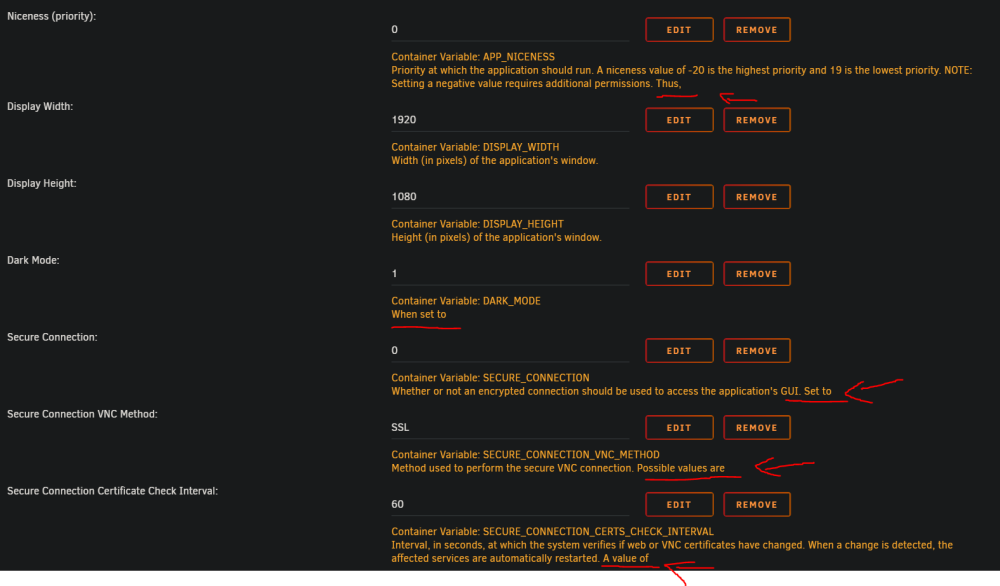
Thank you for your response. I see, but how is this container still maintained by you? Do you implement changes yourself or in collaboration with msp360? I added a screenshot of the frozen VNC screen after a backup. All buttons are grey. Maybe I'm using it wrong? Restarting the container fixes the issue. I'm on Chrome Browser (Version 120.0.6099.217), Unraid 6.12.3. I attached a screenshot of the unraid container config (cb2.png). Some sentences are not finished.
-
Hello, I'm trying to wrap my head around cloudberry backup and I want to check, if it's a solution for my use case. After reading through the comments here, my understanding is CloudberryBackup was officially discontinued and replaced with msp360-standalone-backup. You can require a license for an annual payment of $19.99. But it's still possible to run CloudBerryBackup docker and install it through community-app-store? Questions: 1) What has the MSP360-license to do with the community store app "CloudberryBackup"? 2) I was trying out the Community-app and my VNC chrashes after a backup. Is the docker-container that is available on the community-app-store still maintained/updated and a viable solution? If so, how? 3) The github-documentation seems to be dated, since there is no mentioning of MSP360 and it's not mentioned in the first post of this topic. 4) The config to set up the container in unraid is filled with incomplete sentences like "Port to access the application's GUI via the web interface. NOTE: This setting is relevant only when the Network Type is set to". What happened here? It's kind of confusing and it looks faulty. I'd be very glad, if someone could explain.


