OriginSaint
Members
-
Joined
-
Last visited
Everything posted by OriginSaint
-
Great work. Thanks so much for all you do!
-
I tried forcing an update and even adding ':latest' to the end of the repo and applying, no luck, issue persisted. supervisord.zip
-
Updated today to find that when it restarted the container, I'm now getting a 7za binary... NOT found! warning in the WebGUI. Tried doing a workaround to install 7zip myself by opening the terminal for the container and using pacman -S 7zip, but that returned an error failed to commit transaction (conflicting files) 7zip: /usr/bin/7za exists in the filesystem Is there something I need to do to fix this issue?
-
Quick update here. As mentioned before I ordered the TP-Link TX201 (2.5Gbps card) to try instead of the TX401 (10Gbps), mostly because the TX201 is a PCIe x1 card instead of needing the larger PCI lane port, and since my internet service is only 3Gbps and the switches and upstream networking hardware are only capable of 2.5Gbps anyway, I'd never see the benefit of over that speed regardless. I installed the TX201 today in the second slot, the first x1 slot, and booted, and everything worked perfectly fine with no changes to drivers, plugins or anything of that sort. Speed test shows full 2.5Gbps download and upload speeds being received on the server, so everything looks kosher. Since I won't see any benefit from using the TX401 anyway, I've decided to cut my losses and return it to Amazon since I've got a working setup now and will save time faffing about with the TX401 for realistically no benefit in the foreseeable future. Thanks to everyone that chimed in!
-
Given I'm still unsure if it's anything to do with the card or the drivers, and since it's cheap, I just ordered a TP-Link TX201 2.5Gbps card that's only PCIe x1, so it will be able to slot into one of my other 2 PCIe ports on my motherboard. When that arrives Friday, I will try that out and see where it gets me. I'll update here with my results! Thanks to you both for the help thus far - hoping I can get it sorted so I can take advantage of this faster network speeds for transfer and remote media server streaming!
-
From my research the chipset doesn’t appear to be Realtek, it seems to be a “Marvell AQC113”. See review and breakdown here: https://www.servethehome.com/tp-link-10gigabit-pcie-network-adapter-mini-review-marvell-aqc113/ Does this mean the plugin drivers would not work for this card?
-
As a reminder this diagnostic was taken without the TP-Link expansion card plugged in and the cards port is 10Gbps and the motherboards is 1Gbps. What is the fix in this case? Do I need to install one of these Realtek plugins for the driver?
-
Didn't post them originally since without the network card plugged in, I didn't know if there'd be any useful information. Here you go. origin_saint-server-diagnostics-20260107-2053.zip
-
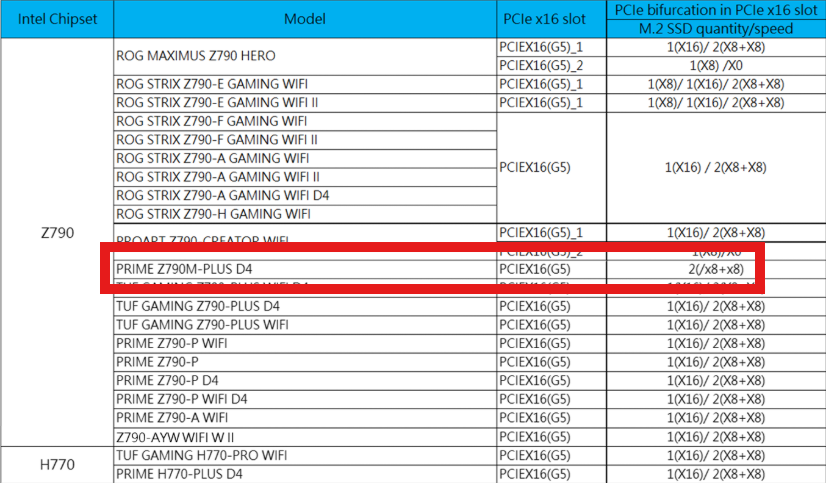
Hi all! Recently upgraded my internet to 3Gbps (only have 2.5Gbps switches though, but I'm fine with that), but realized the ethernet port on the motherboard in my Unraid build only support 1Gbps. Figured the best thing to do would be get a PCI wired network card. Pretty quick search led me to buy the TP-Link TX401 PCIe x4 10Gbps card off Amazon, seeing a boatload of reviews directly mention "plug-and-play" compatibility with Unraid without needing to fuss about with drivers or anything complex. Currently, the "primary" PCI slot on my motherboard is occupied with a LSI00194 (8-port PCI 2.0 x8 SAS card that I use SAS->SATA breakouts on to expand my HDD count), so I plugged the TX401 into the bottom PCI port since that's the only one left that will accommodate it. On boot, I received a slew of error messages on the command line that looked like this: port 0000:00:1b.4: AER: Correctable error message received from 000:05:00.0 0000:05:00.0: PCIe Bus Error: severity=Correctable, type=Physical Layer, (Receiver ID) 0000:05:00.0: device [1d6a:04c0] error status/mask=00000001/0000e000 0000:05:00.0: [ 0] RxErr (First) Not knowing if it would boot or not, I didn't want to risk letting it run and filling my hard drive with these logs when it clearly says it's a "correctable" error, I powered it down, took the card out and switched back to using the motherboard port for now. I first thought maybe there was an issue with bifurcation on the PCIe lanes due to me using 2 M.2 slots and trying to use both main PCIe ports, but checking the motherboard documentation only leads me to believe that at worst, it would reduce the PCIe ports to x8, which to me seems like it would be fine since the LSI SAS card uses x8, and the TP-Link TX401 uses x4. So even if this were the case, I would expect things to still function. I briefly looked at the Linux driver installation FAQ from TP-Link for this network card, but I've never installed any drivers in Unraid myself, and with so many people seemingly not needing to do that, I wasn't sure that was what needed doing. Here is that website: https://www.tp-link.com/us/support/faq/3436/ I have a lot of questions, and plenty of confusion on this. Will this card work with my system at all? If it will, what is the issue currently, and how do I fix it? If this card won't work, is there reason to believe a basic PCIe x1 2.5Gbps network card wouldn't work either? Totally fine to just return this card and get something more basic I would greatly appreciate help and advice with this, as I'm a bit out of my depth at this point, but half the reason for the internet speed upgrade was for my Unraid server, so I'd obviously love to figure out how to sort this situation out. Thanks in advance for any assistance! Here are my relevant build specs: Motherboard: ASUS PRIME Z790M-PLUS D4 In the PCIEX16(G5) port: LSI00194 SAS Card In M.2_1(SOCKET3) port: Crucial 500GB P3 Plus NVMe PCIe 4 SSD In the M.2_2(SOCKET3) port: Samsung 1TB 980 Pro NVMe PCIe 4 SSD In the PCIEX16(G4) port: where I am attempting to install the TP-Link TX401 CPU: Intel i5-13400 Here are links to product pages, etc...: ASUS PRIME Z790M-PLUS D4 TP-Link TX401 LSI00194
-
Tried 4 other cables, all brand new, nothing. Took it out and connected it to my external enclosure and plugged it into my Win11 machine, as soon as it spins up, the head clicks every second forever and never shows up in the file system. Hit the nail right on the head; Thanks so much!
-
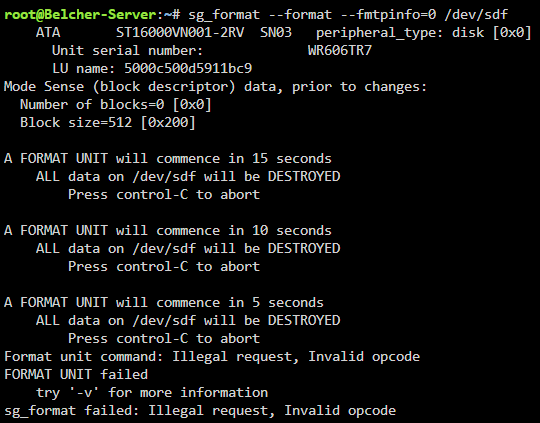
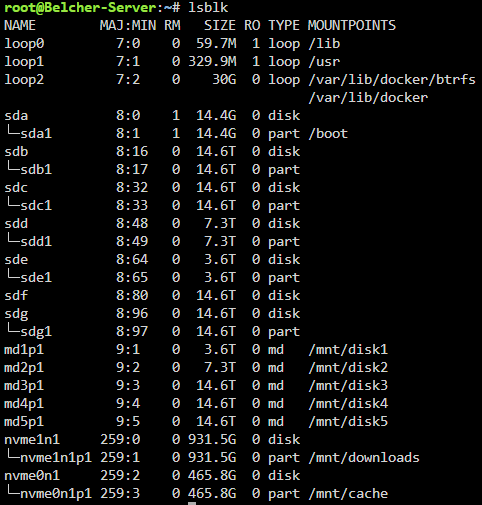
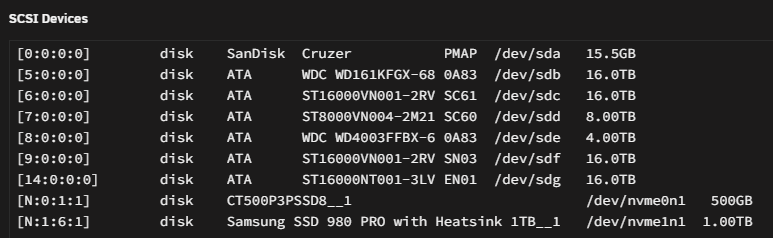
Hi, Ran into a new issue today trying to install a new HDD into my Unraid server: It appeared in the list to assign to the array, but after I clicked on it, it disappeared. Then clicking the drop down, it wasn't there anymore. It showed back up after a reboot but did the same thing. I notice this is similar to this other post: However, I tried running the command mentioned there: sg_format --format --fmtpinfo=0 /dev/sdf And received the following error: I did verify using "lsblk" that the drive appeared, as well as checking in the Tools -> System Devices menu. Of note hardware-wise, I currently have one of the 16TB drives that are working, plugged into a SATA PCI expansion card, and that card is what I'm also trying to plug this new harddrive into. (link to expansion card) I know this isn't ideal, and I have ordered a LSI Logic SAS9211-8I along with a SAS/SATA breakout cable, but they won't be here for a bit. I have not tried taking the drive out and using an enclosure to take a look at it on my Windows 11 machine, but if that would help with troubleshooting/etc..., I'll be more than happy to. Attached are the syslog and diagnostics. I appreciate any and all help in advance. Thanks! belcher-server-syslog-20231110-0234.zip belcher-server-diagnostics-20231109-2126.zip