





JohnBee
Members
-
Joined
-
Last visited
Everything posted by JohnBee
-
I swear this is why I avoid upgrading, and yet, my Unraid machine decided it will not load UI in browser anymore - everything else works, but no gui ... And more important, no rhythm or reason ... Unraid never changes - forced an update, gui returned - not cool
-
Hi and thanks so much for answering. That said, and when connected to one another(Win 10 file share), both machines max-out their 10Gbit/s throughput capacity in read & write, to and from one another. That said, I have not run any iperf tests as of yet, and so if you have any suggestions on how I might do so to interrogate matters further, that would be most helpful also.
-
I have an unraid server on 10gb network and have been enjoying near full read/write saturation with my workstation(1.1-1.2Gb/s), thanks to a generous nvme cache and a bit of tweaking to mtu. That said, I then decided to add another pc to the mix, but soon discovered that I cannot achieve anywhere near the same write speeds than with my own workstation, and in spite of using the very same NIC and profile between them. Now one would think this would be a hardware issue(pcie lanes, etc), though a bit of testing revealed the PC in question, to be fully capable of maxing out both read & write to other machines on the network. Beyond this, I even tried swapping the existing NIC and connection(drop-in), into said PC, only to find the very same limitation at work(350-400MB/s), and after doing 1.2GB/s on the previous machine ... I also tried using a fresh Windows(10) installation, to rule-out any OS related issues, as well as swapping-out different NIC's, to no avail... Thus leading to ask, how is this even possible? I must admit, this experience has me questioning the very fabric of reality lol I did manage to make some(mediocre) progress with extra directives in smb settings, though nothing to write home about(very minor). Whatever the case, and as I was able to rule out pretty much everything other than smb, the question is, why would this even happen in the first place? How could unraid/smb possibly differ between two pc's, using the same nic, os, processor, nvme and network settings, to the point of limiting write speeds to less than 1/2 the potential speeds? At any rate, I was hoping someone might have some ideas or suggestions in interrogating this further, and moreso, in uncovering an explanation and cause - if not only for my own sanity lol PS, also wanted to add that I can effectively max-out writing to Unraid server from PC, using sFTP with multi-threaded transfers, and that single threaded transfers are limited to 350-400MB/s
-
Yes, same file, in same location (verified) That said, I restarted Unraid, and the problem went away
-
Here's what it looks like
-
Having settled on the realities of NIC overheads, I suddenly realized that file transfers to Unraid are only faster using direct IP through Windows Explorer, and in-contrast with the hostname \\Unraid\_share\ which then slows to hard drive speed, rather than the nvme cache pool? Anyone have any ideas as to why that is?
-
Thanks for the info, will look at faster solutions
-
After installing a super fast nvme cache in my NAS, on 10Gb LAN putting out 9.87Gb/s on Promox VM's, though it would appear as though upload transfers to Unraid are limited to around 700MB/s That being said, and as most all of my 10Gb NIC's are dual 10Gb, I was wondering if it is possible to bind two NIC's together with SMB, so-as to make it multithreaded? PS, I have tested and can confirm 10GB/s transfers with multi-threaded over ssh/sftp, and so it would appear as though this is technically possible yes?
-
As the title says, I've been trying to improve my NAS write speeds, using a 2TB nvme pcie4 nvme over a 10Gb network. That said, I managed to eliminate all intermediary factors from the equation, by connecting directly to NAS from PC, but found the same behavior 1/2; speed writes, w/ full speed(1.1 GB/s), read speeds In addition to this, I tried; iperf3 = 9.98Gb/s File transfer to Promox VM = 9.93Gb/s read/write File transfer to Ubuntu bare metal server = 9.97Gb/s read/write Any ideas or suggestions? PS, did the usual MTU/Large frame, flow control, etc, etc, none appear to make a difference, best I can get is 5.1Gb/s transient, though mostly 5Gb/s on average PS2. I'm using SPF+ w/fiber optic
-
I would like update this thread and post that I have identified the cause of this behaviour as well as found a suitable solution. The first thing to note, is that this particular behaviour seems specific to assigning relevant paths and directories to alternative devices - such as nvme's or SSD drives The second to note is that the Docker and VM services, will continue to point to their original paths until these are either stopped or cycled. That said, and should this not be done, the respective Docker and VM services can potentially report false information, and as a result of polling the now original paths and folders. And so, the solution to this, and at this time, appears to that of cycling both the Docker and VM services after the changes to their respective devices are made. - hope this helps and thanks to JorgeB, for following-up on this PS. it would seem that the ideal scenario on this, is that of cycling said services following devices changes
-
Here is what I have found; [Scenario 1] Upon installing Unraid and setting; appdata, domains and system(cache pool settings), to 'nvme', prio-to all other things, the docker and vm images will drop from management panels following a restart of array, or the Unraid server. [Scenario 2] Upon installing Unraid, and creating docker and vm images prior-to changing; appdata, domains and system cache, to 'nvme', the dockers and vm's will not drop from their respective management panels following array restarts, or restarting the Unraid server That said, it would appear that there are discrepancies with setting-up and/or changing system shares(appdata, domains and system) prior-to specific server activities, though I have yet to interrogate this further...
-
I made progress on this after reinstalling Unraid from scratch, and starting with a clean slate. That said, and to the best of my abilities, it would seem that the issue is linked to assigning the docker and vm image files to a separate nvme drive, this in-turn, leading to the system dropping these from their respective management panels. In addition to this, and equally perplexing, is that I can only reproduce this one time, after which, both the dockers and vm's will be retained regardless of whether the array is cycled, or the Unraid is restarted. Which seems rsther odd to say the least. Therefore and with that being said, I would like to cover the recommended method to provision an nvme drive for docker and vm images, so-as to determine whether this can be avoided, as well as whetherthis is a genuine bug. - thanks for your continued participation on this btw. I do appreciate the help
-
Here's another apparent discovery toward this issue. If I restore the VM, by mounting the image within a newly created shell, the VM will now persist through array restarts, shutdown, reboots etc. That said, I am no closer to identifying the culprit on this most intriguing behavior
-
This seems like very odd behavior. The question now is; why would Unraid conclude the images or storage deleted following the start and stop of the array? That said, do you have any tips on how I might close-in on this particular bug? I would add that this is a test server, and that all of the disks can be deleted, formatted, etc NB. I was able to reproduce this by rebooting the NAS as well, all VM's and Dockers removed from the tabs
-
The weird part is, this is a fresh install, and so after initial configuration, I proceeded to create a docker, then stopped and started the array, and the docker disapeared from the manager window. Thing of it is, this was happening in my previous install as well, which prompted me to scrap the server configuration and start over. Really not sure what could cause this, and it's got me stumped. Guess my only recourse, is to nuke the disks and see if that makes a difference, though all of the metrics say the disks are 100%, which is weird.
-
Would add that this behavior also extends to dockers, as well as reinstallation of my USB /Unraid OS server. Only thing left, is the drives, which appear to be the culprits in this behavior?
-
I have since reinstalled, but find the same issue. Here's the diag file bertnas-diagnostics-20230524-1211.zip
-
Having installed a fresh Unraid server, and noticed the screen is now blank during the creation of dockers and VM's That said, I know this was not the case before, and I have not changed anything, in-terms of hardware, and so I'm wondering if anyone knows what might cause this? ps. the screen will remain blank until the conclusion of the installation process - at which point, the completed script process will appear with the [done] button...
-
I managed to recreate this After re-creating a vm, I then stopped and started the Array and found the VM gone from the manager listing That said, the .img and relevant data appears to be intact, though I cannot for the likes of me, figure out why the VM keeps disappearing from the list
-
NB. this particular bug is specific to: Version: 6.11.5 Problem: After restarting Unraid or the Array, some(or all) docker and VM, images are dropped from their respective management panels. That said, and after a little investigating, I discovered that this behaviour is specific to assigning the system shares(appdata, domains and system), to an nvme drive, prior-to, and following initial Unraid server setup. After which, and upon creating docker and vm images, a restart of the array or Unraid server, will result in the disappearance of said images from their respective management panels.
-
HI and thanks for answering. That said, the answer is yes, in that, I have run memtest86 - 0 errors That said, here is my list of things tried; 1. Tried changing ram; different brands(32GB) vs 64GB 2. Tried different USB installation sticks; 16GB, 32GB, 64GB, each different brands 3. Tried removing and/or swapping HDD drives and/or nvme(cache drive) 4. Disabled C-state in bios 5. Ensured, and turned-off all forms of oc/boost/xms profiles Having said that, I managed(by sheer miracle), to installed the latest OS update - I say, miracle, as the system usually freezes-up before I can do anything, though as it stands, it was able to conclude the update, and OS is now latest .RC5, and low and behold, the system has been up longer than I have ever seen - and it actually building parity drive. And so, I guess there's that. That said, why isn't there a way to collect logs and identify the cause of these incessant lockups? Do we have to pay a license to get support, or is this the extent of the support given for this particular software?
-
Sorry for the confusion, I thought the issue was resolved, as I found errors on one of my drives, though it appears that, that was not the case, as Unraid is now frozen again. Needless to say, my experience with Unraid is not proving to be a positive one at all
-
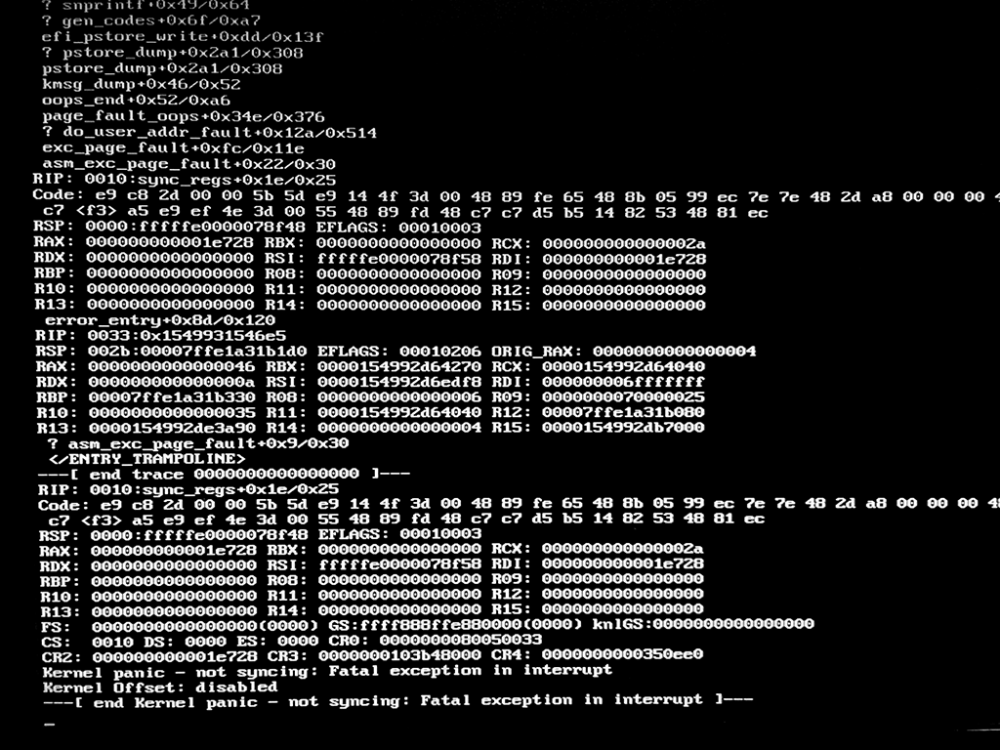
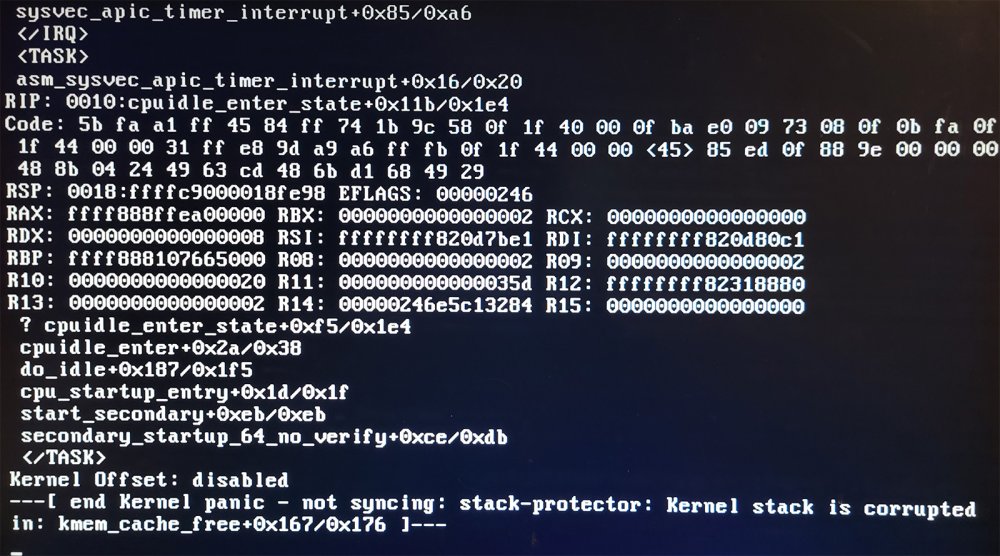
I cannot seem to build an array, against the system freezing-up /or shutting down with kernel panics That said, is there any way to identify or troublshoot this issue against the system freezing-up before I can navigate the UI?
-
Having installed UNRAID, I noticed the OS started to hang, requiring a reboot to get back online. And so after a bit of camping out, I caught sight of the following error;
-
Just to update, it would appear that the Windows USB installer is not working properly. I have not taken the time to investigate further, though it appears that it is creating empty boot drives - of this I have confirmed with multiple USB devices, and different types. That said and after copying the 'unRAIDServer-6.11.5-x86_64.zip' archive contents to the existing USB drive, everything seems to be working as intended. Though it should be said that the installer is offered on the front page, and that this will likely lead to confusion. - hope this helps


