





sihorrocks
Members
-
Joined
-
Last visited
Everything posted by sihorrocks
-
Thanks. It actually links to the github to raise an issue. But I'll see if i can find the correct support thread in here.
-
@trurl have you had any luck with Immich? I can't for the life of me get it running - tried every quick fix I can find on reddit etc - webUI will not run.
-
I created a wholly new share /downloads and set Sabnzbd to download to that new share. Seems to have fixed it, maybe because both downloads and the media library were on the same data share. Didn't have that problem in the past - but it seems to be working now, so very good - thanks. Just got to check its all working, then restart the VM for HA. I think the mover is working correctly too, files that were downloaded to the cache seem to have been moved over to the array overnight.
-
Classic 'a little bit of knowledge is a dangerous thing' error there. All the arrs give the exact same error. Well that would make sense! Changed the /config path to appdata docker run -d --name='sabnzbd' --net='bridge' --pids-limit 2048 -e TZ="Pacific/Auckland" -e HOST_OS="Unraid" -e HOST_HOSTNAME="Tower" -e HOST_CONTAINERNAME="sabnzbd" -e 'PRIVOXY_ENABLED'='false' -e 'UNBOUND_ENABLED'='false' -e 'VPN_ENABLED'='false' -e 'VPN_CONF'='wg0' -e 'VPN_PROVIDER'='generic' -e 'VPN_LAN_NETWORK'='' -e 'VPN_EXPOSE_PORTS_ON_LAN'='' -e 'VPN_AUTO_PORT_FORWARD'='true' -e 'VPN_AUTO_PORT_FORWARD_TO_PORTS'='' -e 'VPN_KEEP_LOCAL_DNS'='false' -e 'VPN_FIREWALL_TYPE'='auto' -e 'VPN_PIA_USER'='' -e 'VPN_PIA_PASS'='' -e 'VPN_PIA_PREFERRED_REGION'='' -e 'VPN_PIA_DIP_TOKEN'='no' -e 'VPN_PIA_PORT_FORWARD_PERSIST'='false' -e 'PUID'='99' -e 'PGID'='100' -e 'UMASK'='002' -l net.unraid.docker.managed=dockerman -l net.unraid.docker.webui='http://[IP]:[PORT:8080]' -l net.unraid.docker.icon='' -p '8080:8080/tcp' -v '/mnt/cache/appdata/sabnzbd/':'/config':'rw' -v '/mnt/user/data/':'/data':'rw' --hostname=sabnzbd.internal --cap-add=NET_ADMIN --sysctl="net.ipv4.conf.all.src_valid_mark=1" --sysctl="net.ipv6.conf.all.disable_ipv6=1" 'ghcr.io/hotio/sabnzbd:latest' 316ebf06c2cd887bdf0fb2f1e90049af4745d4eb341d1b0427d836f0344d7dac The command finished successfully!
-
Here's sab - docker run -d --name='sabnzbd' --net='bridge' --pids-limit 2048 -e TZ="Pacific/Auckland" -e HOST_OS="Unraid" -e HOST_HOSTNAME="Tower" -e HOST_CONTAINERNAME="sabnzbd" -e 'PRIVOXY_ENABLED'='false' -e 'UNBOUND_ENABLED'='false' -e 'VPN_ENABLED'='false' -e 'VPN_CONF'='wg0' -e 'VPN_PROVIDER'='generic' -e 'VPN_LAN_NETWORK'='' -e 'VPN_EXPOSE_PORTS_ON_LAN'='' -e 'VPN_AUTO_PORT_FORWARD'='true' -e 'VPN_AUTO_PORT_FORWARD_TO_PORTS'='' -e 'VPN_KEEP_LOCAL_DNS'='false' -e 'VPN_FIREWALL_TYPE'='auto' -e 'VPN_PIA_USER'='' -e 'VPN_PIA_PASS'='' -e 'VPN_PIA_PREFERRED_REGION'='' -e 'VPN_PIA_DIP_TOKEN'='no' -e 'VPN_PIA_PORT_FORWARD_PERSIST'='false' -e 'PUID'='99' -e 'PGID'='100' -e 'UMASK'='002' -l net.unraid.docker.managed=dockerman -l net.unraid.docker.webui='http://[IP]:[PORT:8080]' -l net.unraid.docker.icon='' -p '8081:8080/tcp' -v '/data/usenet':'/config':'rw' -v '/mnt/user/data/':'/data':'rw' --hostname=sabnzbd.internal --cap-add=NET_ADMIN --sysctl="net.ipv4.conf.all.src_valid_mark=1" --sysctl="net.ipv6.conf.all.disable_ipv6=1" 'ghcr.io/hotio/sabnzbd:latest' 8fc8a932682b5e7e57e250997bb53b74ed4896d5b7637a300c2c35e158fdad48 The command finished successfully! Here's lidarr - docker run -d --name='binhex-lidarr' --net='bridge' --pids-limit 2048 -e TZ="Pacific/Auckland" -e HOST_OS="Unraid" -e HOST_HOSTNAME="Tower" -e HOST_CONTAINERNAME="binhex-lidarr" -e 'PUID'='99' -e 'PGID'='100' -e 'UMASK'='000' -l net.unraid.docker.managed=dockerman -l net.unraid.docker.webui='http://[IP]:[PORT:8686]' -l net.unraid.docker.icon='' -p '8687:8686/tcp' -v '/mnt/user/appdata/binhex-lidarr':'/config':'rw' -v '/mnt/user/data/usenet/':'/data':'rw' -v '/mnt/user/data/usenet/complete/':'/media':'rw' --restart=always 'ghcr.io/binhex/arch-lidarr' 7554ae58efcff9ef8d8422de7b0c8576045148dacc99e48a51c9e22215adccc1 The command finished successfully!
-
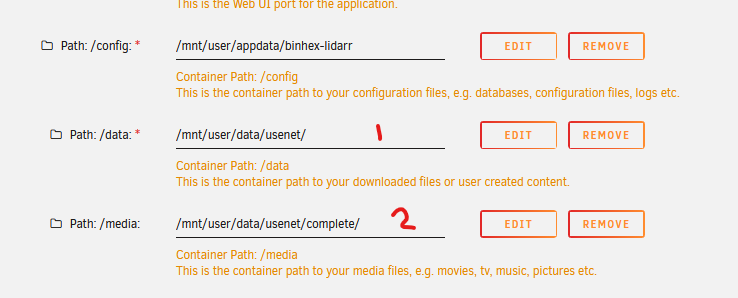
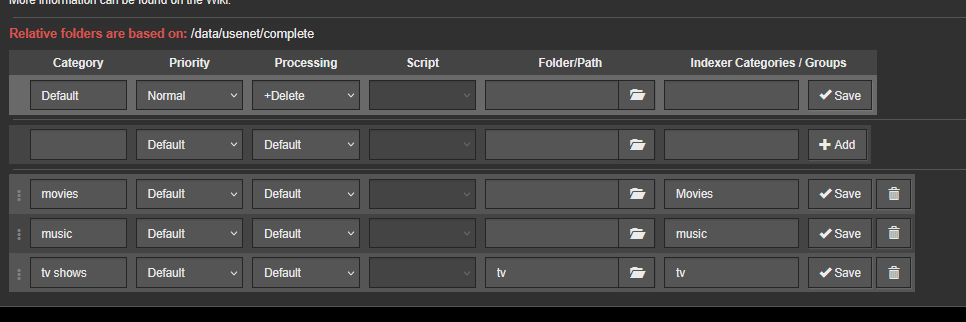
Do you know your way around the arr suite and sabnzbd - I am getting an error (which I have received before) across the arr suite related to folder / share access but last time i was able to fix it by correctly setting up my categories in sabnzbd. This fix is not working this time. So I have my arr suite share access set up like this, where 1 is my library in /usenet/media/movies etc and 2 is where sabnzbd downloads files to usenet/complete/movies etc using the relevant categories The descriptions are now making me second guess - is /data for my library and /media for newly downloaded files to be renamed and moved to my library, or is it the other way round? Sabnzbd is setup like this This is manifesting by the arr suite being unable to find the downloaded media - they can access my library just fine, but downloaded media folders look empty to the arr suite - so they cannot import and rename new media. Sab downloads okay, but arr only sees an empty folder in usenet/complete/movies - if i browse to the folder the media file is there. I've tried every variation to the /media Path I can think of, going higher or lower in the path, but nothing will make it work. Prior to the rebuild I had this error, but setting up my categories in sab seemed to fix it. Any ideas of what I should change on these two paths? Spent a couple of hours pulling my hair out here. The Arr documentation is just confusing me further.


-
That's all done - thank you very much for your time and patience so far. I'll start putting apps back on - and be in touch when they're all up and running. Probs a couple of days away.
-
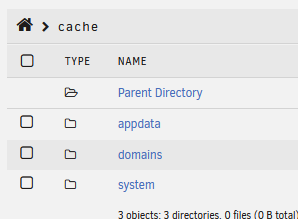
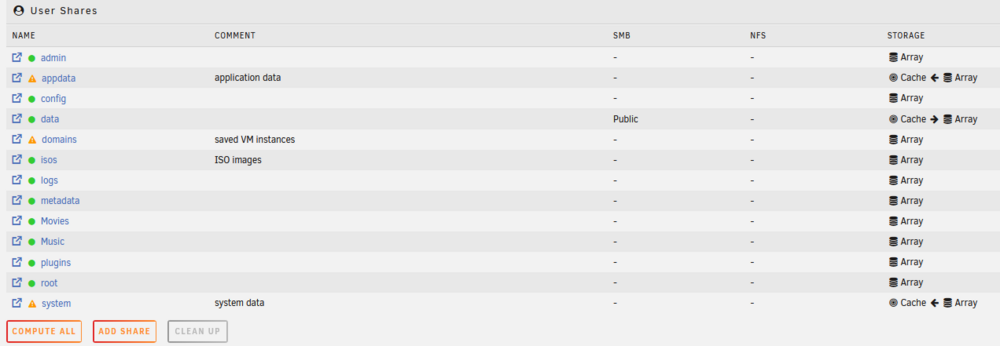
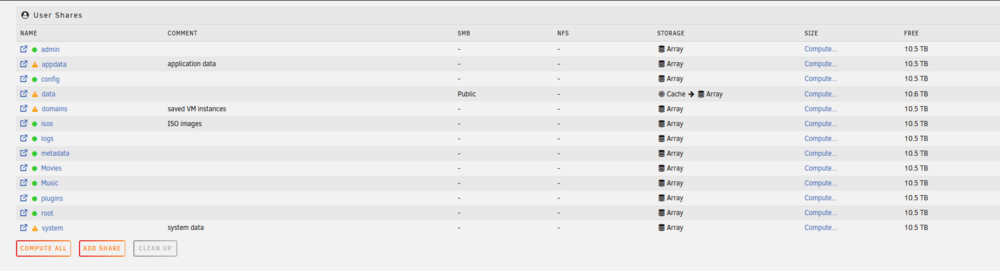
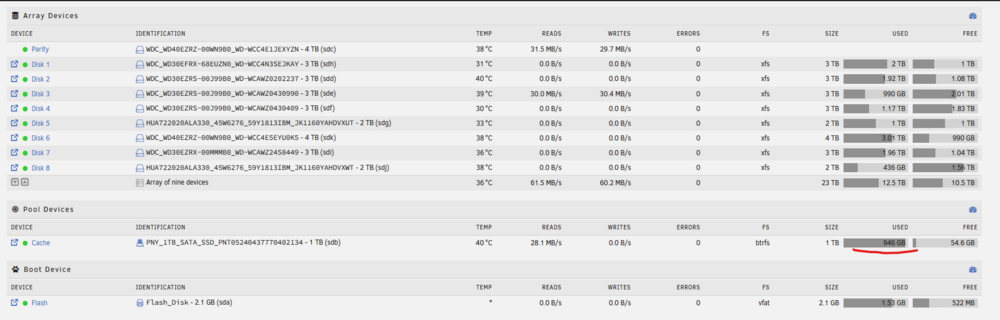
Mover settings done Invoked mover, but didn't really seem to do much, just refreshed the GUI and the mover button wasn't greyed out and no mover is running info, but the appropriate shares seem to be on the cache and navigating into the appdata folders shows the application's data. Cache increased from 3Gb to 8Gb - so looking good - but just seemed to move instantly which was weird. New diags attached diagnostics-180126.zip
-
Took all day and night, but mover finished, and all but 3GB moved off of the cache. Back to normal. Really happy. Next steps? New diags attached. Diagnostics-180125.zip
-
Seeme to be moving files off the cache - you'll see the immediate reduction in size. Seems to be continuously reducing!
-
Worked from console. Mover stopped - great. Can't recall if I rebooted - so tried and it wouldn't actually restart, just seemed to refresh the GUI. Either that or it restarted in one minute. Very strange. Have performed a full shutdown (took 20 mins to shutdown - guessing because of the full cache?) and restarted the array. New diags attached. Should i retry the mover? tower-diagnostics-170126.zip
-
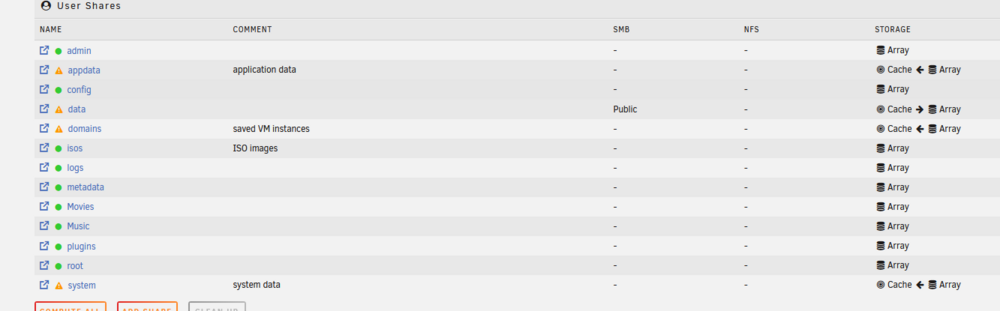
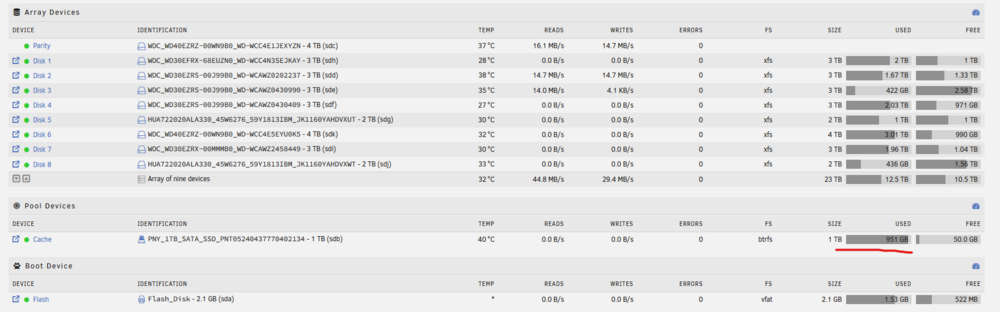
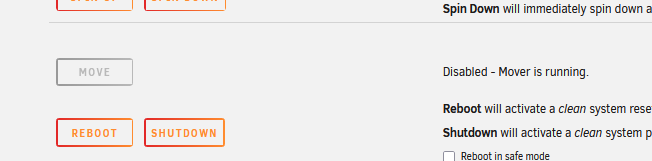
Hey mate - so something is going wrong, my cache has filled back up to 95% and I am getting warning notifications - seems to have moved a bunch of my media files over from the array (where they should be) to the cache? The media files are in the data share data/usenet/media/complete/movies etc. I noticed as I can't install any more apps (or access the apps menu in the GUI) as the cache is all but full. This is pretty much exactly what was happening before the SSD died and why I had moved everything more or less to the array. New diags attached. Did I just dumb ass set some of these cache-arrays settings wrong on the shares? So far I haven't even configured any of the apps i just installed to the docker. Edit - mover appears to be running too. tower-diagnostics-160125.zip

-
Great. I'll crack on with installing and resetting up my arr suite (will take a while). And I will be back in touch when they are all installed. Do I need to do anything before starting the VM for Home Assistant? The SpaceInvader all-in-one HA package creates the VM as part of the install process.
-
Docker settings updated. Diagnostics attached. Can I go ahead and reinstall my apps? Will not reinstall legacy apps. tower-diagnostics-150126.zip
-
So what's next for the docker and VM? New diagnostics attached. tower-diagnostics-140126.zip
-
Thanks - yeah I am happy with them all in one highwater share. Has worked for me, just for access from my various devices running jellyfin player in the house and garage. Haven't encountered any issues with playback.
-
Thanks for that - not sure what happened there. User error I suspect!
-
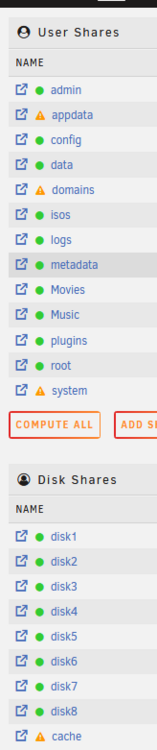
So actually, the answer is no. Not to other user shares. Guess I didn't understand the question totally, I am bit woolly on what is defined as a user share or disk share vs. a folder. Is the definition of an individual share defined by it being created and listed in the share list? The movies and music shares are empty and unused. I should probs remove.
-
Done. Diagnostics attached. tower-diagnostics-20260113-1548.zip
-
Yeah but still within user/data - so sabnzbd is downloaded to user/data/usenet/incoming and then unpacked file added to user/data/usenet/complete then arr picks them up, renames and places in user/data/usenet/media - with corresponding subfolders (movies/TV-shows etc)
-
Yes the full suite. And yes - i followed the pretty standard TRaSH guide and used the folder recommendations in there. Do I just setup user/data share as cache > array?
-
I've set the minimum sizes across all shares. I guess what I would like to do is have sabnzbd download to the cache, so downloads are quick and not using spinning disks, then have mover move the files off the cache (at some point) to the array. Which user share will i need to set up for this? Downloaded files into come to user/data/usenet/incoming
-
tower-diagnostics.zip
-
Delete system folder from disk3. Done Set appdata, domains, system shares to Primary:cache; Secondary:array; Mover action:array->cache Done Running mover. Will post diags when its complete. Back at work so hours all over at the moment.
-
disk3 looks empty disk4 .img is in disk4 Plugins removed.





