





xyzz1887
Members
-
Joined
-
Last visited
-
Yea i guess that's the problem here.. Unplugged them both, now i'm reaching C7 Gotta buy new SSDs i guess..
-
Die Datei wird verschoben. Also ja, die ist dann weg vom Cache.
-
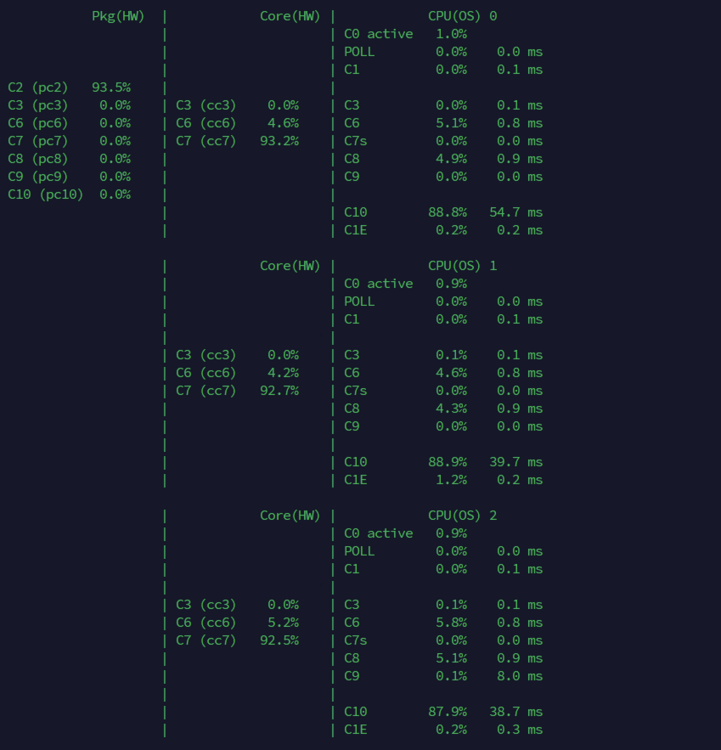
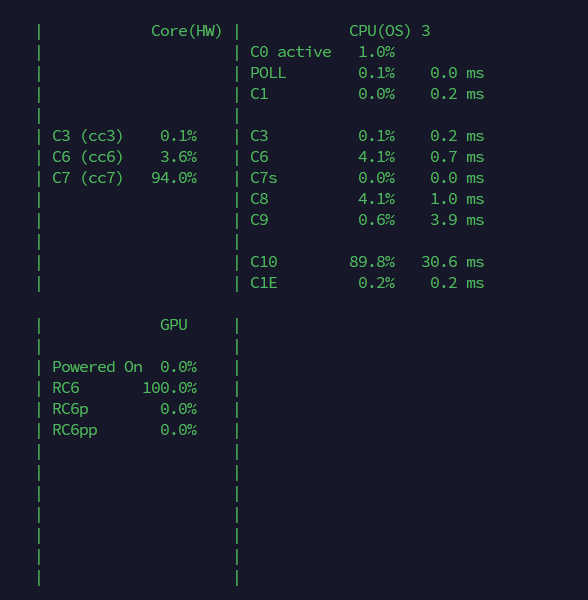
Not sure if there are still people active here, but I'm getting a little frustrated and need some advice. I can't reach anything higher than pkg C2. My Server is running on a ASRock H310-DVS Mainboard with an I3 8100. No SATA Extension cards, no NICs, nothing. Just 1x Seagate HDD and 2x (no name)SATA SSDs. I've enabled all C-States in the BIOS and pretty much every other power setting i could find. I also tried unplugging my network cable and using powertop directly, didn't change anything. Also tried stopping the array, so i got no containers or VMs active, didn't change anything. In the "Tunables"-Tab in Powertop everything shows "Good", so no issue there ig. Any1 got ideas? Images attached below:

-
I might be 6 years late but i experienced the same issue right now and tried searching for the error. For the people that are running Pi-Hole or some sort of DNS Server, this might help: Since the Host can not access custom networks, including your bridge, you have to enable this setting in the docker tab: "Host access to custom networks: Yes". You have to stop the docker service first and go into advanced view. With that enabled, your Host can connect to the Pi Hole. Hope this will help anyone
-
Yep that probably was it. I restarted 2 times and tried again, this time it worked 😀 Thanks.
-
Here are the diagnostics files: tower-diagnostics-20230702-1208.zip
-
Hey, I formatted my drive into XFS encrypted, set up the password, and tried to start the disk array. However, it's been stuck on "Array starting | Mounting disk" for about 30 minutes now. In the Array list, it's also showing up as XFS, not XFS encrypted. I'm not sure if this is normal or if I've done something wrong. Is it usual for the encryption setup to take a while or is there something I'm missing? Thanks


