





Kuddel
Members
-
Joined
-
Last visited
-
Thank you very much for your help. I think I found the mistake thanks to your suggestions. Some time ago, I moved some Docker remnants from the RAID to the SSD. Apparently, I forgot to adjust a path in the Docker. Due to the update and the associated new data, or data in 'wrong' locations, this caused the problems. I think I've been able to correct it now.
-
I actually speak German, so unfortunately my English isn’t very good. I also noticed these errors, but I don’t understand why they suddenly appeared since the system has been running for ages without me changing anything in the Docker. I hope the log file is okay like this. I also just created a diagnostics zip file. Is it safe to upload this file here completely, or should I be careful about something? Or does it only require certain contents? edit: added docker.txt from diagnostics.zip docker.txt
-
docker run -d --name='Thunderbird' --net='bridge' --pids-limit 2048 -e TZ="Europe/Berlin" -e HOST_OS="Unraid" -e HOST_HOSTNAME="SERVER" -e HOST_CONTAINERNAME="Thunderbird" -e 'THUNDERBIRD_V'='latest' -e 'THUNDERBIRD_LANG'='de' -e 'CUSTOM_RES_W'='1280' -e 'CUSTOM_RES_H'='768' -e 'EXTRA_PARAMETERS'='' -e 'UID'='99' -e 'GID'='100' -e 'UMASK'='000' -l net.unraid.docker.managed=dockerman -l net.unraid.docker.webui='http://[IP]:[PORT:XXXX]/vnc.html?autoconnect=true' -l net.unraid.docker.icon='https://raw.githubusercontent.com/ich777/docker-templates/master/ich777/images/thunderbird.png' -p 'XXXX:XXXX/tcp' -v '/mnt/user/appdata/thunderbird/':'/thunderbird':'rw' -v '/mnt/user/Daten/Email Backup/':'/Backups':'rw' --restart=unless-stopped --shm-size=2G 'ich777/thunderbird' d89e3009b640ec292343e89dcd0cf32e79c10ace34c08b29be41638c19337ff4 The command finished successfully!
-
su: failed to execute /bin/bash: Permission denied su: failed to execute /bin/bash: Permission denied su: failed to execute /bin/bash: Permission denied su: failed to execute /bin/bash: Permission denied su: failed to execute /bin/bash: Permission denied su: failed to execute /bin/bash: Permission denied su: failed to execute /bin/bash: Permission denied Nothing to do, noVNC resizing set to default Nothing to do, noVNC qaulity set to default Nothing to do, noVNC compression set to default ---Taking ownership of data...--- ---Starting...--- ---Ensuring UID: 99 matches user--- usermod: no changes ---Ensuring GID: 100 matches user--- usermod: no changes ---Setting umask to 000--- ---Checking for optional scripts--- ---No optional script found, continuing--- ---Checking configuration for noVNC--- Nothing to do, noVNC resizing set to default Nothing to do, noVNC qaulity set to default Nothing to do, noVNC compression set to default ---Taking ownership of data...--- ---Starting...--- ---Ensuring UID: 99 matches user--- usermod: no changes ---Ensuring GID: 100 matches user--- usermod: no changes ---Setting umask to 000--- ---Checking for optional scripts--- ---No optional script found, continuing--- ---Checking configuration for noVNC--- Nothing to do, noVNC resizing set to default Nothing to do, noVNC qaulity set to default Nothing to do, noVNC compression set to default ---Taking ownership of data...--- ---Starting...--- ---Ensuring UID: 99 matches user--- usermod: no changes ---Ensuring GID: 100 matches user--- usermod: no changes ---Setting umask to 000--- ---Checking for optional scripts--- ---No optional script found, continuing--- ---Checking configuration for noVNC--- Nothing to do, noVNC resizing set to default Nothing to do, noVNC qaulity set to default Nothing to do, noVNC compression set to default ---Taking ownership of data...--- ---Starting...--- ---Ensuring UID: 99 matches user--- usermod: no changes ---Ensuring GID: 100 matches user--- usermod: no changes ---Setting umask to 000--- ---Checking for optional scripts--- ---No optional script found, continuing--- ---Checking configuration for noVNC--- Nothing to do, noVNC resizing set to default Nothing to do, noVNC qaulity set to default Nothing to do, noVNC compression set to default ---Taking ownership of data...--- ---Starting...--- ---Ensuring UID: 99 matches user--- usermod: no changes ---Ensuring GID: 100 matches user--- usermod: no changes ---Setting umask to 000--- ---Checking for optional scripts--- ---No optional script found, continuing--- ---Checking configuration for noVNC--- Nothing to do, noVNC resizing set to default Nothing to do, noVNC qaulity set to default Nothing to do, noVNC compression set to default ---Taking ownership of data...--- ---Starting...--- ---Ensuring UID: 99 matches user--- usermod: no changes ---Ensuring GID: 100 matches user--- usermod: no changes ---Setting umask to 000--- ---Checking for optional scripts--- ---No optional script found, continuing--- ---Checking configuration for noVNC--- Nothing to do, noVNC resizing set to default Nothing to do, noVNC qaulity set to default Nothing to do, noVNC compression set to default ---Taking ownership of data...--- ---Starting...---
-
thunderbird Docker does no start anymore since the last update (did it yesterday). I locked at dockerhub to use an older version but there seems to be only the lastest build available. Any idea?
-
Es ist möglicherweise nicht die optimale Lösung, aber zumindest funktioniert es bei mir bislang ohne erkennbare Einschränkungen: In den SMB-Einstellungen die Option "Enhanced macOS Interoperability" auf "No" setzen. Danach kann ich unter Windows wie gewohnt auf die SMB-Freigaben zugreifen etc.
-
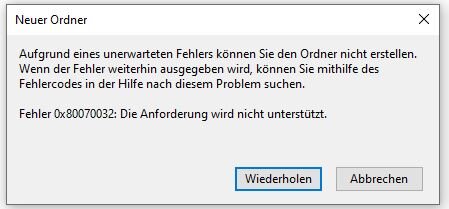
I have a simular Problem.... I've been trying to get the plugin to work for quite some time. I have linked both a Dropbox and a GDrive account. Through the Rclone web GUI, I can access both accounts and delete data, etc. I can also access the mounted folders and delete data via the Unraid web interface. However, on my network (in my case, a Windows 11 PC), I can access the shared folders, but I can't delete or install files. "Empty" folders or text files can be created, but I still get errors. I've read several similar reports online, suggesting it has something to do with the SAMBA share, but none of the solutions I've tried have worked for me. Currently, I am using the following commands. mkdir -p /mnt/user/Clouds/Dropbox mkdir -p /mnt/user/Clouds/GDrive rclone mount --max-read-ahead 1024k --allow-other --vfs-cache-mode full --umask 000 --uid 99 --gid 100 Dropbox: /mnt/user/Clouds/Dropbox & rclone mount --max-read-ahead 1024k --allow-other --vfs-cache-mode full --umask 000 --uid 99 --gid 100 GDrive: /mnt/user/Clouds/GDrive & [GDrive] type = drive scope = drive token = {XXXXXXX} team_drive = [Dropbox] type = dropbox token = {XXXXXX} The share is now being configured in a very standard way through the Unraid web GUI. In the parent folder (Clouds), I can actually perform actions correctly over the network.

-
Leider muss ich mich noch einmal zurückmelden. Augenscheinlich hat es zwar funktioniert und ich (nur ich wie gewollt) konnte auf alle Dateien zugreifen. Mir ist jedoch zunächst nicht aufgefallen, dass ich leider keine Dateien über das Netzwerk in die freigegebenen Ordner kopieren kann. Leere Ordner oder Textdateien kann ich erstellen. Wenn ich jedoch etwas darauf kopieren möchte, erhalte ich immer die Fehlermeldung, dass kein Speicherplatz mehr frei sei. Wenn ich über das Terminal die freigegebenen Ordner überprüfe, wird mir jedoch der korrekte freie Speicherplatz angezeigt. In der Zwischenzeit habe ich vergeblich ChatGPT und das Internet nach Lösungsansätzen durchsucht, aber ich komme mal wieder nicht weiter. Hat hier jemand eine Idee?
-
Danke, scheint zu funktionieren!
-
ok, dann warte ich mal hier bis du mit Neuigkeiten um die Ecke kommst. Ich bin ehrlich: ich habe leider sehr wenig Ahnung aber dachte schon ich bin total behämmert...
-
Ja die sind bereits raus, ich hatte es zwischenzeitlich mit einem anderen Code versucht und deswegen war der eigentliche Code als ich ihn hier eingefügt hatte auskommentiert. Leider funktioniert es aber immer noch nicht. Ich habe ursprünglich alles nach Anleitung eingerichtet und der Code den du gesagt stimmt mit meinen Scripten überein. Mein mount script: mkdir -p /mnt/disks/Dropbox mkdir -p /mnt/disks/GDrive rclone mount --max-read-ahead 1024k --allow-other --vfs-cache-mode writes Dropbox: /mnt/disks/Dropbox & rclone mount --max-read-ahead 1024k --allow-other --vfs-cache-mode writes GDrive: /mnt/disks/GDrive & und mein unmount script: fusermount -u /mnt/disks/Dropbox fusermount -u /mnt/disks/GDrive Ich habe es mit und ohne die mkdir Befehle versucht und die Scripte werden immer beim starten bzw. stoppen des Arrays ausgeführt aber irgendetwas führt dazu, dass die Schreibrechte der beiden Ordner immer wieder zurückgesetzt bzw. entzogen werden...
-
wunderbar! Das scheint geklappt zu haben. Ich habe dann jetzt mein mount Script überprüft aber hier steht genau der passende Code drinne... Sobald ich mein Array jedoch Stoppe bzw wieder starte sind die Berechtigungen wieder zurückgesetzt. Was mache ich falsch? ps: ist es eigentlich schädlich für die Festplatten oder etwas anderes wenn das Array oft gestoppt und gestartet wird?
-
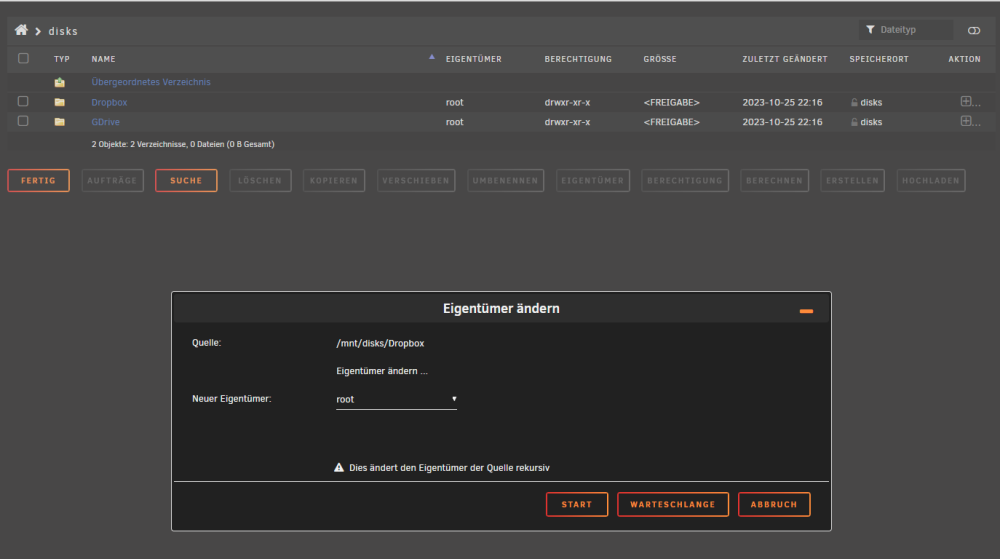
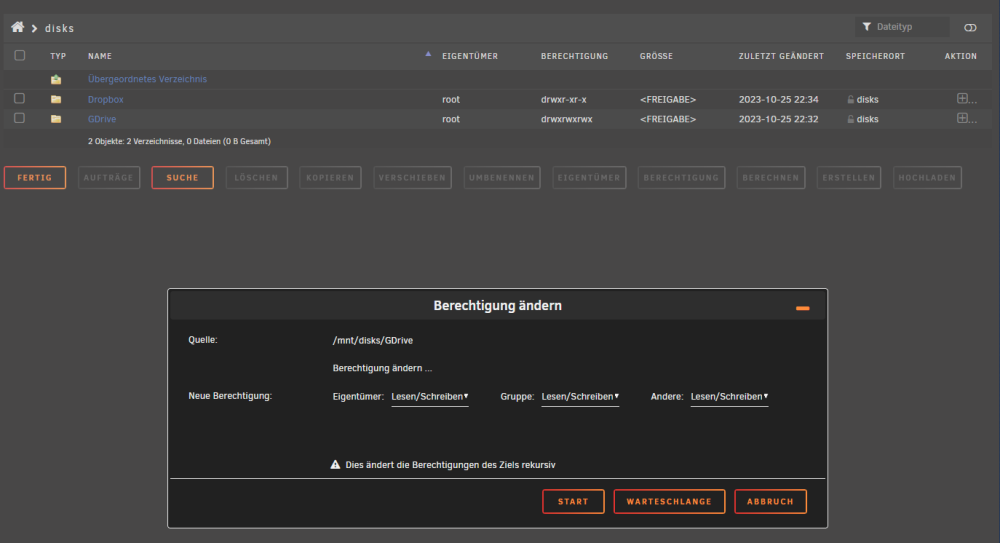
de mount Befehl gibt: "[1] 6024" zurück Beim ersten Versuch hat es glaube ich nicht funktioniert. Da sah meine Conifg dann so aus: Ich habe es dann noch Mal versucht und ich denke die Berechtigungen wurden anders gesetzt, dementsprechend sieht es jetzt so aus und funktioniert auch: Ich möchte ja aber nicht, dass jeder zugreifen kann. Ich dachte paralel schon ob ich den Eigentümer nicht wechseln könnte weil er mit unter Windows auch sagt ich brauche die Berechtigung von "´\root" aber wenn ich etwas anderes anwähle wird nichts geändert. Wir scheinen ja aber auf dem richtigen Weg zu sein, von daher bin ich gespannt wie es weiter geht
-
ls -l /mnt/disks/Gdrive ls -l /mnt/disks/Dropbox Dropbox listet mir im Terminal die Ordner und Datein auf, Gdrive nicht sonder gibt mir folgende Meldung aus: bash: ls -l /mnt/disks/GDrive: No such file or directory über Krusade kann ich übrigens auch darauf zugreifen und Ordner etc. erstellen. wie starte ich den SMB Service neu? Ich hatte das Array gestoppt weil ich den Code ja sonst nicht ändern kann aber nichts explizit neu gestartet...
-
leider kein Erfolg. Ich kann übrigens im gemounteten disks Ordner Datein erstellen aber sobald ich im Dropbox oder GDrive unterordner bin gehts nicht mehr....



