





ashkasto
Members
-
Joined
-
Last visited
Everything posted by ashkasto
-
Thank you!! Looks like there was a bad splitter for power to one of the sata drives. I rebuilt drive in maintainance mode and now back up and running. Very much appreciate your help!
-
Thank you, let me check the power supply or cables, I left the SMART Test for the Extended Self test and came back to "Interrupted (host reset)" error, could not complete the extended smart test. Could that be from power cable issue as well? Unconfirmed 332964.crdownload
-
Greetings I recently noticed that my disk 3 has a error "device is disabled, contents emulated" I looked up and read...So i stoped the array, unassigned the disabled disk from partition and started array again, then stoped array again, then reassigned the disk to same slot and started maintenance mode and iniated sync. Shortly after initiating sync, the sync paused and same error showed up next to my disk 3, at that time under error colum i noticed 1024 as errors as well. So does this mean my drive is bad? I have attached a diagnostic and smart quick test. I am doing the extended test right now also. Thank you for any help or advice ashlab-smart-20251203-2216.zip Unconfirmed 156632.crdownload ashlab-smart-20251203-2122.zip
-
can Anyone help with this please?
-
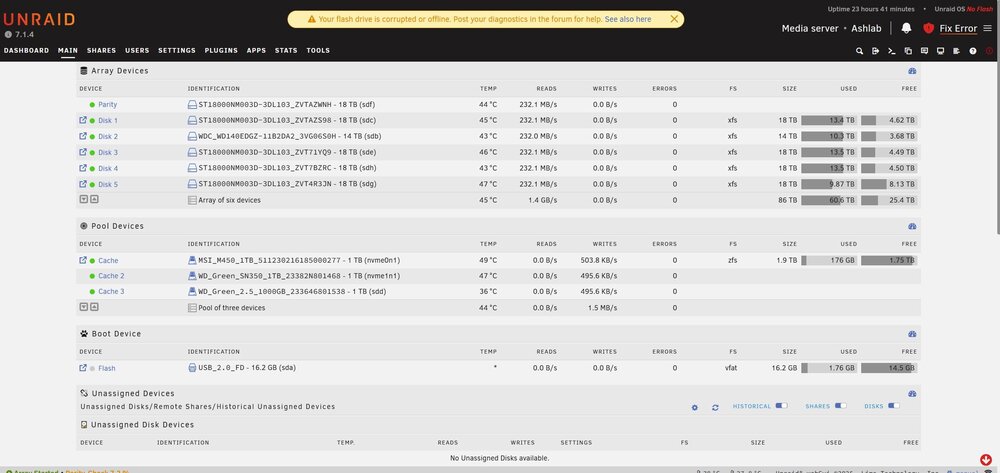
This is the syslog after the server stop responding and screenshot on unraid screen with error, unable to access usb drive. Do I need a new USB drive? syslog-192.168.12.9.log
-
How and where do I do that on my server? Thank you ...nvm I turned on the sys log to save on my casche drive...hope to catch what is happening
-
Recently I have encountered an issue where the unraid server stops working after starting the server. It can be in 24hr or a few days. It happened once in a week or two now more frequent. I must power down the server with power button and reload server and things work and then same cycle occurs hours to days later. I can not access the GUI sometimes at all and the docker apps load but do not work. I have included the diagnotic file when it loads back up. This last time it loaded up but was not working correctly and the diagnotic file would not download. Can any help explain what is going on and what I can do to fix it? Thank You ashlab-diagnostics-20250801-0944.zip
-
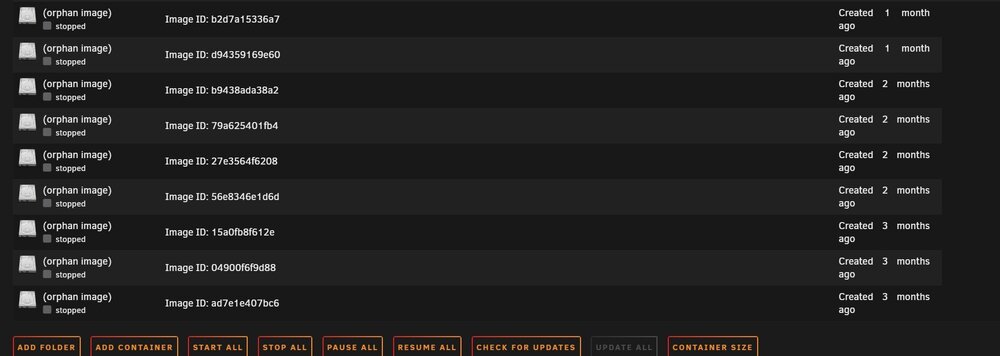
It turned out that I had a lot of orphan images that needed to be removed by clicking the advanced tab. I wish I knew that before making my docker vdisk larger.
-
I have unraid OS plus, Does that allow 12 drives per license? If I want to upgrade to unlimited drives what are my options? Now the subscriptions do not offer lifetime software upgrades? If so why not? thank You
-
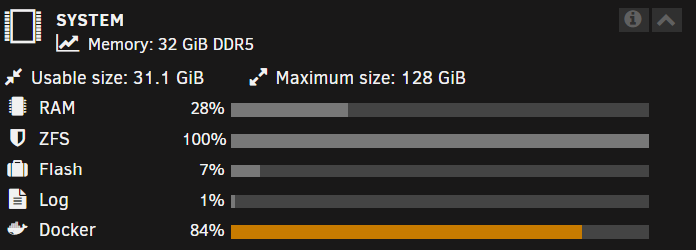
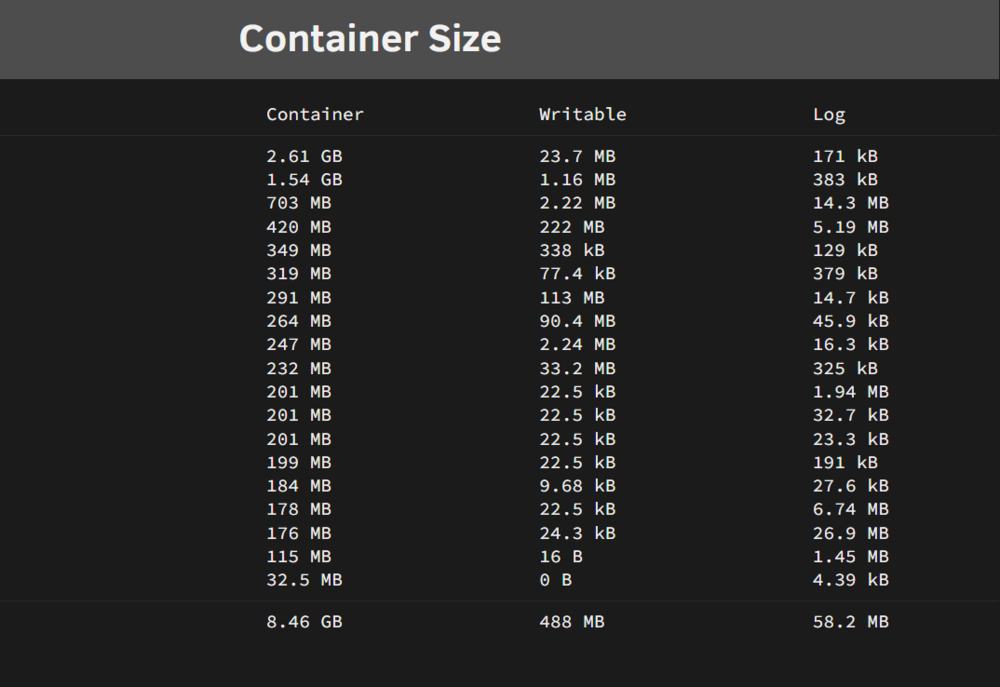
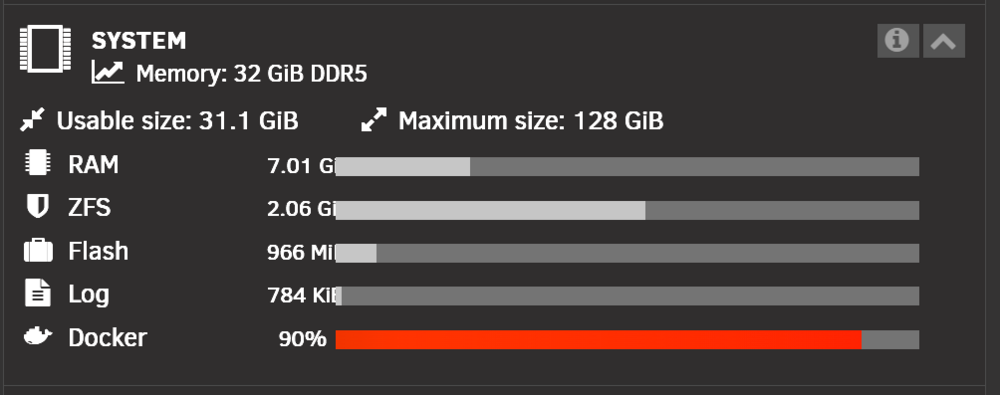
I would appreciate any clarification on this topic in more detail My image file size is set to 27Gb, because I increased it, I am also aware that now I can not make a smaller img file without deleting all my docker applications and starting from scratch (which is so much time I put is setting my dockers up I don't want to do unless I can save my docker setting and reload them.). On looking at container size I do not use that much space says 8.46 GB if I am understanding this correct. So not sure why the system section says I have 84% utilization Appreciate anyone's knowledge about this subject. Unconfirmed 998744.crdownload

-
why does it state system memory? I am a bit confused what this means. Can you help direct me where I can get more info what this means? Also, is the fact that it is in the RED a bad thing? How do I resolve it if it is? The fix common problems keeps showing I have limited space... see screen shot

-
Hello I would appreciate assistance in finding out what docker instance could be causing me a problem. My RAM is fully utilized by docker for some reason. I have attached diagnostics Thank you Unconfirmed 204250.crdownload
-
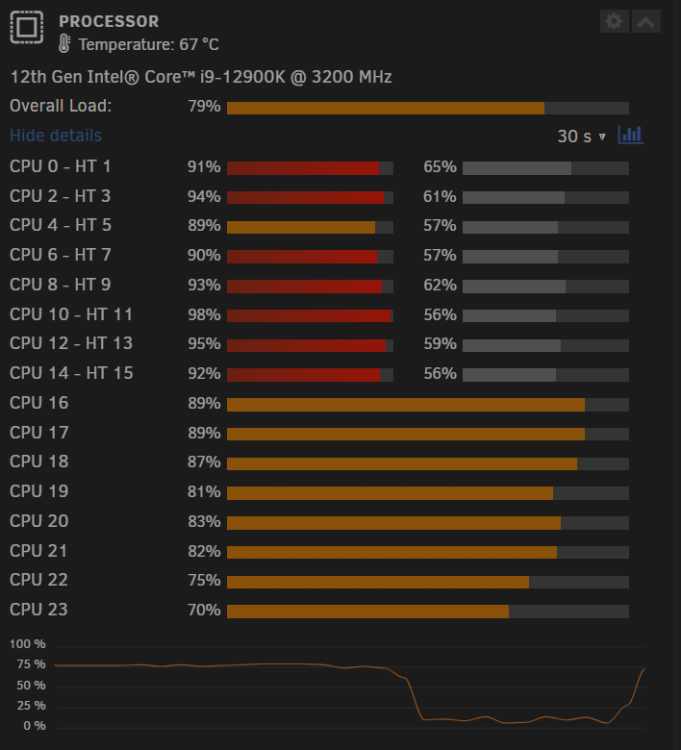
it has transcoded before but never had such a load reported. with the i9 12900k one transcode should not place 75-80 percent load
-
Hoping someone can explain why I have such high CPU load on the server. Today came home and noticed it was running very high. Docker was not loading and was unable to stop array. I tried reboot and would not load and received a bzfirmware error and replaced all bz* files on my usb drive and reloaded the system. It is running okay but still getting these very high loads for not much going on. I included a diagnostic file. Thank you for any help Unconfirmed 630986.crdownload
-
Got it, thank you
-
Thanks that looks like it fixed it. I thought i need that plugin for scheduling my nightly mover action? Will mover do its nightly action without Mover Tunning?
-
recently i noticed that my share folder on my cache drive that is surpassed to move nightly to the array does not always run. Also, when i click the move button nothing happens anymore to move files over to the array. Can someone point me to some possible trouble shooting that can fix this please. I added my diagnostic data. Thanks ashlab-diagnostics-20231206-0834.zip
-
itimpi it is still happening, that fix was just temporary. Any other suggestions please?
-
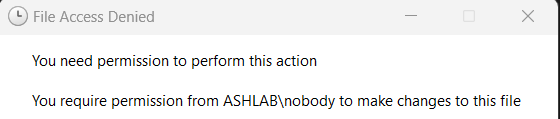
Frank1940 thank you for the info. I cant seem to find which docker or group is causing it. I receive info in sonarr today that "Series title mismatch, automatic import is not possible" and i was able to manually grab or edit and delte movie through windows 11 to my unraid server. Then radarr had error message as this... So I use windows pc to see the folder in my data/media/movies and find the movie folder it is empty I check my usenet/complete/movies folder a see the movie fodler and movie i hold a drag like i normally do and windows gives this error: I use your instruction and open a command prompt in uraid and can not find the empty folder in my data/media/movies folder I checked the usenet folder and this is what showed up I can not explain why every12-24 hours I am having limited access to the folder managements on the unraid server. I still do not know what docker group to ask this question to as well as it seems to happen frequently with a few. makes me wounder if my unraid global setting are incorrect somewhere. needless to say I have tried to disable all docker container and reset permissions for disks and shares, which temporarily fixes it. My PUID is 99, PGID is 100, UMASK varies 002, 022 i read somewhere that umask may need to be 000 but I do not want to mess with that unless this is for sure an issue Thank you


-
can anyone help me with radarr and sonarr docker. When new folders are being made by docker container they do not have correct permissions. I get errors when sonarr and radarr try to migrate files to plex server. When i reset permission in tools section of unraid I am then ok, but the following day same thing happens again. Thank you
-
So as a follow up, I have noticed when using new permissions under tools for the shares folders everything's works again for a short period of time. Then suddenly same problem reoccurs. Also, the radarr container then gives errors that is can not relocate the file as well. My windows folder accessing the unraid server also block me from deleting or moving folders. Keeps reverting back after it is fixed for some reason Appreciated any help
-
I just performed it for all my disks and shares. Thanks so much. hopefully this resolves the issue
-
I have not trying to run Tools->New Permissions let me try this thanks What if I changed the folders to root of my current root user, will this cause issues in the future? Thanks
-
I am very new to unraid and Linux. Trying to follow and understand the server setup. Came across my share folders and other folders. I frequents moves files from my windows pc to the unraid server. I am having errors moving files saying I do not have permission. When i see the owner of folder it says nobody. I change owner to my root user name in unraid and it work. Only thing that happens is some time later or maybe after a reboot of the unraid server the folder goes back to nobody and same issues happens. This happens also on docker containers i have installed as well. Do I need to change my user permission somewhere? What is the nobody owner? Anywhere where is can find more details on this issue. Thank you
-
I did manual setup, got it to work but the make bootable section would not work without turning off the "real-time virus & threat protection" on windows 11 maybe that is why the flash creator could not work either, not sure






