





madmin
Members
-
Joined
-
Last visited
Everything posted by madmin
-
OK - Danke für die Einschätzung und den Link (Vieles dort kann ich noch nicht einordnen, aber das kommt wohl schon noch). Was ich verstehe: XFS reicht aus (logisch, hat es ja auch bisher), die zweite Hälfte von ZFS kommt mit Unraid 12.7 (wann auch immer, und was auch immer die enthält), und für "high-level features" braucht man mehr als eine ZFS Platte im RAIDZ-Verbund, also eher im Pool als im Array (Was auch immer high level ist, bei der Selbstheilung verstehe ich es zumindest). Was mir noch unklar ist: Hat ZFS für eine Einzelplatte ohne RAIDZ Nachteilem oder läuft da das UNRAID Array auch mit ZFS wie gedacht? Hat ZFS Vorteile über "reicht" hinaus? So wie ich Snapshots und Kompression verstehe, müssten die ja schon mit einer einzelnen Platte funktionieren, auch wenn die keine RAIDZ-Schwester hat. Sind nested Datasets high-level, kommen sie erst in 12.7, oder müssten sie funktionieren (wie bei Spaceinvader One , und ich mache etwas kritisches falsch)? Verbaue ich mir was, wenn ich - im Vorausgriff auf 12.7 - die Array-Platten als einzelne ZFS-HDDs betreibe (dann eben nur mit Datasets auf der Share-Ebene)?
-
TL;DNR: Nach stundenlanger Doc- und Forensuche bin ich offenbar unfähig, nested ZFS-Datasets / Sub-Datasets unterhalb eines Shares in Windows zu beschreiben - und wäre Euch über Hinweise dankbar, wie es geht oder welche Infos ich übersehen habe. Langfassung: Ich habe mich nach Serverbau nun erst einmal für folgendes Setup entschieden: Array: 16 TB HDD = Partiy 16 TB HDD = ZFS (solo, also kein RAID-Z) Cache Pool: 1x 1 TB M.2 = ZFS (erst einmal auch solo ohne RAID-Z), als Primary für Shares mit den User- und Familien-Daten Wie ich die 2x 8 TB HDD nutze, entscheide ich noch. User Shares für die disk1 anlegen geht problemlos (Das ist dann ja auch automatisch gleich ein ZFS Dataset, was auch als solches angezeigt wird). Ich kann auch problemlos von meinem hinterlegten Unraid-User von Windows 11 aus auf die Netzwerk-Shares zugreifen und Dateien und Ordner direkt schreiben/löschen. Was allerdings nicht klappt, ist das Schreiben auf nested (also Sub-)Datasets: U.a. für Jellyfin habe ich ein share "media" auf disk1 angelegt (SMB-Typ "sicher", mit Schreibrechten für meinen Unraid-User). Anstatt von Unterordnern habe ich aber unterhalb dieses shares gleich Datasets angelegt (z.B. fotos, audio, video, ebooks, usw.). Da kann ich über Windows Netzlaufwerk aber nichts drauf kopieren... 🤔 ("keine Berechtigung"). Auch wenn ich auf SMB-Typ "privat" ändere: gleiches Ergebnis. Der User hat dabei jeweils explizit Schreibrechte auf das share. Username = Windowsuser, anderes Passwort, aber offenbar erfolgreich in Windows Anmeldeinformationen hinterlegt (sonst würde er ja auf das Haupt-Share nicht schreiben). Die einzige Lösung, die mir einfällt, ist, für jeden Zweck ein eigenes Share / Haupt-Dataset anzulegen. Das finde ich aber reichlich unübersichtlich und un-rekursiv. Aber das kann ja nicht "by design" so gedacht sein... Wenn ich die Tutorials von Spaceinvader One zu ZFS richtig verstehe, wandelt der ja mit seinem "auto-convert folders" script selbst unterhalb /appdata jeden App-Ordner (also nested Ordner) in Datasets um, damit Snapshots weitgehend unabhängig voneinander gemanaged werden. Snapshots sind neben der Kompression für mich der wesentliche Vorteile von ZFS (neben Selbstheilung, aber ich wollte mir noch nicht mit einem RAID-Z die Array-Flexibiltität einschränken). Diese quasi-Time-Machine-Funktion finde ich super gegen UTS-Fehler (überschreiben, engültig löschen) und Ransomware (Ich weiß, ersetzt kein Backup - ergänzt es aber). Deshalb möchte ich gern die großen Datasets gleich richtig anlegen (nicht für umganreiche Daten als Ordner).
-
Puh, in der Tat... Zunächst hatte ich die Platten an FAN1 und FAN2 gesteckt und den ersten Dip hochgesetzt (Basis-Geschwindigkeit von 20 % auf 40 % hochgesetzt). Dip 2 und 3 hatte ich OFF gelassen, weil das schon das schnell hochlaufende Profil ist. Dip 4 und 5 (Warnung FAN läuft nicht) hatte ich auf ON gestellt. Beim Formatieren ging T dann hoch auf 47 °C, und da gab es Überhitzungswarnungen. Bei > 15 h (16 TB bei 250 MB/sec) war mir das nichts, also habe ich abgebrochen und die Lüfter zum Formatieren erst einmal wieder direkt rangeklemmt (100 % = ständiges Föhn-Rauschen, aber Plattentemperatur geht unter Dauerlast nur auf 40 °C, und wir haben noch nicht Sommer - Klimatisierte Räume haben wir nicht...). Aber ich habe ein Video gefunden, das diese PWM Fan Control Boards gut beschreibt: Fazit: Der Trick ist, dass nur FAN1 über die Temperaturreglung geht (Obwohl der Warner für FAN1 und FAN2 ist...). FAN2 und FAN3 haben je ein Trimm-Poti, dass die Geschwindigkeit fest einstellt. Für eine Temperaturregelung müssen also beide Lüfter an FAN1. Ich bräuchte also ein Y-Kabel, aber die Arctic CO (Hatte ich wegen der Doppel-Kugellager genommen) haben ja einen DaisyChain-Anschluss dran (d.h ein Lüfter kann direkt an den anderen rangekabelt werden). Und dann schaue ich mal, ob ich den Temp-Sensor halbwegs in die Region der Festplattentemperatur bekomme (Der berührt ja die HDDs nicht, sondern hängt etwas daneben, und misst also eher den Raum als die Platte). Dann kann ich hoffentlich bedarfsorientiert bei ~ 35 °C auf Ramp Up Speed und bei ~ 45 °C auf 100 % hochlaufen lassen. Im Notfall muss ich beide Lüfter dann an FAN2 und FAN3 über TrimPoti bei < 100 % einstellen und hoffen, dass ich einen Kompromiss an Lautstärke und Kühlleistung bekomme, der auch im Sommer taugt. Puh, das ist aber auch Alles kompliziert im Detail... 😁
-
Sorry, ist ein JMB 585 Zusatzcontroller. Hm... Also dann doch eventuell die Synology als Backup weiterbetreiben. Ich denke drüber nach! Danke - Ich habe hier richtig viel gelernt!
-
Man kann natürlich nichts vorhersehen, aber Überspannungsschutz ist im Schaltkasten (grob) und an der Dose (fein) vorhanden, und zumindest die Synology fühlt sich an einer Eaton USV per USB-Steuerung wohl. Das kann Unraid wohl laut Menü auch Und wenn wirklich die Bude raucht, dann ist wenigsens 98 % der persönlich-familiären Historie auf dem Monate alten Offsite Backup. Eventuell noch mehr aktuelles auf der externen Nextcloud. Mach ich - Danke! Das wäre auch noch eine Idee. Eigentlich wollte ich mich ja von der Synology unabhängig machen, und ein integriertes System. Aber die Überlegung einer separaten temporären laufenden Backup-Maschine ist natürlich nicht von der Hand zu weisen. Naja, das CWWK J6413 betreibt am 1. PCIe schon im Endeffekt einen internen JMB685 Port-Multiplikator. Insofern rechne ich da nicht mit besten C-States und Durchsätzen. Andererseits reden wir hier von einem niederschwelligen Familien-NAS ohne besondere Anforderungen wie Transcoding, der eine Datenplatte an einem nicht aufrüstbaren Marvell Armada 385 Dual-Core mit 512 MB RAM und USB-Nightly ablösen soll (Die Synologs 216j ist mir dann doch schon als Medienserver etwas lahm...). Maximalausbaustufe (neben M.2 Cache) wäre: 1x Data, 1x Parity, 1x Offsite Hotplug, eventuell 1...2 alte HDDs "weil's geht". OK, sehr verständlich zusammengefasst. Verstanden. HDDs nicht in einen Pool; aber Daten, die häufig geschrieben oder gelesen werden, dann darüber.
-
OK, das ist schonmal eine super Zusammenfassung - Danke! Mit Bündeln meinst Du Drive-übergreifende Shares? Die brauche ich vermutlich nicht bei 18 TB Main drive bei meiner Nutzung. Also Alles XFS. Verstanden - Danke! Gemeint war, dass Unraid gegenüber RAID ja Vorteile hat. "RAID-Korsett": Ich hatte es so verstanden, dass im RAID alle Drives gleich groß sein müssen, und bei einer Vergrößerung dann eben auch Alles ausgetauscht werden muss, was teuer ist und Einiges an Datenlogistik abverlangt. Bei Unraid schaltet man beliebige (kleinere) Platten dazu, oder vergößert eine, und dazu halt die Parity - Das klingt halt freier. Nein. Gäbe es einen Cache-Pool, hätte ich es verstanden. Aber aufgrund der 30x30 Pool-Drives Werbung und Forenposts, in denen die Pools anders verwendet zu werden scheinen (Mag ich falsch verstanden haben), war ich verunsichert, wozu ich mehrere Pools haben kann oder möchte. Und deshalb hatte ich eine Grenze im Hirn, dass auch die Backup-Platten nicht im Array mitschwimmen, sondern einen eigenen Pool bekommen. Aber anscheinend gehören die ja doch in das Array. Irgendwie habe ich immer noch nicht ganz gerafft, wie ich Datenplatten handhabe, die für sich außerhalb des Verbunds stehen (z.B. eine Offsite-Sicherung, die ich gelegentlich per Hotplug einbinden will). Wahrscheinlich ist das für alte Hasen völlig logisch, für mich ist das eine neue Denkweise, unabhängige Platten in einem Verbund zu halten, und dann, ob Hotplug oder nicht, mit einer gemeinsamen Parity zu verrechnen. Das verstehe ich noch nicht so ganz. OK, Cache ist nicht nur für Tempo, sondern auch zum Schlafenlegen der energieintensiven HDDs. Verstanden, und auch, warum Cache-Platten auch eine sinnvolle größe haben sollten und offenbar gern mit einem Raid abgesichert werden. Auch neu für mich war, dass die Daten entweder im Cache, oder auf dem Array stehen, aber wie ein gemeinsames Laufwerk angesprochen werden (Also mir als User egal sein kann, wo sie momentan geparkt sind). Das erklärt, warum die nicht so schnell wie möglich weggeschrieben werden müssen, der Cache-Pool aber auch nicht riesig groß sein muss. Danke auch für die Hirn-Neuverkabelung. Sowas Alles lese ich halt nur begrenzt aus der Doku raus. Offen: Wieso drehen alle Platten, wenn ich Daten für alle Platten über den Cache leite? Werden die nicht nur dann hochgedreht, wenn auch Daten für die jeweilige Platte aus dem Cache geschrieben werden? OK, wäre dann also wie ein Array ohne Parity, oder eben ein zusätzliches Raid. Prioritätenfrage. Wobei eine zusätzliche 1 TB M.2 ja nicht die Welt kostet und sich bei Cache-Verweildauern in Tagen ja schon lohnen. OK. Freigeben möchte ich da eher nicht, also eine Push-Anwendung recherchieren und finden (FreeFileSync hatte ich früher schonmal benutzt). Den Nextcloud-Client wollte ich wie gesagt vermeiden, ich suche eher was wie Synology Drive (also Sicherung auf ein share, nicht in eine Nextcloud-MariaDB). So oder so: Danke für die Geduld. Wie gesagt, es liegt nicht am Unwillen zum Lesen der Doku, sondern an der Kombi aus deren Anschaulichkeit und meiner Vorstellungskraft.
-
@DataCollector OK, schon einmal Danke für die ausführliche Antwort. Das hilft mir etwas, die Doku und die Foren-Beiträge besser zu verstehen. Ich habe die Doku tatsächlich gelesen, finde sie aber bei weitem nicht so selbsterklärend wie Ihr alte Hasen hier, und bringe auch Dinge mit manchen Foren-Beiträge nicht in Deckung (Daher die Fragen). Vielleicht mache ich es mir auch einfach nur zu kompliziert. Insbesondere verstehe ich den Mechanismus der Pools und die unterschiedlichen File Systems nicht im Detail. Da hat Dein Post schon einmal geholfen. Ich wollte hier auch nicht Alle mit einem Riesen-Post über Vorhaben und mein Arsenal konfrontieren, aber hier: Familien-NAS mit Alltags-Dokumenten und mit moderat Medien-Daten (Fotos/Familienvideos, digitalisierten CDs, wenig Movies - ohne UHD o.ä.). Im Alltag werden nur wenige Daten geschrieben, vieles ist eher archiviert, und das meiste steuerbar. Ich brauche daher keine Hoch-Verfügbarkeit (RAID, oder Unraid Parity), sondern vor Allem Datensicherheit (Backups). Backups dürfen auch Risiko- und zeitlich gestaffelt sein. Offsite-Backup reicht z.B. nur alle paar Monate als Baseline-Archiv. Aktuelles aber immer mindestens immer lokal auf dem Arbeitsrechner und auf dem NAS, sowie einem Nightly-Backup im Server. Wenn da mal was ausfällt, verliere ich also maximal Daten eines Tages. Das wäre bei Familienfotos blöd, aber im Regelfall nicht schlimm. Es wäre auch schön, wenn es etwas Schutz gegen überschreiben gäbe (z.B. 3 alte Dateiversionen wieder herstellbar - Eine alte Version ist ja dann immer im Nightly Backup, aber manchmal merkt man das Problem ja zu spät). Offene Ports möchte ich nicht, deshalb habe ich eine gehostete Nextcloud (1 TB) für unterwegs-Daten (Kalender, Adressbücher, etc.) und externes Share. Da könnte man das allerwichtigste Aktuelle (so 0,5 TB) auch hinsichern. Wenn ich also vom Arbeitsrechner Synce, soll das nicht an eine weitere Nextcloud gebunden sein, sondern auf einem normal lesbaren Share. Ich bin eventuell paranoid, was Ransomware auf einem Fast-Inselsystem angeht, aber idealerweise sollte die Backups außerhalb der Backup-Zeit mögilchst nicht eingehängt sein. Was ich habe: Unraid Basic, d.h. max. 6 Platten (inkl. Array, Pool und Hotplug-Offsite Backup HDD - zählt eine USB cradle auch rein?). Das Board kann ohne PCIe 6 SATA + 2 M.2. Aufpreis für nächste Stufe würde ich notfalls zahlen. Insgesamt ~3 TB Daten, Tendenz steigend. 2x Seagate Exos 18 (18 TB), neu (leider gleiche Quelle). Entweder als Array mit Parity (allerdings wüsste ich nicht, wofür), oder als Data + Backup. Soweit ich das jetzt verstehe, müsste aber auch eine Backup-Platte dann doch mit in das Array rein, nur dann eben nicht als Parity - Kann ich sie da für Backups ein- und wieder aushängen? 1x M.2 Samsung EVO 970 (1 TB) für Cache. Cache ist für mich schnellschreiben, dann moven. Doku spricht von Default tägliches moven nachts. Deine Antwort interpretiere ich so, dass dadurch die Platte energiesparend im spin-down bleiben soll. Das heißt aber, solange ich nicht > 1 TB am Tag schreibe, muss ich nicht für jedes Share einen eigenen Cache-Pool anlegen. Wofür brauche ich denn dann "bis zu 30 pools á 30 Platten" (Doku)? ca. 5 Jahre alt, optional / zusätzlich: 2x WD Red (8 TB) - bisher eine als Datengrab in der Synology, eine per USB-Cradle als Nightly Backup. Die könnte man nutzen: entweder als Backup mit Parity nutzen (wenn ich die Doku richtig verstehe, muss das dann aber in das Array, da kein Cache-Pool) oder als Erweiterung für weniger wichtige Daten oder eine davon als Offsite-Kopie, um die 4 TB zu ersetzen. 1x WD Green (4 TB) - bisher als Offsite-Backup, für die ich die USB-Cradle dann manuell umbestücke. Wo ich auch noch hänge: Preclear wird empfohlen, braucht aber ein Plugin, das erst nach Start des Arrays installiert werden kann, welches dann also doch nicht Pre-Cleared werden kann? Oder ist das am Ende gar nicht so wichtig?
-
Nachdem mein CWWK J6413 im Jonsbo N3 build nun erstmal läuft, bräuchte ich etwas Orientierung zur Aufstellung der Festplatten. Es geht um die Wahl einer sinnvoller Verteilung der Platten zwischen Array und Pools und dem passenden File System. Ich habe schon Einiges gelesen, habe aber das Gefühl, das ist ein Kaninchenbau, aus dem ich in Wochen noch nicht wieder rausgefundenb habe... Fragen: 1) File System: Ich sehe hier gelegentlich erwähnt, dass XFS oder v.A. Btrfs systematisch Datenverluste haben (können). ZFS klang schon vor Unraid super, gerade das BitRot-Protect, und nun ist es ja auch hier verfügbar. Aber soweit ich verstehe, wäre ein Array mit Parity dann ja dann nur mit RAID umsetzbar - und ich wollte nicht auf das RAID-Korsett gleich großer Platten angeweisen sein (Umständlich bei Upgrades, und ich habe auch etliche Platten unterschiedlicher Größe übrig - wenn auch einige davon schon 5 Jahre alt sind, aber man kann ja steuern, das kritische Daten eher auf den neuen Platten landen sollen). 2) Generell brauche ich aber auch nicht zwingend eine Parity für Verfügbarkeit - Dann bringt ZFS ja auch nicht so viele Vorteile? Oder bringt das auch bei einem Array ohne RAID / Parity mehr Zuverlässigkeit? Muss denn dann überhaupt ein Array existieren - oder kann ich auch nur mit Pools arbeiten? Vieles scheint ja in der GUI erst verfügbar, wenn ein Array gestartet ist. 3) Ich verstehe den Cache Pool so, dass man den als Primary beschreibt, und das dann auf ein Secondary wegschreiben lässt. Was wird denn im Cache wie lange zwischengespeichert? Nur die Files mit Änderungen für ein paar Sekunden/Minuten? Dann könnte ich da ja Alles drüber laufen lassen (Array, Backup-Pools, etc.). Oder ist der Cache dann quasi die einzige aktuelle Vollkopie des aktuellen Stands, der dann nur einmal am Tag weggeschrieben wird? Dann kann ich ja nur Verzeichnisse von insgesamt max. Cache-Größe darüber laufen lassen. Soweit ich verstehe, ist Parity spätestens im Cache-Pool auch eher Luxus? 4) Welche Lösung ist empfehlenswert (Unraid-Einsteiger mit begrenzten Linux-Kenntnissen) für a) Sync der Arbeitsdaten vom Arbeitsrechner quasi in Echtzeit auf ein unkodiert lesbares Share (also nicht in die DB einer Nextcloud)? Oder macht man das am besten per SMB und Windows-Boardmitteln ("verfügbar machen" o.ä.)? b) HDD zu HDD Daily Backup (rollierend inkrementell, oder noch besser ähnlich einer Time Machine mit den z.B. drei letzten Dateiversionen). c) HDD zu Hotplug-HDD manuelles Offsite-Backup der selektiv wichtigsten Daten (rollierend inkrementell, oder bei den älteren Platten auch als voll-Backup alle paar Monate) d) HDD zu externer Nextcloud (Ich habe eine 1 TB Hosted Nextcloud, mit der ich die nötigsten Daten täglich syncen könnte). Ich habe öfter Lucky Backup als handhabungsfreundlich erwähnt gesehen.
-
Puh - 70+ € zusätzlich zu den Lüftern für eine Windows-konfigurierte Kurve ist mir eine Nummer zu happig. Aber trotzdem Danke für den Tipp!
-
@DataCollector Super, danke! Jetzt habe ich auch wieder gefunden, wo ich schonmal was dazu gelesen hatte: Das CWWK J6413 macht kein PWM mit, man kann nur über den CPU-Fan mit Y-Kabel gehen: https://forums.servethehome.com/index.php?threads/tips-and-tricks-for-a-cwwk-j6413-motherboard.40463/ Das scheint mir aber zu sehr gebastelt. Das Jonsbo N3 hat an der Back Plane 2x 4pin-header für 12 V, aber die machen wohl trotzdem kein PWM: https://www.reddit.com/r/sffpc/comments/17724zo/psa_the_jonsbo_n3_case_can_accept_92mm_fans/ Somit sind PWM fans also nicht zwingend (allerdings kosten die ja auch kaum mehr). Die von Dir verlinkten Temperatur-Drehzahl-Regeler mit Alarmfunktionen steuern offenbar per PWM, wenn ich das richtig sehe - Somit dürfte dann die Kombi eines solchen Reglers mit zwei PWM-fans am einfachsten passen - Super, danke! Bleibt für mich also nur noch die Frage, ob jemand Erfahrung mit den deutlich günstigeren Xilence, Arctic o.ä. Gehäuselüftern hat (ersatzweise dann eben mit 80/120 mm) und beurteilen kann, ob die in kritischen Daten auch real schlechter sind, so dass man lieber doch lieber gleich das Doppelte für Noctua ausgeben sollte. Bei ca. 1000 € Gesamtinvest für das bestückte Gehäuse macht das zwar am Ende nicht so viel aus, aber in Zeiten knapper Kassen möchte eine Gehäusebelüftung für 20 € Aufpreis nicht nur ein gutes Gefühl, sondern schon auch technisch einen realen Mehrwert (z.B. Lebensdauer, dB) bieten. Aber ja, mir ist schon auch klar, dass eine Minitaturlösung für das Wandregal ein Kompromiss ist, der sich irgendwie auch finanziell äußert 😁 Insgesamt ist das ja schon eine recht bezahlbare und dennoch ausbaubare Lösung (wenn man mal die Arbeitsstunden für den Gehäuse-Umbau auf der Kostenstelle "Weil ich es ausprobieren wollte" verbucht).
-
Die 2x 100 mm Lüfter in der HDD-Etage des Jonsbo N3 sind mir doch etwas laut. Dazu: Frage 1 - Ansteuerung: Wie steuere ich die an, wenn ich die nicht permament auf 100 % laufen lassen will? Die Backplane hat zwar 2x Anschlüsse, aber 3 pin, und das scheint nichts zu drosseln. Ich brauche dann wohl einen 4Pin Lüfter, und muss einen 4pin Anschluss auf dem MoBo finden, oder? Kann das MoBo dann die Drehzahl basierend auf den HDD-Temperaturen steuern? Angezeigt wird sie ja, also scheint sie ausgelesen zu werden. Nur ob sie bei Temperaturkurven verfügbar sind, oder ob da die Prozessortemperatur als Basis genommen wird, weiß ich nicht (Das wäre bei einem Zwei-Geschosser-Gehäuse dann ja eh sinnfrei). Ich könnte eine Temperaturlogik mit Sensor einbauen, die die Geräte PWM drosselt. Nach der Bastelei bisher habe ich da wenig Lust drauf. Ich könnte die Lüfter pauschal mit einem Poti o.ä. runterregeln. Aber falls die Festplatten mehr Kühlung brauchen, gibt es dann keine Reserve - Für irgendwas ist 100 % ja eigentlich gedacht... Frage 2 - Modell: Zu welchem würdet Ihr raten? Full depth 25 mm passt. Ich nehme an, ich brauche ein 12 V Modell? Für eine 4pin PWM-Lösung kämen z.B. in Frage: Noctua NF-A9 PWM - 20 €/Stück, ~22 dB: Hochgelobt, aber 2x 20 € tun weh, um ein halbes Gehäuse zu be-winden - Das ist dann schon fast der halbe Preis eines Gehäuses (inkl. Lüfter)... Wenn es sich denn erfahrungsgemäß auf lange Sicht lohnt, würde ich das aber machen. Beim Betrieb an einer MoBo-Buchse bräuchte man dann wohl noch ein Y-Kabel. Xilence XPF92.R.PWM 92mm, knapp 8 €/Stück, 22 dB: Klingt gut und günstig, hat sehr gute Bewertungen, aber weniger viele. Ebenfalls Y-Kabel für 2 Stück am MoBo erforderlich. EDIT: Die werben auch mit Flüssigkeitslagerung (hydrodynamische Lager, nehme ich an). ARCTIC F9 PWM PST (8,5V): ARCTIC F9 PWM CO (12V), ca. 11,50 €/Stück, "0,4 son": Top Bewertungen, wirbt wie Noctua mit Speziallagern, und ich würde gleich die PST-Variante nehmen (die haben den Verteiler gleich drin, so dass man sie von einem Anschluss aus Daisy-Chain-Verketten kann). 0,4 son wäre laut Umrechungstabelle aber schon jenseits der 30 dB, also doppelt so laut wie die anderen beiden. Keine Ahnung, was das in der Praxis und bei PWM ausmacht. Habt Ihr andere Vorschläge mit gutem Preis-Leistungs-Verhältnis?
-
Update im englischen Thread: ich habe das Gehäuse für den horizontalen Einbau des ATX-Netzteils umgebaut.
-
OK, it obviously took me a few days to proceed with my build. It is time for an Update: tl;dnr: Do not do it, it is not worth the effort, unless you want to substantially invest effort and time - You know the Levi's commercial with the boy hammering the square peg into the round hole? Right - Just like that, only steel instead of wood... Maybe it would be easier with a 3D-printed bracket with metal inserts (I would not trust time-yielding plastic to hold up the torque of the horizontally mounted PSU...). But even then, it is a mechanically tight fight (not yet regarding the airflow...). Multiple times, I though about selling the Corsair and buying an SFX PSU instead, but I had already invested too much time to not see the result. No experiences with operation yet (temperatures, etc.). This turned out a frankenstein-ed brick-like NAS with too many organs inside... 😂 Long story: The existing top beam and the vertical PSU assembly bracket were made from a 1 mm metal sheet that I trusted absolutely zero to carry an ATX PSU horizontally. So I removed it and designed a really solid bracket from 20 mm square piping (1.5 mm strength) that I cut badly at home, filed the saw buildup down forever, and had it welded that should be sufficent: There is little space in the case between the LED PCB on the front side and the motherboard, and the supporting feet of the bracket were unfortuntaly welded 5 mm too wide apart. So I had to cut the lower pipe bits into two C-Shaped feet, and file slots in there for the bottom screws (not yet in the photo). You need the open feet to get it under the bottom screw head, too. After the fact, I would redesign the bracket because the access and screw holes ended up in pipe walls, a horizontal one (top right), and a vertical one (low left) - which cost me ~ one hours of milling with a hand machine drill, and two broken drill bits and one broken wood milling bit to clear for the screw head (You can tell from how they look and where they found their final position, too). All not really professional work, but I finally made it work and painted it black with metal protection finish. The countersunk screws holding the original beam were fine-pitch threaded, but my threading tools were metric standard, so I had to order new screws (in the foto, there is temporary screws that will not allow the cover to go over). I also had to cut a piece out, for the cable to go to the PSU (I put some felt pad protector in there to protect the cable - We would not want the case to be "powered"). I designed the bracket to leave most of the ventilation opening uncovered (just really few mm at the side, top and bottom are covered, I do not think it's a big deal). I also took out all the mesh from the front and cover sides ot allow better airflow. I could remove the small hole sheet from the front, too, if it was a problem, but the remaining openings would be really large. I managed to fixate it on the bottom with only one bottom screw (No way to turn it), but the bracket is basically supported on the feet itseld, so the screw only kind of fixes its position. If I ever wanted to mount süß outside the drive bay in "first floor", it would have to be on the other side (before the mod, you could mount one on each side). The PSU hovers like 2 cm above the mainboard - luckily only on ca. the back 1/3 of it. Half of the CPU fan is underneath it. It is - intentionally - the PSU side with the sucking fan, though, so I hope it will not cause overheating, but practice will have to tell. If it goes wrong, there is two fan mounts on the back that could be equipped (probably in a pushing configuration). Also below it, are the power connector (so its cables are bent with a bit of tension), the SATA connectors (OK-ish, they are thinner / less stiff). In the photo above, the CPU plug is still missing, I had to find out that I need to seperate the 8 pin plug for that into two 4 pin ones. In the "ground floor", I plugged in two Seagate Exos X18 (18 TB). I do not really "need" parity, but the space of one is more than I need, so I am not sure yet how I will configure them (one productive, one daily backup / time machine, maybe). Once I retire my Synology, there will be one WD Red (8 TB) and a WD green backup drive (4 TB) to follow, but those are like 5 or 6 years old already. After plugging in the CPU power, Unraid booted fine. The HDDs had ca. 30...32 °C, the M2 40°C, but I had them not actually in use. But the two HDD fans plugged into the Hotplug plane are actually running at 100 % all the time, and sound like quite a hairdrier - They will have to go, I cannot imaging having those running permanently in a house without basement, even in a side room. I might switch them out for two Noctua 92x25 PWMs, but because it is two of them, it would be 40 bucks. I will do it if they are that much better than the 5 bucks ones (e.g. Xilence) - Maybe someone here has some experiences to compare. I have seen a mod where someone plugged them into the MoBo fan socket, with a Y-cable following a small inline logic chip for speed control. Not sure if the MoBo can control them when they are not in the same compartment as the MoBo itself (The MoBo seems to measure the HDDs' temperature though). Again - If someone has some advice, I'd be happy. So: It is doable. But really consider if it is worth it.
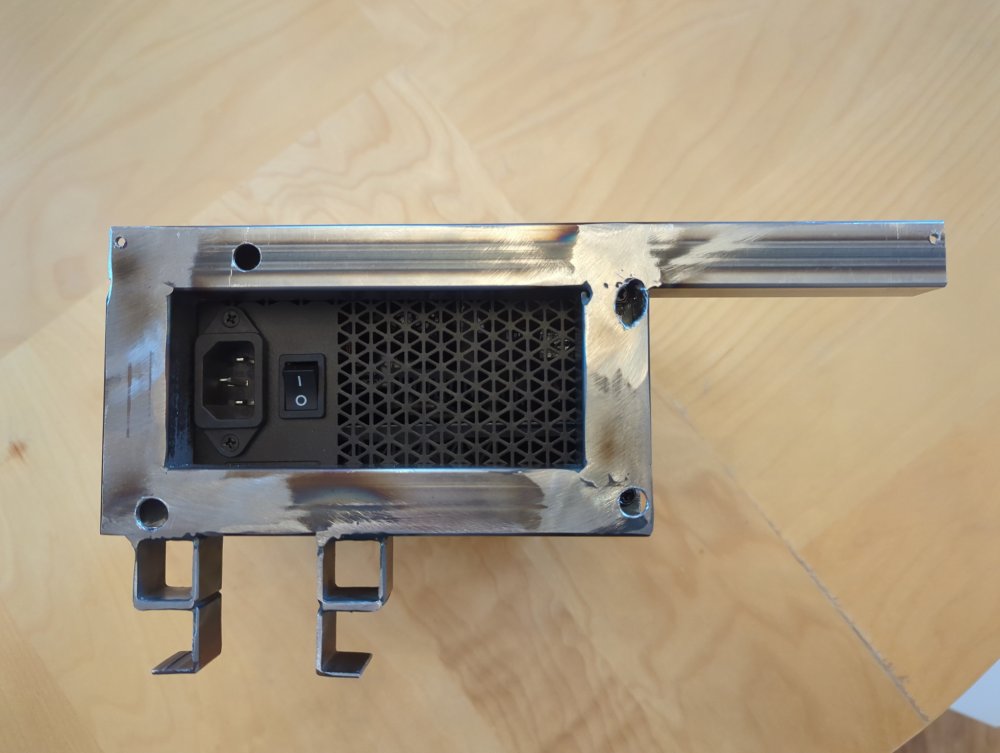
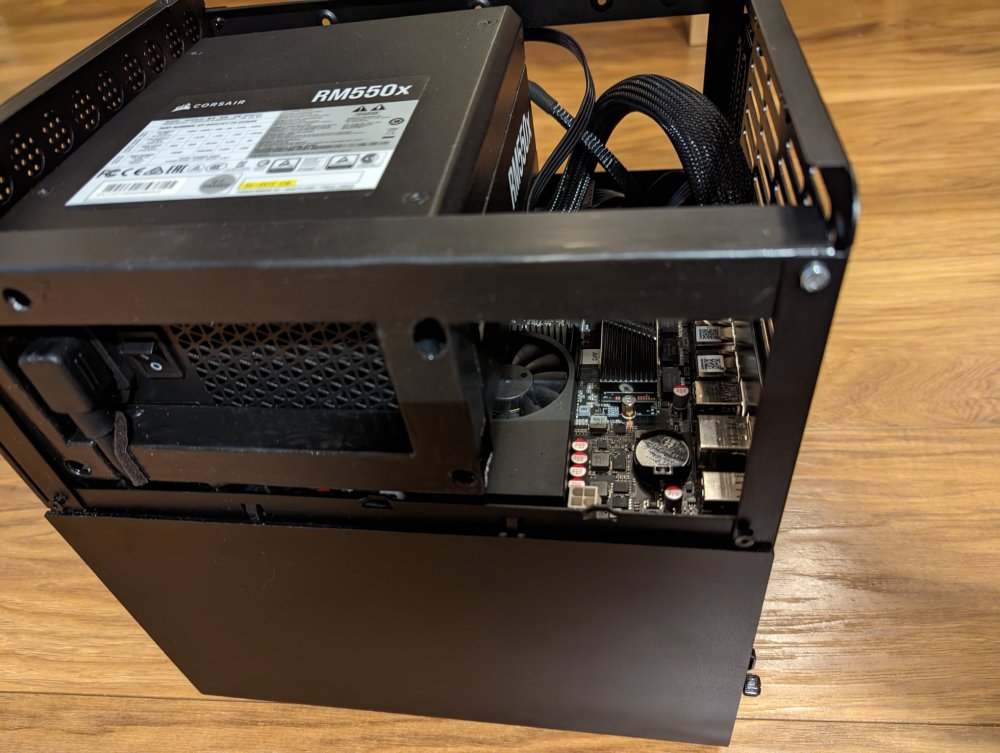
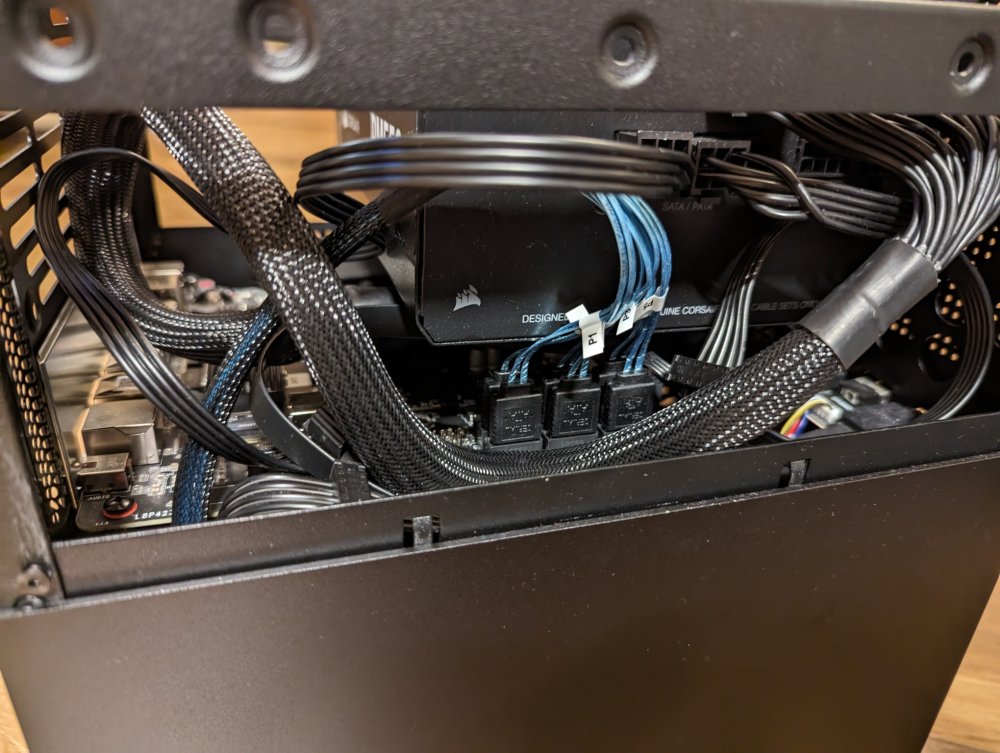
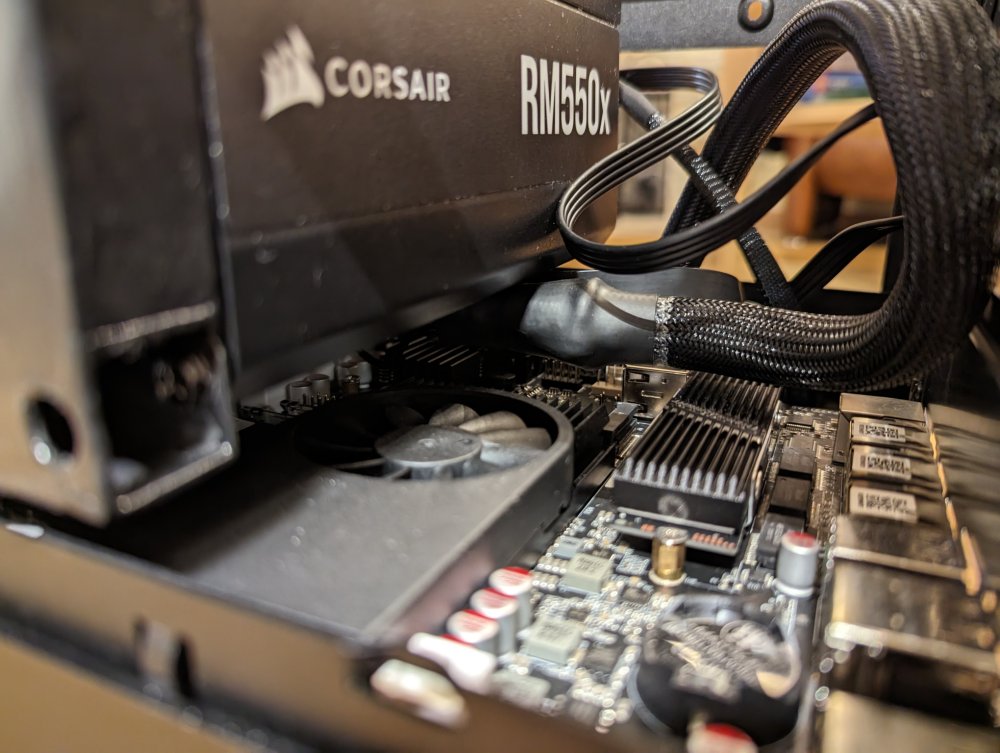
-
Thanks for all the Input! Just a short update: I ordered and received the N3 and all components, but ran into a show-stopper problem that I had not anticipated: The Jonsbo N3 only fits in a PSX PSU up to 105 mm depth. I had already ordered the Corsair RM 450 550x gold as my preferred PSU - which is an ATX PSU that is deeper (which I could have solved) - but it is also taller than a PSX and will not fit the N3 without case modification. I opted to engage that project, which involved substituting a thin sheet metal strut of the case with a welded pipe frame, to support the heavy ATX PSU in an unusual free-hanging horizontal orientation - based on a suggestion by @mgutt who suggested to make this in 3D printed plastic. But I have no 3D printer, and I do not trust plastics for this, so I went heavy metal for this. It turned out to be a major project that I have had near to no time for, in the past weeks. However, I do have the pipe frame now, but it still requires some drilling, thread-cutting, painting, and a small bracket from the other side's strut to support support the free-hanging end. I will update my build thread with the progress and images, when I have time.
-
Ah, jetzt, ja... Die Idee ist super, das wäre die Lösung! Da muss ich dann nicht was ganz Neues finden... Und ich hielt mich schon für recht passabel in Tetris, aber NAS-Bau scheint da nochmal besser zu schulen Da wäre ich nicht drauf gekommen, weil die mechanische Biegebelastung bei dieser Anordnung ziemlich ungünstig ist (Berufskrankheit). Aber da niemand auf der PSU Trampolin-springt, könnte das für das Eigengewicht ausreichen... (Die PSU ist zwar nicht gerade leicht, aber dürfte gehen). CPU-Kühler dürfte kein Problem sein, der baut bei dem Board nicht hoch. Vielleicht braucht man dann zusätzliche Lüfter auf der Etage, um die Luft zwischen PSU und CPU wegzuwedeln, aber auch das wäre lösbar. Man verliert wahrscheinlich einen der beiden 2,5" mounting points ab der Seite - Bei 8 Bay und 6 MoBo-Ports kein Problem Ein 3D-Drucker ist nicht unmittelbar vorhanden, aber bei der Biegebelastung auf die dann recht kleine Abstützhöhe wäre mir Metall eh lieber - Ich kriege da bestimmt was hingebastelt. Super, Danke!
-
Dieser jemand bin auch ich - Ich habe das konkretisierte Projekt auf Englisch reingestellt und von hier verlinkt. Sorry für die Dopplung. Der CPU-Kühler ist tatsächlich nicht das Problem: Das PSU ist länger als Platz ist bis zum Mini-PCB für USB, USB-C, und Audio. Gut, das PCB ist nicht zwingend nötig und kann ausgebaut werden. Aber auch dann ist das PSU dicker als der Platz zwischen Gehäuse-Hinterwand und MoBo-Außenkante. Und sie ist breiter als Platz zwischen Zwischendecke und Gehäuseoberteil ist: Im Englischen Thread habe ich die Maße der Form Faktoren aus Wikipedia mit den Maßen dieser PSU verglichen, und das passt definitiv nicht zusammen. Die Corsair wirkt auch nicht wie ein Small Form Factor, sondern ziemlich massiv...
.jpg.4426d1babe97d57641fc0866b8f804a5.jpg)
.jpg.b37e38237b0220fde6818e903b20774f.jpg)
-
Ok, maybe I got it wrong as a rookie, but this is what I researched: The Corsair RM550x is advertized as ATX and measures 150 mm (W) x 86 mm (H) x 160 mm (L), which, according to https://en.wikipedia.org/wiki/Power_supply_unit_(computer)#Appearance seems to be more of an ATX large (up to 180 mm length, opposed to ATX spec 140 mm). I measured a clearance for the PSU of ~140 mm x ~70 mm x 105 mm in the case - which leaves room for a SFX form factor PSU spec'ed as 125 mm x 63,5 mm x 100 mm. Even if I remove the mini-PCB which carries the Front USB, USB-C, and Audio sockets and limits length, that would only extend the length clearence, but not the rest. The Corsair SF600 is advertized as SFX and measures 100 mm x 63 mm x 125 mm - So that would fit the bill, but at much larger ~170 € cost, and it's on backorder for basically the rest of the year (Dec 24...26)... So that is no solution at hand, either. Are there any experiences with be Quiet or Sharkoon (or other) 500 W Gold rated SFX units, especially with efficiency in the most relevant idle @ 30 W range? Or would a picoPSU be the best way to go? I mainly bought the N3 for improved airflow around the hotswap backplate, not for actually equipping it with 8+2 drives. It just feels odd to limit options at this point, but I probably will not really need them...
-
Zu den SoC: Grünes vs. schwarzes Board sagt mir nichts. Soweit ich verglichen habe, haben die N-Boards etwas weniger Takt, nur den halben max. RAM (2x 16 GB), dafür mehr LAN-Ports und bessere iGPUs. Die werden auch gern im Router-Gehäuse verkauft. Damit war mein Fokus für NAS eher bei der eine Architektur-Generation moderneren J-Serie (ob das nennenswert am Verbrauch schraubt, weiß ich nicht). In Benchmarks liegt meiner Erinnerung nach selbst der N6005 Pentium Silver etwas hinter dem J6413 Celeron, ich bin aber kein CPU-Kenner. Bei Grafik liegen die N Prozessoren klar vorn. Den J6412 gibt es auch noch als Option für 160 €, aber bei der geringen Differenz über die Laufzeit... Auch die 20 € zum N5105 waren für mich nicht entscheidend. Ich glaube, der JB685 SATA Multiplier ist auch eine Generation jünger als der JB675 auf den N-Boards...? Wie relevant das Alles in der Praxis in welcher Situation ist - keine Erfahrung... Für mich klar pro J-Serie bei NAS-Anwendungen sprach der 2. M.2/PCIe-Port für Cache-Raid-Option oder SATA-Multiplier, und vor allem die 32 GB Spec pro DDR4 Slot. Irgendjemand meinte, die N-Serie sei auch schon erfolgreich mit 2x 32 GB bestückt worden, aber darauf wollte ich mich nicht verlassen. Das Netzteil schaue ich mir mal an, Danke. Vielleicht geht es aber wirklich durch Ausbau des Front-Peripherie-PCB, das wäre mir das liebste. Vom Jonsbo N3 wusste selbst der deutsche Vertrags-Händler von Jonsbo (CaseKing) noch nichts - Also hab ich entgegen meiner Überzeugung bei AliExpress bestellt, mit Rabatt-Code War das inkl. Lieferung auf Niveau des N2. Lieferung erfolgte deutlich schneller als angegeben. Soweit ich sehe, passt das RM550x auch nicht ohne weiteres in das N2 (Freiraum-Spec 150 bei PSU-Länge 160), aber das können N2-Besitzer vielleicht besser sagen. Ich sehe durchaus Probleme beim N3 (neben PSU-Freiraum die merkwürdige interne Kaltgerärekabel-Verlängerung, durch die man nicht an den Netzschalter kommt, und das 10" Doppel-Lüfter-Format, für das ich bei Noctua noch kein potenzielles Upgrade finden konnte - Beim N2 kann man wenigstens einen Full-Depth 12" ranbasteln). Das ohne Mod kompatibelste Case scheint mir (nur nach Recherche, keine eigene Erfahrung) das Node 304 zu sein. Das scheint aber wieder andere Issues zu haben (Kabelführung vs. Airflow, nur Schlitz als Zuluft, die HDD-Brackets schrecken mich ab, generell Zugänglichkeit, ...). MiniITX ist halt anscheinend immer ein Kompromiss...
-
Thanks! Also for the SFX heads up: Looking at SFX specs, the height and width should fit (although it does not really look like it, and the screw holes do not match...). A length of 140 mm seems to be SFX standard - The Jonsbo's 105 is quite a bit on the lower end (especially for an 8 bay case), where the Corsair with 160 mm is a bit on the higher end... I will have a look if I can remove the USB/Audio jack PCB to make room for it - That seems to be the limitation - and fit it in there...
-
Die bestellten Teile lagen jetzt wegen anderer Pflichten 1-2 Wochen rum... Aber heute habe ich es mal angegangen. Den Thread habe ich wg. englisch hier weitergeführt. Ich hatte jetzt doch das Corsair RM550x (2021) bestellt, als die UK Version (Kaltgerätekabel mit nicht-EU-Stecker) für ~105 € verfügbar war... Einfach, weil das N3 bis zu 8 3,5" HDDs zzgl. 1-2 2.5" SSDs supported und ich bei Mehrbedarf nicht die PSU zweimal bezahlen wollte und auch möglichst Alles kompakt intern haben wollte. Wie sich rausstellt, war das ein Fehler aus mangelnder Erfahrung: Im N3 passen ATX-Netzteile nicht rein, sondern nur PSX bis 105 mm. Im N2 waren noch 150 mm möglich (keine Ahnung, ob das für ATX gereicht hätte, im Node 304 wäre es gegangen). Jetzt muss ich mir für die PSU was einfallen lassen - Das Corsair muss ich wohl abgeben - Bei der schlechten Verfügbarkeit löst das vielleicht noch jemandes Problem. Ich habe sie bisher ja nicht einmal festgeschraubt oder angeschaltet... Dann wird es wohl doch die PicoPSU 160 W mit Leicke Schaltnetzteil werden, wenn niemand einen Tipp für ein effizientes PSX-PSU hat, das auch den Ausbau auf 8 HDDs unterstützen würde. Dank eines anderen Tipps hier (10 % Gutschein für Galaxy) habe ich 2 neue Seagate Exos X18 mit 16 TB für < 210 € bekommen 👍
-
Starting from this German thread, I tried to plan a simple DIY NAS with "potential for more", built around a new SoC based on this German build report. The goal was to substitute my Synology DS 216j (1x WD Red 8 TB internal + USB-Dock-Backup on a WD green 4 TB for the critical data), with a more powerful, less proprietary, updateable and more reasonably priced DIY NAS, with potential use of docker, and maybe a VM. motherboard miniITX CWWK J6413 (Celeron with iGPU, 2x 32 GB DDR4, 1+5x SATA, 2x M2 slot), 174 € case: the new Jonsbo N3 (8x 3,5" HotSwap with improved backplate). I considered the Node 304 and the N2, but for improved airflow and formfactor, the N3 came out just in time. PSU: ATX Corsair RM550x - Which turned out to be a problem, see below. RAM: 1x 32 GB Corsair DDR4 3200 (CT32G4SFD832A) (maybe a bit over the top for my purposes, but easy to upgrade with another unit if needed). Cache: 1x Samsung 970 EVO Plus M.2 NVMe SSD (MZ-V7S1T0BW), 1 TB with heatsink Thermalright TR-M. 2 2280 TYP A B 2280 I found two Seagate Exos X18 16 TB for ~210 € each - Much more than I need, but it was cheaper than lesser options, and it helps me move data from my 7 year old WD Red 8 TB, which might break down sooner or later. I might use one as internal backup, or for parity (and use the old WD red for internal backup). This should give me sufficient basic power with enough options to upgrade when needed. I wish I could report more progress at this point, but it turned out that the PSU does not fit the N3 - Which I lacked the experience to notice... The Jonsbo N series is appearently specified for PSX formfactor PSUs, where the Corsair is an ATX formfactor... The N3 is especially tight (<105, instead of <140 for the N2). I plan to use 2...4 HDDs only, so I initially intended to go for a picoPSU 160 W with external Leicke PSU. But the Corsair seemed to be more appropriate a case with up to 8x 3.5" HDDs + 2x 2.5" SSD, and I did not want to buy a new PSU later, so when the rare Corsair became available in a UK version, I just pulled the trigger. Not sure what to do about it now. I could sell the Corsair and restrict myself to the picoPSU (as long as I do not need more than 4 HDDs), or find a similar efficient PSX unit right from the start. BTW, the N3 has a really strange PSU concept: The PSU is seated internally in a bracket, with ~ 2 cm clearance to the case wall - with no access to the power cable socket and the main switch at all. Instead, the case comes with an internal cable (that goes where the bracket has 2 cm clearance, see fotos from N3 interior) with a plug for the PSU that is connected to a power socket on the back of the case... So appearently, you cannot hard-switch-off the system, but that is probably not so much relevant for a server that is rarely disconnected, and if so, requires a controlled power-down.
.jpg.d28fd82eb38049b4f8bf1e3c05ebc28b.jpg)
(small).jpg.7acba9503104fc4a174fc220f98db5a3.jpg)
(small).jpg.c53278575e1369e736eed9ff925a5ff1.jpg)
-
Wow - I will definitely look further into it, but it looks like they listened to and incorporated a lot of the points addressed in video reviews... 2 full thickness HDD fans (optional, for aftermarket choice?) behind an only partial backplabe PCB, extra mounts for MoBo fans, 8 HDD slots, extra side mounts points for SSD, Less restricting inlets... And still a depth of ~26 cm... Awesome!
-
I understand why it is likely to be true. I am not sure of the 304 is much better, though (but maybe that's a good question for a separate thread). Actually, it looks like the N2 has some space between all hard drives, and the backplane PCB has some cut throughs, and the guide rails are lined with holes to draw air in. Granted, this is pretty indirect airflow, but the fan seems to pull air out right behind the PCB. It's a 15 mm thin version, though, due to 10 mm missing depth - which seems to be the N2's major design fault, according to this review (at 3:50...6:15). I linked a report to modifications in a post before that componsates that (or, I saw someone mention you can mount a Noctua 12x25 mm full thickness fan outside). Also, at least one of the double mesh filters should be taken out or substituted with a wire cage. The separate MoBo compartment seems not to have a separate cooling fan in the case, but it has holes in the top to draw in air with an active CPU cooler (which my preferred board has). Most case openings seem to be covered by mesh, but that could be taken out (not sure of this would be a new problem). The Node 304 has only space in the middle of a set of two drives, with covers around each set and a full opening to the bottom. It also has a small slot on top and bottom to let air in (instead of an open front like the N2). It has two more fans pushing air there, so maybe the more active cooling is what makes this concept better - although many people suggest to exchange them all for more powerful aftermarket fans. But poor room for cable management and other stuff can make the case pretty crowded and obstruct airflow. This guy explains in a video that his 2.5 SSD builds overheated, so he made a massive effort in 3D-printing and grinding the case to include a 140 mm fan in the front (I do not know why he covers it with thin mesh, then - but it seems to work). The CPU seems to be in an area that is not affected much by airflow - but at least, the sides seem to have holes in that area for the CPU cooler to draw in air. But I suppose all that is theory.... So I am really unsure - It seems, the 304 is somewhat more closed and less organized in design, and comes with more and louder fans to compensate (which are recommended to be switched out). I do not want to grind around the frame and print a new front for a great, massive 140 fan). The N2 has the backplane PCB. And I agree, a PCB between MoBo and drives is an additional point of failure in the electronic leads. Actually, taking out the backplane and losing the hotswap capability is an additional option if things do not suffice. And clearance wise, even the 304 is almost 37.5 cm deep - I agree, this is not much difference to 39 cm of the 804 (which is wider and higher, too, but that would not be my problem). The 22.4 cm of the N2 is significantly easier to fit in a shelf...
-
Thanks a lot for going in details 👍 I have seen the Node 804 mentioned quite often as a go-to case. I plan on using only 2...4 HDDs (You never know - But 8 would really be a bit much space reserve). Also, the current 2-Bay Synology is placed on a 30 cm deep board - Which is not sufficient to support a 40 cm deep case. And even if I changed that to a 40 cm deep shelf board (which would be a problem at this position), there would not be much clearence to the wall for airflow... I have read some build reports claiming that the N2 (not the N1) is more tidy / less crowded that the Node 304. I have read a bit of criticism of the latter for bad airflow (not so much for the N2, but appearently I did not search well enough on reddit). I was also sceptical about the 304's closed front panel, with only small slots behind it for airflow. The Node 304 requires many disassembly steps for that - but granted, you do not need that all the time... So my hope was, by shelling out the extra 60 bucks for an N2, in addition to easier access to HDDs in case of expansion/failure, I would actually get a better airflow. The N2 seems to have a separate compartment for HDDs, too, and the case fan seems to pull air right through this compartment (well, obstructed somewhat by the HDD-panel). But no-one actually went into depth there - That's why I ask for practical experiences (like the linked post you kindly provided, thanks!). There is a build report that adds some modifications, one being to swap the stock fan out for a Noctua A12x25 (full thickness), mounted protruding a few mm's from the N2's back. Not sure how much that helps, but it sounds like a promising improvement. But if the 60 bucks extra for the N2 comes actually with a worse airflow, I'd have to rethink the case choice...
-
Not sure what you want to say - Has the Jonsbo N2 maybe even a worse airflow than the Node 304? I am asking because I actually do care which has a better "insignificant" feature, airflow - after having hard third and fourth thoughts and research about it - without a clear result... But since I am looking to substitute an even smaller Synology, there is no place in the shelf for a full ATX case... So I am looking for the (technically) best miniITX case.




.jpg.4426d1babe97d57641fc0866b8f804a5.jpg)
.jpg.b37e38237b0220fde6818e903b20774f.jpg)
.jpg.d28fd82eb38049b4f8bf1e3c05ebc28b.jpg)
(small).jpg.7acba9503104fc4a174fc220f98db5a3.jpg)
(small).jpg.c53278575e1369e736eed9ff925a5ff1.jpg)