





Brramble
Members
-
Joined
-
Last visited
-
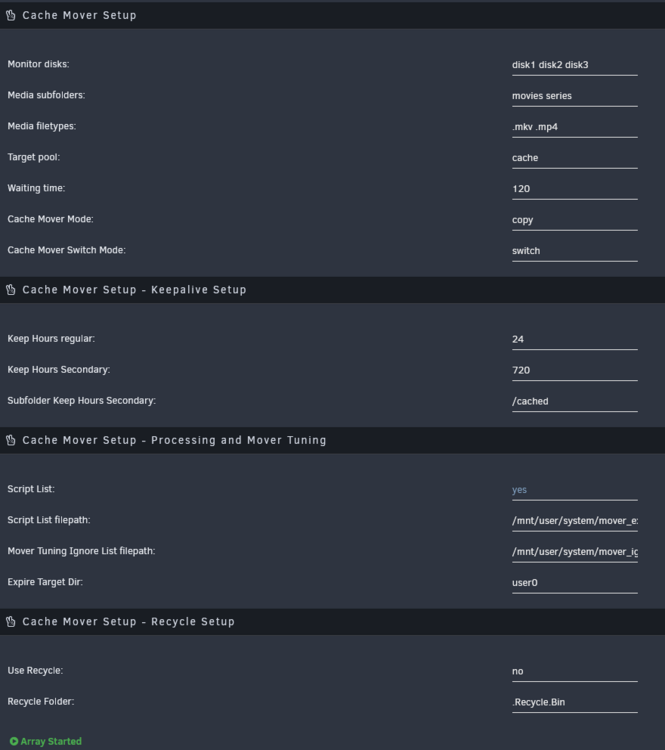
Hey @alturismo, thanks for this plugin! Really excited to start using it. Just wanting to check my setup with you, if I may? Im wanting to cache my two folders (movies series) which are on my array (share is called media, under media there are both top level folders). I've applied this config and hoping something starts to happen. Regarding the secondary folder mentioned, is this a folder I need to make on the cache share? Or does this need to be a new unraid share? Thanks.
-
Im using Unraid 6.12.3 and all my disks in the array including the parity keep spinning up and down to read SMART. I have Dynamix File Activity plugin enabled but no new files have been reported to be opened or modified. Im at a bit of a dead end on what to do. Has anyone had this before? Thanks in advance: Nov 1 20:15:17 Tower emhttpd: read SMART /dev/sdb Nov 1 20:15:34 Tower emhttpd: read SMART /dev/sdd Nov 1 20:15:34 Tower emhttpd: spinning down /dev/sdc Nov 1 20:15:36 Tower emhttpd: spinning down /dev/sde tower-diagnostics-20231101-2022.zip
-
Hey - Does this support limiting the bandwidth on containers? Do you know if we are able to make unprivileged containers yet? Thanks!
-
Thank you for confirming that @ich777, makes complete sense now. I recently moved from Proxmox and was familiar with seeing the configuration reflect within htop. I wonder why it is this way, do you happen to know? Thanks again.
-
Brramble changed their profile photo
-
Hello Just wondering if I have missed anything obvious here... I'm on 6.12.3 and fresh install of the LXC plugin. When I use the following config, the memory and CPU within the LXC container doesn't get applied. For example when I run htop, I can still see the full specification of the host. Thanks for any advice in advance


