





Jamfin
Members
-
Joined
-
Last visited
-
Hi @mstrhakr , did you see this by the way? Toggling Advanced View only works on the compose containers and not those in the view above. I am not sure if this is related to FolderView3 or not though.
-
I've noticed that the Advanced View only changes the compose side of things, i've lost all advanced metrics in relation to my containers.
-
I currently use the https://forums.unraid.net/topic/114415-plugin-docker-compose-manager/ plugin, is it quite easy to migrate across or is there steps involved in doing so?
-
Brilliant - thank you for confirming. It was due to the port in the configuration file being 443 and not the default container one of 8080. Not sure how it managed to get like that. Thanks for the swift responses, you've saved my bacon.
-
Thanks for that confirmation! I've now switched it to HTTPS and still no progress, no message within the console debug either, still blank.
-
Yeah - I read your response to the turning off SSL if the wing is behind the proxy above due to the erroring of the certificates. Should I just point that to where the certificate is signed in my Caddy? /var/www/html # curl -I https://wing.<domain>:443 HTTP/2 502 alt-svc: h3=":8443"; ma=2592000 server: Caddy date: Sat, 28 Dec 2024 18:22:05 GMT That's the response from within the panel container to the wing domain.
-
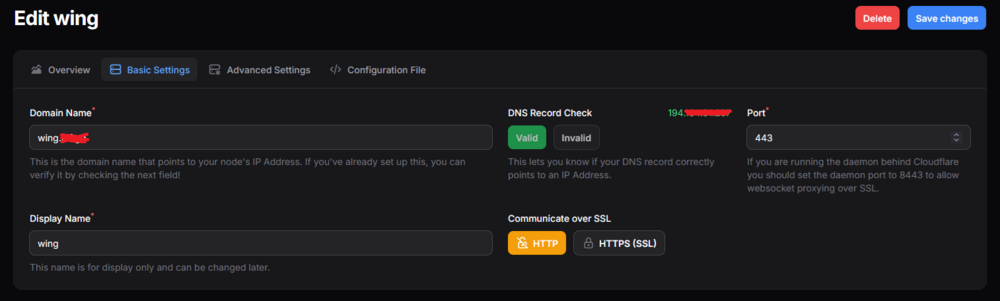
Hey, I've got a VPS I use to proxy external resources, so I've got the panel and wing proxied behind the same VPS, the panel is working all fine under my subdomain just fine i'm just having trouble connecting to the wing. I'm looking in the console for the error but I can't see why it's happening as the response is blank: As I say they're both proxied through the 194. IP with the panel at pelican.<domain> and the wing on <wing>. and i'm using Caddy to proxy back to my Unraid Server through Tailscale. pelican.<domain> { reverse_proxy 100.100.1.1:8050 } wing.<domain> { reverse_proxy 100.100.1.1:8051 } It works fine if I use the docker network IP etc but I of course want to have the external 194. IP as the default for any servers being created. Any guidance would be massive Thanks.

-
Jamfin changed their profile photo
-
Ah! Apologies for the misunderstanding, i'll give the system a reboot now. Thank you for the clarification.
-
No, it was just after restarting and rebuilding the offending container. Should I be restarting then? Is that /mnt/disk1 cached in RAM now?
-
Silly me, forgot to fix that a while back... I had old SSD's in my array whilst I waited for my NAS drive so disk1 doesn't exist anymore correct. Although; i've found the offending container and done a rescan of common problems but it still remains so it must be elsewhere on the system. Do you have any recommendations of where I can check? All my docker containers no longer contain disk1 checks.
-
Hi people! Fairly new to unraid so forgive ingorance or being clueless. I've had my server setup now for the best part of a month; all of which has been perfect and no issues at all. However; since upgrading to 6.12.8 (could be completely unrelated) my server seems to just completely brick after a few days of runtime. Initially I noticed that my server was running for 9 days until I went into my Homarr container and went to save something then the server completely bricked and I had to power cycle it, so I had assumed it was something to do with Homarr. However about an hour ago, it happened again (2 days after the first one) when I was out the house so it couldn't be related. I do have a few plugins, containers, a windows VM (which literally just runs an idle game on it for when i'm out the house and don't want my computer on also) which is low usage and a rclone mount. I've attached my diagnosis for those that know what to look for but unfortunately i'm kind of in the blue. I've not had syslog logging to my flash so I've turned that on to be able to catch the culprit if it happens again. I'd appreciate any insight into the matter, i'm kind of a bit blind and this server now runs quite a few public services so i'd like to be able to get to the bottom of it before I do any damage to the drives by having to power cycle the machine. home-diagnostics-20240308-1301.zip




