ThePlague
Members
-
Joined
-
Last visited
Everything posted by ThePlague
-
Würde gerne, ein Unreal Tournament 2004 Server laufen lassen, nur gibt es da kein Docker was sehr schade ist. Vielleicht könnte jemand einen erstellen da ich das selber nicht kann? Hab gesehen das es für UT99 ein Docker gibt würde mich freuen, wenn es auch einen für UT2004 geben würde.
-
Okay Vielen Danke @ alturismo, DataCollector für die antworten, ich werde erstmal den Server befüllen, und dann die Parityfestplatte aktivieren das sollte man ja dann im betrieb nicht mehr mitbekommen da alles im Hintergrund passiert.
-
Vielen Dank für die Information, ja genau die habe ich noch nicht eingerichtet. Das kann ich aber auch erst später machen, wenn ich alle daten auf den Server schon habe oder sollte man das direkt am Anfang machen mit der Parityfestplatte?
-
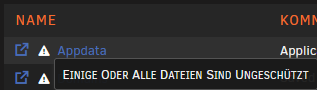
Hallo an alle, ich habe mal eine kurze frage vielleicht kann mir da jemand helfen, da ich nichts darüber gefunden habe leider. Und zwar, wie kann ich bei Benutzerfreigaben (Shares) machen das sie da sicher steht bei mir sieht es so grad aus? das steht und ich habe schon alles versucht oder ist es nicht schlimm so wie es jetzt ist? Und Entschuldigung für die blöde frage aber ich bin ganz neu dabei....