vindictive-voyeur2295
Members
-
Joined
-
Last visited
Everything posted by vindictive-voyeur2295
-
The last check finished the same day I installed the disk - at the end of it the report showed 4 errors: Parity-Check2024-09-21, 13:35:43 (Saturday)18 TB5 day, 4 hr, 23 min, 3 sec40.2 MB/sOK4 The above check was the run after its hard lock up a week prior. So unsure if a disk is failing or if when adding a new drive I have hit a sata connector by accident when installing.
-
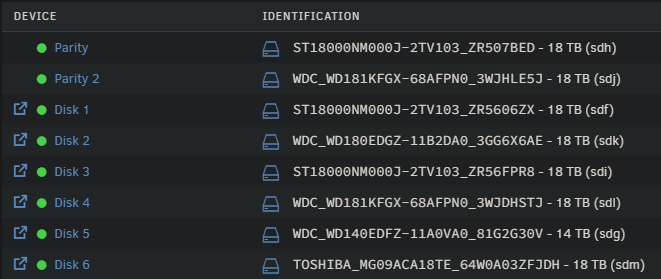
I have had my first parity sync errors which I have noticed and not sure how to tackle it, using mostly 18tb drives so as you can imagine it takes a few days to run one parity sync. Installed a new HDD on Saturday - I did not turn the machine of whilst doing this (silly I know was in a hurry), shutdown the array which in hindsight would have been better to do BEFORE installing the new HDD, formated the new drive and added it to the array, I then let the disk get cleared and started a new parity sync without the checkbox ticked to write corrections. Its now 40 odd percent complete and I am showing 80 sync errors. None of my drives are showing errors and disks are passing smart tests (most of them a couple get stuck on 90% but have read this a bug with the drives in questions) Depending on how large this error count grows I am not sure on what the best course of action to take is and hoping you guys can guide me to it. System log is attached. The drives in my system are as below: If the number didnt grow to large I initially thought best thing to do is do another run and write the corrections this time, but upon reading further mostly on here it seems this is not the best idea since I could then be writing trash to my parity drives. Not sure if better course is to shut the machine down once this run completes and do another run to see if they clear themselves. It did have a hard lock up a week or so ago and I am wondering if this is where the issues began. r3l-unraid-syslog-20240924-1422.zip
-
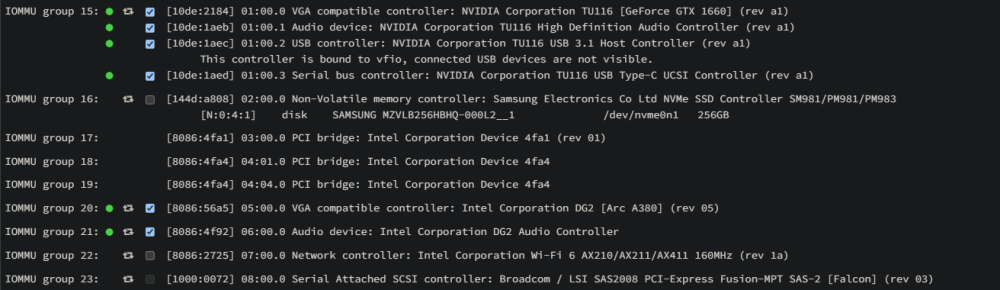
First post here guys, I have been running Unraid for a few months now and it seems stable enough however my VM's no longer run. Have 2 GPU's in my system; GTX1660 ARC A380 Setup 2 windows 10VM's - 1 for testing out gaming through parsec on the 1660 and another machine for video transcoding and other basic tasks, minecraft server etc. Both were working fine, I had bound both IOMMU groups at boot and had the video drivers installed on each machine for both everything was working fine: For the last few weeks I have been focused on work on not looked at my system to much until a couple of days ago and noticed I could no longer access either machine, after giving up I then tried making new machines and attaching the old disks to the new machines - didnt work. Then tried completley new machines and new virtual disks, setup the systems with OVMF and Q35 as before and added a virtual GPU as well as a secondery GPU 1660/Arc respectively, machines booted fine, got my drivers installed, shut them down and removed the virtual GPU leaving only the physical card, start them up again and boom - nothing. Logs are spitting out the below error for 1 machine: 2023-11-23 11:46:20.174+0000: starting up libvirt version: 8.7.0, qemu version: 7.1.0, kernel: 6.1.49-Unraid, hostname: r3l-unraid LC_ALL=C \ PATH=/bin:/sbin:/usr/bin:/usr/sbin \ HOME='/var/lib/libvirt/qemu/domain-1-Windows 10 VM' \ XDG_DATA_HOME='/var/lib/libvirt/qemu/domain-1-Windows 10 VM/.local/share' \ XDG_CACHE_HOME='/var/lib/libvirt/qemu/domain-1-Windows 10 VM/.cache' \ XDG_CONFIG_HOME='/var/lib/libvirt/qemu/domain-1-Windows 10 VM/.config' \ /usr/local/sbin/qemu \ -name 'guest=Windows 10 VM,debug-threads=on' \ -S \ -object '{"qom-type":"secret","id":"masterKey0","format":"raw","file":"/var/lib/libvirt/qemu/domain-1-Windows 10 VM/master-key.aes"}' \ -blockdev '{"driver":"file","filename":"/usr/share/qemu/ovmf-x64/OVMF_CODE-pure-efi.fd","node-name":"libvirt-pflash0-storage","auto-read-only":true,"discard":"unmap"}' \ -blockdev '{"node-name":"libvirt-pflash0-format","read-only":true,"driver":"raw","file":"libvirt-pflash0-storage"}' \ -blockdev '{"driver":"file","filename":"/etc/libvirt/qemu/nvram/1203a37a-6bae-8028-b6e8-ab3ff0b6d958_VARS-pure-efi.fd","node-name":"libvirt-pflash1-storage","auto-read-only":true,"discard":"unmap"}' \ -blockdev '{"node-name":"libvirt-pflash1-format","read-only":false,"driver":"raw","file":"libvirt-pflash1-storage"}' \ -machine pc-q35-7.1,usb=off,dump-guest-core=off,mem-merge=off,memory-backend=pc.ram,pflash0=libvirt-pflash0-format,pflash1=libvirt-pflash1-format \ -accel kvm \ -cpu host,migratable=on,hv-time=on,hv-relaxed=on,hv-vapic=on,hv-spinlocks=0x1fff,hv-vendor-id=none,host-cache-info=on,l3-cache=off \ -m 4096 \ -object '{"qom-type":"memory-backend-ram","id":"pc.ram","size":4294967296}' \ -overcommit mem-lock=off \ -smp 4,sockets=1,dies=1,cores=2,threads=2 \ -uuid 1203a37a-6bae-8028-b6e8-ab3ff0b6d958 \ -display none \ -no-user-config \ -nodefaults \ -chardev socket,id=charmonitor,fd=35,server=on,wait=off \ -mon chardev=charmonitor,id=monitor,mode=control \ -rtc base=localtime \ -no-hpet \ -no-shutdown \ -boot strict=on \ -device '{"driver":"pcie-root-port","port":16,"chassis":1,"id":"pci.1","bus":"pcie.0","multifunction":true,"addr":"0x2"}' \ -device '{"driver":"pcie-root-port","port":17,"chassis":2,"id":"pci.2","bus":"pcie.0","addr":"0x2.0x1"}' \ -device '{"driver":"pcie-root-port","port":18,"chassis":3,"id":"pci.3","bus":"pcie.0","addr":"0x2.0x2"}' \ -device '{"driver":"pcie-root-port","port":19,"chassis":4,"id":"pci.4","bus":"pcie.0","addr":"0x2.0x3"}' \ -device '{"driver":"pcie-root-port","port":20,"chassis":5,"id":"pci.5","bus":"pcie.0","addr":"0x2.0x4"}' \ -device '{"driver":"pcie-root-port","port":21,"chassis":6,"id":"pci.6","bus":"pcie.0","addr":"0x2.0x5"}' \ -device '{"driver":"nec-usb-xhci","p2":15,"p3":15,"id":"usb","bus":"pcie.0","addr":"0x7"}' \ -device '{"driver":"virtio-serial-pci","id":"virtio-serial0","bus":"pci.2","addr":"0x0"}' \ -blockdev '{"driver":"file","filename":"/mnt/user/domains/Windows 10 VM/vdisk1.img","node-name":"libvirt-3-storage","cache":{"direct":false,"no-flush":false},"auto-read-only":true,"discard":"unmap"}' \ -blockdev '{"node-name":"libvirt-3-format","read-only":false,"cache":{"direct":false,"no-flush":false},"driver":"raw","file":"libvirt-3-storage"}' \ -device '{"driver":"virtio-blk-pci","bus":"pci.3","addr":"0x0","drive":"libvirt-3-format","id":"virtio-disk2","bootindex":1,"write-cache":"on","serial":"vdisk1"}' \ -blockdev '{"driver":"file","filename":"/mnt/user/isos/en-us_windows_10_consumer_editions_version_22h2_updated_may_2023_x64_dvd_8ae93bf4.iso","node-name":"libvirt-2-storage","auto-read-only":true,"discard":"unmap"}' \ -blockdev '{"node-name":"libvirt-2-format","read-only":true,"driver":"raw","file":"libvirt-2-storage"}' \ -device '{"driver":"ide-cd","bus":"ide.0","drive":"libvirt-2-format","id":"sata0-0-0","bootindex":2}' \ -blockdev '{"driver":"file","filename":"/mnt/user/isos/virtio-win-0.1.229.iso","node-name":"libvirt-1-storage","auto-read-only":true,"discard":"unmap"}' \ -blockdev '{"node-name":"libvirt-1-format","read-only":true,"driver":"raw","file":"libvirt-1-storage"}' \ -device '{"driver":"ide-cd","bus":"ide.1","drive":"libvirt-1-format","id":"sata0-0-1"}' \ -netdev tap,fd=36,id=hostnet0 \ -device '{"driver":"virtio-net","netdev":"hostnet0","id":"net0","mac":"52:54:00:53:f7:24","bus":"pci.1","addr":"0x0"}' \ -chardev pty,id=charserial0 \ -device '{"driver":"isa-serial","chardev":"charserial0","id":"serial0","index":0}' \ -chardev socket,id=charchannel0,fd=34,server=on,wait=off \ -device '{"driver":"virtserialport","bus":"virtio-serial0.0","nr":1,"chardev":"charchannel0","id":"channel0","name":"org.qemu.guest_agent.0"}' \ -device '{"driver":"usb-tablet","id":"input0","bus":"usb.0","port":"1"}' \ -audiodev '{"id":"audio1","driver":"none"}' \ -device '{"driver":"vfio-pci","host":"0000:05:00.0","id":"hostdev0","bus":"pci.4","addr":"0x0"}' \ -device '{"driver":"vfio-pci","host":"0000:06:00.0","id":"hostdev1","bus":"pci.5","addr":"0x0"}' \ -sandbox on,obsolete=deny,elevateprivileges=deny,spawn=deny,resourcecontrol=deny \ -msg timestamp=on char device redirected to /dev/pts/0 (label charserial0) 2023-11-23T11:46:22.164204Z qemu-system-x86_64: VFIO_MAP_DMA failed: Invalid argument 2023-11-23T11:46:22.164247Z qemu-system-x86_64: vfio_dma_map(0x1474a49f4800, 0x381800000000, 0x200000000, 0x1472a2a00000) = -2 (No such file or directory) 2023-11-23T11:46:23.330126Z qemu-system-x86_64: VFIO_MAP_DMA failed: Invalid argument 2023-11-23T11:46:23.330141Z qemu-system-x86_64: vfio_dma_map(0x1474a49f4800, 0x381800000000, 0x200000000, 0x1472a2a00000) = -22 (Invalid argument) 2023-11-23T11:46:23.361581Z qemu-system-x86_64: VFIO_MAP_DMA failed: Invalid argument 2023-11-23T11:46:23.361594Z qemu-system-x86_64: vfio_dma_map(0x1474a49f4800, 0x381800000000, 0x200000000, 0x1472a2a00000) = -22 (Invalid argument) 2023-11-23T11:46:23.427750Z qemu-system-x86_64: VFIO_MAP_DMA failed: Invalid argument 2023-11-23T11:46:23.427765Z qemu-system-x86_64: vfio_dma_map(0x1474a49f4800, 0x381800000000, 0x200000000, 0x1472a2a00000) = -22 (Invalid argument) 2023-11-23T11:46:23.432079Z qemu-system-x86_64: VFIO_MAP_DMA failed: Invalid argument 2023-11-23T11:46:23.432088Z qemu-system-x86_64: vfio_dma_map(0x1474a49f4800, 0x381800000000, 0x200000000, 0x1472a2a00000) = -22 (Invalid argument) 2023-11-23T11:46:23.438165Z qemu-system-x86_64: VFIO_MAP_DMA failed: Invalid argument 2023-11-23T11:46:23.438178Z qemu-system-x86_64: vfio_dma_map(0x1474a49f4800, 0x381800000000, 0x200000000, 0x1472a2a00000) = -22 (Invalid argument) 2023-11-23T11:46:23.442124Z qemu-system-x86_64: VFIO_MAP_DMA failed: Invalid argument 2023-11-23T11:46:23.442132Z qemu-system-x86_64: vfio_dma_map(0x1474a49f4800, 0x381800000000, 0x200000000, 0x1472a2a00000) = -22 (Invalid argument) 2023-11-23T11:46:28.052087Z qemu-system-x86_64: VFIO_MAP_DMA failed: Invalid argument 2023-11-23T11:46:28.052118Z qemu-system-x86_64: vfio_dma_map(0x1474a49f4800, 0x381800000000, 0x200000000, 0x1472a2a00000) = -22 (Invalid argument) 2023-11-23T11:46:28.057509Z qemu-system-x86_64: VFIO_MAP_DMA failed: Invalid argument 2023-11-23T11:46:28.057524Z qemu-system-x86_64: vfio_dma_map(0x1474a49f4800, 0x381800000000, 0x200000000, 0x1472a2a00000) = -22 (Invalid argument) 2023-11-23T11:46:28.076670Z qemu-system-x86_64: VFIO_MAP_DMA failed: Invalid argument 2023-11-23T11:46:28.076786Z qemu-system-x86_64: vfio_dma_map(0x1474a49f4800, 0x381800000000, 0x200000000, 0x1472a2a00000) = -22 (Invalid argument) 2023-11-23T11:46:28.117593Z qemu-system-x86_64: VFIO_MAP_DMA failed: Invalid argument 2023-11-23T11:46:28.117615Z qemu-system-x86_64: vfio_dma_map(0x1474a49f4800, 0x381800000000, 0x200000000, 0x1472a2a00000) = -22 (Invalid argument) 2023-11-23T11:46:28.135079Z qemu-system-x86_64: VFIO_MAP_DMA failed: Invalid argument 2023-11-23T11:46:28.135103Z qemu-system-x86_64: vfio_dma_map(0x1474a49f4800, 0x381800000000, 0x200000000, 0x1472a2a00000) = -22 (Invalid argument) 2023-11-23T11:46:31.449283Z qemu-system-x86_64: VFIO_MAP_DMA failed: Invalid argument 2023-11-23T11:46:31.449301Z qemu-system-x86_64: vfio_dma_map(0x1474a49f4800, 0x381800000000, 0x200000000, 0x1472a2a00000) = -22 (Invalid argument) I am now at a loss as to what to try next and hoping you guys could give me some advice, Aboslutley loving Unraid so far, just seem to have hit a road black now which I cant solve. Physcially nothing has changed in my system, both cards have HDMI dummy plugs in them if that helps and everything was just working fine until now. If I have missed any info out just let me know.