siron1992
Members
-
Joined
-
Last visited
Everything posted by siron1992
-
I used to use crappy external SSDs for all my data, so I wanted to build a NAS (because you get more bang for your buck with specs) than buying a prebuilt, like QNAP etc. The thing that swung me to UnRaid was the ability to have Dockers. TBH, I didn't know I needed any until I looked through the community apps. Now I have a Minecraft Server, FileZilla, Plex, AdGaurd Home and an Automated Speed Tester, to name a few. I'd run independently on my desktop for most of the above, so having them on 24/7 on my build in a docker is just amazing. I can't imagine my home setup without it now. You won't regret it!
-
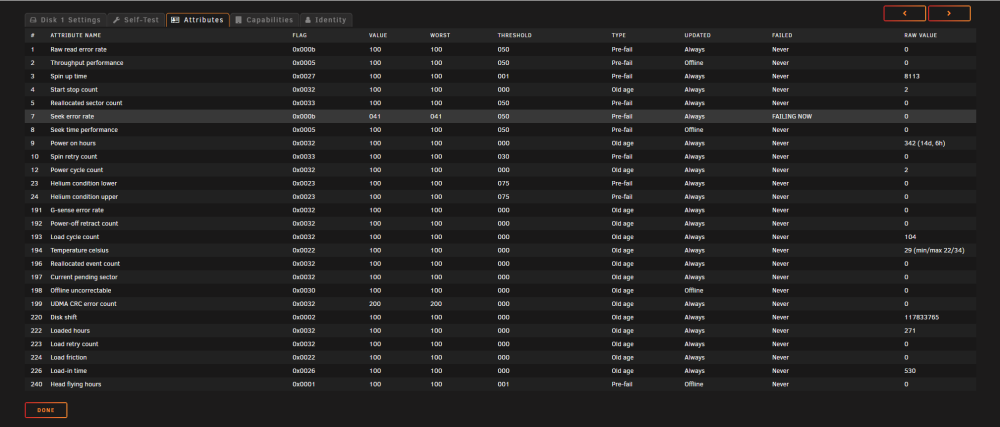
Sorry to wake up an old post, but how did you get on with these @dacunno? I've bought a total of 4 N300 16 TBs. One failed with Seek Error Rate 2 weeks in, the replacement is now in, and has been running for 3 days - but again, its pretty close to the threshold. Are these just crap drives? Should I look at a different brand?
-
Thank you @dboonthego
-
You sir are a legend. You've answered my inital question, but just for clarity around Parity - I assume it continually writes to parity and the 'Parity Check' is just a fail safe to ensure Parity is accurate? Is that correct just so I understand how Parity works?
-
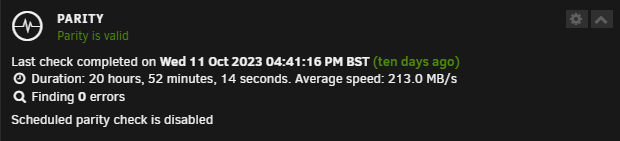
Thanks for the advice - last Parity Check was 10 days ago, should I rerun the check before removing the drive? In terms of moving the data for redundancy, is it just a case of manuall moving everything from /mnt/disk1 to /mnt/disk2 or am I missing something here?
-
Hey All, Unraid's just flagged up that Disk 1 (which is only 2 weeks old) has a SEEK_ERROR_RATE issue with the status FAILING NOW. What does this mean? And what should I do with the Data on that disc? I have Disk 2 which is empty. DO I need to manually copy data from D1 to D2? I was under the impression that I could just remove D1 and replace with a new drive, and the data would be recovered from Parity? Logs attached. Thanks! alfred-smart-20231021-2102.zip