flaminiom
Members
-
Joined
-
Last visited
Everything posted by flaminiom
-
This scenario is repeatable on my 6.12.13 install. Built in VPN with wireguard is active and handful of containers are using this gateway. I have SWAG/NGINX running for reverse proxy and a handful of containers are not on the VPN network. (I tried both reverse proxy containers sharing a custom network and on bridge while manually directing container to app IP in NGINX config and does not seem to affect this scenario) I can access the reverse proxy fine. I shut down the array and change the IP4 DNS server for Unraid in Settings->Network Settings. Restart array and containers. Everything works EXCEPT the reverse proxy is broken for external access. Same containers work fine locally. If I flip the VPN off, everything works again. If I flip it back on, it continues to work. I would expect containers not using the VPN gateway to be unaffected by the VPN gateway status, plus not sure why changing this network setting between stop/start cycles would cause it all to go squirrelly. Take care.
-
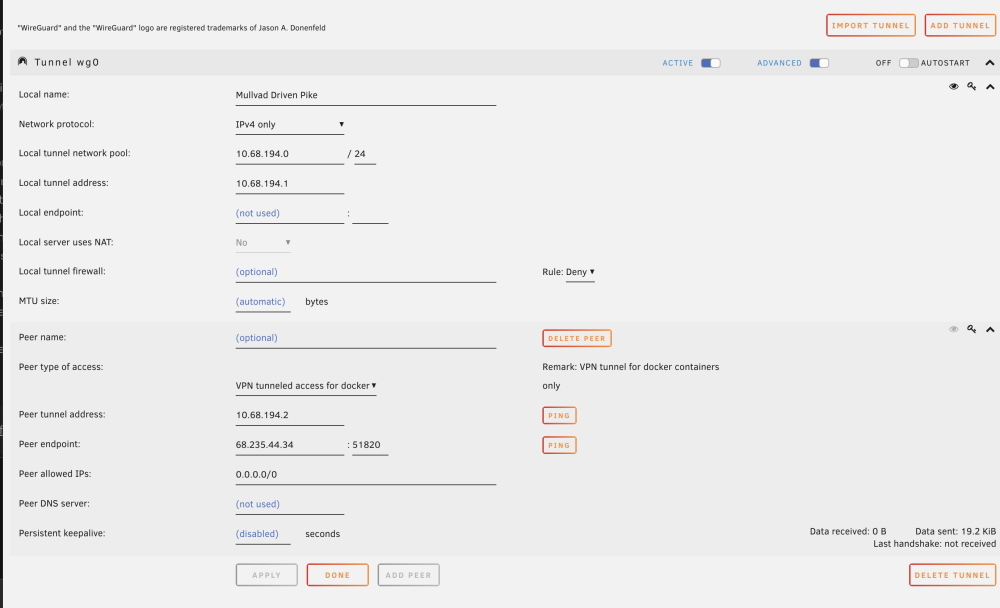
Ugh! Figured it out after sufficiently banging my head against the wall. It was a firewall rule. The rule was activated a while ago, but this is the first time launching a VPN session with it in place. Which is a little weird because I guess it prevented the session handshake and it couldn't get off the ground. I didn't think of it because the change happened weeks ago. Anyway, I'll leave my post below for anyone in might help the future. My VPN for tunneled access for dockers suddenly stopped working. I had shut down to add a new drive and decided to change up my VPN config to a new server, which I do occasionally just because. The new config loaded, I flipped the active switch, but I have no access on that network. It says Last Handshake: Not connected and it sends a few kb and nothing received. I tried testing with a Firefox container and nothing. Also tried pinging 8.8.8.8 in the console of the container and nothing. I can successfully ping the peer endpoint. Peer tunnel address fails. Not sure if it matters, but I accidentally hit tunneled access for system when adding that new config. Could something there have made it go loopy? I'm using IPv4 only. I tried creating new configs, different servers. I tried the config file for the server that was just working for me and nothing. I tried going into /host/config and deleting everything in wireguard. I tried adding a config for Proton VPN which also worked for me in the past and that doesn't work either. I tried flipping it on/off countless time. I tried rebooting a few times. The log seems to indicate the VPN starts with no other entries. Nov 28 09:20:06 XXXXXX wireguard: Tunnel WireGuard-wg0 started Nov 28 09:20:06 XXXXXX network: update services: 1s Any suggestions or an approach to troubleshoot?