





rbreen
Members
-
Joined
-
Last visited
-
Renaming the Music.cfg to music.cfg resolved the issue. Thanks!
-
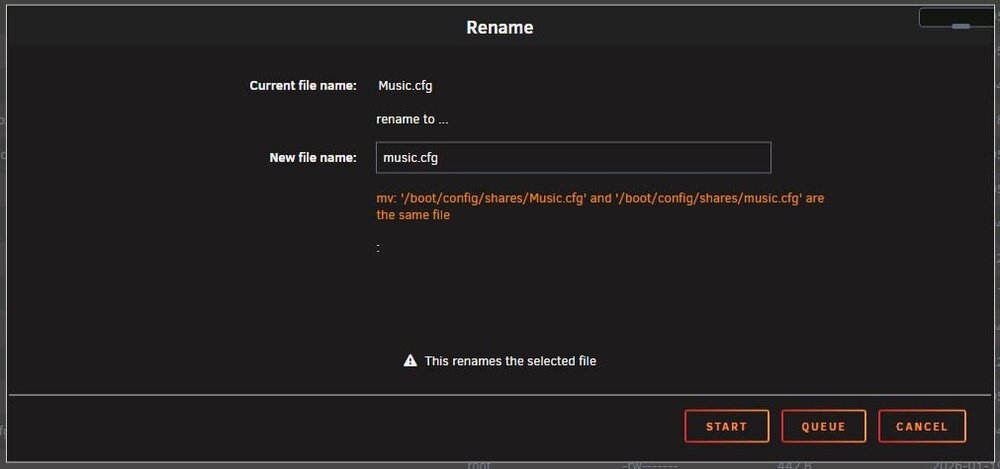
I guess I cannot do this through the unraid gui - I get the error - mv: '/boot/config/shares/Music.cfg' and '/boot/config/shares/music.cfg' are the same file. I will try tonight when I am not remote and post back here.
-
I would love a bit of help/reassurance - I lost my cache ssd drive on my main array. I had a previously installed nvme drive that I had moved my appdata over onto, so I decided to not replace the cache drive at this time. I just noticed that some of my shares are now unavailable and in the shares detail it has moved storage onto the nvme drive and I cannot edit any of the properties. I also have a case-insensitive share name non unique error on the share. In my flash/config/share directory, the share is listed as Music.cfg but in the unraid share it is listed as lowercase music. Is the fix to change the case on either the .cfg file or the unraid share detail, or something else? If I click through the share my data is still present. I did check, and I only have 1 .cfg file for the share. tower-diagnostics-20260315-1031.zip
-
User DiscoverIt helped me on the discord and fixed my problem. Turns out I had a configuration issue in my /boot/config/shares/ with an old TV.cfg AND the current tv.cfg file. Removing the old file and rebooting started the mover again. Thanks again to DiscoverIt
-
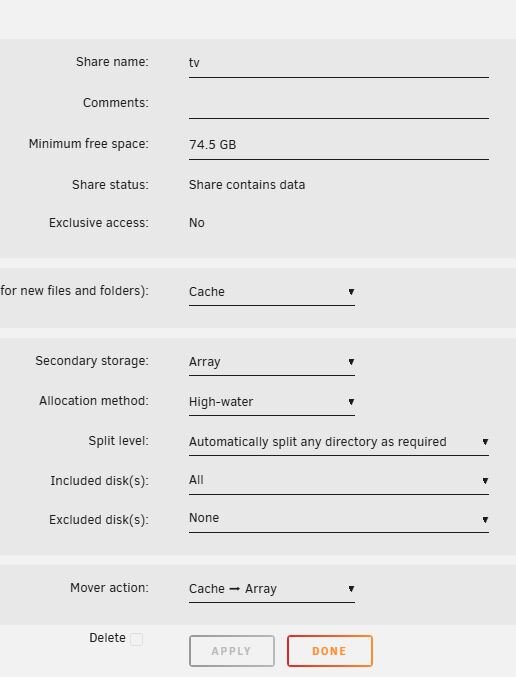
I have a mover problem. I am sure it is something silly, but I cannot find it! I have a share (tv) that is set to move from cache to array every night, there is room on the array and I do not have mover tuning plugin installed, I have disabled docker and triggered the the mover command through the mover settings tab with mover logging enabled, I see the mover starting in the syslog, and then the mover completion 1 second later without any movement of the files in the share (also no error). I have run check common problems. Any other places to look for problems? I am on 7.1.4 tower-diagnostics-20250726-1013.zip

-
The plug in seems to stop after 60 seconds? Any troubleshooting I can do? Seems to start fine, but nothing logs to screen, refresh a few times and then status returns to stopped.
-
I cant wait to try this when I get home!!!!! I have been struggling with this for months - sometimes I would make a small step forward, but have only gotten couch potato and sonarr working. Way excited!! Thanks!!!!!!
-
I also would love to see an updated guacamole docker - I use the current Unraid one all the time!
-
Thanks so much! Got it up and running - time to bite the bullet and get the pro license!
-
Any chance we could get a 5.0 final? I really appreciate all the hard work! Thanks!

