





Fma965
Community Developer
-
Joined
-
Last visited
-
I think this fixed my issue, i had to restart my camera and nfs settings one time first though but seems good so far, thanks!
-
I already disabled Home Assistant then did the action then shared the diagnostic, anything in the log before Feb 11 14:15:42 F9-NAS was before HA was disabled that is just old entries and not relevant to the issue. The shares that i am modifying also have NFS setup so my guess is they restart NFS but then unassigned devices doesn't handle this configuration and therefore NFS starts up without whatever configuration unassigned devices uses. then when i disable unassigned devices NFS and enable it again the configuration get's reapplied. Thanks for looking in to it :), also why does Unraid forum say i am a moderator lol? EDIT: maybe it was for something years ago? can't remember tbh 😂
-
That's from a Home Assistant integration. Snippet of the log, the start is when I made a change to the Media share, NFS then stops working as shown by "refused mount request" then i disable NFS and enable it again in the unassigned devices and it works again. Feb 11 14:15:42 F9-NAS rpc.mountd[24968]: refused mount request from 10.0.21.1 for /mnt/disks/CCTV_RAW (/): not exported Feb 11 14:15:43 F9-NAS emhttpd: Starting services... Feb 11 14:15:43 F9-NAS emhttpd: shcmd (328): /etc/rc.d/rc.samba reload Feb 11 14:15:43 F9-NAS emhttpd: shcmd (331): exportfs -ra Feb 11 14:15:44 F9-NAS emhttpd: shcmd (333): /etc/rc.d/rc.avahidaemon reload Feb 11 14:15:47 F9-NAS emhttpd: Starting services... Feb 11 14:15:47 F9-NAS emhttpd: shcmd (346): /etc/rc.d/rc.samba reload Feb 11 14:15:48 F9-NAS emhttpd: shcmd (349): exportfs -ra Feb 11 14:15:48 F9-NAS emhttpd: shcmd (351): /etc/rc.d/rc.avahidaemon reload Feb 11 14:15:52 F9-NAS rpc.mountd[24968]: refused mount request from 10.0.21.1 for /mnt/disks/CCTV_RAW (/): not exported Feb 11 14:16:02 F9-NAS rpc.mountd[24968]: refused mount request from 10.0.21.1 for /mnt/disks/CCTV_RAW (/): not exported Feb 11 14:16:05 F9-NAS ool www[2946321]: /usr/local/emhttp/plugins/unassigned.devices/scripts/rc.settings 'nfs_settings' Feb 11 14:16:05 F9-NAS unassigned.devices: Updating share settings... Feb 11 14:16:05 F9-NAS unassigned.devices: Updating share settings... Feb 11 14:16:05 F9-NAS unassigned.devices: Removing SMB share 'CCTV_RAW'. Feb 11 14:16:06 F9-NAS unassigned.devices: Removing NFS share '/mnt/disks/CCTV_RAW'. Feb 11 14:16:06 F9-NAS unassigned.devices: Removing SMB share 'NC-HomeServer - Media'. Feb 11 14:16:06 F9-NAS unassigned.devices: Removing NFS share '/mnt/remotes/NC-HomeServer - Media'. Feb 11 14:16:06 F9-NAS unassigned.devices: Adding SMB share 'CCTV_RAW'. Feb 11 14:16:06 F9-NAS unassigned.devices: Warning: Unassigned Devices are not set to be shared with NFS. Feb 11 14:16:06 F9-NAS unassigned.devices: Adding SMB share 'NC-HomeServer - Media'. Feb 11 14:16:06 F9-NAS unassigned.devices: Warning: Unassigned Devices are not set to be shared with NFS. Feb 11 14:16:06 F9-NAS unassigned.devices: Share settings updated. Feb 11 14:16:11 F9-NAS ool www[2946304]: /usr/local/emhttp/plugins/unassigned.devices/scripts/rc.settings 'nfs_settings' Feb 11 14:16:11 F9-NAS unassigned.devices: Updating share settings... Feb 11 14:16:11 F9-NAS unassigned.devices: Updating share settings... Feb 11 14:16:11 F9-NAS unassigned.devices: Removing SMB share 'CCTV_RAW'. Feb 11 14:16:11 F9-NAS unassigned.devices: Removing SMB share 'NC-HomeServer - Media'. Feb 11 14:16:11 F9-NAS unassigned.devices: Adding SMB share 'CCTV_RAW'. Feb 11 14:16:11 F9-NAS unassigned.devices: Adding NFS share '/mnt/disks/CCTV_RAW'. Feb 11 14:16:11 F9-NAS unassigned.devices: Adding SMB share 'NC-HomeServer - Media'. Feb 11 14:16:11 F9-NAS unassigned.devices: Adding NFS share '/mnt/remotes/NC-HomeServer - Media'. Feb 11 14:16:11 F9-NAS unassigned.devices: Share settings updated. Feb 11 14:16:12 F9-NAS rpc.mountd[24968]: authenticated mount request from 10.0.21.1:781 for /mnt/disks/CCTV_RAW (/mnt/disks/CCTV_RAW) new diagnostic attached, Feb 11 14:15:34 F9-NAS sshd-session[2955901]: Close session: user root from 192.168.1.2 port 47654 id 0 is the last entry, after that i disabled the HA integration f9-nas-diagnostics-20250211-1416.zip f9-nas-diagnostics-20250211-1416.zip
-
f9-nas-diagnostics-20250211-1307.zip
-
Hey, i noticed that my CCTV camera kept losing NFS connection (can't use SMB because don't want to use old versions) and i realize it happens everytime i make a change to any share. is this a known issue? disabling NFS exports on the unassigned devices settings and enabling it again fixes it.
-
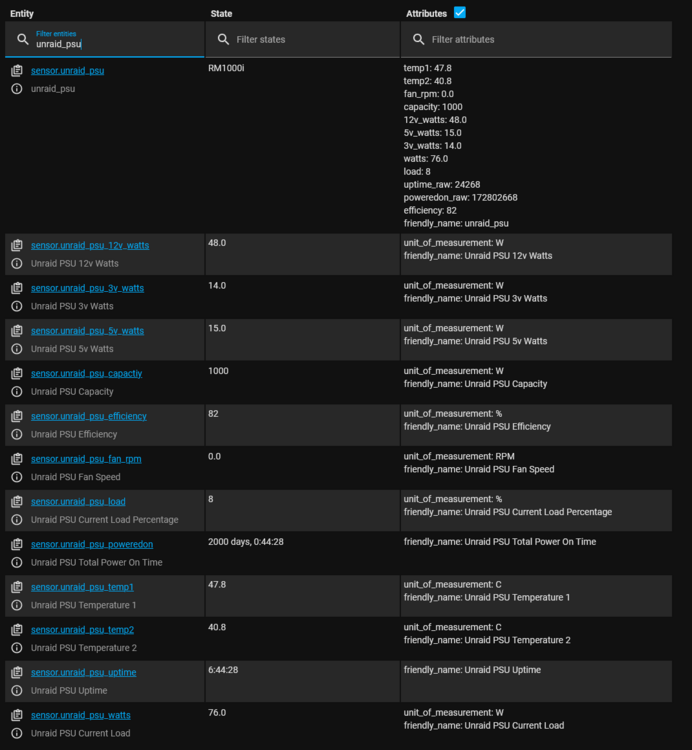
Nice to see this continuing to be maintained, i came back to Unraid recently.... just to add my 2 cents. The following patch to expose the temperature sensors and corsair stats still works on Unraid 7.0 I chose to use a user script instead of the modified go file, i set it to the following and set it to run on first array start # Add Un-Authenticated access to Unraid 6.10-RC1+ for SystemTemp.php and Status.php (Corsair Plugin) echo -e "# Fma965 Un-Authenticated Access\nlocation ~ /plugins\/corsairpsu\/status.php {\nallow all;\ninclude fastcgi_params;\n}\n\nlocation ~ /plugins\/dynamix.system.temp\/include\/SystemTemp.php {\nallow all;\ninclude fastcgi_params;\n}\n# End Fma965 Un-Authenticated Access\n\n$(cat /etc/nginx/conf.d/locations.conf)" > /etc/nginx/conf.d/locations.conf; nginx -s reload # End Nginx Basic Auth Patch And this template code for Home Assistant also sensor: - platform: rest name: unraid_psu json_attributes: - temp1 - temp2 - fan_rpm - capacity - 12v_watts - 5v_watts - 3v_watts - watts - load - uptime_raw - poweredon_raw - efficiency resource: http://192.168.1.3/plugins/corsairpsu/status.php value_template: '{{ value_json.product }}' headers: User-Agent: Home Assistant Content-Type: application/json - platform: template sensors: unraid_psu_temp1: friendly_name: 'Unraid PSU Temperature 1' unit_of_measurement: 'C' unique_id: 'unraid_psu_temp1' value_template: '{{ states.sensor.unraid_psu.attributes["temp1"] }}' unraid_psu_temp2: friendly_name: 'Unraid PSU Temperature 2' unit_of_measurement: 'C' unique_id: 'unraid_psu_temp2' value_template: '{{ states.sensor.unraid_psu.attributes["temp2"] }}' unraid_psu_fan_rpm: friendly_name: 'Unraid PSU Fan Speed' unit_of_measurement: 'RPM' unique_id: 'unraid_psu_fan_rpm' value_template: '{{ states.sensor.unraid_psu.attributes["fan_rpm"] }}' unraid_psu_capactiy: friendly_name: 'Unraid PSU Capacity' unit_of_measurement: 'W' unique_id: 'unraid_psu_capacity' value_template: '{{ states.sensor.unraid_psu.attributes["capacity"] }}' unraid_psu_12v_watts: friendly_name: 'Unraid PSU 12v Watts' unit_of_measurement: 'W' unique_id: 'unraid_psu_12v_watts' value_template: '{{ states.sensor.unraid_psu.attributes["12v_watts"] }}' unraid_psu_5v_watts: friendly_name: 'Unraid PSU 5v Watts' unit_of_measurement: 'W' unique_id: 'unraid_psu_5v_watts' value_template: '{{ states.sensor.unraid_psu.attributes["5v_watts"] }}' unraid_psu_3v_watts: friendly_name: 'Unraid PSU 3v Watts' unit_of_measurement: 'W' unique_id: 'unraid_psu_3v_watts' value_template: '{{ states.sensor.unraid_psu.attributes["3v_watts"] }}' unraid_psu_watts: friendly_name: 'Unraid PSU Current Load' unit_of_measurement: 'W' unique_id: 'unraid_psu_watts' value_template: '{{ states.sensor.unraid_psu.attributes["watts"] }}' unraid_psu_load: friendly_name: 'Unraid PSU Current Load Percentage' unit_of_measurement: '%' unique_id: 'unraid_psu_load' value_template: '{{ states.sensor.unraid_psu.attributes["load"] }}' unraid_psu_uptime: friendly_name: 'Unraid PSU Uptime' unique_id: 'unraid_psu_uptime' value_template: '{{ timedelta(0, states.sensor.unraid_psu.attributes["uptime_raw"] | int(0)) }}' unraid_psu_poweredon: friendly_name: 'Unraid PSU Total Power On Time' unique_id: 'unraid_psu_poweredon' value_template: '{{ timedelta(0, states.sensor.unraid_psu.attributes["poweredon_raw"] | int(0)) }}' unraid_psu_efficiency: friendly_name: 'Unraid PSU Efficiency' unit_of_measurement: '%' unique_id: 'unraid_psu_efficiency' value_template: '{{ states.sensor.unraid_psu.attributes["efficiency"] }}' # This can be used for Dynamix System Temp also scrape: - resource: "http://192.168.1.3/plugins/dynamix.system.temp/include/SystemTemp.php" verify_ssl: false scan_interval: 5 sensor: - name: Unraid CPU Temp select: "#temp" value_template: '{{ value.split(" ")[0]|replace("rpm","")|replace("°C","") }}' unit_of_measurement: 'C' unique_id: 'unraid_cpu_temp' - name: Unraid Motherboard Temp select: "#temp" value_template: '{{ value.split(" ")[1]|replace("rpm","")|replace("°C","") }}' unit_of_measurement: 'C' unique_id: 'unraid_motherboard_temp' - name: Unraid Fan 1 Speed select: "#temp" value_template: '{{ value.split(" ")[2]|replace("rpm","")|replace("°C","") }}' unit_of_measurement: 'RPM' unique_id: 'unraid_fan1_speed' - name: Unraid Fan 2 Speed select: "#temp" value_template: '{{ value.split(" ")[3]|replace("rpm","")|replace("°C","") }}' unit_of_measurement: 'RPM' unique_id: 'unraid_fan2_speed'
-
Nice work, you can PR it if you want and also i'll grant you access to the repo, or you can host your own, CA is already configured for my repo though so whichever way is fine with me.
-
Thanks, to clarify you need to replace TTYNumber with the corresponding port for the PSU, not just type TTYNumber /dev/tty... In addition https://github.com/ka87/cpsumon has not been updated for 7 years and https://github.com/notaz/corsairmi also not been updated in like 5 years
-
Guys you can all keep reporting the issues with certain PSU's but if the underlying binary, CorsairRMI and cpsumoncli don't detect it then it's not going to work Run these commands via SSH/Terminal /usr/local/bin/corsairmi OR /usr/local/bin/cpsumon/cpsumoncli TTYNumber If they give response then i can probably update the plugin, otherwise it will need a new binary
-
Never worked
-
This would be pointless, netdata docker container already detects the PSUs, this plugin is purely for the integration in the dashboard at this point There is a super easy way though, plugin write to a text file, docker container read the text file, output to HA but again not really needed since netdata can do what you want.
-
Yes it works fine, i use this


-
Also, as a side note that code doesn't work any more, last time i tested this code did. It also technically doesn't have any security implications as all it does is disables auth on that page #!/bin/bash # Start the Management Utility /usr/local/sbin/emhttp & # Add Un-Authenticated access to Unraid 6.10-RC1+ for Status.php (Corsair Plugin) while [ ! -f /var/run/nginx.pid ] do sleep 2 # or less like 0.2 done echo -e "# Fma965 Un-Authenticated Access\nlocation ~ /plugins\/corsairpsu\/status.php {\nallow all;\ninclude fastcgi_params;\n}\n\n# End Fma965 Un-Authenticated Access\n\n$(cat /etc/nginx/conf.d/locations.conf)" > /etc/nginx/conf.d/locations.conf; nginx -s reload # End Nginx Basic Auth Patch
-
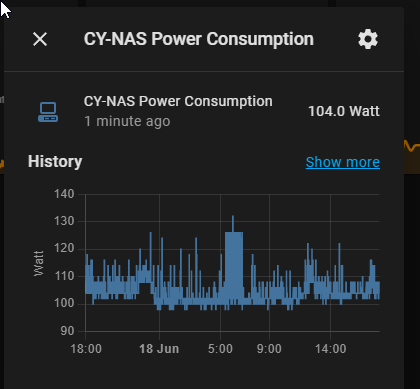
I've been out of the loop for a while, does unraid provide a bearer token auth method yet... you know like every single other appliance ever! sidenote, if you want PSU stats in Home Assistant use the NetData docker container works great. (assuming your PSU is supported)
-
This has been mentioned multiple times but i'll mention it again. 1. Unraid now uses form auth not basic auth therefore the direct access to the json wont work 2. PSU's that are not supported use a completely different protocol, if a CLI exists for slackware/linux that reads the data maybe i'll consider adding it



