





m0dded
Members
-
Joined
-
Last visited
-
Thanks for looking into this - yes I have ollama and its the only docker using the gpu. To stress test the gpu I loaded gpu-burn docker container and did random 1,5,10,60 mins tests and no crashes observed. I also loaded several different llms in ollama randomly and no crashes. Seems ollama is crashing the gpu but not sure what is causing it and why it mostly happens when the appdata backup runs at night.
-
Hi @ich777 - seems the crash has happened again and nvidia-smi shows no devices found. I haven't reboot the machine yet - as generally this will bring the card back. Attaching diagnostics as requested previously. trinity-diagnostics-20250213-1107.zip
-
@ich777 - Thanks will do - seems to have been quite stable after I uninstalled and reinstalled the nvidia driver. Hopefully the issue has gone away. Thanks again for your help and for the plugin
-
@mcmasterp - have done that and the power cable too. Strangest thing is its stable when it gets used. Issue started to occur post Unraid 7 and I am assuming after backup as it seems to be overnight
-
This was in the bug report - not sure if it helps: (['[ 265.363644] NVRM: loading NVIDIA UNIX x86_64 Kernel Module 565.77 Wed Nov 27 23:33:08 UTC 2024\n', '[38542.793206] NVRM: GPU at PCI:0000:01:00: GPU-68a24a84-1227-c298-42fe-359fe10a2390\n', "[38542.793209] NVRM: Xid (PCI:0000:01:00): 79, pid='<unknown>', name=<unknown>, GPU has fallen off the bus.\n", '[38542.793213] NVRM: GPU 0000:01:00.0: GPU has fallen off the bus.\n', '[38542.793240] NVRM: A GPU crash dump has been created. If possible, please run\n', ' NVRM: nvidia-bug-report.sh as root to collect this data before\n', ' NVRM: the NVIDIA kernel module is unloaded.\n', "[38542.793341] NVRM: Xid (PCI:0000:01:00): 154, pid='<unknown>', name=<unknown>, GPU recovery action changed from 0x0 (None) to 0x2 (Node Reboot Required)\n", 'ERROR: An internal driver error occurred\n', 'ERROR: An internal driver error occurred\n', 'ERROR: An internal driver error occurred\n', "ERROR: Error while querying valid values for attribute 'OperatingSystem' on [gpu:0] (No such attribute).\n", 'ERROR: An internal driver error occurred\n', "ERROR: Error while querying valid values for attribute 'Ubb' on [gpu:0] (No such attribute).\n", 'ERROR: An internal driver error occurred\n', "ERROR: Error while querying valid values for attribute 'Overlay' on [gpu:0] (No such attribute).\n", 'ERROR: An internal driver error occurred\n', "ERROR: Error while querying valid values for attribute 'Stereo' on [gpu:0] (No such attribute).\n", 'ERROR: An internal driver error occurred\n', "ERROR: Error while querying valid values for attribute 'TwinView' on [gpu:0] (No such attribute).\n"], ['[ 265.363644] NVRM: loading NVIDIA UNIX x86_64 Kernel Module 565.77 Wed Nov 27 23:33:08 UTC 2024\n'], ['[ 0.000000] Linux version 6.6.68-Unraid (root@Develop) (gcc (GCC) 14.2.0, GNU ld version 2.43.1-slack151) #1 SMP PREEMPT_DYNAMIC Tue Dec 31 13:42:37 PST 2024\n', 'Linux version 6.6.68-Unraid (root@Develop) (gcc (GCC) 14.2.0, GNU ld version 2.43.1-slack151) #1 SMP PREEMPT_DYNAMIC Tue Dec 31 13:42:37 PST 2024\n'])
-
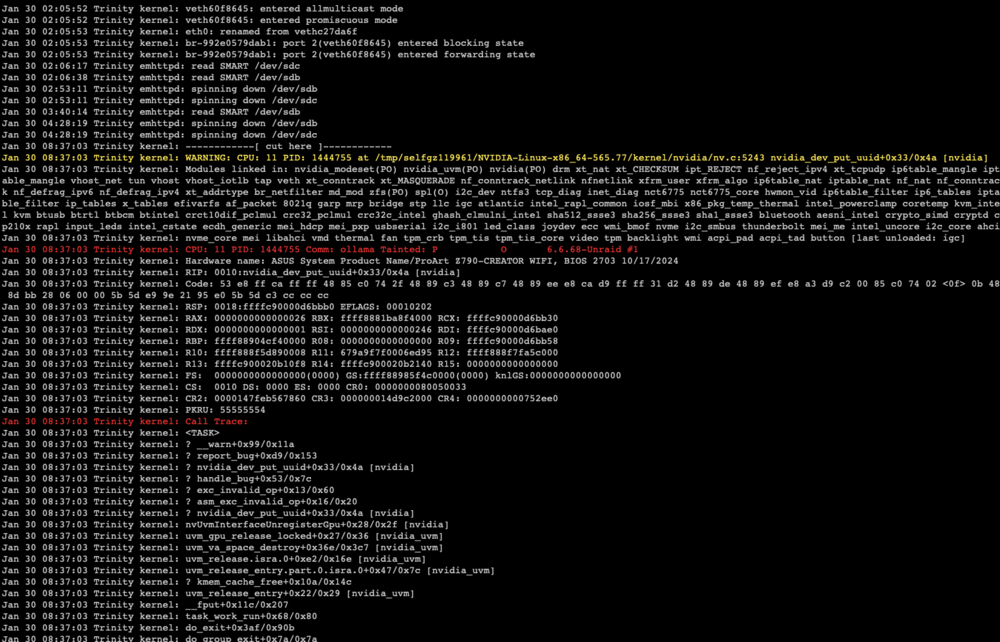
@ich777 thanks for the quick reply. The issue is occurring at night during backup - however i just ran a manual backup after a reboot and the issue didn't occur. Will get the diagnostics to you overnight. PSU is LianLi 1000W EG1000.BE so don't think that is an issue - I have stress tested the gpu and there was no crash. Would really like to solve this issue and achieve stability, so appreciate your help. I do see this in syslog when the container starts: Jan 30 09:34:31 Trinity kernel: br-5f6600742638: port 4(vethacf6d46) entered disabled state Jan 30 09:34:31 Trinity kernel: ACPI BIOS Error (bug): Failure creating named object [\_SB.PC00.PEG1.PEGP._DSM.USRG], AE_ALREADY_EXISTS (20230628/dsfield-184) Jan 30 09:34:31 Trinity kernel: ACPI Error: AE_ALREADY_EXISTS, CreateBufferField failure (20230628/dswload2-477) Jan 30 09:34:31 Trinity kernel: ACPI Error: Aborting method \_SB.PC00.PEG1.PEGP._DSM due to previous error (AE_ALREADY_EXISTS) (20230628/psparse-529) Jan 30 09:34:32 Trinity kernel: eth0: renamed from vethb22b052 Jan 30 09:34:32 Trinity kernel: br-5f6600742638: port 4(vethacf6d46) entered blocking state Jan 30 09:34:32 Trinity kernel: br-5f6600742638: port 4(vethacf6d46) entered forwarding state Jan 30 09:34:33 Trinity kernel: ACPI BIOS Error (bug): Failure creating named object [\_SB.PC00.PEG1.PEGP._DSM.USRG], AE_ALREADY_EXISTS (20230628/dsfield-184) Jan 30 09:34:33 Trinity kernel: ACPI Error: AE_ALREADY_EXISTS, CreateBufferField failure (20230628/dswload2-477) Jan 30 09:34:33 Trinity kernel: ACPI Error: Aborting method \_SB.PC00.PEG1.PEGP._DSM due to previous error (AE_ALREADY_EXISTS) (20230628/psparse-529)
-
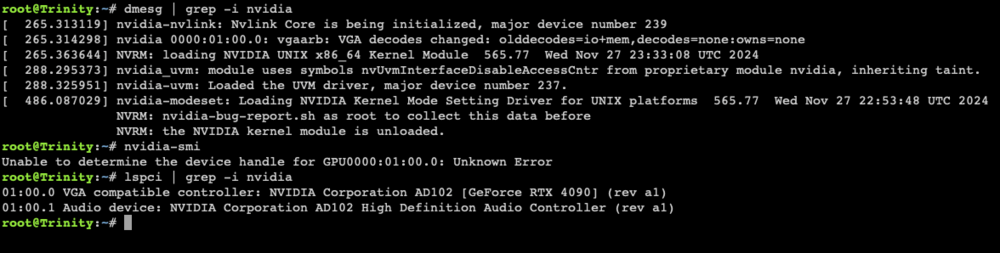
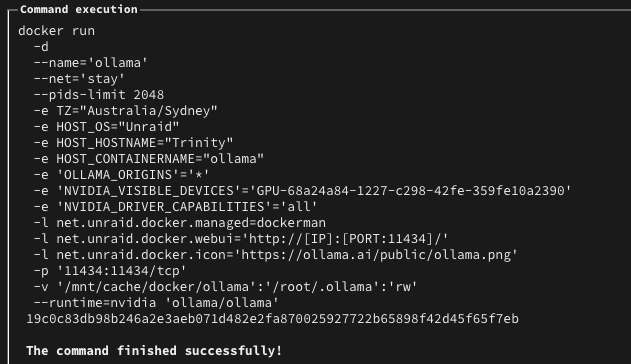
Wondering if someone can help me fix the issue with RTX 4090 - issue seems when daily backup runs, the nvidia gpu was being dropped for some reason. As a fix - i removed the driver and the steps to reinstall. GPU is only assigned to ollama docker container - and after the backup ran last night this morning it seems the issue has occurred again. Seems to have only started since I updated to Unraid 7 Here are some outputs - if someone can help troubleshoot please Docker run settings for ollama: Edit: seeing this in syslog Attached - nvidia-bug-report nvidia-bug-report.log-2.gz
-
Yes thank you. Not much data on those sata disks as was planning to setup a few things that I never gotten around to do. The only data there is are iso's so not really worried about the data on there. Thanks again for your help will organize getting the disk replaced under warranty.
-
Managed to get the diagnostics - I have attached for you - thank you for helping! trinity-diagnostics-20240318-1505.zip
-
Sorry currently overseas so a bit tricky to connect and get diagnostics zip will try to get it soon. Basically I have an array: disk1 - data disk2 - data disk3 - parity these are sata drives and there are smart errors reported on disk 1
-
It’s not the parity disk, just the data disk and just one of the 2 is faulty.
-
Been running unraid for a while and everything been running really well. last few days seems one of my disk in the array is failing, lots of SMART errors Its a 2 disk + 1 parity array. if I just pull the faulty disk out can I get by while I arrange its replacement?
-
Hi - just upgraded to 6.12.5 from 6.12.4 and one of my NVME drive is showing as missing. Wondering if someone can help take a look at the diagnostics please? EDIT: RESOLVED - issue was loose ribbon cable for the NVME Drive. trinity-diagnostics-20231129-1407.zip


