





Mr.Slumber
Members
-
Joined
Everything posted by Mr.Slumber
-
@ZappyZap Thank you so much for work for Unraid, really appreciate it! Had the same problem with your Unraid Zerobyte docker template, so I changed the following to: "Repository: ghcr.io/nicotsx/zerobyte:latest" No problem since and also now have the newest Zerobyte update 0.20 Best regards and keep up the good work!
-
Hi, maybe this will help: Export/Import Funktion nutzen
-
Wunderbar! Thank you @hawihoney 👍
-
Thanks @Russ Uno! Setup with your screenshot now everything's working just fine!
-
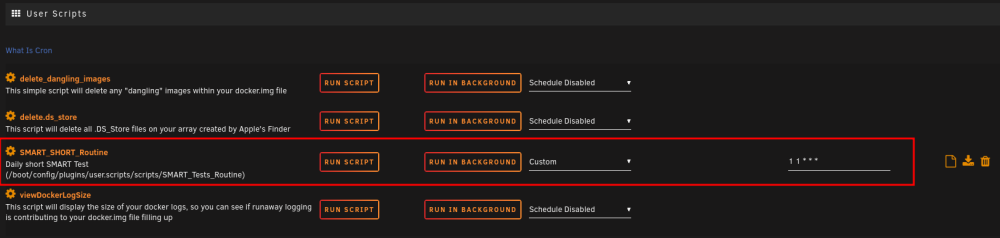
Quick solution 17.01.2024: Since I have no script/programming skills but I really want this "safety net of SMART tests" for my array I looked around what I could achieve myself, this is what I found... And believe it or not it's working successfully 😉 Step 1: install "User Scripts" via the CA plugin/app store Step 2: go to the "User Scripts" plugin and set up a new script (please find screenshots attached) Step 3: find the correct /dev/sdX (X stands for the letter of your array HDD, look under "MAIN" in your Unraid GUI) of all your array HDDs you want to test and then paste commands in your new script you find in the second screenshot attached. As I have 6 HDDs in my array atm my letters run from b, c, d, e, f to g (parity HDD included) Step 4: save the script and let it test run in the background Step 5: check your logs. If everything went smoothly you can now add a cron schedule at which the script should run. For me (see screenhot 1) I run the script daily at 1 minute past 1 o'clock ( 01.01 am) The script only runs a daily SMART short selftest, for adding a weekly SMART long/extend test you can write "smartctl -d ata -tlong /dev/sdX" (X stands for the letter of your array HDD) Hope that was helpful for all of you with no scripting skills like myself and please feel free and comment this. Constructive criticism very welcome since I have no script/programming skills.

-
Thanks @Russ Uno for your posting. I'll try this, maybe it'll also solve my problems
-
Ok, thanks your your response. I'm definitely not able to write a user script but maybe such a script is also on someone else's wish list and this is a vibrant community so we'll see...
-
Being an Unraid newbie because I've been running TrueNAS servers for 4-5 years now, please correct me if I'm wrong: In the last years I avoided some critical data loss because of failing HDDs: as a kind of an early warning system I ran a script on my (TrueNAS) servers that ran a a daily SMART short self-test and a weekly SMART extended self-test. I'm not sure wether Unraid: does run SMART tests out of the box on a regularly basis? if it's possible there is a script that can achieve this? (e.g. via user scripts plugin?) if this is necessary with Unraid or does Unraid provide some other kind of automated early warning system regarding HDD/SSD damage/erros? Thank you very much for your input, I did not find anything like this script in the forum or CA.
-
Please allow me to look again in the direction that started this post but of course thank you very much for your input Filling my array with precleared HDDs atm and it's just a "smooth sailing" along with Docker, this fantastic community and all the community apps. It's fun and thanks to everybody being involved with Unraid. Really loving it!!! So for me the decision towards the Supermicro X13SAE-F was a good but not cheap one. I always found the idracs of Dell servers very useful for troubleshooting and the Supermicro has also a kind of online IPMI so this also was something which made me choose it. Of course other (much cheaper) brands would have been possible (thanks for your recommendations) but I hope for the next 5+ years I will not have to shut Unraid down. Let's see
-
Yes, it's working just fine with it's GUID. Thanks for your recommendation.
-
Just a short update for anyone who is interested: I found the LSI HBA 9201-8I was a very reliable HBA for many years in my TrueNAS servers BUT not for this actual built. So without it, everything is working just fine for me with this built and being an Unraid "firsttimer" I must say that I really love Unraid!!! Filling my array with precleared HDDs atm and it's just a "smooth sailing" along with Docker, this fantastic community and all the community apps. It's fun and thanks to everybody being involved with Unraid.
-
Thank you @JorgeB for all your help! I wasted too much time on troubleshooting so I kicked the LSI HBA 9201 out, wired all my disks directly to the mobo and its 8 Sata ports and bought an Adaptec 1430SA for the remaining HDDs. The Adaptec 1430SA hasn't arrived yet but the rest works like charm and up until now I'm happy with my Unraid setup. Let's see what happens when parity sync is through... Lesson learned: no LSI SAS2008 / LSI HBA 9201-8I for me anymore...
-
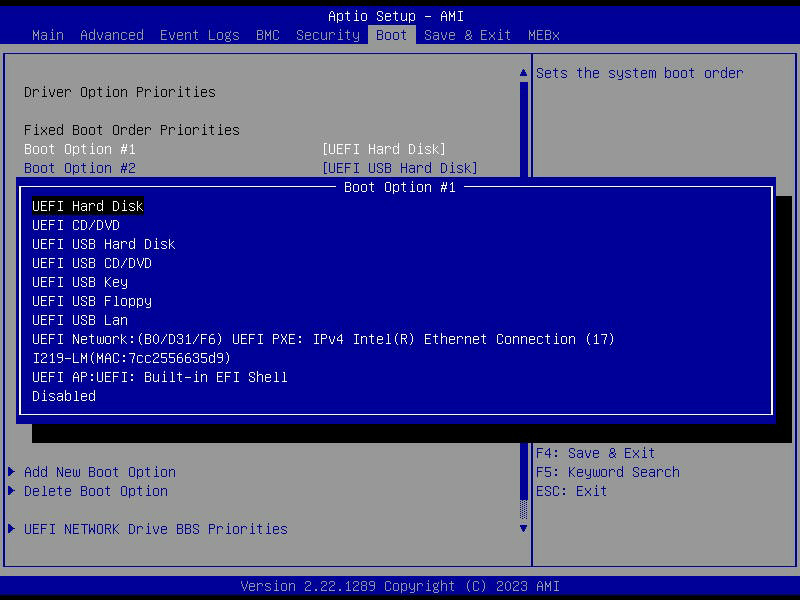
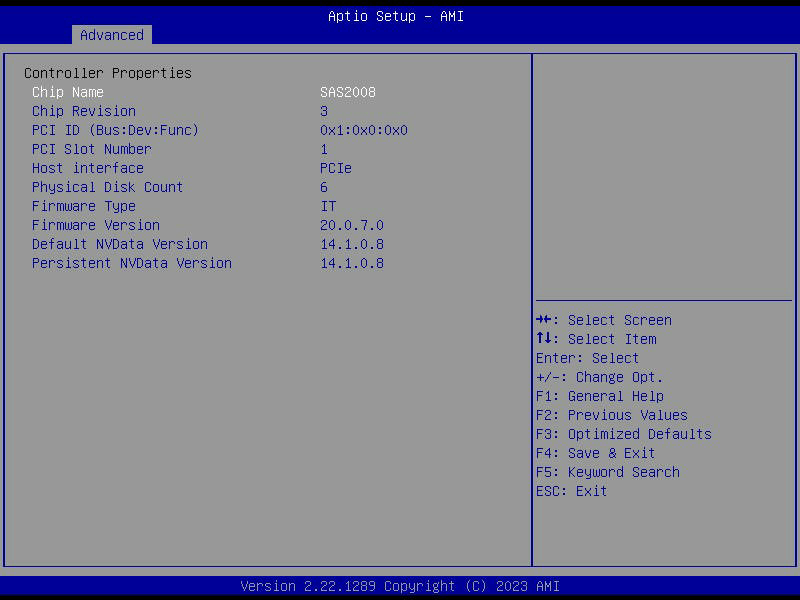
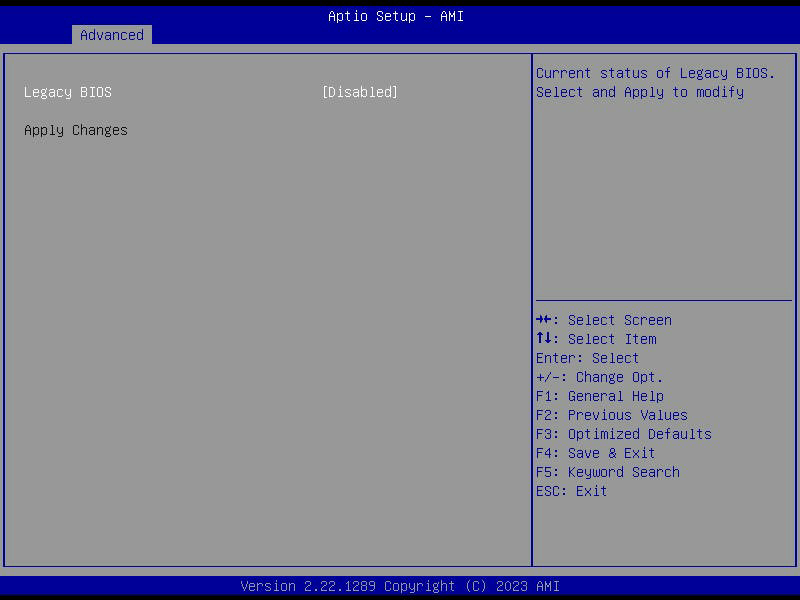
Did all of this, even exchanged the controller for an LSI HBA 9201-8i (also flashed to IT mode)... everytime the same. No disks to be seen. The problem seems to be the BIOS setup of the SuperMicro X13SAE-F. Because it will only boot in UEFI mode (there's no setting to boot in legacy mode) it's not possible to hit "CTRL-C" in POST so you can't change controller settings. You can change the LSI controller settings when you're in the X13SAE-F BIOS settings, please see attached screenshots. So there it is possible to disable legacy boot but nothing changes. When being in the LSI BIOS via the X13SAE-F BIOS the controller sees all HDDs which are attached (screenshot below) BUT outside of the LSI BIOS so when you're back in the X13SAE-F BIOS you should e.g. be able to select the HDD you want which is attached to the controller. This is not the case because the X13SAE-F BIOS sees only "UEFI hard disk" but this is just generic and not one of the HDDs being attached to the controller. So: if the BIOS can't see the LSI controller attached HDDs I think neither Unraid nor Ubuntu etc. are able to see the HDDs later on. The card worked perfectly with TrueNAS for 4 years but the reason was (I think) that everything was legacy boot and not UEFI... Really don't know what do to tried every possible BIOS setup in the X13SAE-F and the controller cards BIOS but it just won't work. Perhaps anyone that has a X13SAE-F mobo can answer how the boot their machine with which settings. Thank you :-) not possible to select any HDD attached to LSI HBA inside the LSI HBA BIOS all 6 attached disks are seen inside LSI HBA BIOS I disabled legacy boot but that solved nothing...
-
Did both things you suggested but still no HDDs to be seen if they're connected to the LSI SAS2008... Any ideas? Thank you in advance.
-
Will try both and keep you posted! Thank you very much for your quick reply and help! Already loving this forum!
-
I hope I've done this right? Thank you in advance.
-
Hi, just switched from TrueNAS to Unraid. The LSI SAS2008 controller (flashed and used in IT Mode) was working perfectly fine under TrueNAS. I just deleted TrueNAS and did not change a thing on the controller but after having installed Unraid the HDDs connect to the controller can not be seen under "Main". Unraid "System info" shows that "IOMMU" is activated, when I look under "Tools/System Devices" you see: "IOMMU group 13:[1000:0072] 02:00.0 Serial Attached SCSI controller: Broadcom / LSI SAS2008 PCI-Express Fusion-MPT SAS-2 [Falcon] (rev 03)" Activating "Bind select group 13 to vfio at boot" and rebooting doesn't change a thing, still no hdds connected to the controller can be seen. I connected one SSD to the onboard SATA Controller of my Supermicro X13SAE-F, this SSD can be seen in "Main". Thank you very much in advance for sharing your thoughts, ideas and productive criticism. :-)
-
I also chose a new USB 2.0 flash drive for Unraid: JetFlash 600 8GB USB 2.0 (it's got MLC NAND which is next best thing to SLC NAND. SLC NAND is far more expensive but of course far more reliable, so I think this is a good compromise)
-
Thank you @Lolight for your feedback also. Yeah, I'm aware that you could build this thing for much lower cost, thanks for the link to pcpartpicker . My main concern is always uptime and reliability because if something goes wrong it goes "...aren't you the tech guy in the house, why doesn't it run..." perhaps you know what I mean so over the last years I chose always the "prosumer homelab route" to avoid stress... Of course I know that a non-server-grade mobo can nowadays run for e.g. 5 years straight with no problems but isn't it always a game of numbers... Ok, today I pulled the trigger, let's see if Santa will be right in time with this build... more on this channel later on
-
Reading on and on here in the forums this would be my hardware of choice which ticks most of the boxes for me but please correct me if I understand these things wrong: MoBo: Supermicro X13SAE-F CPU: Intel Core i5-13500 RAM: 2x Micron 16GB DDR5-4800 ECC UDIMM CPU Cooler: noctua NH-D9L I hope this "fits together", will fit into my soon to be decommissioned TrueNAS build (further details in my signature) and will give me much "room to breathe" for the next years speaking of expanding the array, perhaps adding an Intel ARC (not really needed I think but...) and all these things to tinker around with... Critics, opinions and thoughts welcome anytime! Thank you.
-
@Russ Uno Thank you, very helpful and exactly what I was looking for!
-
@Zonediver Thank you for your reply. Ok, will buy an i7 12th/13th generation, but now speaking about the mobo... I've had good experience with Supermirco boards but being "Pro" they are quiet expensive. Heard good things about ASRock boards but dunno... Any suggestions much appreciated. Thank you.
-
Dear Unraid Community, I've been running a 60TB TrueNAS Server (hardware specs please find here: The $1000 TrueNAS prosumer build ) with no downtime nonstop for 4 years now, but now it's time for a change Read a lot in the forums lately but would be very happy with some advice of you, thank you in advance MoBo + CPU now: Supermicro X11SSM-F + Intel Core i3-7320 MoBo + CPU future: ? ? ? my use case for Unraid: 40TB ZFS Storage, 1 Cache Drive, running 10 Docker containers, running Plex Media Server as Docker container, running 2 VMs (Ubuntu Server 22.04 as printserver so no oooomphh requirement here) My biggest concern is the Plex Server, so the MoBo and the Intel CPU should have enough power to deliver max 2 streams of 4K material. Later in the season I'm planning to add GPU/graphics card to the MoBo für Plex hardware transcoding but the CPU should be able to handle the load alone at the moment. Currently I'm running Plex server on an old Dell R-230 with an old Xeon 4core CPU and it's working fine. The MoBo should be able to handle max 64GB RAM (ECC RAM is not necessarily required I think for Unraid) Thank you very much in advance for your hints and opinions. I'm really looking forward to switch to Unraid with all it's fantastic features




