





Luminance1364
Members
-
Joined
-
I really appreciate your attentive assistance! Thank you so very much! I saw the update on the docker this morning, so I just tried it for fun. It looks like it moved to 2.7 again, but things are a touch different, from what I can see in the logs. [Info/1] Upgrading instance ADS01 [Info/9] Upgrade successful Starting AMP... [Info/1] AMP Instance Manager v2.7 built 05/03/2026 00:25 ... [Notice/8] AMP instance ADS01 is now running. AMP Started! AMP is now running. Logs can be viewed through AMP web UI or at ampdata/instances/Main/AMP_Logs So the way I read that is the new default instance of ADS01 is running, but it is writing into the Main instance. So it's kind of crossing the wires. Anyway, here is what I have done. Answers to your questions: 1. ADS01, 4 x Minecraft servers, Main, 1 x Factorio server and 1 x Terraria server. 2. There is just 1: "InstanceName": "ADS01" 3. Yes, lots, 99 in fact. Dating all the way back to 2024. So that's great. The last one that looks good is: instances.json-20260301.bak. Here is what I did. I renamed the current instances.json to instances.json-20260307.2.bak. Then I copied instances.json-20260301.bak and renamed it instances.json. Then I moved the instances\ADS01 folder to my workstation, so it's off of the server. Since I suspect that one to be the problematic one. Now the instances.json file matches the file system. Then I turned my container on and it did the same thing. It created an ADS01 folder and started a factory instance. I removed the new instances.json, re-copied the last known good instances.json, edited the file to change Main to ADS01, deleted the new ADS01 and then copied the old Main and renamed it ADS01. I then had to hop in the CLI and run 'su -l amp' and then 'ampinstmgr reactivate Instance_Name_01' for each server. All of my servers are up now, hooray! I will try restarting the container at another time. I don't have time to do much else today. I appreciate your support! Thanks so much. AMP really is a great tool, so thanks for doing the work to make it available to us all on Unraid.
-
Yeah, sure thing! No worries. I hope I got all of the sensitive data. Here are screenshots. I did not change anything in AMP to my knowledge. The change I was making was removing some VLANs that are no longer needed and then adding a new one for a new project. None of which were the network or VLAN that AMP uses.
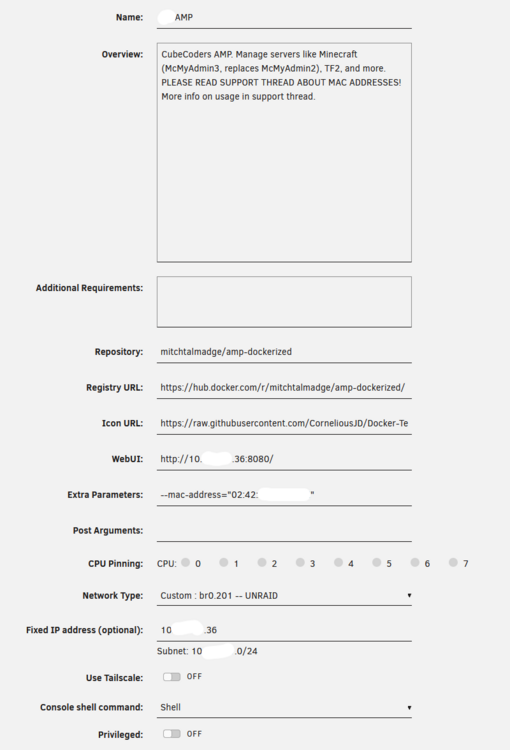
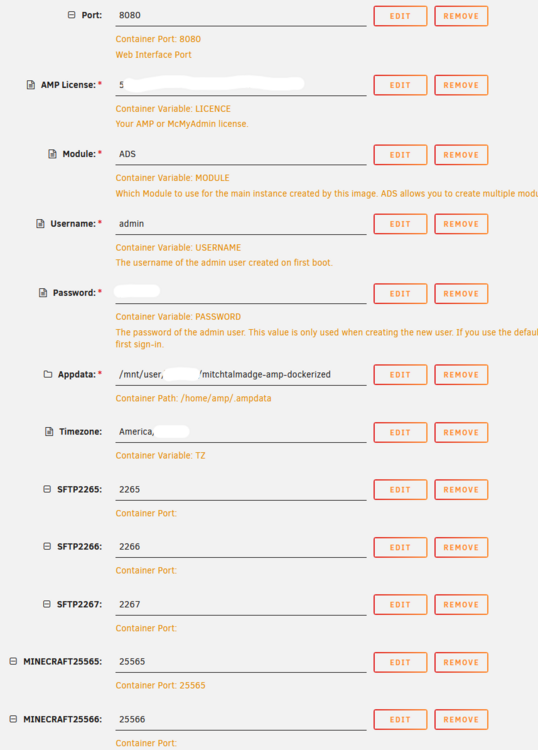
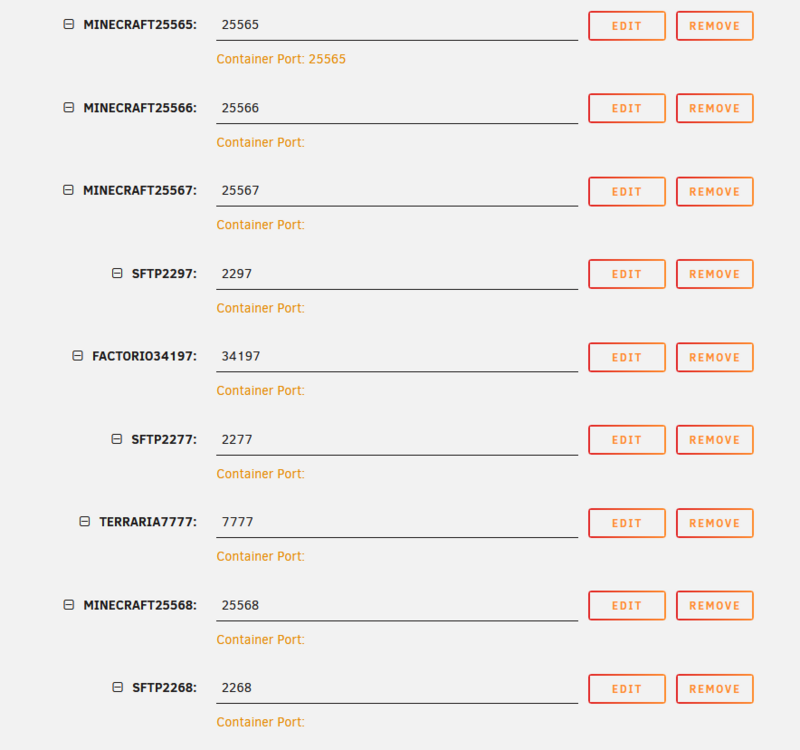
-
I rebooted Unraid today and when AMP came up it upgraded to 2.7.0.0. My game servers were up and running and everything looked good. Well, I had to make some tweaks in Unraid and restart my containers again. This time AMP came up as 2.6.4.2 and thinks it's a factory default instance. Can't login, no game servers are up, etc. I thought I would post here to share the experience and then also ask what the best procedure is to restore my config? I have appdata backups, but most of the data seems to be there still on my file system, AMP appears to have created a new Instance called ADS01 and I now can't login to the UI. I think my config might all live in the Main instance and then each game server has its folder still and they all look good from a quick glance, but not too sure right now. Anyway, I didn't see anything on the github issues page or anywhere else I have searched, so I figured I would start here. Thanks for any help you can suggest to me.
-
Last nights update fixed it. Thanks!
-
I am having issues with Tailscale and this container. It doesn't happen on other containers I have that also use Tailscale, so I decided to post here for that reason. Here is what I am seeing in the logs: Executing Unraid Docker Hook for Tailscale Detecting Package Manager... Detected pacman Package Manager! Installing packages... Please wait... ERROR: Installing packages! :: Synchronizing package databases... core downloading... extra downloading... error: failed retrieving file 'core.db' from europe.archive.pkgbuild.com : Could not resolve host: europe.archive.pkgbuild.com warning: fatal error from europe.archive.pkgbuild.com, skipping for the remainder of this transaction error: failed retrieving file 'extra.db' from europe.archive.pkgbuild.com : Failed to connect to europe.archive.pkgbuild.com port 443 after 4 ms: Could not connect to server error: failed retrieving file 'core.db' from america.archive.pkgbuild.com : Could not resolve host: america.archive.pkgbuild.com warning: fatal error from america.archive.pkgbuild.com, skipping for the remainder of this transaction error: failed retrieving file 'extra.db' from america.archive.pkgbuild.com : Failed to connect to america.archive.pkgbuild.com port 443 after 1 ms: Could not connect to server error: failed retrieving file 'core.db' from asia.archive.pkgbuild.com : Could not resolve host: asia.archive.pkgbuild.com warning: fatal error from asia.archive.pkgbuild.com, skipping for the remainder of this transaction error: failed retrieving file 'extra.db' from asia.archive.pkgbuild.com : Failed to connect to asia.archive.pkgbuild.com port 443 after 1 ms: Could not connect to server error: failed to synchronize all databases (failed to retrieve some files) ERROR: Unraid Docker Hook script throw an error! Starting container without Tailscale! Starting container... Seems odd, so I looked up the domain names and I get an NXDOMAIN response from each. I get this response from my internal DNS, which has an upstream of Cloudflare. I nslookup direct to Cloudflare, Google and Quad9 from the container CLI and they all return NXDOMAIN. So, on its face, it seems like an issue for pkgbuild.com, but I am wondering if these DNS entries are just old and need an update of some sort. Anyway, thanks for your time!



