





m3digi
Members
-
Joined
-
Last visited
-
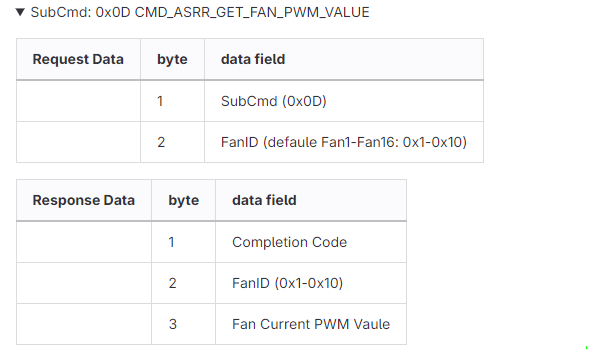
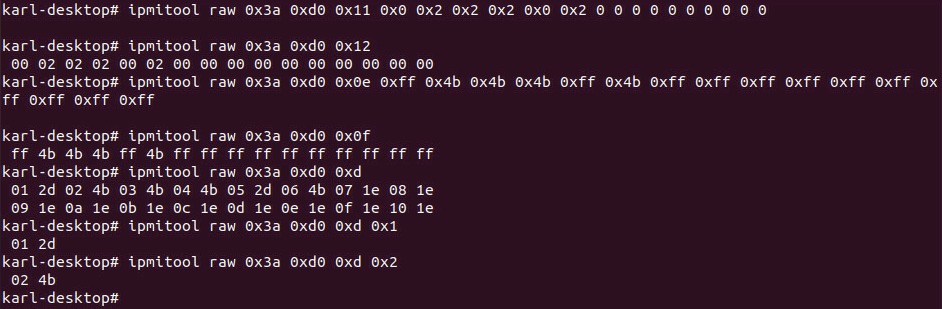
Hi Simon, Thank you for researching this. The W680D4U (AST2600 BMC) doesn't respond to any of the commands in the manual you provided. I contacted AsRockRack Support. Here is the information they provided: --- //get fan current PWM all ipmitool raw 0x3a 0xd0 0x0d //get fan current PWM single ipmitool raw 0x3a 0xd0 0x0d 0x01 //set fan mode ipmitool raw 0x3a 0xd0 0x11 0x0 0x2 0x2 0x2 0x0 0x2 0x0 0x0 0x0 0x0 0x0 0x0 0x0 0x0 0x0 0x0 0x0 //set fan duty Note: Unused(non-manual) fans need to be set to 0xff ipmitool raw 0x3a 0xd0 0x0e 0xff 0x4b 0x4b 0x4b 0xff 0x4b 0xff 0xff 0xff 0xff 0xff 0xff 0xff 0xff 0xff 0xff For fan mode (speed), usually the 0x0 is for Auto, 0x32 is half way of your fan’s maximum speed, then 0x64 is fan’s full speed. For fan duty, 0% = 0x00 and 100% = 0xff. --- I hope this in information is helpful to you. Please let me know how I can be of further assistance.
-
Hi Simon, I also have the AsRockRack W680D4U2L2T/G5 motherboard. The output from ipmi-raw 00 3a da is: rcvd: DA C1 Any assistance you can provide with getting the fan locations to report in Unraid is greatly appreciated. Please let me know if you need any additional information. I'm happy to work with you to get this working properly for this motherboard.
-
I'm experiencing a similar issue with Nextcloud and Unraid. My log files don't produce anything conclusive to help me identify the problem. I believe the issue has to do with generating previews of images and files in Nextcloud. But, nothing conclusive so far.
-
After another look in the BIOS, I resolved the issue by going to: Advanced > VMD Configuration > Enable VMD Controller Now my NVMe plugged into the M.2_1 slot is detected by Unraid. Thank you.
-
Did anyone find a solution to this issue? I have the same motherboard, and have experienced the same issue. Unraid won't recognize my WD Red SN700. If I put my NVME into an NVME to PCIe x4 adapter, Unraid recognizes the SN700 with no problem. I've tried changing various BIOS settings to get the M.2 slot to work, but I haven't had any success.
