Alistar
Members
-
Joined
-
Last visited
-
Got it. Thank you for support. Will mark this one as resolved.
-
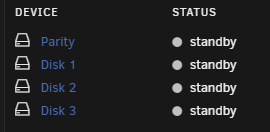
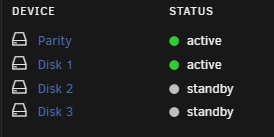
During cleanup process I have realized that in VM Manager and Docker service itself I still had paths pointing to /mnt/user instead /mnt/cache. I have changed that as well to avoid similar issue in the future with vms: Other than that I have made all mentioned changes and it works now Btw is my understading correct, that in best scenario - parity should remain in standby if 'Write' is happening to cache, and only activate when mover kicks in? Also Parity remains in standby if only "read" is happening from Disk 1-3?


-
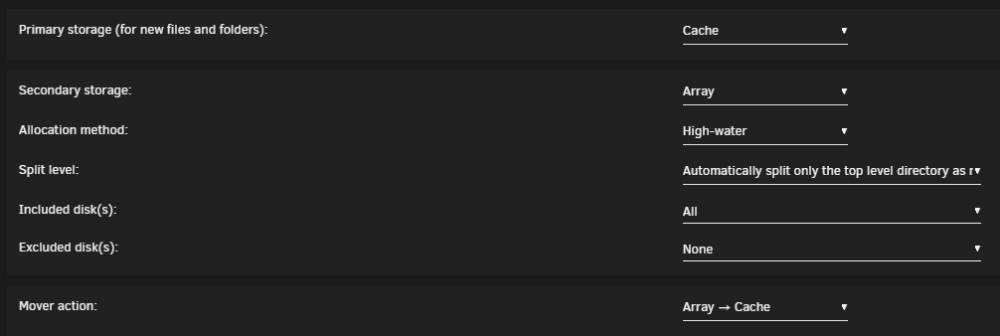
Thanks for taking time to take a look on my case! I have checked the settings of 'system' share: Thought it looks good. Should I set secondary storage to none, or change anything here? Indeed theres a docker.img file on disk1: And same location is empty on cache: How can I safely move it now from Disk1 to Cache?


-
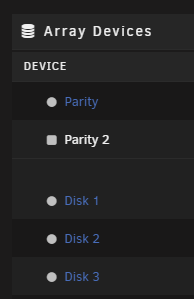
Hi, I've been trying to spin down Parity drive when not used for some time now, but seems like constantly something is keeping it active. Even if I try to spin it down manually, it goes up after some seconds. Two other drives go down - no issues. Im using 1 ssd cache + 4 exos drives + 1 usb for backup. Unraid 6.12.6 Checked manually paths etc. in dockers and at first glance all looks good. Spin down delay enabled - double checked. New user here, and run out of ideas. Maybe I misconfigured something or missed some of the settings? Highly appreciated if someone could take a look at diag logs, and advise what could be improved. tower-diagnostics-20240130-2116.zip
-
I was not able to directly test it, as ASPM settings are not available on motherboard level. One of the commands says it supports ASPM L1. Unless L1 is not sufficient and what really matters is only L0sL1 ?

-
Right. I've seen it earlier, but forgot about this specific fragment. Would you recommend any "confirmed" mATX motherboard or nvme? Considering I will use this config for at least few years, might be worth selling biostar + lexar (it has aspm not supported as well) and upgrade to something else (to be honest I do not expect any miracle from biostar support).
-
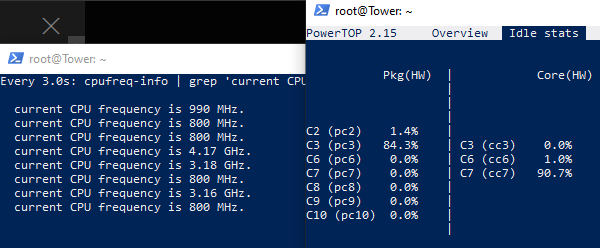
I'm back with some updates @mgutt, and thanks for your quick reply. Parity + Disk1. I'm kinda failing to troubleshoot what causes Parity drive to constantly spin up. Even if stopped manually. Possibly will create separate topic for that. Disk1 keeps mainly the files that my family is using or content being read by qbit, so I can live with that one active. As per 80Plus Gold, should have something around 90% efficiency at loads below 20%. Platinum gives only +2%, rated 92% Created support ticket, but no idea about their response times. Will see. Removed both components and enabled back motherboard 1gbe. disabled array auto start, and used guide command to spin down all drives: Executed auto tune and powertop (via ssh), to see if theres any difference with removed devices: All Tunables are good, but it still sits at C3, even with cores doing C7 and frequency going down to 800mhz. Main change is that only 2 devices are now listed as ASPM disabled/not supported. btw. with removed devices, and all disk spun down, its at 23-24W. Any hope for me, or just unlucky with mobo selection for going low with power consumption?

-
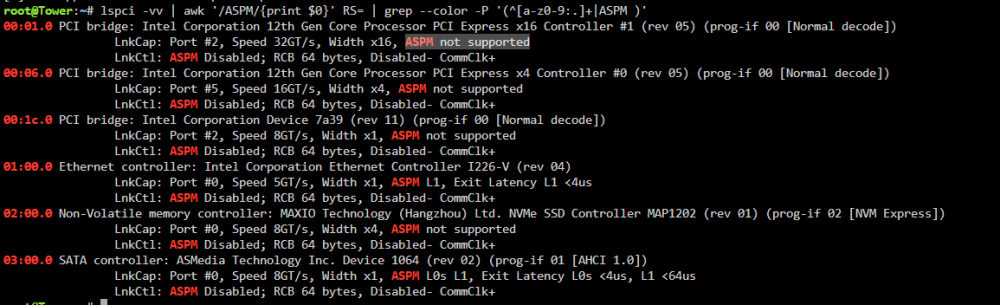
Hi all, So far I have managed to go down from ~80W (fresh build) to ~40 (lowest I have noticed was 38, but usually its around 40-45) - with 2 disks active (+2 standby) and some dockers active and qbit running. At first I was quite happy with the result, and then a bit dissapointed after seeing results on forum and users achieveing sub 20W. So in general been hoping to reduce even more with powertop, but got stuck at C3. Let me share more details: Hardware: Unraid 6.12.6 CPU: i3-12100 MB: Biostar B760MXC PRO 2.0 RAM: Lexar Thor, DDR4, 16 GB, 3200MHz, CL16 (2 x 8GB) PSU: be quiet! Pure Power 11 400W (80 Plus Gold) HDD: 4x Seagate Exos 10TB ST10000NM018G SSD (cache): Lexar NM620 1TB NIC: Additional 2.5gbps Intel i226 APC UPS and tp-link tapo p110 smart plug with power meter What I did so far in general: - Enabled drives to spin down when not used - 'power save' mode in tips and tricks, +other config and CA plugins to utilize ssd cache and optimise hdd's #Powertop (installed using nerdtools): - enabled c-states in bios; disabled hdaudio, led controller, builtin 1gb nic, undervolting by setting offset at -0.100 - with powertop auto-tune all tunables are 'good' - CPU reaching C7, while pkg max C3 Now: It was advised to enable ASPM in bios. However such option seem to not exist in biostar uefi BIOS Manual I run below command as per guide: ASPM is disabled for listed devices as theres's no such option to enable anything in bios. More over, ASPM is NOT supported for few devices, which concerns me the most (i guess theres no point in even trying to force enable them somehow as it is not supported?). Questions: 1. Is 'ASPM not supported' permanently blocking me from further actions and reaching lower c-states, and all I can do is just buy another motherboard? - If yes, are there any 'whitelisted' or considered as 'good' consumer grade matx boards (socket 1700)? - if not - what would be next steps here? 2. 2.5gbps Intel i226 pcie card - Ive seen someone asking about it - is it known to cause potential issues with reaching lower c-states and potential blocker? 3. Do you see any other risks related to my current hardware setup? Sorry for long post, any help and explanation appreciated.
-
-
Alistar changed their profile photo
-
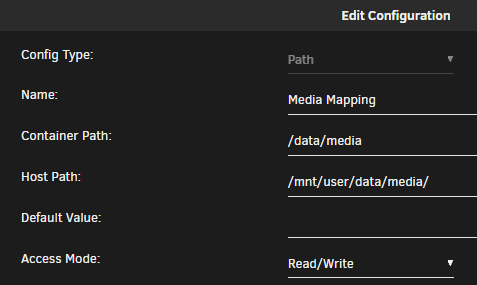
Hi all, I've been trying to configure symlinks for Plex, so I can separate location where data is downlaoded from what is in Plex libraries, but seems like I'm missing something and content is not detected in Plex. And im not sure where mistakes were made. Details and examples below: OS: 6.12.6 Plex: Official Plex Repo, latest stable version Downloaded data is under: /data/torrents/ and respective subfolders ie. /data/torrents/movies Example target for symlink: /data/media/ and respective subfolder ie. /data/media/movies What I did in terminal: ln -s /mnt/user/data/torrents/movies/ /mnt/user/data/media/ As a result, folder 'movies' became visible in /media. Plex docker config: And Plex library: As a result content is not visible in Plex. I have also tried ln with -s -r parameters, but it also doesnt work. Any advice or idea, what I'm missing here or what should be corrected? Thanks.