





FlowDE
Members
-
Joined
-
Last visited
Everything posted by FlowDE
-
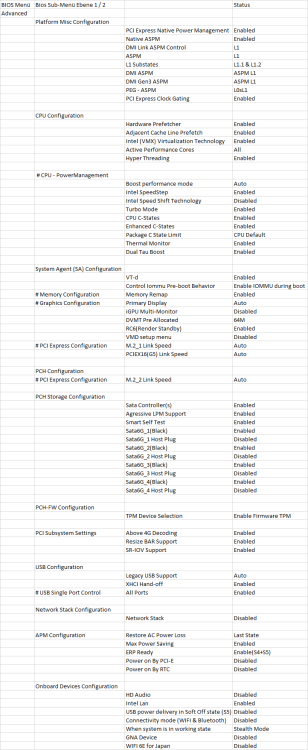
Well then maybe some of your Bios configuration still missing or Bios Update? here are some configuration on my Asus MB maybe some of them are also available on your MSI
-
Check your NIC if your Motherboard has also an Intel 2,5 GB I226V then probably it can't reach any deeper C-States. (Asus and BIOStar using the same NIC and maybe your MSI too) Unplug NIC-Cable (don't disable NIC in BIOS or put it energy saving via Powertop) and Check the C-States whit Monitor / Keyboard directly. It Should reach C6-C8 and whiteout Monitor and a short wait Time maybe it reach C10.
-
Yeah thank you! Was just wondering why the cache was full again after the mover moved all files from the cache to the array. I picked a better Tool to sync all files from one NAS to Unraid.
-
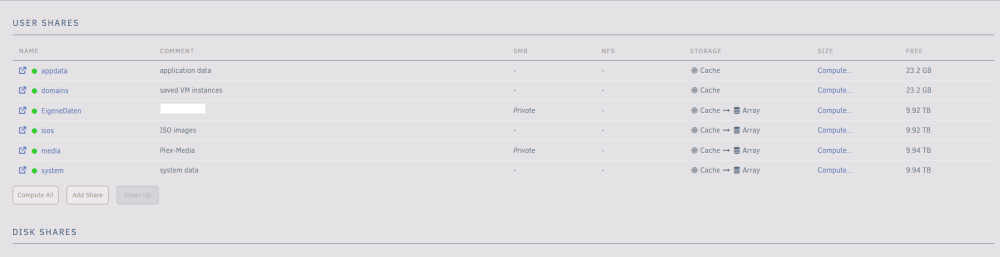
If the Log is correct its wont move any Data because these Files already exit. I am not sure why they are also on the array and the cache disk now.
-
I read a lot Topics because in terms of the Mover. I am pretty new to Unraid and Testing things out but i don't know why the Mover wont start even manually to move Data to the array. Most Topics found on the Net are older Unraid-Version and i don't have those options for the share. (just primary and secondary storage) I am actually moving Data from my Old NAS to my new Unraid instance. I would like to use the Cache Storage (2x NVME) to get fast Fast Writing Speed and move all Data over to the Array. Later whit Plex it would be okay if some Files would be on the Cache for faster access. jtsunraid-diagnostics-20240115-1406.zip
-
Hey all, thank you mgutt for your guide! System: I3 12100 Asus B760 ITX MB 2x NVME WD Red NVME 3x WD Red 6 TB 32 GB Corsair Venegance 650W Corsair NT I got similar issue whit my 2,5 GBit Intel NIC. If the Networkcable is attached my system won't reach anything lower then C2/C3. After adding the Script to reduce the Power consumption, the System gets unstable if the Networkcable isn't attached (just for testing purpose) Actually i got a support Ticket open at the Asus Support Website but it doesn't look good they say the behavior is normal that the Network-Chip prevent higher C-States. Greetings JT



