





niwmik2
Members
-
Joined
-
Last visited
-
Thanks, will wait for next version and confirm if it resolves the issue.
-
FYI, I enabled "Debug Log Mover Tuning plugin actions" and now it's working. Apr 3 12:51:21 Tower move: ---------------------------------------------------------- Processing [Television] share -------------------------------------------------------- Apr 3 12:51:21 Tower move: Primary storage: cache_hd - size: 932GiB - used: 46 % (424GiB) Apr 3 12:51:21 Tower move: Secondary storage: user0 Apr 3 12:51:22 Tower move: Share Information: Name: Television - Path: /mnt/cache_hd/Television Apr 3 12:51:22 Tower move: Moving threshold: 0% (0B) ; Freeing threshold: 0% (0B) Apr 3 12:51:22 Tower move: Mover action: cache_hd->user0 (cache:yes). Pool is above moving threshold percentage: 46% >= 0%. Apr 3 12:51:22 Tower move: => Will smart move old files from cache_hd to user0. Nothing will be moved from user0 to cache_hd Apr 3 12:51:22 Tower move: --------------------------------------------------- Debugging [Television] share Find Function -------------------------------------------------- Apr 3 12:51:22 Tower move: FINDSTR: find "/mnt/cache_hd/Television" -type f -depth -not -name '.placeholder' -printf '%T@|%s|%S|%n|%i|%p|\0' | awk -v RS='\0' -v FS='|' -v SPARSENESS='0' -v PRIMARYSTORAGENAME='cache_hd' -v SECONDARYSTORAGENAME='user0' -v SHARENAME='Television' -v SHAREUSECACHE='yes' -v PRIMARYSIZETHRESH='0' ' { printf "%s|%s|%s|%s|%d|%d|%d|%d|%d|%d|%s\n", PRIMARYSTORAGENAME, SECONDARYSTORAGENAME, SHARENAME, SHAREUSECACHE, $1, PRIMARYSIZETHRESH, $2, $3, $4, $5, $6}' Apr 3 12:51:22 Tower move: Apr 3 12:51:22 Tower move: Updated Filtered filelist: /tmp/ca.mover.tuning/Filtered_files_2025-04-03T125119.list for Television
-
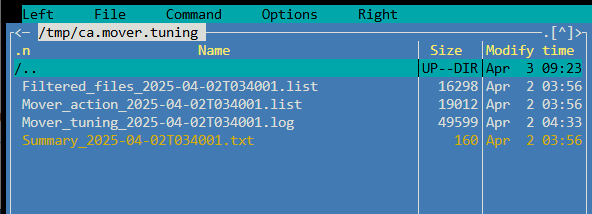
Running version 2025.03.30. Yesterday ran for the first time successfully. Today mover ran and has error "syntax error near unexpected token `newline'". It then doesn't appear to generate any of the files (list, log, txt) to process and nothing was moved because of that. Is there a setting I should look at? Apr 3 03:56:46 Tower root: ---------------------------------------------------------- Processing [Television] share -------------------------------------------------------- Apr 3 03:56:46 Tower root: Primary storage: cache_hd - size: 932GiB - used: 40 % (365GiB) Apr 3 03:56:46 Tower root: Secondary storage: user0 Apr 3 03:56:46 Tower root: Share Information: Name: Television - Path: /mnt/cache_hd/Television Apr 3 03:56:46 Tower root: Moving threshold: 0% (0B) ; Freeing threshold: 0% (0B) Apr 3 03:56:46 Tower root: Mover action: cache_hd->user0 (cache:yes). Pool is above moving threshold percentage: 40% >= 0%. Apr 3 03:56:46 Tower root: => Will smart move old files from cache_hd to user0. Nothing will be moved from user0 to cache_hd Apr 3 03:56:46 Tower root: /usr/local/emhttp/plugins/ca.mover.tuning/age_mover: eval: line 991: syntax error near unexpected token `newline' Apr 3 03:56:46 Tower root: /usr/local/emhttp/plugins/ca.mover.tuning/age_mover: eval: line 991: `find "/mnt/cache_hd/Television" -type f -depth -not -name '.placeholder' -printf '%T@|%s|%S|%n|%i|%p|\0' | awk -v RS='\0' -v FS='|' -v SPARSENESS='0' -v PRIMARYSTORAGENAME='cache_hd' -v SECONDARYSTORAGENAME='user0' -v SHARENAME='Television' -v SHAREUSECACHE='yes' -v PRIMARYSIZETHRESH='0' ' { printf "%s|%s|%s|%s|%d|%d|%d|%d|%d|%d|%s\n", PRIMARYSTORAGENAME, SECONDARYSTORAGENAME, SHARENAME, SHAREUSECACHE, $1, PRIMARYSIZETHRESH, $2, $3, $4, $5, $6}'>>' Apr 3 03:56:46 Tower root: Updated Filtered filelist: Apr 3 03:56:46 Tower root: /tmp/ca.mover.tuning/Filtered_files_2025-04-03T034001.list for Television Apr 3 03:56:46 Tower root: ************************************************************ ANALYSING MOVING ACTIONS *********************************************************** Apr 3 03:56:46 Tower root: Deciding the action (move/sync/keep) for each file. There are 31 files, it can take a while... Apr 3 03:56:46 Tower root: awk: cmd. line:132: printf "PRIMARYSTORAGENAME|FILES_FROM_PRIMARY|SIZE_FROM_PRIMARY|FILES_FROM_SECONDARY|SIZE_FROM_SECONDARY\n" > " Apr 3 03:56:46 Tower root: awk: cmd. line:132: ^ unterminated string Apr 3 03:56:46 Tower root: grep: Apr 3 03:56:46 Tower root: /tmp/ca.mover.tuning/Summary_2025-04-03T034001.txt: No such file or directory Apr 3 03:56:46 Tower root: grep: Apr 3 03:56:46 Tower root: /tmp/ca.mover.tuning/Summary_2025-04-03T034001.txt: No such file or directory Apr 3 03:56:46 Tower root: grep: Apr 3 03:56:46 Tower root: /tmp/ca.mover.tuning/Summary_2025-04-03T034001.txt: No such file or directory Apr 3 03:56:46 Tower root: grep: Apr 3 03:56:46 Tower root: /tmp/ca.mover.tuning/Summary_2025-04-03T034001.txt: No such file or directory Apr 3 03:56:46 Tower root: grep: Apr 3 03:56:46 Tower root: /tmp/ca.mover.tuning/Summary_2025-04-03T034001.txt: No such file or directory Apr 3 03:56:46 Tower root: grep: Apr 3 03:56:46 Tower root: /tmp/ca.mover.tuning/Summary_2025-04-03T034001.txt: No such file or directory Apr 3 03:56:46 Tower root: No new files will be moved/synced from primary to secondary Apr 3 03:56:46 Tower root: No new files will be moved/synced from secondary to primary
-
SOLVED: This may have been a coincidence but once I provisioned my unraid server in Management Access setting I was then able to download the file from GitHub. I'm also getting the can't download error message. I'm not seeing anything that would prevent my unraid server from accessing GitHub. IPv4 DNS server is set to 1.1.1.1. As far as I can tell looking at the system log, when the pre_plugin_checks script is executed, I see "r8169 0000:02:00.0 eth0: Link is Down". Is this to be expected from the script or is this preventing the server from accessing GitHub? plugin: installing: unraid-r8168.plg Executing hook script: pre_plugin_checks plugin: downloading: unraid-r8168.plg ... done Executing hook script: pre_plugin_checks -----------------------Downloading RTL8168 package!------------------------- --------This could take some time, please don't close this window!---------- -----------------------Can't download RTL8168 package----------------------- plugin: run failed: '/bin/bash' returned 1 Executing hook script: post_plugin_checks
