WobbleBobble2
Members
-
Joined
-
Last visited
Everything posted by WobbleBobble2
-
[Attached diagnostics] hal9000-diagnostics-20240209-1532.zip Hi Unraiders, Today I noticed when I try to open a terminal window from the main unraid webUI, the pop up opens and then instantly closes in chrome/edge. In safari it opens and constantly stays in a "reconnecting" state. The other functions, including my dockers and shares appear to be working fine, but I need access to the logs and terminals to debug a separate issue I'm having. So far I've tried the following, but the issue persists: Tried in 3 separate browsers: chrome (normal & incognito), chromium edge, safari Disabled all ad blockers, and added my server URL (.local and ip) to in-browser pop-up blocking white lists. Tried closing all but one browser accessing the webui Shut down all VMs and Dockers Stopped the array Restarted the server Restarted the server in safe mode I've seen a few other threads with a similar issue, but none have been any help: This thread suggests it may be an issue with pfsense/haproxy but I don't use either This thread suggests a rogue docker may be the issue. I'm a new unraid pro user and would really appreciate any help with this strange issue! Thanks!
-
Also having this issue in 6.12.16. Any luck resolving?
-
Also wanted to add a few more details as I am still getting the same VFIO_dma_map errors: 1. I am able to successfully get the 2 VFs (02.1 and 02.2) to show up in settings > system devices in their own IOMMU groups and bind them to VFIO at boot. 2. The alder lake sound card cannot be separated into its own IOMMU group for my motherboard, so it's in a group with the ISA bridge, SMBus, and Serial Bus. 3. I double checked that the drive my domains folder is in still has plenty of space (another person with the VFIO_dma_map error encountered this) 4. I thought the error might have something to do with me disabling the sound card in UEFI, but I re-enabled audio and got the same error. 5. I also tried enabling & disabling multi-monitor igpu setting in UEFI and it had no effect. If you are having trouble getting the new VFs to show up make sure you haven't bound the primary VF 02.0 to VFIO at boot as this will prevent the new VFs from showing up. I'm posting the full VM log here along with my diagnostics in case anyone might be able to help: -object '{"qom-type":"secret","id":"masterKey0","format":"raw","file":"/var/lib/libvirt/qemu/domain-1-Windows 10/master-key.aes"}' \ -blockdev '{"driver":"file","filename":"/usr/share/qemu/ovmf-x64/OVMF_CODE-pure-efi.fd","node-name":"libvirt-pflash0-storage","auto-read-only":true,"discard":"unmap"}' \ -blockdev '{"node-name":"libvirt-pflash0-format","read-only":true,"driver":"raw","file":"libvirt-pflash0-storage"}' \ -blockdev '{"driver":"file","filename":"/etc/libvirt/qemu/nvram/[removed]_VARS-pure-efi.fd","node-name":"libvirt-pflash1-storage","auto-read-only":true,"discard":"unmap"}' \ -blockdev '{"node-name":"libvirt-pflash1-format","read-only":false,"driver":"raw","file":"libvirt-pflash1-storage"}' \ -machine pc-i440fx-7.2,usb=off,dump-guest-core=off,mem-merge=off,memory-backend=pc.ram,pflash0=libvirt-pflash0-format,pflash1=libvirt-pflash1-format \ -accel kvm \ -cpu host,migratable=on,hv-time=on,hv-relaxed=on,hv-vapic=on,hv-spinlocks=0x1fff,hv-vendor-id=none,host-cache-info=on,l3-cache=off \ -m 16384 \ -object '{"qom-type":"memory-backend-ram","id":"pc.ram","size":17179869184}' \ -overcommit mem-lock=off \ -smp 8,sockets=1,dies=1,cores=4,threads=2 \ -uuid [removed]\ -display none \ -no-user-config \ -nodefaults \ -chardev socket,id=charmonitor,fd=35,server=on,wait=off \ -mon chardev=charmonitor,id=monitor,mode=control \ -rtc base=localtime \ -no-hpet \ -no-shutdown \ -boot strict=on \ -device '{"driver":"pci-bridge","chassis_nr":1,"id":"pci.1","bus":"pci.0","addr":"0x2"}' \ -device '{"driver":"pci-bridge","chassis_nr":2,"id":"pci.2","bus":"pci.0","addr":"0x3"}' \ -device '{"driver":"pci-bridge","chassis_nr":3,"id":"pci.3","bus":"pci.0","addr":"0x6"}' \ -device '{"driver":"pci-bridge","chassis_nr":4,"id":"pci.4","bus":"pci.0","addr":"0x8"}' \ -device '{"driver":"pci-bridge","chassis_nr":5,"id":"pci.5","bus":"pci.0","addr":"0x9"}' \ -device '{"driver":"pci-bridge","chassis_nr":6,"id":"pci.6","bus":"pci.0","addr":"0xa"}' \ -device '{"driver":"ich9-usb-ehci1","id":"usb","bus":"pci.0","addr":"0x7.0x7"}' \ -device '{"driver":"ich9-usb-uhci1","masterbus":"usb.0","firstport":0,"bus":"pci.0","multifunction":true,"addr":"0x7"}' \ -device '{"driver":"ich9-usb-uhci2","masterbus":"usb.0","firstport":2,"bus":"pci.0","addr":"0x7.0x1"}' \ -device '{"driver":"ich9-usb-uhci3","masterbus":"usb.0","firstport":4,"bus":"pci.0","addr":"0x7.0x2"}' \ -device '{"driver":"ahci","id":"sata0","bus":"pci.0","addr":"0x4"}' \ -device '{"driver":"virtio-serial-pci","id":"virtio-serial0","bus":"pci.0","addr":"0x5"}' \ -blockdev '{"driver":"file","filename":"/mnt/user/domains/Windows 10/vdisk1.img","node-name":"libvirt-3-storage","cache":{"direct":false,"no-flush":false},"auto-read-only":true,"discard":"unmap"}' \ -blockdev '{"node-name":"libvirt-3-format","read-only":false,"cache":{"direct":false,"no-flush":false},"driver":"raw","file":"libvirt-3-storage"}' \ -device '{"driver":"virtio-blk-pci","bus":"pci.0","addr":"0xc","drive":"libvirt-3-format","id":"virtio-disk2","bootindex":1,"write-cache":"on","serial":"vdisk1"}' \ -blockdev '{"driver":"file","filename":"/mnt/user/isos/Win10_22H2_English_x64v1.iso","node-name":"libvirt-2-storage","auto-read-only":true,"discard":"unmap"}' \ -blockdev '{"node-name":"libvirt-2-format","read-only":true,"driver":"raw","file":"libvirt-2-storage"}' \ -device '{"driver":"ide-cd","bus":"sata0.0","drive":"libvirt-2-format","id":"sata0-0-0","bootindex":2}' \ -blockdev '{"driver":"file","filename":"/mnt/user/isos/virtio-win-0.1.240-1.iso","node-name":"libvirt-1-storage","auto-read-only":true,"discard":"unmap"}' \ -blockdev '{"node-name":"libvirt-1-format","read-only":true,"driver":"raw","file":"libvirt-1-storage"}' \ -device '{"driver":"ide-cd","bus":"sata0.1","drive":"libvirt-1-format","id":"sata0-0-1"}' \ -netdev tap,fd=36,id=hostnet0 \ -device '{"driver":"virtio-net","netdev":"hostnet0","id":"net0","mac":"52:54:00:73:76:08","bus":"pci.0","addr":"0xb"}' \ -chardev pty,id=charserial0 \ -device '{"driver":"isa-serial","chardev":"charserial0","id":"serial0","index":0}' \ -chardev socket,id=charchannel0,fd=34,server=on,wait=off \ -device '{"driver":"virtserialport","bus":"virtio-serial0.0","nr":1,"chardev":"charchannel0","id":"channel0","name":"org.qemu.guest_agent.0"}' \ -device '{"driver":"usb-tablet","id":"input0","bus":"usb.0","port":"1"}' \ -audiodev '{"id":"audio1","driver":"none"}' \ -device '{"driver":"vfio-pci","host":"0000:00:02.2","id":"hostdev0","bus":"pci.6","addr":"0x10"}' \ -device '{"driver":"vfio-pci","host":"0000:00:1f.3","id":"hostdev1","bus":"pci.0","addr":"0xd"}' \ -sandbox on,obsolete=deny,elevateprivileges=deny,spawn=deny,resourcecontrol=deny \ -msg timestamp=on char device redirected to /dev/pts/0 (label charserial0) 2024-02-06T08:45:42.252270Z qemu-system-x86_64: vfio: Cannot reset device 0000:00:1f.3, no available reset mechanism. 2024-02-06T08:45:42.256264Z qemu-system-x86_64: vfio: Cannot reset device 0000:00:1f.3, no available reset mechanism. 2024-02-06T08:45:42.755580Z qemu-system-x86_64: VFIO_MAP_DMA failed: Invalid argument 2024-02-06T08:45:42.755597Z qemu-system-x86_64: vfio_dma_map(0x147620e48800, 0x38200010c000, 0x4000, 0x147a2884a000) = -22 (Invalid argument) 2024-02-06T08:45:42.755679Z qemu-system-x86_64: VFIO_MAP_DMA failed: Invalid argument 2024-02-06T08:45:42.755682Z qemu-system-x86_64: vfio_dma_map(0x147620e48800, 0x382000000000, 0x100000, 0x1476252ff000) = -22 (Invalid argument) 2024-02-06T08:45:42.761136Z qemu-system-x86_64: VFIO_MAP_DMA failed: Invalid argument 2024-02-06T08:45:42.761146Z qemu-system-x86_64: vfio_dma_map(0x147620e48800, 0x381800000000, 0x20000000, 0x1475fec00000) = -22 (Invalid argument) 2024-02-06T08:45:42.762136Z qemu-system-x86_64: VFIO_MAP_DMA failed: Invalid argument 2024-02-06T08:45:42.762143Z qemu-system-x86_64: vfio_dma_map(0x147620e48800, 0x38200010c000, 0x4000, 0x147a2884a000) = -22 (Invalid argument) 2024-02-06T08:45:42.762282Z qemu-system-x86_64: VFIO_MAP_DMA failed: Invalid argument 2024-02-06T08:45:42.762286Z qemu-system-x86_64: vfio_dma_map(0x147620e48800, 0x382000000000, 0x100000, 0x1476252ff000) = -22 (Invalid argument) 2024-02-06T08:45:42.811477Z qemu-system-x86_64: VFIO_MAP_DMA failed: Invalid argument 2024-02-06T08:45:42.811492Z qemu-system-x86_64: vfio_dma_map(0x147620e48800, 0x381800000000, 0x20000000, 0x1475fec00000) = -22 (Invalid argument) 2024-02-06T08:45:42.814038Z qemu-system-x86_64: VFIO_MAP_DMA failed: Invalid argument 2024-02-06T08:45:42.814046Z qemu-system-x86_64: vfio_dma_map(0x147620e48800, 0x38200010c000, 0x4000, 0x147a2884a000) = -22 (Invalid argument) 2024-02-06T08:45:42.814165Z qemu-system-x86_64: VFIO_MAP_DMA failed: Invalid argument 2024-02-06T08:45:42.814169Z qemu-system-x86_64: vfio_dma_map(0x147620e48800, 0x382000000000, 0x100000, 0x1476252ff000) = -22 (Invalid argument) 2024-02-06T08:45:44.531401Z qemu-system-x86_64: VFIO_MAP_DMA failed: Invalid argument 2024-02-06T08:45:44.531442Z qemu-system-x86_64: vfio_dma_map(0x147620e48800, 0x381800000000, 0x20000000, 0x1475fec00000) = -22 (Invalid argument) 2024-02-06T08:45:44.533997Z qemu-system-x86_64: VFIO_MAP_DMA failed: Invalid argument 2024-02-06T08:45:44.534011Z qemu-system-x86_64: vfio_dma_map(0x147620e48800, 0x38200010c000, 0x4000, 0x147a2884a000) = -22 (Invalid argument) 2024-02-06T08:45:44.534318Z qemu-system-x86_64: VFIO_MAP_DMA failed: Invalid argument 2024-02-06T08:45:44.534323Z qemu-system-x86_64: vfio_dma_map(0x147620e48800, 0x382000000000, 0x100000, 0x1476252ff000) = -22 (Invalid argument) 2024-02-06T08:45:44.577147Z qemu-system-x86_64: VFIO_MAP_DMA failed: Invalid argument 2024-02-06T08:45:44.577193Z qemu-system-x86_64: vfio_dma_map(0x147620e48800, 0x381800000000, 0x20000000, 0x1475fec00000) = -22 (Invalid argument) 2024-02-06T08:45:44.584370Z qemu-system-x86_64: VFIO_MAP_DMA failed: Invalid argument 2024-02-06T08:45:44.584398Z qemu-system-x86_64: vfio_dma_map(0x147620e48800, 0x38200010c000, 0x4000, 0x147a2884a000) = -22 (Invalid argument) 2024-02-06T08:45:44.584584Z qemu-system-x86_64: VFIO_MAP_DMA failed: Invalid argument 2024-02-06T08:45:44.584590Z qemu-system-x86_64: vfio_dma_map(0x147620e48800, 0x382000000000, 0x100000, 0x1476252ff000) = -22 (Invalid argument) 2024-02-06T08:45:44.635492Z qemu-system-x86_64: VFIO_MAP_DMA failed: Invalid argument 2024-02-06T08:45:44.635553Z qemu-system-x86_64: vfio_dma_map(0x147620e48800, 0x381800000000, 0x20000000, 0x1475fec00000) = -22 (Invalid argument) 2024-02-06T08:45:44.677263Z qemu-system-x86_64: VFIO_MAP_DMA failed: Invalid argument 2024-02-06T08:45:44.677285Z qemu-system-x86_64: vfio_dma_map(0x147620e48800, 0x381800000000, 0x20000000, 0x1475fec00000) = -22 (Invalid argument) 2024-02-06T08:45:46.544729Z qemu-system-x86_64: VFIO_MAP_DMA failed: Invalid argument 2024-02-06T08:45:46.544760Z qemu-system-x86_64: vfio_dma_map(0x147620e48800, 0x381800000000, 0x20000000, 0x1475fec00000) = -22 (Invalid argument) 2024-02-06T08:45:46.583933Z qemu-system-x86_64: VFIO_MAP_DMA failed: Invalid argument 2024-02-06T08:45:46.583951Z qemu-system-x86_64: vfio_dma_map(0x147620e48800, 0x38200010c000, 0x4000, 0x147a2884a000) = -22 (Invalid argument) 2024-02-06T08:45:46.584150Z qemu-system-x86_64: VFIO_MAP_DMA failed: Invalid argument 2024-02-06T08:45:46.584156Z qemu-system-x86_64: vfio_dma_map(0x147620e48800, 0x382000000000, 0x100000, 0x1476252ff000) = -22 (Invalid argument) 2024-02-06T08:45:57.747577Z qemu-system-x86_64: VFIO_MAP_DMA failed: Invalid argument 2024-02-06T08:45:57.747600Z qemu-system-x86_64: vfio_dma_map(0x147620e48800, 0x38200010c000, 0x4000, 0x147a2884a000) = -22 (Invalid argument) 2024-02-06T08:45:57.747862Z qemu-system-x86_64: VFIO_MAP_DMA failed: Invalid argument 2024-02-06T08:45:57.747872Z qemu-system-x86_64: vfio_dma_map(0x147620e48800, 0x382000000000, 0x100000, 0x1476252ff000) = -22 (Invalid argument) hal9000-diagnostics-20240206-0053.zip


-
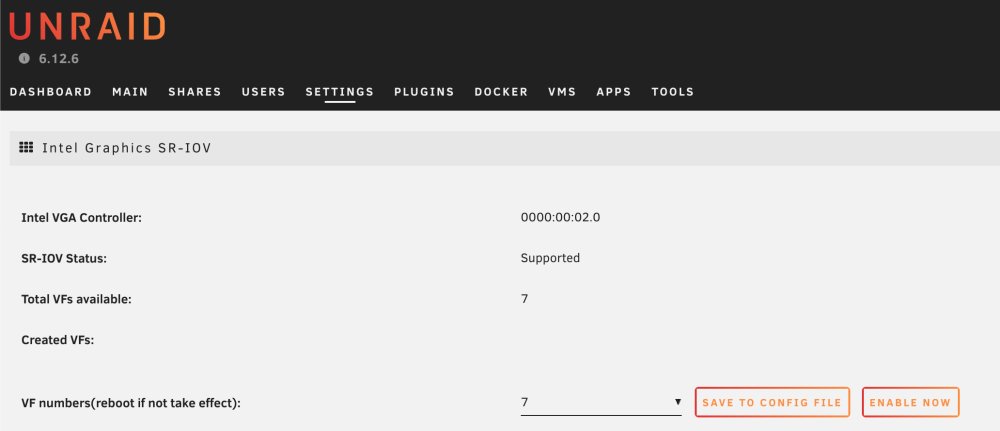
Thank you for the quick reply! Ok so I set the number of VFs to one in the SR-IOV plugin, then selected 00:02.1 in the VM and that seems to have resolved the first error in my original post, which is in the main unraid log. However the second error still shows up in the VM log and the VM won't start: -device '{"driver":"vfio-pci","host":"0000:00:02.1","id":"hostdev0","bus":"pci.6","addr":"0x10"}' \ -sandbox on,obsolete=deny,elevateprivileges=deny,spawn=deny,resourcecontrol=deny \ -msg timestamp=on char device redirected to /dev/pts/1 (label charserial0) 2024-02-06T03:13:40.767622Z qemu-system-x86_64: VFIO_MAP_DMA failed: Invalid argument 2024-02-06T03:13:40.767677Z qemu-system-x86_64: vfio_dma_map(0x14942d228c00, 0x381800000000, 0x20000000, 0x14940b000000) = -2 (No such file or directory) 2024-02-06T03:13:40.823130Z qemu-system-x86_64: VFIO_MAP_DMA failed: Invalid argument 2024-02-06T03:13:40.823146Z qemu-system-x86_64: vfio_dma_map(0x14942d228c00, 0x381800000000, 0x20000000, 0x14940b000000) = -22 (Invalid argument) 2024-02-06T03:13:42.798137Z qemu-system-x86_64: VFIO_MAP_DMA failed: Invalid argument 2024-02-06T03:13:42.798242Z qemu-system-x86_64: vfio_dma_map(0x14942d228c00, 0x381800000000, 0x20000000, 0x14940b000000) = -22 (Invalid argument) 2024-02-06T03:13:42.835529Z qemu-system-x86_64: VFIO_MAP_DMA failed: Invalid argument 2024-02-06T03:13:42.835550Z qemu-system-x86_64: vfio_dma_map(0x14942d228c00, 0x381800000000, 0x20000000, 0x14940b000000) = -22 (Invalid argument) 2024-02-06T03:13:42.894002Z qemu-system-x86_64: VFIO_MAP_DMA failed: Invalid argument 2024-02-06T03:13:42.894028Z qemu-system-x86_64: vfio_dma_map(0x14942d228c00, 0x381800000000, 0x20000000, 0x14940b000000) = -22 (Invalid argument) 2024-02-06T03:13:42.941425Z qemu-system-x86_64: VFIO_MAP_DMA failed: Invalid argument 2024-02-06T03:13:42.941438Z qemu-system-x86_64: vfio_dma_map(0x14942d228c00, 0x381800000000, 0x20000000, 0x14940b000000) = -22 (Invalid argument) 2024-02-06T03:13:45.600164Z qemu-system-x86_64: VFIO_MAP_DMA failed: Invalid argument 2024-02-06T03:13:45.600186Z qemu-system-x86_64: vfio_dma_map(0x14942d228c00, 0x381800000000, 0x20000000, 0x14940b000000) = -22 (Invalid argument) Also great to know about being able to also use the iGpu for plex!
-
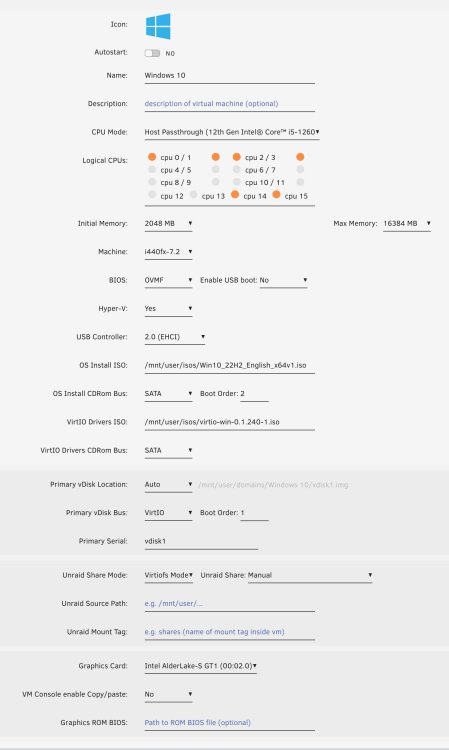
I was able to successfully install this plugin and (unlike other recent commenters) successfully set the VFs number. However I don't really understand what these virtual functions are or how many I need. I am just trying to pass my 12600k iGpu through to a windows VM (top priority) and if possible allow to also be used by my plex docker. If the simultaneous use by plex docker is not possible, then I can just run the plex server in the windows VM. When I activate 1, 4, or 7 VFs I get the same error in logs: kernel: i915 0000:00:02.1: [drm] *ERROR* tlb invalidation response timed out for seqno 23 From the VM logs I get this: char device redirected to /dev/pts/0 (label charserial0) 2024-02-06T00:36:01.107238Z qemu-system-x86_64: -device {"driver":"vfio-pci","host":"0000:00:02.0","id":"hostdev0","bus":"pci.0","addr":"0x2"}: IGD device 0000:00:02.0 has no ROM, legacy mode disabled 2024-02-06T00:36:01.546538Z qemu-system-x86_64: VFIO_MAP_DMA failed: Invalid argument 2024-02-06T00:36:01.546553Z qemu-system-x86_64: vfio_dma_map(0x14e186a1ac00, 0x380010000000, 0x1000000, 0x14e185000000) = -22 (Invalid argument) 2024-02-06T00:36:01.546647Z qemu-system-x86_64: VFIO_MAP_DMA failed: Invalid argument 2024-02-06T00:36:01.546652Z qemu-system-x86_64: vfio_dma_map(0x14e186a1ac00, 0x380000000000, 0x10000000, 0x14e175000000) = -22 (Invalid argument) 2024-02-06T00:36:01.546779Z qemu-system-x86_64: vfio-pci: Cannot read device rom at 0000:00:02.0 Device option ROM contents are probably invalid (check dmesg). Skip option ROM probe with rombar=0, or load from file with romfile= 2024-02-06T00:36:01.551701Z qemu-system-x86_64: VFIO_MAP_DMA failed: Invalid argument 2024-02-06T00:36:01.551710Z qemu-system-x86_64: vfio_dma_map(0x14e186a1ac00, 0x380010000000, 0x1000000, 0x14e185000000) = -22 (Invalid argument) 2024-02-06T00:36:01.551770Z qemu-system-x86_64: VFIO_MAP_DMA failed: Invalid argument 2024-02-06T00:36:01.551774Z qemu-system-x86_64: vfio_dma_map(0x14e186a1ac00, 0x380000000000, 0x10000000, 0x14e175000000) = -22 (Invalid argument) 2024-02-06T00:36:01.557479Z qemu-system-x86_64: VFIO_MAP_DMA failed: Invalid argument 2024-02-06T00:36:01.557488Z qemu-system-x86_64: vfio_dma_map(0x14e186a1ac00, 0x380010000000, 0x1000000, 0x14e185000000) = -22 (Invalid argument) 2024-02-06T00:36:01.557556Z qemu-system-x86_64: VFIO_MAP_DMA failed: Invalid argument 2024-02-06T00:36:01.557559Z qemu-system-x86_64: vfio_dma_map(0x14e186a1ac00, 0x380000000000, 0x10000000, 0x14e175000000) = -22 (Invalid argument) 2024-02-06T00:36:01.577905Z qemu-system-x86_64: VFIO_MAP_DMA failed: Invalid argument 2024-02-06T00:36:01.577917Z qemu-system-x86_64: vfio_dma_map(0x14e186a1ac00, 0x380010000000, 0x1000000, 0x14e185000000) = -22 (Invalid argument) 2024-02-06T00:36:01.577987Z qemu-system-x86_64: VFIO_MAP_DMA failed: Invalid argument 2024-02-06T00:36:01.577991Z qemu-system-x86_64: vfio_dma_map(0x14e186a1ac00, 0x380000000000, 0x10000000, 0x14e175000000) = -22 (Invalid argument) 2024-02-06T00:36:03.139161Z qemu-system-x86_64: VFIO_MAP_DMA failed: Invalid argument 2024-02-06T00:36:03.139188Z qemu-system-x86_64: vfio_dma_map(0x14e186a1ac00, 0x380010000000, 0x1000000, 0x14e185000000) = -22 (Invalid argument) 2024-02-06T00:36:03.139352Z qemu-system-x86_64: VFIO_MAP_DMA failed: Invalid argument 2024-02-06T00:36:03.139356Z qemu-system-x86_64: vfio_dma_map(0x14e186a1ac00, 0x380000000000, 0x10000000, 0x14e175000000) = -22 (Invalid argument) 2024-02-06T00:36:03.143430Z qemu-system-x86_64: VFIO_MAP_DMA failed: Invalid argument 2024-02-06T00:36:03.143439Z qemu-system-x86_64: vfio_dma_map(0x14e186a1ac00, 0x380010000000, 0x1000000, 0x14e185000000) = -22 (Invalid argument) 2024-02-06T00:36:03.143543Z qemu-system-x86_64: VFIO_MAP_DMA failed: Invalid argument 2024-02-06T00:36:03.143547Z qemu-system-x86_64: vfio_dma_map(0x14e186a1ac00, 0x380000000000, 0x10000000, 0x14e175000000) = -22 (Invalid argument) 2024-02-06T00:36:05.514505Z qemu-system-x86_64: VFIO_MAP_DMA failed: Invalid argument 2024-02-06T00:36:05.514546Z qemu-system-x86_64: vfio_dma_map(0x14e186a1ac00, 0x380010000000, 0x1000000, 0x14e185000000) = -22 (Invalid argument) 2024-02-06T00:36:05.514758Z qemu-system-x86_64: VFIO_MAP_DMA failed: Invalid argument 2024-02-06T00:36:05.514766Z qemu-system-x86_64: vfio_dma_map(0x14e186a1ac00, 0x380000000000, 0x10000000, 0x14e175000000) = -22 (Invalid argument) Here are the settings I used for the VM (see attached image). No idea what to do here but would super appreciate any help!!
-
Does your icloud method require a paid icloud account with enough storage to store your entire library? Any way to do this with the free 5gb account?
-
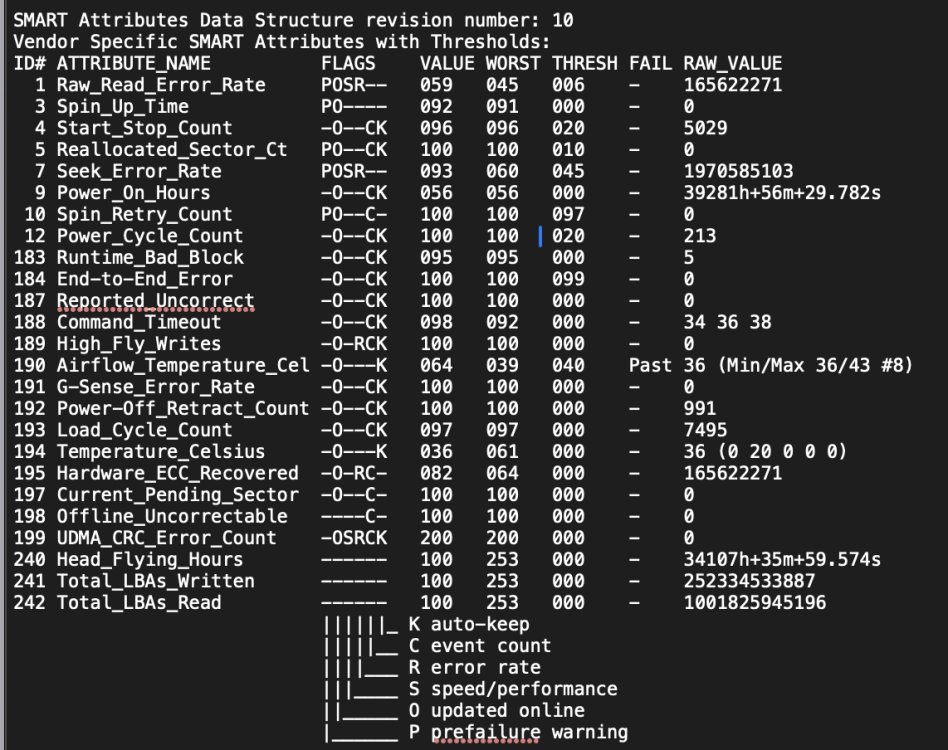
Ok I re-ran the quick SMART and then downloaded the diagnostics. Attached. As mentioned, an extended SMART causes the drive to disconnect so I can't run that. server-diagnostics-20240117-1350.zip
-
Spin down was already disabled during the last several extended tests, the most recent of which I included the syslog in post #1.
-
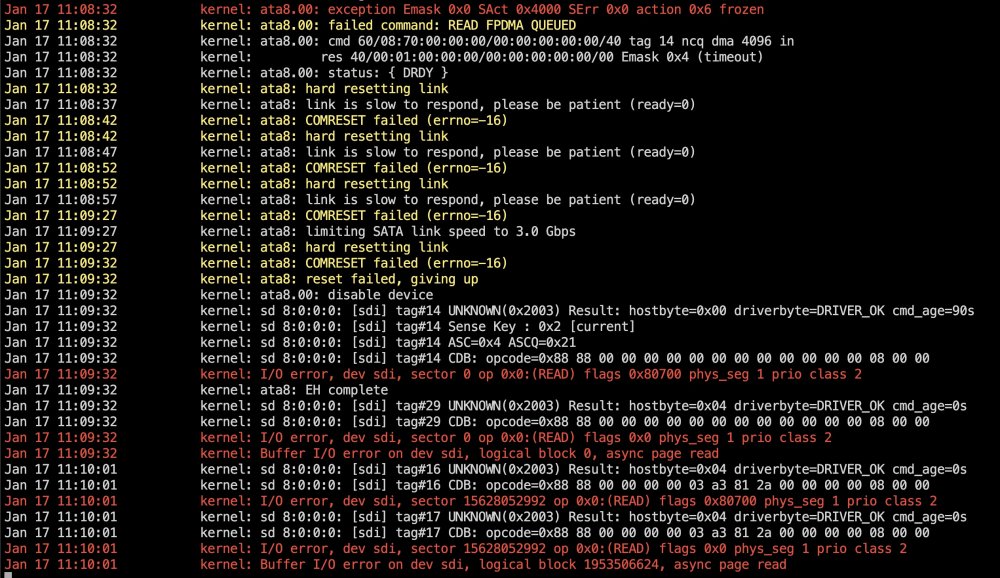
The disconnect occurs during the extended test. The syslog reports and I/O error and the drive shows up as "disabled" in the array. So I interpretted this as the drive "disconnecting" but maybe I am using the wrong word? The drive still shows up in unraid but is not accessible.
-
Here you go! Thanks for the quickly reply and sorry for not uploading this upfront! server-diagnostics-20240117-1136.zip
-
Hello! I have an 8TB Seagate Barracuda that was in my array that suddenly got disabled (red X) two days ago. The failure appears to be in the drive, not the SATA cable, SATA port, or power cables as I get the same results with: a) 3 different SATA cables b) 2 different SATA ports (both on the mobo) c) 2 different SATA power cables including a MOLEX>SATA Power Adapter The symptoms are: 1) After a reboot, I am able to successfully run a quick SMART test and everything passes (see attached image #1). 2) However when I try to run an extended SMART test, the disk disconnects and becomes unreachable after about 15 minutes. In order to reconnect to the disk, I have to reboot. A screenshot of the syslog is attached as image 2 What I don't get is why the quick smart test shows no issues. Should I just give up on this drive? Any thoughts or comments much appreciated!!