krazytaco
Members
-
Joined
-
Last visited
-
I'm back with a recap - it's been a wild ride. First off, the issue with no display was a case of me being a moron - I kept taking the HDMI cord from the monitor and plugging it into the NAS box (the other end of the cable was in my primary tower PC). I never fully realized this for a long time, I RMA'd my CPU and got a new one, then even ended up buying a new motherboard and only after reassembling the NAS did I realize how dumb I was. With the display issue resolved I still had the base problem of the NAS being unreachable via browser or even directly on the NAS box itself (though all the docker containers were still running and accessible by outside services). After I rebuilt the NAS box everything magically started working, but as I'll discuss later that was of course just coincidence and had more to do with restarting the physical box and having the stars align correctly more than anything I did to fix it. Finally, my rebuild was working great for a month or so before the issue came back, I couldn't access Unraid via browser nor on the box itself though all services/dockers were running and behaved fine (e.g. PLEX from the TV and whatnot). I may end up getting chided for how I ended up solving it but here it is: I prompted ChatGPT my issue ('services running on my NAS work fine but when I try to login to the machine at <ipdadress>:180 all my browsers say the connection was refused or that they can't establish a connection'). ChatGPT ran me through some diagnostics, it had me check that SSH was enabled (it wasn't, and it walked me through how to re-enable it first) and then determined a little while later that the server was of course online but unreachable via browser, specifically the port my NAS uses for the web interface had no service running on it (whereas UnRaid's GUI service, emhttp, should be running). ChatGPT determined that the culprit was probably that nginxproxy was hijacking the gui's port's prior to emhttp being able to bind to it - the AI walked me through first disabling docker at startup (to ultimately kill nginxproxy), killing emhttpd, then restarting the NAS box - on restart the browser connection and local GUI worked again - from there I restarted Docker and now everything is working as expected. So TL;DR - No Display - I was a moron and used the wrong end of the HDMI cable, that's why I had no display No Access to GUI Via Browser or via NAS box - NGINX Proxy Manager had hijacked the webgui port on boot at some point and caused UnRAID's GUI service to be unable to bind to the port as expected - killing docker, restarting the NAS box, then re-enabling docker fixed everything
-
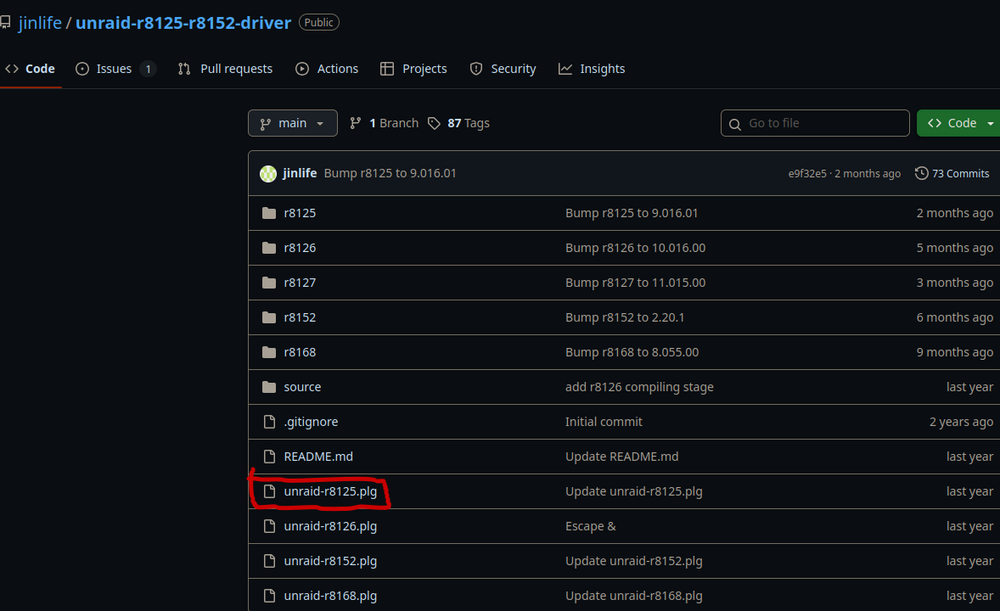
I downloaded the rtl8125 plg file however after booting into unraid it gets moved to the Plugin File Install Errors tab in the Plugins GUI - to be clear, I downloaded the one highlighted red - did I do something wrong? I've attached a new diagnostics export if that helps. keraina-nas-diagnostics-20251115-1902.zip
-
The plugin github only goes up to r8168 - how long does it typically take to add new realtek drivers, specifically r8169 in this case?
-
I originally installed Unraid to a flash stick and used it for about a year on PC 'A', today I moved the same stick to a new PC 'B'. The onboard NIC of PC 'B' is not getting picked up by Unraid (interface eth0 in Network Settings' has a blank for Interface Description. The interface widget on the dashboard only has options for 'bond0' and 'lo'. I tried booting into Mint via a different flash drive on PC 'B' and the network/ethernet worked fine on that. So far I've tried renaming network.cfg on the Unraid flash drive to network.cfg.old however that didn't have any effect, it still lacks network access. The NIC that comes with PC 'B' that I'm using is Realtek 2.5Gb (onboard NIC as part of the B760M-AYW WIFI D4 II motherboard) - what can I do to restore internet access on Unraid? keraina-nas-diagnostics-20251113-2137.zip
-
As far as I can tell my Unraid box is connected to my home network just fine - it's always lived at 10.0.0.97:180 for over a year now. I use Xfinity for home internet and the Xfinity App reports it sees the NAS box at the same IP address as always (the NAS is connected to the modem via ethernet). A few weeks ago though I was suddenly unable to load up the unraid GUI at http://10.0.0.97:180/Dashboard, Firefox on my desktop returns an 'Unable to connect' error page and Edge on my phone has a similar error, 'Hmmm... can't reach this page'. This morning I tried plugging in a monitor to my NAS however after doing so I don't get any signal from the box and nothing displays even after also plugging in a mouse and keyboard and trying some inputs. I'm also able to see the server and it reports being Online via Unraid Connect. Any ideas what might be preventing me from seeing the Unraid GUI but at the same time everything installed on it seems to work for other devices on the network (such as PLEX)?
-
I'm also having issues connecting to the webUI as of a couple days ago (previously, say last week, I was able to access the WebUI without issue) and as far as I know I never changed anything configuration wise. I'm connecting to the WebUI straight from another PC on the network the Unraid server is located on. I've seen the LAN_NETWORK config issue pop up a few times searching this but again I haven't changed what was already there and for grins I recalculated the correct value using the Online IP CIDR tool to confirm that what I have is correct already (10.0.0.0/24). I'm not seeing any specific errors in the log other than that it tries to resolve google.com and fails. log.txt
-
Within the past few days I'm unable to get to the dashboard on my Unraid server. Normally I have the dashboard logged in and pinned in my browser but when I came back from a vacation recently going to that tab shows I'm on the dashboard page (http://10.0.0.97:180/Dashboard) but it's just a black screen. I tried opening and logging in via both Edge and Chrome browsers however when I enter my username and password I don't get a wrong credentials error, the tab only briefly 'thinks' for a second and then drops me back at the login screen again. Even though I can't login my Plex server that runs on it is still available. loginNotAdvancing.mp4
-
Whether I use http or https I have the same results it seems.
-
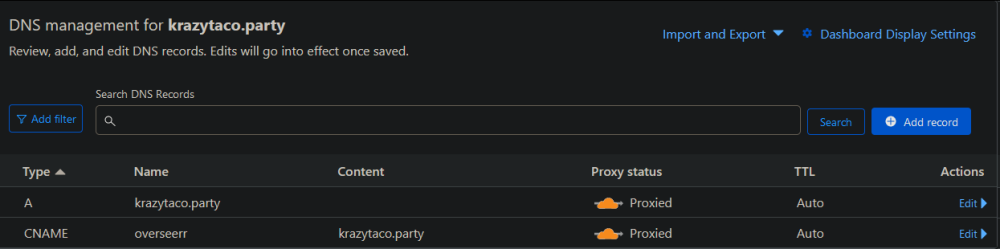
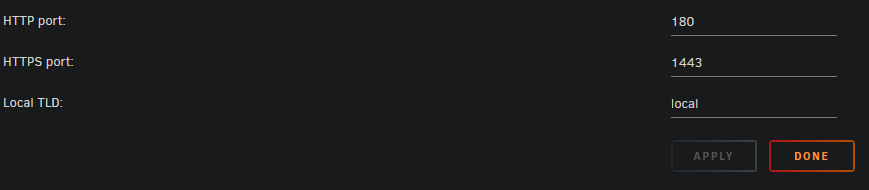
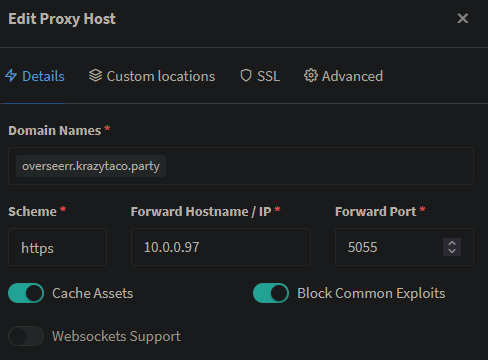
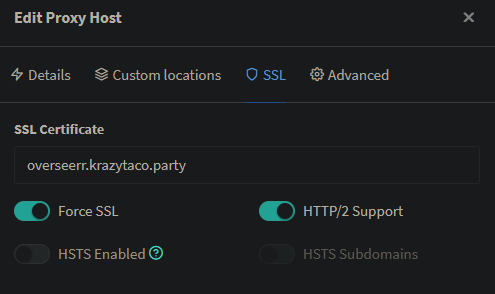
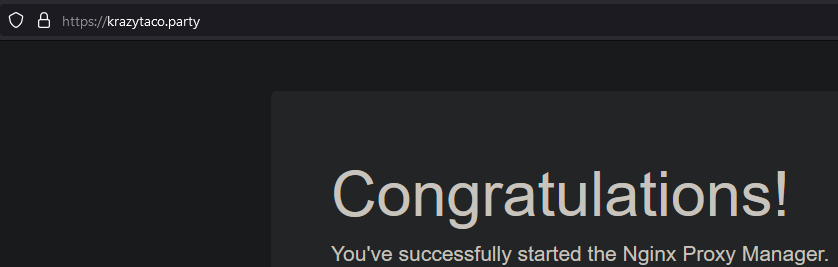
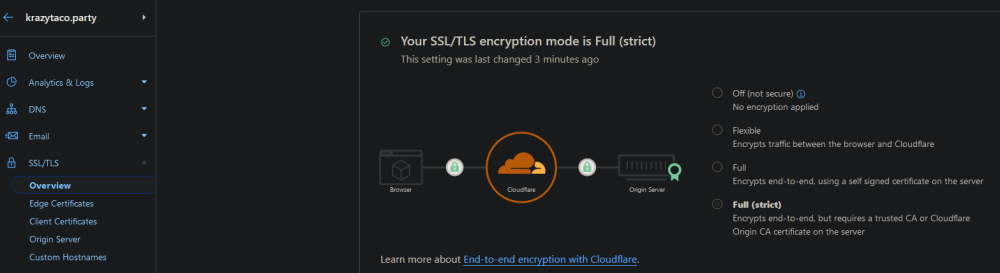
Update: I seem to have figured it out - I watched this video on how to create an SSL certificate from Cloudflare directly and use it in Nginx (as opposed to using Let's Encrypt). In addition to the certificate, I also set my Cloudflare domain within Cloudflare to use Full (Strict) encryption Once I did these two things I can now access the website via the internet. Hi there! I've gotten to the Nginx welcome page but I can't seem to get it configured to route traffic hitting my cloudflare domain name to overseerr. I have a domain via cloudflare that's setup like below with the A record being automatically configured via the cloudfare-DDNS container in Unraid My server runs off an Xfinity Modem/Router which doesn't allow ports to be forwarded to other ports, it only allows opening of ports - I've opened ports 80, 443, and 5055 on my router and then reconfigured Unraid to run its webUI on ports 180 and 1443 Nginx is configured to run on ports 80 and 443 - overseerr is installed and configured to run on port 5055 Within Nginx, I have a host setup to look at domain name of overseerr.krazytaco.party, scheme of https, forward hostname of 10.0.0.97, and forward port of 5055 - Let's encrypt is used to provide SSL. If I navigate to https:// or http://krazytaco.party I land on the Nginx congrats page If I go to http://overseerr.krazytaco.party in either http or https form I get a bad redirect error in the browser. What am I missing to make https://overseer.krazytaco.party accessible from the internet?



-
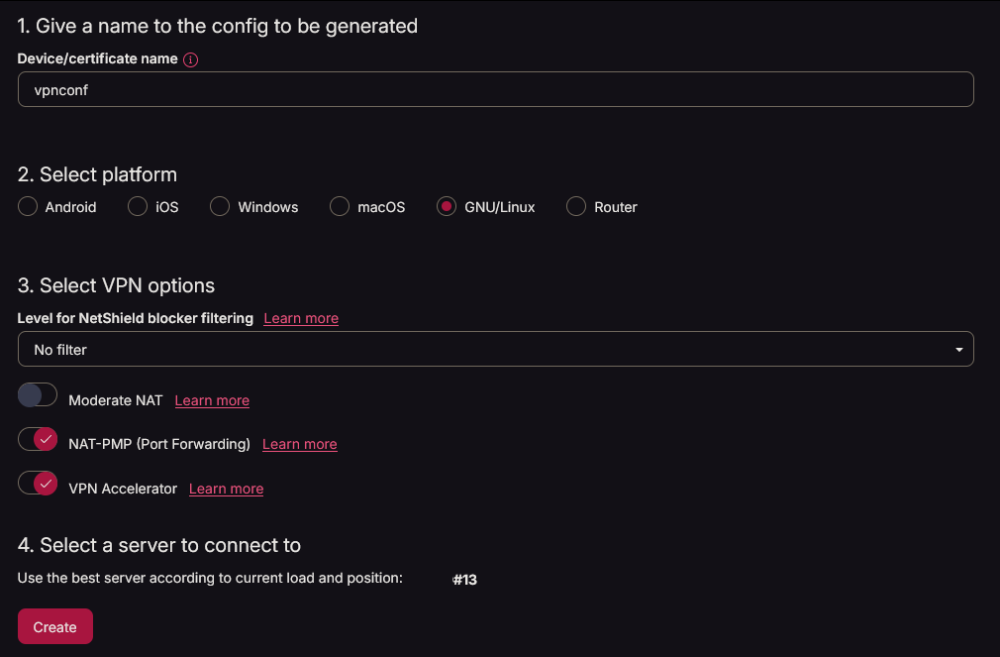
I'm also trying to setup the container using protonVPN/wireguard and have yet to get the webUI working. I generated a fresh wireguard config file from proton, ensured port forwarding was allowed, and uploaded that to the config/wireguard directory - the container accepted it and auto-renamed to wg0.conf then started up seemingly fine, however when I try to visit the WebUI I get a connection timeout error. I was reading this guide from Proton and when I get to the part about verifying that port forwarding (natpmpc) is allowed I get a -7 Failed response for readnatpmpresponseorretry - I don't see why it would fail though since I just created the config file with the option toggled. supervisord.log